
Redarc Manager 30 Battery System Wiring Diagram
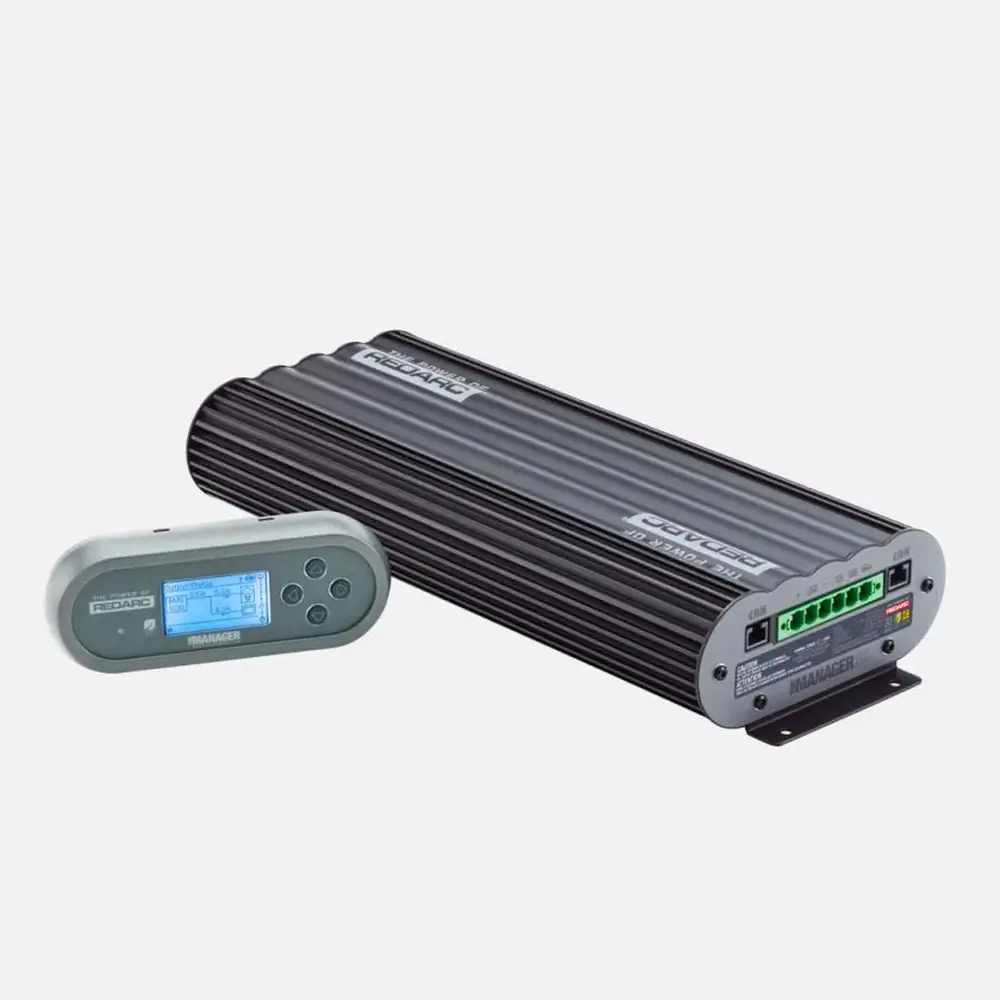
Typical setup
The unit's six terminals, CAN interfaces, AC input, battery sensor and loads.
Terminals and components · 12
- Battery output
- DC input
- Solar
- Ground
- Load disconnect
- Ignition
- CAN
- Sensor
- Loads
- SBI12-BLD
- AC
Wire size
Distance Cross section Up to 1.5 m 8 mm² (8 B&S) Over 1.5 m 13 mm² (6 B&S) Order
It is the first wire to connect and the last to disconnect.
Relay
Use a 12 V relay with a coil current of 1 A max, with resistor or diode suppression.
Setting
This feature must be turned on in the User Menu.
Setting
This feature must be turned on in the User Menu.
Voltage
It needs at least 17.5 V to start charging and never more than 32 V open circuit: 12 V panels go in parallel.
Wire size
Distance Cross section Up to 3 m 8 mm² (8 B&S) Over 3 m 13 mm² (6 B&S) Order
It is the last wire to connect and the first to disconnect (after the connector).
Redarc only
The CAN system works with Redarc CAN devices only.
Cord
If the cord is damaged, replace it with the genuine Redarc part.
Caution
The sensor's red lead must go to the battery positive.
Fuse
Rate the fuse slightly above the total load current; MIDI style fuses are recommended.
Essential
Essential loads stay on until the battery is flat.
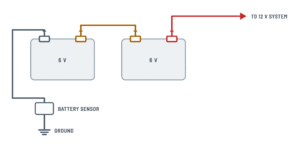
Batteries in series and parallel
How to build the battery bank and where the sensor goes.
Terminals and components · 3
- Positive
- Negative and sensor
- Link
Diagonal
Take the + and the − from opposite ends of the bank so every battery charges equally.
Capacity
In parallel the capacities add up: three 100 Ah batteries = 300 Ah.
Capacity
In series, the bank takes the capacity (Ah) of the smallest battery. Set it at first start-up or in the advanced menu.
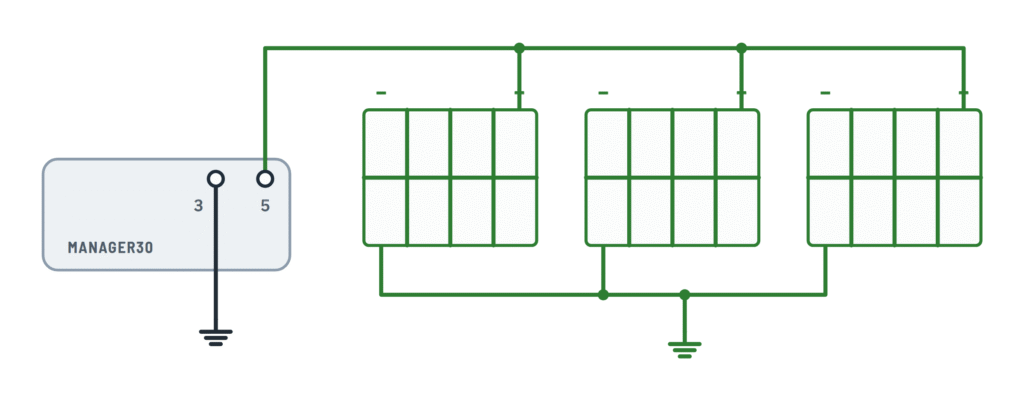
Solar panels
Several 12 V panels in parallel on the solar input (MPPT regulator).
Terminals and components · 3
- Solar
- Ground
Voltage
It needs at least 17.5 V to start charging and never more than 32 V open circuit: 12 V panels go in parallel.
Voltage
The array must give 17.5 V to 32 V open circuit: that is why 12 V panels go in parallel, never in series.
Diodes
A single panel needs no blocking diode; with an array, follow the panel maker's instructions.
About This Diagram
These diagrams are redrawn from pages 20–23 of the Redarc Manager 30 Battery Management System manual, and we offer them completely free and in English. We have also categorized it in the Off-Grid & Backup (Solar & Batteries) section on Diagramverse, and it has been rated by 1 user with an average rating of 5.0. If you have any specific questions about the Redarc Manager 30 Battery System Wiring Diagram, we suggest checking the Frequently Asked Questions (FAQs) section.
Printable Redarc Manager 30 Wiring Diagrams





Wiring Instructions
Before you start
First, pick the drawing that matches your Redarc Manager 30's installation. The Complete tab shows the typical setup, with every input, the battery sensor, the load fuses and the SBI12-BLD. If your house bank has more than one battery, use the Batteries tab: choose Series (2 × 6 V) for two 6 V batteries or Parallel (3 × 12 V) for several 12 V batteries. If you are connecting more than one 12 V panel, use the Solar tab.
You will need a multimeter, a heavy-duty lug crimper, heat-shrink, insulated tools, M6 screws or bolts for the Main Unit and two screws for the Battery Sensor. You also need a 40 A fuse for the battery output, a 50 A fuse for the DC input and a fuse for each load branch. None of these fuses come in the kit. Use automotive cable between 8 B&S and 6 B&S:
- DC input: 8 B&S (8 mm²) up to 3 m from the start battery, and 6 B&S (13 mm²) beyond that.
- Battery output: 8 B&S (8 mm²) up to 1.5 m from the house battery, and 6 B&S (13 mm²) beyond that. The recommended maximum length is 5 m.
These sizes are recommendations. The final cable and fuse sizes are set by the vehicle codes that apply to you. Installation by a qualified auto electrician is recommended, and the job must meet local regulations. In Australia, AS/NZS 3001 is one relevant standard.
Mount the Main Unit on a flat, solid surface using all four holes. It can sit horizontally or vertically but never upside down, and it needs at least 10 cm of clearance above the heatsink. Keep it out of the engine bay, away from water and spray, and within 2 m of the house battery. Before you start wiring, unplug the AC cord, cover or disconnect the solar panels, and take off rings and watches.
Step-by-step wiring
- Build the house bank as shown on the Batteries tab. In series, link the first 6 V battery's + to the second one's −. In parallel, take the positive and the ground from diagonally opposite batteries so all of them charge equally.
- Wire the Battery sensor: red lead to the house battery positive, BNEG stud to the house battery negative and GND stud to the vehicle common ground. From now on, every load and equipment ground goes to chassis or to the GND side of the sensor, never straight to the battery negative.
- With the Output Connector unplugged from the Main Unit, connect Battery output (+) (1) to the house battery positive through the 40 A fuse, mounted close to the battery.
- Connect Ground (chassis) (3) to the vehicle common ground point, away from the battery and fuel lines.
- If you want the load disconnect feature, run Load disconnect (2) to the coil of the SBI12-BLD, or of another 12 V relay with a coil of 1 A or less. Diode or resistor suppression on the coil is recommended.
- Connect Ignition trigger (IGN) (4) only if your vehicle has a variable voltage alternator. Otherwise, leave it unconnected.
- Connect Solar input (5) to the panel positive and the panel negative to ground. Wire several 12 V panels in parallel, and keep the array's open-circuit voltage between 17.5 V and 32 V.
- Connect DC input (vehicle) (6) last, to the start battery positive through the 50 A fuse fitted near that battery. Never connect it straight to the alternator.
- Wire the Load fuses from the house battery positive. Essential loads connect directly, and non-essential loads go through the SBI12-BLD.
- Plug the Output Connector into the Main Unit. Then connect the Remote monitor and the Sensor CAN cable to either CANBus interface.
- Finally, plug the genuine AC cord into the AC mains input at the rear and into an earthed socket outlet.
Testing and start-up
Before you plug in the Output Connector, check each wire against ground with your multimeter. The battery output wire should read house battery voltage with the correct polarity. The DC input wire should read start battery voltage. The solar wire should read at least 17.5 V open circuit in good sun.
The first time you power up, the Remote Monitor asks for the language, the battery type and size, and then the date and time. Enter the bank capacity carefully: for parallel batteries, add up their Ah ratings; a series bank takes the lowest Ah rating in the bank. If you are unsure of the battery type, choose Gel. Load disconnect is Off and DC Input Trigger is set to Auto out of the box. If you wired terminals 2 or 4, turn on or change these settings in the menus.
Test each source on its own. With AC connected, the Signal Indicator glows green. Start the engine: on a 12 V vehicle, the DC input turns on at 13.2 V and off at 12.7 V. In sun, the Input Status screen should show solar power. The Output Status screen should show positive charging current going into the battery.
Safety notes
- Lead-acid batteries give off explosive gas. Keep sparks, flames and smoking away, and wear eye protection.
- The unit's reverse polarity protection protects the charger, not your cables. Only correctly sized fuses near each battery protect the wiring.
- The AC side carries 230 V. Use only an earthed outlet and the genuine cord, never use a damaged cord, and never open the unit.
- To disconnect, remove the AC connector first, then the CAN cables, then the Output Connector. If you are removing the unit completely, then disconnect the DC input, the ground and the battery output, in that order.
Troubleshooting
| Symptom | Probable Cause | What to Check |
|---|---|---|
| The Remote Monitor says "No Battery Sensor Detected" right after installation | The sensor timed out because it had power for a long time before the Main Unit was connected, or the Sensor CAN cable isn't seated | Check that the CAN cable is firmly plugged into a CANBus interface. Disconnect all charging sources, unplug the green Output Connector and remove the sensor's red lead. Wait 60 seconds, then reconnect in reverse order. |
| A load is running but the remote doesn't show the current it draws | The load's ground goes straight to the house battery negative and bypasses the sensor | Move every load and equipment ground to chassis or to the sensor's GND stud. Only the sensor's BNEG stud should connect to the battery negative. |
| The display shows negative current while charging with no loads on | The battery sensor's BNEG and GND connections are swapped | Confirm that BNEG goes to the house battery negative and GND goes to the vehicle common ground. Swap them if they are reversed. |
| The house battery doesn't charge while driving | The 50 A fuse is blown or missing, DC input (vehicle) 6 is wired to the alternator instead of the battery, or a variable voltage alternator never reaches 13.2 V | With the engine running, measure DC input 6 against ground. It should read start battery voltage, above 13.2 V. Check the fuse. With a smart alternator, wire Ignition trigger 4 and set DC Input Trigger to Ignition. |
| The "Solar supply over voltage" warning appears | The 12 V panels are wired in series, so the array exceeds 32 V | Measure the array's open-circuit voltage. Rewire the panels in parallel so it stays between 17.5 V and 32 V. |
| The solar input shows a voltage but almost no charge | Shade or low light, or the array's open-circuit voltage is below 17.5 V | Check for shade and measure the open-circuit voltage in full sun. Also check that the panel negative actually reaches ground. |
| The "Bad cable detected" warning appears, or charging current stays low | Undersized output cable, a loose lug, or a poor ground between the unit and the battery | Under charge, measure the voltage drop between Battery output 1 and the house battery positive. Re-crimp the lugs, upsize to 6 B&S on long runs and check the chassis ground. Also make sure the unit has good ventilation. |
| The non-essential loads never switch off when the battery runs low | Load disconnect is still Off in the menu, Load disconnect 2 isn't wired to the relay coil, or the relay coil draws more than 1 A | Turn on Load Disconnect and set the trigger levels. Check that terminal 2 goes to the SBI12-BLD coil and that the relay is 12 V with a coil of 1 A or less. |
| The "Load Disconnect output shorted" warning appears | The load disconnect wire touches ground, or the relay coil is faulty | Disconnect terminal 2 and check the wire and the relay coil for a short to chassis. If the warning persists, contact your supplier. |
| The "Charger over voltage fault" appears | The battery output goes to something other than a 12 V, 6-cell bank, for example a 24 V bank or a miswired series bank | Measure the bank voltage. It must be a nominal 12 V bank. In series, only two 6 V batteries are linked + to −. |
| The charger keeps switching between Boost and Absorption | The battery type selected doesn't match the battery | Open the Battery Setup menu and select the correct type. If you are unsure, select Gel. |
| The battery type keeps resetting to Gel and the remote asks for it again | The Battery sensor's red lead is losing contact with the house battery positive | Tighten and inspect the red lead connection at the battery positive, then enter the battery type again. |