
Siemens Sinamics V20 VFD Wiring Diagram

Main circuit
Mains supply, motor output and braking connection. Choose the supply voltage in the diagram selector.
Terminals and components · 8
- Mains supply
- Motor output
- Earth (PE) and shield
- Braking
Supply systems
TN, TT and IT systems are supported. On an IT system, use the unfiltered variant and an earth-fault monitor. On frame size FSE, the integrated EMC filter is disconnected from earth by removing the EMC screw next to L1–L3.
Residual current device
Upstream, a type A 100 mA or type B(k) 300 mA residual current device can be used, depending on the variant.
Cable cross-section
Depends on frame size and power: from 1 mm² on 0.37–0.75 kW units up to 25 mm² on the 30 kW FSE. The 7.5 kW unit is frame size FSC and uses 6 mm².
Connection
L1 and L2/N take phase and neutral, or two phases. Each unit has only one of the two input variants: 400 V three-phase or 230 V single-phase.
Several single-phase units
Their harmonics add up in the neutral, which can carry more current than the phases. IEC 60364-5-52 recommends sizing the neutral at 1.45 times the phase current. On TN-C systems, consider the harmonics in the PEN.
Cable cross-section
From 1 mm² on 0.12–0.25 kW units up to 6 mm² on the 2.2–3 kW frame size FSAD.
Supply systems
TN, TT and IT systems are supported. On an IT system, use the unfiltered variant and an earth-fault monitor.
Sizing
The protection type and short-circuit current rating (SCCR) are chosen from the protection data Siemens publishes for each V20 article number.
UL/cUL installations
Use UL-approved fuses, circuit breakers or type E combination motor controllers, and 75 °C copper wire only.
Warning
Open the disconnector and verify that no voltage is present before working on the terminals.
Warning
Earth leakage current exceeds 3.5 mA AC. A fixed earth connection or industrial connectors to IEC 60309 are required, with the minimum PE cross-section set by local regulations. An interrupted PE is a danger to life.
Cross-section
The same as the supply conductors for each frame size.
Output contactor
Do not open the motor side while the inverter is running with non-zero current: this can damage the inverter.
Cable cross-section
Depends on frame size: from 1 mm² on small units up to 16 mm² on the 30 kW FSE.
Shield
Connect it with the shield connection kit or a metal mounting plate bonded to the cabinet and to the PE or EMC bar.
Maximum length
Without an output reactor: 50 m unshielded and 25 m shielded (100 m and 50 m on the 400 V FSE). With an output reactor: 150 m on 400 V FSA–FSD, 200–300 m on FSE and 200 m on 230 V. To meet the EMC category with the integrated filter, the limit drops to between 5 and 50 m depending on frame size.
Routing
Keep control cables as far as possible from power cables and away from rotating parts.
Connection
The motor earth conductor returns to the inverter PE. The motor cable shield is bonded at the same point.
Star or delta
A 230/400 V motor on a 400 V inverter, or a 120/230 V motor on a 230 V inverter, is connected in delta when it runs at 87 Hz instead of 50 Hz.
Overload protection
In UL/cUL installations, the internal motor overload protection to UL 61800-5-1 requires P0610 = 6, which is the factory setting.
Operation
The resistor works with the built-in braking chopper, and the duty cycle is set with P1237. The chopper only acts when the inverter has an ON command and is running: when it is off, regenerated energy does not reach the resistor.
Minimum resistance
Depends on frame size. On FSC it is 35 Ω for 5.5 kW and 27 Ω for 7.5 kW. For FSC 5.5 to 7.5 kW, use resistor 6SL3201-0BE21-8AA0 (375 W, 75 Ω).
Fire hazard
Use only resistors approved for the inverter, installed to regulations and with their temperature monitored.
Dynamic braking module
Module 6SL3201-2AD20-8VA0 connects to DC+ and DC− and only suits 230 V single-phase units. Its duty cycle is set with the module dial; P1237 does not apply.
DC coupling
DC+ and DC− also allow coupling up to 2 V20 inverters of the same voltage and power, with a cable of 3 m maximum. Both are fed through the same contactor and fuse combination, sized for one inverter. With a braking module, an extra connector is needed.
Fire hazard
Use only approved resistors, installed to regulations and with their temperature monitored.
Control: inputs
Digital inputs DI1–DI4 and analog inputs AI1 and AI2. The selector changes the digital input wiring.
Terminals and components · 13
- Digital inputs
- Input supply
- Reference (DI C, 0V)
- Analog signals
- Shield and earth
- Jumper on the terminal strip
In this variant
When the contact closes, DI1 receives 24 V from V20 terminal 13. The DI C reference is at 0 V.
Technical data
Operating voltage −3 to 30 V; absolute maximum ±35 V for 500 ms every 50 s. 0→1 threshold between 5 V and 11 V (inverted in NPN). Current 0.6 to 2 mA with the contact open and 15 mA maximum with the contact closed. Response time 4 ± 4 ms.
What to connect
Pushbuttons, selector switches, relay, thermal-overload or limit-switch contacts, PLC outputs and 3-wire PNP or NPN sensors. 2-wire BERO sensors and pulse trains are not supported.
Cable length
Up to 30 m for the inputs and for the 24 V supply. Longer cables pick up switching overvoltages that can damage the inverter.
Function
Each input's function is set with P0701–P0704. Connection macros Cn001–Cn011 configure it for the application.
In this variant
When the contact closes, DI1 receives 0 V from V20 terminal 14. The DI C reference is at 24 V.
Technical data
Operating voltage −3 to 30 V; absolute maximum ±35 V for 500 ms every 50 s. 0→1 threshold between 5 V and 11 V (inverted in NPN). Current 0.6 to 2 mA with the contact open and 15 mA maximum with the contact closed. Response time 4 ± 4 ms.
What to connect
Pushbuttons, selector switches, relay, thermal-overload or limit-switch contacts, PLC outputs and 3-wire PNP or NPN sensors. 2-wire BERO sensors and pulse trains are not supported.
Cable length
Up to 30 m for the inputs and for the 24 V supply. Longer cables pick up switching overvoltages that can damage the inverter.
Function
Each input's function is set with P0701–P0704. Connection macros Cn001–Cn011 configure it for the application.
In this variant
When the contact closes, DI1 receives the external supply +. The − goes to DI C.
Technical data
Operating voltage −3 to 30 V; absolute maximum ±35 V for 500 ms every 50 s. 0→1 threshold between 5 V and 11 V (inverted in NPN). Current 0.6 to 2 mA with the contact open and 15 mA maximum with the contact closed. Response time 4 ± 4 ms.
What to connect
Pushbuttons, selector switches, relay, thermal-overload or limit-switch contacts, PLC outputs and 3-wire PNP or NPN sensors. 2-wire BERO sensors and pulse trains are not supported.
Cable length
Up to 30 m for the inputs and for the 24 V supply. Longer cables pick up switching overvoltages that can damage the inverter.
Function
Each input's function is set with P0701–P0704. Connection macros Cn001–Cn011 configure it for the application.
In this variant
When the contact closes, DI1 receives the external supply −. The + goes to DI C.
Technical data
Operating voltage −3 to 30 V; absolute maximum ±35 V for 500 ms every 50 s. 0→1 threshold between 5 V and 11 V (inverted in NPN). Current 0.6 to 2 mA with the contact open and 15 mA maximum with the contact closed. Response time 4 ± 4 ms.
What to connect
Pushbuttons, selector switches, relay, thermal-overload or limit-switch contacts, PLC outputs and 3-wire PNP or NPN sensors. 2-wire BERO sensors and pulse trains are not supported.
Cable length
Up to 30 m for the inputs and for the 24 V supply. Longer cables pick up switching overvoltages that can damage the inverter.
Function
Each input's function is set with P0701–P0704. Connection macros Cn001–Cn011 configure it for the application.
In this variant
When the contact closes, DI2 receives 24 V from V20 terminal 13. The DI C reference is at 0 V.
Technical data
Operating voltage −3 to 30 V; absolute maximum ±35 V for 500 ms every 50 s. 0→1 threshold between 5 V and 11 V (inverted in NPN). Current 0.6 to 2 mA with the contact open and 15 mA maximum with the contact closed. Response time 4 ± 4 ms.
What to connect
Pushbuttons, selector switches, relay, thermal-overload or limit-switch contacts, PLC outputs and 3-wire PNP or NPN sensors. 2-wire BERO sensors and pulse trains are not supported.
Cable length
Up to 30 m for the inputs and for the 24 V supply. Longer cables pick up switching overvoltages that can damage the inverter.
Function
Each input's function is set with P0701–P0704. Connection macros Cn001–Cn011 configure it for the application.
In this variant
When the contact closes, DI2 receives 0 V from V20 terminal 14. The DI C reference is at 24 V.
Technical data
Operating voltage −3 to 30 V; absolute maximum ±35 V for 500 ms every 50 s. 0→1 threshold between 5 V and 11 V (inverted in NPN). Current 0.6 to 2 mA with the contact open and 15 mA maximum with the contact closed. Response time 4 ± 4 ms.
What to connect
Pushbuttons, selector switches, relay, thermal-overload or limit-switch contacts, PLC outputs and 3-wire PNP or NPN sensors. 2-wire BERO sensors and pulse trains are not supported.
Cable length
Up to 30 m for the inputs and for the 24 V supply. Longer cables pick up switching overvoltages that can damage the inverter.
Function
Each input's function is set with P0701–P0704. Connection macros Cn001–Cn011 configure it for the application.
In this variant
When the contact closes, DI2 receives the external supply +. The − goes to DI C.
Technical data
Operating voltage −3 to 30 V; absolute maximum ±35 V for 500 ms every 50 s. 0→1 threshold between 5 V and 11 V (inverted in NPN). Current 0.6 to 2 mA with the contact open and 15 mA maximum with the contact closed. Response time 4 ± 4 ms.
What to connect
Pushbuttons, selector switches, relay, thermal-overload or limit-switch contacts, PLC outputs and 3-wire PNP or NPN sensors. 2-wire BERO sensors and pulse trains are not supported.
Cable length
Up to 30 m for the inputs and for the 24 V supply. Longer cables pick up switching overvoltages that can damage the inverter.
Function
Each input's function is set with P0701–P0704. Connection macros Cn001–Cn011 configure it for the application.
In this variant
When the contact closes, DI2 receives the external supply −. The + goes to DI C.
Technical data
Operating voltage −3 to 30 V; absolute maximum ±35 V for 500 ms every 50 s. 0→1 threshold between 5 V and 11 V (inverted in NPN). Current 0.6 to 2 mA with the contact open and 15 mA maximum with the contact closed. Response time 4 ± 4 ms.
What to connect
Pushbuttons, selector switches, relay, thermal-overload or limit-switch contacts, PLC outputs and 3-wire PNP or NPN sensors. 2-wire BERO sensors and pulse trains are not supported.
Cable length
Up to 30 m for the inputs and for the 24 V supply. Longer cables pick up switching overvoltages that can damage the inverter.
Function
Each input's function is set with P0701–P0704. Connection macros Cn001–Cn011 configure it for the application.
In this variant
When the contact closes, DI3 receives 24 V from V20 terminal 13. The DI C reference is at 0 V.
Technical data
Operating voltage −3 to 30 V; absolute maximum ±35 V for 500 ms every 50 s. 0→1 threshold between 5 V and 11 V (inverted in NPN). Current 0.6 to 2 mA with the contact open and 15 mA maximum with the contact closed. Response time 4 ± 4 ms.
What to connect
Pushbuttons, selector switches, relay, thermal-overload or limit-switch contacts, PLC outputs and 3-wire PNP or NPN sensors. 2-wire BERO sensors and pulse trains are not supported.
Cable length
Up to 30 m for the inputs and for the 24 V supply. Longer cables pick up switching overvoltages that can damage the inverter.
Function
Each input's function is set with P0701–P0704. Connection macros Cn001–Cn011 configure it for the application.
In this variant
When the contact closes, DI3 receives 0 V from V20 terminal 14. The DI C reference is at 24 V.
Technical data
Operating voltage −3 to 30 V; absolute maximum ±35 V for 500 ms every 50 s. 0→1 threshold between 5 V and 11 V (inverted in NPN). Current 0.6 to 2 mA with the contact open and 15 mA maximum with the contact closed. Response time 4 ± 4 ms.
What to connect
Pushbuttons, selector switches, relay, thermal-overload or limit-switch contacts, PLC outputs and 3-wire PNP or NPN sensors. 2-wire BERO sensors and pulse trains are not supported.
Cable length
Up to 30 m for the inputs and for the 24 V supply. Longer cables pick up switching overvoltages that can damage the inverter.
Function
Each input's function is set with P0701–P0704. Connection macros Cn001–Cn011 configure it for the application.
In this variant
When the contact closes, DI3 receives the external supply +. The − goes to DI C.
Technical data
Operating voltage −3 to 30 V; absolute maximum ±35 V for 500 ms every 50 s. 0→1 threshold between 5 V and 11 V (inverted in NPN). Current 0.6 to 2 mA with the contact open and 15 mA maximum with the contact closed. Response time 4 ± 4 ms.
What to connect
Pushbuttons, selector switches, relay, thermal-overload or limit-switch contacts, PLC outputs and 3-wire PNP or NPN sensors. 2-wire BERO sensors and pulse trains are not supported.
Cable length
Up to 30 m for the inputs and for the 24 V supply. Longer cables pick up switching overvoltages that can damage the inverter.
Function
Each input's function is set with P0701–P0704. Connection macros Cn001–Cn011 configure it for the application.
In this variant
When the contact closes, DI3 receives the external supply −. The + goes to DI C.
Technical data
Operating voltage −3 to 30 V; absolute maximum ±35 V for 500 ms every 50 s. 0→1 threshold between 5 V and 11 V (inverted in NPN). Current 0.6 to 2 mA with the contact open and 15 mA maximum with the contact closed. Response time 4 ± 4 ms.
What to connect
Pushbuttons, selector switches, relay, thermal-overload or limit-switch contacts, PLC outputs and 3-wire PNP or NPN sensors. 2-wire BERO sensors and pulse trains are not supported.
Cable length
Up to 30 m for the inputs and for the 24 V supply. Longer cables pick up switching overvoltages that can damage the inverter.
Function
Each input's function is set with P0701–P0704. Connection macros Cn001–Cn011 configure it for the application.
In this variant
When the contact closes, DI4 receives 24 V from V20 terminal 13. The DI C reference is at 0 V.
Technical data
Operating voltage −3 to 30 V; absolute maximum ±35 V for 500 ms every 50 s. 0→1 threshold between 5 V and 11 V (inverted in NPN). Current 0.6 to 2 mA with the contact open and 15 mA maximum with the contact closed. Response time 4 ± 4 ms.
What to connect
Pushbuttons, selector switches, relay, thermal-overload or limit-switch contacts, PLC outputs and 3-wire PNP or NPN sensors. 2-wire BERO sensors and pulse trains are not supported.
Cable length
Up to 30 m for the inputs and for the 24 V supply. Longer cables pick up switching overvoltages that can damage the inverter.
Function
Each input's function is set with P0701–P0704. Connection macros Cn001–Cn011 configure it for the application.
In this variant
When the contact closes, DI4 receives 0 V from V20 terminal 14. The DI C reference is at 24 V.
Technical data
Operating voltage −3 to 30 V; absolute maximum ±35 V for 500 ms every 50 s. 0→1 threshold between 5 V and 11 V (inverted in NPN). Current 0.6 to 2 mA with the contact open and 15 mA maximum with the contact closed. Response time 4 ± 4 ms.
What to connect
Pushbuttons, selector switches, relay, thermal-overload or limit-switch contacts, PLC outputs and 3-wire PNP or NPN sensors. 2-wire BERO sensors and pulse trains are not supported.
Cable length
Up to 30 m for the inputs and for the 24 V supply. Longer cables pick up switching overvoltages that can damage the inverter.
Function
Each input's function is set with P0701–P0704. Connection macros Cn001–Cn011 configure it for the application.
In this variant
When the contact closes, DI4 receives the external supply +. The − goes to DI C.
Technical data
Operating voltage −3 to 30 V; absolute maximum ±35 V for 500 ms every 50 s. 0→1 threshold between 5 V and 11 V (inverted in NPN). Current 0.6 to 2 mA with the contact open and 15 mA maximum with the contact closed. Response time 4 ± 4 ms.
What to connect
Pushbuttons, selector switches, relay, thermal-overload or limit-switch contacts, PLC outputs and 3-wire PNP or NPN sensors. 2-wire BERO sensors and pulse trains are not supported.
Cable length
Up to 30 m for the inputs and for the 24 V supply. Longer cables pick up switching overvoltages that can damage the inverter.
Function
Each input's function is set with P0701–P0704. Connection macros Cn001–Cn011 configure it for the application.
In this variant
When the contact closes, DI4 receives the external supply −. The + goes to DI C.
Technical data
Operating voltage −3 to 30 V; absolute maximum ±35 V for 500 ms every 50 s. 0→1 threshold between 5 V and 11 V (inverted in NPN). Current 0.6 to 2 mA with the contact open and 15 mA maximum with the contact closed. Response time 4 ± 4 ms.
What to connect
Pushbuttons, selector switches, relay, thermal-overload or limit-switch contacts, PLC outputs and 3-wire PNP or NPN sensors. 2-wire BERO sensors and pulse trains are not supported.
Cable length
Up to 30 m for the inputs and for the 24 V supply. Longer cables pick up switching overvoltages that can damage the inverter.
Function
Each input's function is set with P0701–P0704. Connection macros Cn001–Cn011 configure it for the application.
In this variant
Jumpered to 0V (terminal 14), it sets the DI1–DI4 reference at 0 V: the inputs are activated by 24 V.
Changing mode
Parameters are the same in PNP and NPN: only the DI C jumper changes.
I/O Extension Module
If joined to the module DI C, DI5 and DI6 share this reference and the same mode (part 4).
In this variant
Jumpered to 24V (terminal 13), it sets the reference at 24 V: the inputs are activated by 0 V.
Changing mode
Parameters are the same in PNP and NPN: only the DI C jumper changes.
I/O Extension Module
If joined to the module DI C, DI5 and DI6 share this reference and the same mode (part 4).
In this variant
Receives the external supply −. No jumper on the terminal strip.
Changing mode
Parameters are the same in PNP and NPN: only the DI C jumper changes.
I/O Extension Module
If joined to the module DI C, DI5 and DI6 share this reference and the same mode (part 4).
In this variant
Receives the external supply +. No jumper on the terminal strip.
Changing mode
Parameters are the same in PNP and NPN: only the DI C jumper changes.
I/O Extension Module
If joined to the module DI C, DI5 and DI6 share this reference and the same mode (part 4).
In this variant
It is the contacts' common: when closed, they take 24 V to the input.
Technical data
24 V output (−15 % / +20 %) referenced to 0V, 50 mA maximum, not isolated.
Field practice
If it powers 3-wire sensors, add up their consumption. Close to the limit, use an external 24 V supply.
In this variant
It is jumpered to DI C (terminal 12). The contacts close to 0V.
Technical data
24 V output (−15 % / +20 %) referenced to 0V, 50 mA maximum, not isolated.
Field practice
If it powers 3-wire sensors, add up their consumption. Close to the limit, use an external 24 V supply.
In this variant
The 12–14 jumper puts DI C at 0 V.
Function
Same as terminal 5: reference for terminals 1, 2, 3, 4, 6, 7 and 13.
In this variant
It is the contacts' common: when closed, they take 0 V to the input.
Function
Same as terminal 5: reference for terminals 1, 2, 3, 4, 6, 7 and 13.
In this variant
The + goes to the contacts' common and the − to DI C.
Supply type
The control terminals are SELV: the supply must be SELV or PELV extra-low voltage.
Cable length
Up to 30 m for the inputs and for the 24 V supply.
In this variant
The − goes to the contacts' common and the + to DI C.
Supply type
The control terminals are SELV: the supply must be SELV or PELV extra-low voltage.
Cable length
Up to 30 m for the inputs and for the 24 V supply.
Technical data
10 V output (±2 % between 20 and 30 °C) referenced to 0V, 11 mA maximum, short-circuit protected.
Use
Powers the setpoint potentiometer: one end on 10V, the other on 0V and the wiper on AI1.
Value
On all analog inputs, the potentiometer resistance must be 4.7 kΩ or more.
Field practice
4.7–10 kΩ is typical.
Connection
One end to 10V (terminal 1), the other to 0V (terminal 5) and the wiper to AI1 (terminal 2), with shielded cable.
Technical data
Bipolar input from −10 to +10 V or 0 to 20 mA; 4–20 mA is selected in software. Not isolated from the control electronics. Accuracy ±1 % of full scale, 12-bit resolution and wire-break detection. Input impedance: over 30 kΩ for voltage and 235 Ω for current.
What to connect
A setpoint potentiometer, a PLC analog output or a 4–20 mA transmitter (pressure, flow, level).
As a digital input
It can also work as a digital input: 0→1 threshold 4.0 V, 1→0 threshold 1.6 V and response time 4 ± 4 ms.
Technical data
Unipolar input from 0 to 10 V or 0 to 20 mA; 4–20 mA is selected in software. Same characteristics as AI1: 12-bit, ±1 % and wire-break detection.
What to connect
A 4–20 mA transmitter (pressure, flow, level) or a PLC analog output. In the PID macros it receives the process feedback.
Return
The signal return goes to 0V (terminal 5).
Function
Reference for 10V, AI1, AI2, AO1, RS-485 and 24V (terminals 1, 2, 3, 4, 6, 7 and 13). Same potential as terminal 14.
In this diagram
It takes the potentiometer end and the AI2 signal return.
Connection
Bond the shield to earth with the shield connection kit or with a conductive metal mounting plate bonded to the cabinet and to the PE or EMC bar.
Routing
Keep control cables as far as possible from power cables and away from rotating parts.
Control: outputs and RS-485
Transistor output DO1, relay output DO2, analog output AO1, RS-485 bus and expansion port.
Terminals and components · 9
- Digital outputs
- Analog output
- RS-485
- 0V reference
- Shield and earth
- Expansion port
Technical data
Normally open transistor output, isolated (500 V DC) and polarized: ±35 V and 100 mA maximum. Response time 4 ± 4 ms.
What to connect
A PLC input, an LED indicator or a small auxiliary relay. A 24 V lamp can be about 2.4 W at most.
Field practice
With coils, fit a freewheeling diode.
Function
Set with P0731. Factory setting is fault active (52.3); the macros change it to running (52.2).
Contacts
19 (C) is the common. At rest, C is connected to 17 (NC); when the relay energizes it switches to 18 (NO). For a load to switch on when the output is active, connect it between 18 and 19.
Technical data
Isolated changeover contact (4 kV): 240 V AC or 30 V DC +10 %, 0.5 A at 250 V AC resistive. Opens in 7 ± 7 ms and closes in 10 ± 9 ms.
Function
Set with P0732. Factory setting is warning active (52.7); the macros change it to fault active (52.3).
Mains voltage
It is the only control terminal that can carry 230 V AC. Terminals 1 to 16 are SELV.
Field practice
Do not share a cable with SELV signals. With inductive loads or large contactors, add an interface relay or an RC suppressor.
Technical data
Current output from 0 to 20 mA (4–20 mA in software), ±0.5 mA between −10 and 60 °C, 20 mA into 500 Ω maximum. Not isolated.
What to connect
A panel meter for frequency or current, or an analog input of a PLC or recorder.
Function
Set with P0771; the factory setting shows actual frequency (21).
Function
Reference for terminals 1, 2, 3, 4, 6, 7 and 13; same potential as terminal 14.
In this diagram
It takes the AO1 meter return and the RS-485 bus 0V. It is the same terminal 5 used by the analog inputs (part 2).
Protocols
USS with macro Cn010 (38,400 bps) or Modbus RTU with macro Cn011 (9600 bps).
Commissioning
P2010, P2011, P2021 and P2023 are not reset by a factory reset. After changing P2023, switch the inverter off, wait for the LED and display to go dark, and switch it on again.
Field practice
With a short telegram off time (P2014), a slow master or a noisy bus causes telegram-loss trips.
Use
Together with N− it forms the RS-485 bus to a PLC, HMI, gateway or other V20 units.
Field practice
Use shielded twisted pair, terminate the bus at both ends and also run the 0V reference.
Use
Together with P+ it forms the RS-485 bus. Keep the same polarity on every device on the bus.
Connection
Bond the shield to earth with the shield connection kit or with a conductive metal mounting plate bonded to the cabinet and to the PE or EMC bar.
Routing
Keep control cables as far as possible from power cables and away from rotating parts.
Outside the cabinet
Any signal or communication that leaves the cabinet, such as RS-485, must be shielded.
Modules
- BOP Interface Module: for an external BOP, for example on the cabinet door.
- Parameter loader: clones parameters with an SD card and can power the inverter without mains, over Micro USB.
- SINAMICS V20 Smart Access: web access over Wi-Fi from a PC, tablet or smartphone.
- I/O Extension Module: adds DI5–DI6 and DO3–DO4 (part 4).
I/O Extension Module
Adds two digital inputs (DI5, DI6) and two relay outputs (DO3, DO4). For the 400 V V20 only. Fit and remove it with the inverter switched off.
Terminals and components · 10
- Digital inputs
- Input supply
- Reference (DI C, 0V)
- Relay outputs
- Module and port
- Jumper on the V20 terminal strip
Compatibility
Only for 400 V V20 variants with firmware V3.94 or later.
Mounting
Fit and remove it with the inverter switched off. Remove the module before fitting the parameter loader.
Status LED
- Steady yellow: powered, initializing.
- Steady green: communication with the inverter OK.
- Red flashing at 2 Hz: communication fault.
Technical data
The module inputs and outputs have the same technical data as those of the V20.
In this variant
When the contact closes, DI5 receives 24 V from V20 terminal 13. The DI C reference is at 0 V.
Technical data
Operating voltage −3 to 30 V; absolute maximum ±35 V for 500 ms every 50 s. 0→1 threshold between 5 V and 11 V (inverted in NPN). Current 0.6 to 2 mA with the contact open and 15 mA maximum with the contact closed. Response time 4 ± 4 ms.
What to connect
Pushbuttons, selector switches, relay, thermal-overload or limit-switch contacts, PLC outputs and 3-wire PNP or NPN sensors. 2-wire BERO sensors and pulse trains are not supported.
Cable length
Up to 30 m for the inputs and for the 24 V supply. Longer cables pick up switching overvoltages that can damage the inverter.
In this variant
When the contact closes, DI5 receives 0 V from V20 terminal 14. The DI C reference is at 24 V.
Technical data
Operating voltage −3 to 30 V; absolute maximum ±35 V for 500 ms every 50 s. 0→1 threshold between 5 V and 11 V (inverted in NPN). Current 0.6 to 2 mA with the contact open and 15 mA maximum with the contact closed. Response time 4 ± 4 ms.
What to connect
Pushbuttons, selector switches, relay, thermal-overload or limit-switch contacts, PLC outputs and 3-wire PNP or NPN sensors. 2-wire BERO sensors and pulse trains are not supported.
Cable length
Up to 30 m for the inputs and for the 24 V supply. Longer cables pick up switching overvoltages that can damage the inverter.
In this variant
When the contact closes, DI5 receives the external supply +. The − goes to DI C.
Technical data
Operating voltage −3 to 30 V; absolute maximum ±35 V for 500 ms every 50 s. 0→1 threshold between 5 V and 11 V (inverted in NPN). Current 0.6 to 2 mA with the contact open and 15 mA maximum with the contact closed. Response time 4 ± 4 ms.
What to connect
Pushbuttons, selector switches, relay, thermal-overload or limit-switch contacts, PLC outputs and 3-wire PNP or NPN sensors. 2-wire BERO sensors and pulse trains are not supported.
Cable length
Up to 30 m for the inputs and for the 24 V supply. Longer cables pick up switching overvoltages that can damage the inverter.
In this variant
When the contact closes, DI5 receives the external supply −. The + goes to DI C.
Technical data
Operating voltage −3 to 30 V; absolute maximum ±35 V for 500 ms every 50 s. 0→1 threshold between 5 V and 11 V (inverted in NPN). Current 0.6 to 2 mA with the contact open and 15 mA maximum with the contact closed. Response time 4 ± 4 ms.
What to connect
Pushbuttons, selector switches, relay, thermal-overload or limit-switch contacts, PLC outputs and 3-wire PNP or NPN sensors. 2-wire BERO sensors and pulse trains are not supported.
Cable length
Up to 30 m for the inputs and for the 24 V supply. Longer cables pick up switching overvoltages that can damage the inverter.
In this variant
When the contact closes, DI6 receives 24 V from V20 terminal 13. The DI C reference is at 0 V.
Technical data
Operating voltage −3 to 30 V; absolute maximum ±35 V for 500 ms every 50 s. 0→1 threshold between 5 V and 11 V (inverted in NPN). Current 0.6 to 2 mA with the contact open and 15 mA maximum with the contact closed. Response time 4 ± 4 ms.
What to connect
Pushbuttons, selector switches, relay, thermal-overload or limit-switch contacts, PLC outputs and 3-wire PNP or NPN sensors. 2-wire BERO sensors and pulse trains are not supported.
Cable length
Up to 30 m for the inputs and for the 24 V supply. Longer cables pick up switching overvoltages that can damage the inverter.
In this variant
When the contact closes, DI6 receives 0 V from V20 terminal 14. The DI C reference is at 24 V.
Technical data
Operating voltage −3 to 30 V; absolute maximum ±35 V for 500 ms every 50 s. 0→1 threshold between 5 V and 11 V (inverted in NPN). Current 0.6 to 2 mA with the contact open and 15 mA maximum with the contact closed. Response time 4 ± 4 ms.
What to connect
Pushbuttons, selector switches, relay, thermal-overload or limit-switch contacts, PLC outputs and 3-wire PNP or NPN sensors. 2-wire BERO sensors and pulse trains are not supported.
Cable length
Up to 30 m for the inputs and for the 24 V supply. Longer cables pick up switching overvoltages that can damage the inverter.
In this variant
When the contact closes, DI6 receives the external supply +. The − goes to DI C.
Technical data
Operating voltage −3 to 30 V; absolute maximum ±35 V for 500 ms every 50 s. 0→1 threshold between 5 V and 11 V (inverted in NPN). Current 0.6 to 2 mA with the contact open and 15 mA maximum with the contact closed. Response time 4 ± 4 ms.
What to connect
Pushbuttons, selector switches, relay, thermal-overload or limit-switch contacts, PLC outputs and 3-wire PNP or NPN sensors. 2-wire BERO sensors and pulse trains are not supported.
Cable length
Up to 30 m for the inputs and for the 24 V supply. Longer cables pick up switching overvoltages that can damage the inverter.
In this variant
When the contact closes, DI6 receives the external supply −. The + goes to DI C.
Technical data
Operating voltage −3 to 30 V; absolute maximum ±35 V for 500 ms every 50 s. 0→1 threshold between 5 V and 11 V (inverted in NPN). Current 0.6 to 2 mA with the contact open and 15 mA maximum with the contact closed. Response time 4 ± 4 ms.
What to connect
Pushbuttons, selector switches, relay, thermal-overload or limit-switch contacts, PLC outputs and 3-wire PNP or NPN sensors. 2-wire BERO sensors and pulse trains are not supported.
Cable length
Up to 30 m for the inputs and for the 24 V supply. Longer cables pick up switching overvoltages that can damage the inverter.
In this variant
Joined to V20 DI C (terminal 12). Since that terminal is jumpered to 0V, DI5 and DI6 work in PNP with a 0 V reference.
One or two input groups
If joined to the V20 DI C, as shown, the V20 and module inputs form a single group: they share the reference and the PNP or NPN mode. If not joined, they form two separate groups that can use different modes or supplies. Joining them is optional.
In this variant
Joined to V20 DI C (terminal 12). Since that terminal is jumpered to 24V, DI5 and DI6 work in NPN with a 24 V reference.
One or two input groups
If joined to the V20 DI C, as shown, the V20 and module inputs form a single group: they share the reference and the PNP or NPN mode. If not joined, they form two separate groups that can use different modes or supplies. Joining them is optional.
In this variant
Receives the external supply − and is joined to V20 DI C (terminal 12).
One or two input groups
If joined to the V20 DI C, as shown, the V20 and module inputs form a single group: they share the reference and the PNP or NPN mode. If not joined, they form two separate groups that can use different modes or supplies. Joining them is optional.
In this variant
Receives the external supply + and is joined to V20 DI C (terminal 12).
One or two input groups
If joined to the V20 DI C, as shown, the V20 and module inputs form a single group: they share the reference and the PNP or NPN mode. If not joined, they form two separate groups that can use different modes or supplies. Joining them is optional.
In this variant
Jumpered to 0V (terminal 14). This sets the reference for DI1–DI4 and, through the link to the module, for DI5 and DI6.
About the jumper
It belongs to the V20 terminal strip and sets the reference for its inputs. It is drawn dashed to set it apart from the module wiring.
In this variant
Jumpered to 24V (terminal 13). This sets the reference for DI1–DI4 and, through the link to the module, for DI5 and DI6.
About the jumper
It belongs to the V20 terminal strip and sets the reference for its inputs. It is drawn dashed to set it apart from the module wiring.
In this variant
No jumper. The reference comes from the external supply, which reaches this terminal through the module DI C.
In this variant
It is the contacts' common: when closed, they take 24 V to DI5 or DI6.
Technical data
24 V output (−15 % / +20 %) referenced to 0V, 50 mA maximum, not isolated.
Shared load
The module has no supply of its own. The V20 inputs, the module inputs and any sensor powered from this terminal share the 50 mA.
Field practice
If it powers 3-wire sensors or many inputs, add up their consumption. Close to the limit, use an external 24 V supply.
In this variant
It is jumpered to DI C (terminal 12), which is at 24 V. The contacts close to 0V.
Technical data
24 V output (−15 % / +20 %) referenced to 0V, 50 mA maximum, not isolated.
Shared load
The module has no supply of its own. The V20 inputs, the module inputs and any sensor powered from this terminal share the 50 mA.
Field practice
If it powers 3-wire sensors or many inputs, add up their consumption. Close to the limit, use an external 24 V supply.
In this variant
The 12–14 jumper puts DI C at 0 V. It is the input reference in PNP.
Function
Reference for terminals 1, 2, 3, 4, 6, 7 and 13. Same potential as terminal 5.
In this variant
It is the contacts' common: when closed, they take 0 V to DI5 or DI6.
Function
Reference for terminals 1, 2, 3, 4, 6, 7 and 13. Same potential as terminal 5.
In this variant
The + goes to the contacts' common and the − to the module DI C, which is joined to the V20 DI C.
Supply type
It connects to V20 terminal 12, which is SELV. The supply must therefore be SELV or PELV extra-low voltage.
Cable length
Up to 30 m for the inputs and for the 24 V supply.
Field practice
Useful when the sensors draw more than the V20 24 V output provides (50 mA) or when the inputs are already powered from the panel.
In this variant
The − goes to the contacts' common and the + to the module DI C, which is joined to the V20 DI C.
Supply type
It connects to V20 terminal 12, which is SELV. The supply must therefore be SELV or PELV extra-low voltage.
Cable length
Up to 30 m for the inputs and for the 24 V supply.
Field practice
Useful when the sensors draw more than the V20 24 V output provides (50 mA) or when the inputs are already powered from the panel.
Contact
It has a normally open contact only: DO3 NO and the common DO3 C. Unlike V20 DO2, it has no NC contact.
Warning
Use DO3 and DO4 only on systems not exceeding overvoltage category II (OVC II). Above that there is a risk of electric shock through the SELV terminals and the expansion ports.
Technical data
Same data as the V20 relay output DO2: 240 V AC or 30 V DC, 0.5 A at 250 V AC resistive and 4 kV isolation.
What to connect
Indicator lamps and coils of small relays or auxiliary contactors.
Field practice
With inductive loads or large contactors, add an interface relay or an RC suppressor. If the relay switches 230 V, do not run that cable with SELV signals.
Contact
It has a normally open contact only: DO4 NO and the common DO4 C. Unlike V20 DO2, it has no NC contact.
Warning
Use DO3 and DO4 only on systems not exceeding overvoltage category II (OVC II). Above that there is a risk of electric shock through the SELV terminals and the expansion ports.
Technical data
Same data as the V20 relay output DO2: 240 V AC or 30 V DC, 0.5 A at 250 V AC resistive and 4 kV isolation.
What to connect
Indicator lamps and coils of small relays or auxiliary contactors.
Field practice
With inductive loads or large contactors, add an interface relay or an RC suppressor. If the relay switches 230 V, do not run that cable with SELV signals.
Function
The module occupies the V20 expansion port and provides its own. The SINAMICS V20 Smart Access (web access over Wi-Fi) or the BOP Interface Module (external BOP, for example on the cabinet door) connects there.
Parameter loader
Remove the module before fitting the parameter loader.
Macros Cn001 and Cn002 · BOP and terminal control
Cn001 keeps all control on the BOP; Cn002 moves start, direction, reset and JOG to four contacts, with the setpoint on a potentiometer. Pick the macro and the wiring type (PNP or NPN) in the selector. Macros are drawn in PNP with the V20 internal supply. In NPN the parameters are the same: only the DI C jumper and the contacts' common change.
Terminals and components · 4
- Macro (BOP)
- Analog signals
- Digital outputs
- Digital inputs
- Contacts' common
- DI C jumper
What it is for
Start, stop and speed from the BOP keypad, with nothing wired to the inputs. Typical use: testing or machines without a control panel.
Operation
The BOP is the command source (P0700 = 1) and its motorized potentiometer provides the setpoint (P1000 = 1). Only the outputs are wired.
Selection
Select it in the BOP setup menu during quick commissioning. The − sign before the number marks the selected macro. The factory macro is Cn000, which changes nothing.
Changing macro
A macro is set only once. To change it, restore factory settings (P0010 = 30, P0970 = 1) and repeat quick commissioning. Otherwise the parameters of both macros mix and operation becomes undefined.
Command data set
The macro only changes CDS0 (AUTO mode). CDS1 remains for control from the BOP (HAND mode).
Parameters set by the macro
Parameter Factory Macro Description P0700[0] 1 1 Command source: BOP P1000[0] 1 1 Setpoint: BOP MOP P0731[0] 52.3 52.2 DO1: running P0732[0] 52.7 52.3 DO2: fault active P0771[0] 21 21 Actual frequency on AO1 P0810[0] 0 0 HAND mode Function
AO1 delivers 0 to 20 mA, from 0 Hz to maximum frequency (50 or 60 Hz depending on the supply). The return goes to 0V (terminal 5).
Technical data
Current output 0–20 mA (4–20 mA in software), 500 Ω maximum, not isolated.
Connection
External DC supply and lamp in series between 15 (DO1+) and 16 (DO1−), with the supply + toward terminal 15.
Technical data
Isolated, polarized transistor output: ±35 V and 100 mA maximum. A 24 V lamp can be about 2.4 W at most.
Field practice
With an auxiliary relay, fit a freewheeling diode across its coil.
Connection
The lamp and its supply go between 18 (NO) and 19 (C), so it lights on a fault. Between 17 (NC) and 19 it would light without a fault.
Technical data
Isolated changeover contact (4 kV): 240 V AC or 30 V DC, 0.5 A at 250 V AC resistive.
Mains voltage
It is the only control terminal that can carry 230 V AC. Do not share a cable with the SELV signals on terminals 1 to 16.
What it is for
Start, direction, fault acknowledgement and JOG from four contacts, with the setpoint on a potentiometer. Typical use: a panel with a run selector, direction selector, reset button and jog button.
Operation
Commands come from the terminals (P0700 = 2) and the setpoint from AI1 (P1000 = 2). DI1 starts and stops, DI2 reverses, DI3 acknowledges faults and DI4 jogs forward.
Selection
Select it in the BOP setup menu during quick commissioning. The − sign before the number marks the selected macro. The factory macro is Cn000, which changes nothing.
Changing macro
A macro is set only once. To change it, restore factory settings (P0010 = 30, P0970 = 1) and repeat quick commissioning. Otherwise the parameters of both macros mix and operation becomes undefined.
Command data set
The macro only changes CDS0 (AUTO mode). CDS1 remains for control from the BOP (HAND mode).
Parameters set by the macro
Parameter Factory Macro Description P0700[0] 1 2 Command source: terminals P1000[0] 1 2 Analog setpoint 1 P0701[0] 0 1 DI1: ON/OFF P0702[0] 0 12 DI2: reverse P0703[0] 9 9 DI3: fault acknowledgement P0704[0] 15 10 DI4: JOG forward P0771[0] 21 21 Actual frequency on AO1 P0731[0] 52.3 52.2 DO1: running P0732[0] 52.7 52.3 DO2: fault active Function
Runs with the contact closed; when opened, stops along the ramp (OFF1).
Parameter
P0701 = 1
In this variant
NO contact (selector or maintained contact): when closed, it takes 24 V from terminal 13 to DI1.
Function
Runs with the contact closed; when opened, stops along the ramp (OFF1).
Parameter
P0701 = 1
In this variant
NO contact (selector or maintained contact): when closed, it takes 0 V from terminal 14 to DI1.
Function
With the contact closed, the motor runs in reverse.
Parameter
P0702 = 12
In this variant
NO contact (selector or maintained contact): when closed, it takes 24 V from terminal 13 to DI2.
Function
With the contact closed, the motor runs in reverse.
Parameter
P0702 = 12
In this variant
NO contact (selector or maintained contact): when closed, it takes 0 V from terminal 14 to DI2.
Function
Acknowledges (resets) a fault.
Parameter
P0703 = 9
In this variant
NO contact (selector or maintained contact): when closed, it takes 24 V from terminal 13 to DI3.
Function
Acknowledges (resets) a fault.
Parameter
P0703 = 9
In this variant
NO contact (selector or maintained contact): when closed, it takes 0 V from terminal 14 to DI3.
Function
Slow forward run while the contact is closed.
Parameter
P0704 = 10
In this variant
NO contact (selector or maintained contact): when closed, it takes 24 V from terminal 13 to DI4.
Function
Slow forward run while the contact is closed.
Parameter
P0704 = 10
In this variant
NO contact (selector or maintained contact): when closed, it takes 0 V from terminal 14 to DI4.
In this variant
The contacts' common goes to 24V (terminal 13) and DI C (terminal 12) is jumpered to 0V (terminal 14). The inputs are activated by 24 V.
PNP or NPN
Macros are drawn in PNP. In NPN the parameters are the same: only the DI C jumper and the contacts' common change.
Supply
The 24V output supplies 50 mA maximum and is not isolated. Input and 24 V cables can be 30 m long at most.
In this variant
The contacts' common goes to 0V (terminal 14) and DI C (terminal 12) is jumpered to 24V (terminal 13). The inputs are activated by 0 V.
PNP or NPN
Macros are drawn in PNP. In NPN the parameters are the same: only the DI C jumper and the contacts' common change.
Supply
The 24V output supplies 50 mA maximum and is not isolated. Input and 24 V cables can be 30 m long at most.
Connection
One end to 10V (terminal 1), the other to 0V (terminal 5) and the wiper to AI1 (terminal 2), with shielded cable.
Value
The potentiometer resistance must be 4.7 kΩ or more.
Field practice
4.7–10 kΩ is typical.
Parameters
P1000 = 2: the setpoint is analog input 1.
Function
AO1 delivers 0 to 20 mA, from 0 Hz to maximum frequency (50 or 60 Hz depending on the supply). The return goes to 0V (terminal 5).
Technical data
Current output 0–20 mA (4–20 mA in software), 500 Ω maximum, not isolated.
Connection
External DC supply and lamp in series between 15 (DO1+) and 16 (DO1−), with the supply + toward terminal 15.
Technical data
Isolated, polarized transistor output: ±35 V and 100 mA maximum. A 24 V lamp can be about 2.4 W at most.
Field practice
With an auxiliary relay, fit a freewheeling diode across its coil.
Connection
The lamp and its supply go between 18 (NO) and 19 (C), so it lights on a fault. Between 17 (NC) and 19 it would light without a fault.
Technical data
Isolated changeover contact (4 kV): 240 V AC or 30 V DC, 0.5 A at 250 V AC resistive.
Mains voltage
It is the only control terminal that can carry 230 V AC. Do not share a cable with the SELV signals on terminals 1 to 16.
Macros Cn003, Cn004 and Cn005 · Fixed speeds
Three ways to pick fixed speeds with the digital inputs: one input per speed, binary combinations, or an analog setpoint with fixed speeds that take priority. Macros are drawn in PNP with the V20 internal supply. In NPN the parameters are the same: only the DI C jumper and the contacts' common change.
Terminals and components · 9
- Macro (BOP)
- Digital inputs
- Contacts' common
- DI C jumper
- Analog signals
- Digital outputs
What it is for
One input starts the drive and three more select fixed speeds of 10, 15 and 25 Hz. Typical use: a mixer or conveyor with three speeds.
Operation
DI1 is the run command. DI2, DI3 and DI4 select 10, 15 and 25 Hz with direct selection (P1016 = 1). If several are active at once, they add up: DI2 + DI3 = 25 Hz; all three, 50 Hz.
Field practice
For mutually exclusive speeds, use a single-position selector or interlock the contacts.
Selection
Select it in the BOP setup menu during quick commissioning. The − sign before the number marks the selected macro. The factory macro is Cn000, which changes nothing.
Changing macro
A macro is set only once. To change it, restore factory settings (P0010 = 30, P0970 = 1) and repeat quick commissioning. Otherwise the parameters of both macros mix and operation becomes undefined.
Command data set
The macro only changes CDS0 (AUTO mode). CDS1 remains for control from the BOP (HAND mode).
Parameters set by the macro
Parameter Factory Macro Description P0700[0] 1 2 Command source: terminals P1000[0] 1 3 Setpoint: fixed frequency P0701[0] 0 1 DI1: ON/OFF P0702[0] 0 15 DI2: fixed speed bit 0 P0703[0] 9 16 DI3: fixed speed bit 1 P0704[0] 15 17 DI4: fixed speed bit 2 P1016[0] 1 1 Direct selection P1020[0] 722.3 722.1 Bit 0 ← DI2 P1021[0] 722.4 722.2 Bit 1 ← DI3 P1022[0] 722.5 722.3 Bit 2 ← DI4 P1001[0] 10 Hz 10 Hz Low speed P1002[0] 15 Hz 15 Hz Medium speed P1003[0] 25 Hz 25 Hz High speed P0771[0] 21 21 Actual frequency on AO1 P0731[0] 52.3 52.2 DO1: running P0732[0] 52.7 52.3 DO2: fault active Function
Run command: with the contact closed it runs at the selected speed.
Parameter
P0701 = 1
In this variant
NO contact (selector or maintained contact): when closed, it takes 24 V from terminal 13 to DI1.
Function
Run command: with the contact closed it runs at the selected speed.
Parameter
P0701 = 1
In this variant
NO contact (selector or maintained contact): when closed, it takes 0 V from terminal 14 to DI1.
Function
Selects fixed speed 1: 10 Hz.
Parameter
P0702 = 15 · P1001 = 10 Hz
In this variant
NO contact (selector or maintained contact): when closed, it takes 24 V from terminal 13 to DI2.
They add up
If activated together with another speed, the frequencies add up.
Function
Selects fixed speed 1: 10 Hz.
Parameter
P0702 = 15 · P1001 = 10 Hz
In this variant
NO contact (selector or maintained contact): when closed, it takes 0 V from terminal 14 to DI2.
They add up
If activated together with another speed, the frequencies add up.
Function
Selects fixed speed 2: 15 Hz.
Parameter
P0703 = 16 · P1002 = 15 Hz
In this variant
NO contact (selector or maintained contact): when closed, it takes 24 V from terminal 13 to DI3.
Function
Selects fixed speed 2: 15 Hz.
Parameter
P0703 = 16 · P1002 = 15 Hz
In this variant
NO contact (selector or maintained contact): when closed, it takes 0 V from terminal 14 to DI3.
Function
Selects fixed speed 3: 25 Hz.
Parameter
P0704 = 17 · P1003 = 25 Hz
In this variant
NO contact (selector or maintained contact): when closed, it takes 24 V from terminal 13 to DI4.
Function
Selects fixed speed 3: 25 Hz.
Parameter
P0704 = 17 · P1003 = 25 Hz
In this variant
NO contact (selector or maintained contact): when closed, it takes 0 V from terminal 14 to DI4.
In this variant
The contacts' common goes to 24V (terminal 13) and DI C (terminal 12) is jumpered to 0V (terminal 14). The inputs are activated by 24 V.
PNP or NPN
Macros are drawn in PNP. In NPN the parameters are the same: only the DI C jumper and the contacts' common change.
Supply
The 24V output supplies 50 mA maximum and is not isolated. Input and 24 V cables can be 30 m long at most.
In this variant
The contacts' common goes to 0V (terminal 14) and DI C (terminal 12) is jumpered to 24V (terminal 13). The inputs are activated by 0 V.
PNP or NPN
Macros are drawn in PNP. In NPN the parameters are the same: only the DI C jumper and the contacts' common change.
Supply
The 24V output supplies 50 mA maximum and is not isolated. Input and 24 V cables can be 30 m long at most.
Function
AO1 delivers 0 to 20 mA, from 0 Hz to maximum frequency (50 or 60 Hz depending on the supply). The return goes to 0V (terminal 5).
Technical data
Current output 0–20 mA (4–20 mA in software), 500 Ω maximum, not isolated.
Connection
External DC supply and lamp in series between 15 (DO1+) and 16 (DO1−), with the supply + toward terminal 15.
Technical data
Isolated, polarized transistor output: ±35 V and 100 mA maximum. A 24 V lamp can be about 2.4 W at most.
Field practice
With an auxiliary relay, fit a freewheeling diode across its coil.
Connection
The lamp and its supply go between 18 (NO) and 19 (C), so it lights on a fault. Between 17 (NC) and 19 it would light without a fault.
Technical data
Isolated changeover contact (4 kV): 240 V AC or 30 V DC, 0.5 A at 250 V AC resistive.
Mains voltage
It is the only control terminal that can carry 230 V AC. Do not share a cable with the SELV signals on terminals 1 to 16.
What it is for
Four inputs form a 4-bit binary number that selects up to 16 speeds; the inverter starts when a non-zero speed is selected. Typical use: control from a PLC with 4 outputs.
Operation
DI1 to DI4 are fixed-speed bits 0 to 3 (P1016 = 2, binary mode). With P0840 = 1025.0, the inverter starts on any combination other than 0000 and stops on 0000. There is no separate run input.
Configure
The macro only sets P1001–P1004 (10, 15, 25 and 50 Hz). Check P1005–P1015 before using the other combinations.
Selection
Select it in the BOP setup menu during quick commissioning. The − sign before the number marks the selected macro. The factory macro is Cn000, which changes nothing.
Changing macro
A macro is set only once. To change it, restore factory settings (P0010 = 30, P0970 = 1) and repeat quick commissioning. Otherwise the parameters of both macros mix and operation becomes undefined.
Command data set
The macro only changes CDS0 (AUTO mode). CDS1 remains for control from the BOP (HAND mode).
Parameters set by the macro
Parameter Factory Macro Description P0700[0] 1 2 Command source: terminals P1000[0] 1 3 Setpoint: fixed frequency P0701[0] 0 15 DI1: fixed speed bit 0 P0702[0] 0 16 DI2: fixed speed bit 1 P0703[0] 9 17 DI3: fixed speed bit 2 P0704[0] 15 18 DI4: fixed speed bit 3 P1001[0] 10 10 Hz Fixed speed 1 P1002[0] 15 15 Hz Fixed speed 2 P1003[0] 25 25 Hz Fixed speed 3 P1004[0] 50 50 Hz Fixed speed 4 P1016[0] 1 2 Binary mode P0840[0] 19.0 1025.0 Starts at the selected fixed speed P1020[0] 722.3 722.0 Bit 0 ← DI1 P1021[0] 722.4 722.1 Bit 1 ← DI2 P1022[0] 722.5 722.2 Bit 2 ← DI3 P1023[0] 722.6 722.3 Bit 3 ← DI4 P0771[0] 21 21 Actual frequency on AO1 P0731[0] 52.3 52.2 DO1: running P0732[0] 52.7 52.3 DO2: fault active Function
Bit 0 of the binary number that selects the fixed speed.
Parameter
P0701 = 15
In this variant
NO contact (selector or maintained contact): when closed, it takes 24 V from terminal 13 to DI1.
Start
Any combination other than 0000 starts the inverter (P0840 = 1025.0).
Function
Bit 0 of the binary number that selects the fixed speed.
Parameter
P0701 = 15
In this variant
NO contact (selector or maintained contact): when closed, it takes 0 V from terminal 14 to DI1.
Start
Any combination other than 0000 starts the inverter (P0840 = 1025.0).
Function
Bit 1 of the binary number that selects the fixed speed.
Parameter
P0702 = 16
In this variant
NO contact (selector or maintained contact): when closed, it takes 24 V from terminal 13 to DI2.
Function
Bit 1 of the binary number that selects the fixed speed.
Parameter
P0702 = 16
In this variant
NO contact (selector or maintained contact): when closed, it takes 0 V from terminal 14 to DI2.
Function
Bit 2 of the binary number that selects the fixed speed.
Parameter
P0703 = 17
In this variant
NO contact (selector or maintained contact): when closed, it takes 24 V from terminal 13 to DI3.
Function
Bit 2 of the binary number that selects the fixed speed.
Parameter
P0703 = 17
In this variant
NO contact (selector or maintained contact): when closed, it takes 0 V from terminal 14 to DI3.
Function
Bit 3 of the binary number that selects the fixed speed.
Parameter
P0704 = 18
In this variant
NO contact (selector or maintained contact): when closed, it takes 24 V from terminal 13 to DI4.
Function
Bit 3 of the binary number that selects the fixed speed.
Parameter
P0704 = 18
In this variant
NO contact (selector or maintained contact): when closed, it takes 0 V from terminal 14 to DI4.
In this variant
The contacts' common goes to 24V (terminal 13) and DI C (terminal 12) is jumpered to 0V (terminal 14). The inputs are activated by 24 V.
PNP or NPN
Macros are drawn in PNP. In NPN the parameters are the same: only the DI C jumper and the contacts' common change.
Supply
The 24V output supplies 50 mA maximum and is not isolated. Input and 24 V cables can be 30 m long at most.
In this variant
The contacts' common goes to 0V (terminal 14) and DI C (terminal 12) is jumpered to 24V (terminal 13). The inputs are activated by 0 V.
PNP or NPN
Macros are drawn in PNP. In NPN the parameters are the same: only the DI C jumper and the contacts' common change.
Supply
The 24V output supplies 50 mA maximum and is not isolated. Input and 24 V cables can be 30 m long at most.
Function
AO1 delivers 0 to 20 mA, from 0 Hz to maximum frequency (50 or 60 Hz depending on the supply). The return goes to 0V (terminal 5).
Technical data
Current output 0–20 mA (4–20 mA in software), 500 Ω maximum, not isolated.
Connection
External DC supply and lamp in series between 15 (DO1+) and 16 (DO1−), with the supply + toward terminal 15.
Technical data
Isolated, polarized transistor output: ±35 V and 100 mA maximum. A 24 V lamp can be about 2.4 W at most.
Field practice
With an auxiliary relay, fit a freewheeling diode across its coil.
Connection
The lamp and its supply go between 18 (NO) and 19 (C), so it lights on a fault. Between 17 (NC) and 19 it would light without a fault.
Technical data
Isolated changeover contact (4 kV): 240 V AC or 30 V DC, 0.5 A at 250 V AC resistive.
Mains voltage
It is the only control terminal that can carry 230 V AC. Do not share a cable with the SELV signals on terminals 1 to 16.
What it is for
Potentiometer setpoint plus two fixed speeds that take priority over it. Typical use: an adjustment speed plus process speeds.
Operation
With no fixed speed selected, the analog setpoint applies. With a fixed speed selected, the (additional) analog setpoint is disabled (P1074 = 1025.0). DI2 and DI3 together add up: 10 + 15 = 25 Hz.
Selection
Select it in the BOP setup menu during quick commissioning. The − sign before the number marks the selected macro. The factory macro is Cn000, which changes nothing.
Changing macro
A macro is set only once. To change it, restore factory settings (P0010 = 30, P0970 = 1) and repeat quick commissioning. Otherwise the parameters of both macros mix and operation becomes undefined.
Command data set
The macro only changes CDS0 (AUTO mode). CDS1 remains for control from the BOP (HAND mode).
Parameters set by the macro
Parameter Factory Macro Description P0700[0] 1 2 Command source: terminals P1000[0] 1 23 Fixed frequency + analog setpoint 1 P0701[0] 0 1 DI1: ON/OFF P0702[0] 0 15 DI2: fixed speed bit 0 P0703[0] 9 16 DI3: fixed speed bit 1 P0704[0] 15 9 DI4: fault acknowledgement P1016[0] 1 1 Direct selection P1020[0] 722.3 722.1 Bit 0 ← DI2 P1021[0] 722.4 722.2 Bit 1 ← DI3 P1001[0] 10 10 Hz Fixed speed 1 P1002[0] 15 15 Hz Fixed speed 2 P1074[0] 0 1025.0 Fixed speed disables the additional setpoint P0771[0] 21 21 Actual frequency on AO1 P0731[0] 52.3 52.2 DO1: running P0732[0] 52.7 52.3 DO2: fault active Function
Runs with the contact closed; when opened, stops along the ramp (OFF1).
Parameter
P0701 = 1
In this variant
NO contact (selector or maintained contact): when closed, it takes 24 V from terminal 13 to DI1.
Function
Runs with the contact closed; when opened, stops along the ramp (OFF1).
Parameter
P0701 = 1
In this variant
NO contact (selector or maintained contact): when closed, it takes 0 V from terminal 14 to DI1.
Function
Selects fixed speed 1 (10 Hz), which disables the analog setpoint.
Parameter
P0702 = 15 · P1001 = 10 Hz
In this variant
NO contact (selector or maintained contact): when closed, it takes 24 V from terminal 13 to DI2.
Function
Selects fixed speed 1 (10 Hz), which disables the analog setpoint.
Parameter
P0702 = 15 · P1001 = 10 Hz
In this variant
NO contact (selector or maintained contact): when closed, it takes 0 V from terminal 14 to DI2.
Function
Selects fixed speed 2 (15 Hz). Together with DI2 they add up: 25 Hz.
Parameter
P0703 = 16 · P1002 = 15 Hz
In this variant
NO contact (selector or maintained contact): when closed, it takes 24 V from terminal 13 to DI3.
Function
Selects fixed speed 2 (15 Hz). Together with DI2 they add up: 25 Hz.
Parameter
P0703 = 16 · P1002 = 15 Hz
In this variant
NO contact (selector or maintained contact): when closed, it takes 0 V from terminal 14 to DI3.
Function
Acknowledges (resets) a fault.
Parameter
P0704 = 9
In this variant
NO contact (selector or maintained contact): when closed, it takes 24 V from terminal 13 to DI4.
Function
Acknowledges (resets) a fault.
Parameter
P0704 = 9
In this variant
NO contact (selector or maintained contact): when closed, it takes 0 V from terminal 14 to DI4.
In this variant
The contacts' common goes to 24V (terminal 13) and DI C (terminal 12) is jumpered to 0V (terminal 14). The inputs are activated by 24 V.
PNP or NPN
Macros are drawn in PNP. In NPN the parameters are the same: only the DI C jumper and the contacts' common change.
Supply
The 24V output supplies 50 mA maximum and is not isolated. Input and 24 V cables can be 30 m long at most.
In this variant
The contacts' common goes to 0V (terminal 14) and DI C (terminal 12) is jumpered to 24V (terminal 13). The inputs are activated by 0 V.
PNP or NPN
Macros are drawn in PNP. In NPN the parameters are the same: only the DI C jumper and the contacts' common change.
Supply
The 24V output supplies 50 mA maximum and is not isolated. Input and 24 V cables can be 30 m long at most.
Connection
One end to 10V (terminal 1), the other to 0V (terminal 5) and the wiper to AI1 (terminal 2), with shielded cable.
Value
The potentiometer resistance must be 4.7 kΩ or more.
Field practice
4.7–10 kΩ is typical.
Parameters
P1000 = 23: fixed frequency plus analog setpoint 1. The fixed speed takes priority (P1074 = 1025.0).
Function
AO1 delivers 0 to 20 mA, from 0 Hz to maximum frequency (50 or 60 Hz depending on the supply). The return goes to 0V (terminal 5).
Technical data
Current output 0–20 mA (4–20 mA in software), 500 Ω maximum, not isolated.
Connection
External DC supply and lamp in series between 15 (DO1+) and 16 (DO1−), with the supply + toward terminal 15.
Technical data
Isolated, polarized transistor output: ±35 V and 100 mA maximum. A 24 V lamp can be about 2.4 W at most.
Field practice
With an auxiliary relay, fit a freewheeling diode across its coil.
Connection
The lamp and its supply go between 18 (NO) and 19 (C), so it lights on a fault. Between 17 (NC) and 19 it would light without a fault.
Technical data
Isolated changeover contact (4 kV): 240 V AC or 30 V DC, 0.5 A at 250 V AC resistive.
Mains voltage
It is the only control terminal that can carry 230 V AC. Do not share a cable with the SELV signals on terminals 1 to 16.
Macros Cn006 and Cn007 · External pushbuttons
Start and stop with external pushbuttons: speed is raised and lowered with pushbuttons (MOP, Cn006) or taken from an analog setpoint (Cn007). Macros are drawn in PNP with the V20 internal supply. In NPN the parameters are the same: only the DI C jumper and the contacts' common change.
Terminals and components · 9
- Macro (BOP)
- Digital inputs
- Contacts' common
- DI C jumper
- Analog signals
- Digital outputs
What it is for
Four pushbuttons: stop, start and raise or lower the speed with the motorized potentiometer (MOP). Typical use: a panel with raise and lower buttons.
Operation
Commands are pulses (3-wire control, P0727 = 3). The inverter starts at 0 Hz (P1040 = 0) and the speed is raised and lowered with the pushbuttons, with 10 s MOP ramps from 0 to maximum frequency.
Selection
Select it in the BOP setup menu during quick commissioning. The − sign before the number marks the selected macro. The factory macro is Cn000, which changes nothing.
Changing macro
A macro is set only once. To change it, restore factory settings (P0010 = 30, P0970 = 1) and repeat quick commissioning. Otherwise the parameters of both macros mix and operation becomes undefined.
Command data set
The macro only changes CDS0 (AUTO mode). CDS1 remains for control from the BOP (HAND mode).
Parameters set by the macro
Parameter Factory Macro Description P0700[0] 1 2 Command source: terminals P1000[0] 1 1 Setpoint: MOP P0701[0] 0 2 DI1: OFF1/HOLD P0702[0] 0 1 DI2: ON pulse P0703[0] 9 13 DI3: MOP up pulse P0704[0] 15 14 DI4: MOP down pulse P0727[0] 0 3 3-wire: ON pulse + OFF1/HOLD + reverse P1040[0] 5 Hz 0 Hz MOP start frequency P1046[0] 0.1 0.1 Hz MOP step P1047[0] 10 s 10 s MOP ramp-up time P1048[0] 10 s 10 s MOP ramp-down time P0771[0] 21 21 Actual frequency on AO1 P0731[0] 52.3 52.2 DO1: running P0732[0] 52.7 52.3 DO2: fault active Function
NC stop pushbutton: when it opens, the motor stops along the ramp (OFF1).
Parameter
P0701 = 2
In this variant
NC pushbutton: when closed, it takes 24 V from terminal 13 to DI1.
Field practice
An NC stop is fail-safe: if the wire breaks, the motor stops.
Function
NC stop pushbutton: when it opens, the motor stops along the ramp (OFF1).
Parameter
P0701 = 2
In this variant
NC pushbutton: when closed, it takes 0 V from terminal 14 to DI1.
Field practice
An NC stop is fail-safe: if the wire breaks, the motor stops.
Function
A pulse starts the inverter; it keeps running until stopped.
Parameter
P0702 = 1. With P0727 = 3
In this variant
NO pushbutton: when closed, it takes 24 V from terminal 13 to DI2.
Function
A pulse starts the inverter; it keeps running until stopped.
Parameter
P0702 = 1. With P0727 = 3
In this variant
NO pushbutton: when closed, it takes 0 V from terminal 14 to DI2.
Function
While pressed, the speed rises along the MOP ramp (P1047).
Parameter
P0703 = 13
In this variant
NO pushbutton: when closed, it takes 24 V from terminal 13 to DI3.
Function
While pressed, the speed rises along the MOP ramp (P1047).
Parameter
P0703 = 13
In this variant
NO pushbutton: when closed, it takes 0 V from terminal 14 to DI3.
Function
While pressed, the speed falls along the MOP ramp (P1048).
Parameter
P0704 = 14
In this variant
NO pushbutton: when closed, it takes 24 V from terminal 13 to DI4.
Function
While pressed, the speed falls along the MOP ramp (P1048).
Parameter
P0704 = 14
In this variant
NO pushbutton: when closed, it takes 0 V from terminal 14 to DI4.
In this variant
The contacts' common goes to 24V (terminal 13) and DI C (terminal 12) is jumpered to 0V (terminal 14). The inputs are activated by 24 V.
PNP or NPN
Macros are drawn in PNP. In NPN the parameters are the same: only the DI C jumper and the contacts' common change.
Supply
The 24V output supplies 50 mA maximum and is not isolated. Input and 24 V cables can be 30 m long at most.
In this variant
The contacts' common goes to 0V (terminal 14) and DI C (terminal 12) is jumpered to 24V (terminal 13). The inputs are activated by 0 V.
PNP or NPN
Macros are drawn in PNP. In NPN the parameters are the same: only the DI C jumper and the contacts' common change.
Supply
The 24V output supplies 50 mA maximum and is not isolated. Input and 24 V cables can be 30 m long at most.
Function
AO1 delivers 0 to 20 mA, from 0 Hz to maximum frequency (50 or 60 Hz depending on the supply). The return goes to 0V (terminal 5).
Technical data
Current output 0–20 mA (4–20 mA in software), 500 Ω maximum, not isolated.
Connection
External DC supply and lamp in series between 15 (DO1+) and 16 (DO1−), with the supply + toward terminal 15.
Technical data
Isolated, polarized transistor output: ±35 V and 100 mA maximum. A 24 V lamp can be about 2.4 W at most.
Field practice
With an auxiliary relay, fit a freewheeling diode across its coil.
Connection
The lamp and its supply go between 18 (NO) and 19 (C), so it lights on a fault. Between 17 (NC) and 19 it would light without a fault.
Technical data
Isolated changeover contact (4 kV): 240 V AC or 30 V DC, 0.5 A at 250 V AC resistive.
Mains voltage
It is the only control terminal that can carry 230 V AC. Do not share a cable with the SELV signals on terminals 1 to 16.
What it is for
Stop, forward and reverse pushbuttons with the speed on a potentiometer. Typical use: the classic “Forward / Reverse / Stop” panel.
Operation
3-wire control with P0727 = 2: STOP plus clockwise and reverse pulses. The speed comes from the potentiometer on AI1. The meaning of P0701–P0704 depends on P0727, which is why the same values are labelled differently from Cn006.
Selection
Select it in the BOP setup menu during quick commissioning. The − sign before the number marks the selected macro. The factory macro is Cn000, which changes nothing.
Changing macro
A macro is set only once. To change it, restore factory settings (P0010 = 30, P0970 = 1) and repeat quick commissioning. Otherwise the parameters of both macros mix and operation becomes undefined.
Command data set
The macro only changes CDS0 (AUTO mode). CDS1 remains for control from the BOP (HAND mode).
Parameters set by the macro
Parameter Factory Macro Description P0700[0] 1 2 Command source: terminals P1000[0] 1 2 Analog setpoint 1 P0701[0] 0 1 DI1: OFF hold (STOP) P0702[0] 0 2 DI2: clockwise pulse + ON P0703[0] 9 12 DI3: reverse pulse + ON P0704[0] 15 9 DI4: fault acknowledgement P0727[0] 0 2 3-wire: STOP + clockwise pulse + reverse pulse P0771[0] 21 21 Actual frequency on AO1 P0731[0] 52.3 52.2 DO1: running P0732[0] 52.7 52.3 DO2: fault active Function
NC stop pushbutton (STOP).
Parameter
P0701 = 1. With P0727 = 2
In this variant
NC pushbutton: when closed, it takes 24 V from terminal 13 to DI1.
Field practice
An NC stop is fail-safe: if the wire breaks, the motor stops.
Function
NC stop pushbutton (STOP).
Parameter
P0701 = 1. With P0727 = 2
In this variant
NC pushbutton: when closed, it takes 0 V from terminal 14 to DI1.
Field practice
An NC stop is fail-safe: if the wire breaks, the motor stops.
Function
A pulse starts the motor clockwise.
Parameter
P0702 = 2
In this variant
NO pushbutton: when closed, it takes 24 V from terminal 13 to DI2.
Function
A pulse starts the motor clockwise.
Parameter
P0702 = 2
In this variant
NO pushbutton: when closed, it takes 0 V from terminal 14 to DI2.
Function
A pulse starts the motor in reverse.
Parameter
P0703 = 12
In this variant
NO pushbutton: when closed, it takes 24 V from terminal 13 to DI3.
Function
A pulse starts the motor in reverse.
Parameter
P0703 = 12
In this variant
NO pushbutton: when closed, it takes 0 V from terminal 14 to DI3.
Function
A pulse acknowledges (resets) a fault.
Parameter
P0704 = 9
In this variant
NO pushbutton: when closed, it takes 24 V from terminal 13 to DI4.
Function
A pulse acknowledges (resets) a fault.
Parameter
P0704 = 9
In this variant
NO pushbutton: when closed, it takes 0 V from terminal 14 to DI4.
In this variant
The contacts' common goes to 24V (terminal 13) and DI C (terminal 12) is jumpered to 0V (terminal 14). The inputs are activated by 24 V.
PNP or NPN
Macros are drawn in PNP. In NPN the parameters are the same: only the DI C jumper and the contacts' common change.
Supply
The 24V output supplies 50 mA maximum and is not isolated. Input and 24 V cables can be 30 m long at most.
In this variant
The contacts' common goes to 0V (terminal 14) and DI C (terminal 12) is jumpered to 24V (terminal 13). The inputs are activated by 0 V.
PNP or NPN
Macros are drawn in PNP. In NPN the parameters are the same: only the DI C jumper and the contacts' common change.
Supply
The 24V output supplies 50 mA maximum and is not isolated. Input and 24 V cables can be 30 m long at most.
Connection
One end to 10V (terminal 1), the other to 0V (terminal 5) and the wiper to AI1 (terminal 2), with shielded cable.
Value
The potentiometer resistance must be 4.7 kΩ or more.
Field practice
4.7–10 kΩ is typical.
Parameters
P1000 = 2: the setpoint is analog input 1.
Function
AO1 delivers 0 to 20 mA, from 0 Hz to maximum frequency (50 or 60 Hz depending on the supply). The return goes to 0V (terminal 5).
Technical data
Current output 0–20 mA (4–20 mA in software), 500 Ω maximum, not isolated.
Connection
External DC supply and lamp in series between 15 (DO1+) and 16 (DO1−), with the supply + toward terminal 15.
Technical data
Isolated, polarized transistor output: ±35 V and 100 mA maximum. A 24 V lamp can be about 2.4 W at most.
Field practice
With an auxiliary relay, fit a freewheeling diode across its coil.
Connection
The lamp and its supply go between 18 (NO) and 19 (C), so it lights on a fault. Between 17 (NC) and 19 it would light without a fault.
Technical data
Isolated changeover contact (4 kV): 240 V AC or 30 V DC, 0.5 A at 250 V AC resistive.
Mains voltage
It is the only control terminal that can carry 230 V AC. Do not share a cable with the SELV signals on terminals 1 to 16.
Macros Cn008 and Cn009 · PID control
PID control with transmitter feedback on AI2: the setpoint comes from the analog input (Cn008) or is picked from fixed setpoints (Cn009). Macros are drawn in PNP with the V20 internal supply. In NPN the parameters are the same: only the DI C jumper and the contacts' common change.
Terminals and components · 9
- Macro (BOP)
- Digital inputs
- Contacts' common
- DI C jumper
- Analog signals
- Digital outputs
What it is for
The PID compares the potentiometer setpoint with the feedback from a transmitter on AI2 and calculates the speed. Typical use: a constant-pressure pump.
Operation
The PID is enabled (P2200 = 1) with the setpoint on AI1 (P2253 = 755.0) and the feedback on AI2 (P2264 = 755.1). Switching to HAND mode sets P2200 to 0 and disables the PID; back in AUTO, P2200 = 1. For a negative setpoint, adapt the setpoint and feedback wiring.
Selection
Select it in the BOP setup menu during quick commissioning. The − sign before the number marks the selected macro. The factory macro is Cn000, which changes nothing.
Changing macro
A macro is set only once. To change it, restore factory settings (P0010 = 30, P0970 = 1) and repeat quick commissioning. Otherwise the parameters of both macros mix and operation becomes undefined.
Command data set
The macro only changes CDS0 (AUTO mode). CDS1 remains for control from the BOP (HAND mode).
Parameters set by the macro
Parameter Factory Macro Description P0700[0] 1 2 Command source: terminals P0701[0] 0 1 DI1: ON/OFF P0703[0] 9 9 DI3: fault acknowledgement P2200[0] 0 1 PID enable P2253[0] 0 755.0 PID setpoint = AI1 P2264[0] 755.0 755.1 PID feedback = AI2 P0756[1] 0 2 AI2 at 0–20 mA P0771[0] 21 21 Actual frequency on AO1 P0731[0] 52.3 52.2 DO1: running P0732[0] 52.7 52.3 DO2: fault active Function
Runs with the contact closed; when opened, stops along the ramp (OFF1).
Parameter
P0701 = 1
In this variant
NO contact (selector or maintained contact): when closed, it takes 24 V from terminal 13 to DI1.
Function
Runs with the contact closed; when opened, stops along the ramp (OFF1).
Parameter
P0701 = 1
In this variant
NO contact (selector or maintained contact): when closed, it takes 0 V from terminal 14 to DI1.
Function
Acknowledges (resets) a fault. DI2 and DI4 remain free.
Parameter
P0703 = 9
In this variant
NO contact (selector or maintained contact): when closed, it takes 24 V from terminal 13 to DI3.
Function
Acknowledges (resets) a fault. DI2 and DI4 remain free.
Parameter
P0703 = 9
In this variant
NO contact (selector or maintained contact): when closed, it takes 0 V from terminal 14 to DI3.
In this variant
The contacts' common goes to 24V (terminal 13) and DI C (terminal 12) is jumpered to 0V (terminal 14). The inputs are activated by 24 V.
PNP or NPN
Macros are drawn in PNP. In NPN the parameters are the same: only the DI C jumper and the contacts' common change.
Supply
The 24V output supplies 50 mA maximum and is not isolated. Input and 24 V cables can be 30 m long at most.
In this variant
The contacts' common goes to 0V (terminal 14) and DI C (terminal 12) is jumpered to 24V (terminal 13). The inputs are activated by 0 V.
PNP or NPN
Macros are drawn in PNP. In NPN the parameters are the same: only the DI C jumper and the contacts' common change.
Supply
The 24V output supplies 50 mA maximum and is not isolated. Input and 24 V cables can be 30 m long at most.
Connection
One end to 10V (terminal 1), the other to 0V (terminal 5) and the wiper to AI1 (terminal 2), with shielded cable.
Value
The potentiometer resistance must be 4.7 kΩ or more.
Field practice
4.7–10 kΩ is typical.
Parameters
P2253 = 755.0: the PID setpoint is AI1.
Connection
The transmitter signal enters AI2 (terminal 3) and its return goes to 0V (terminal 5), with shielded cable.
Parameters
P2264 = 755.1: the PID feedback is AI2. P0756[1] = 2 sets AI2 to 0–20 mA.
Field practice
Typical use: a 4–20 mA pressure transducer on a constant-pressure pump.
Function
AO1 delivers 0 to 20 mA, from 0 Hz to maximum frequency (50 or 60 Hz depending on the supply). The return goes to 0V (terminal 5).
Technical data
Current output 0–20 mA (4–20 mA in software), 500 Ω maximum, not isolated.
Connection
External DC supply and lamp in series between 15 (DO1+) and 16 (DO1−), with the supply + toward terminal 15.
Technical data
Isolated, polarized transistor output: ±35 V and 100 mA maximum. A 24 V lamp can be about 2.4 W at most.
Field practice
With an auxiliary relay, fit a freewheeling diode across its coil.
Connection
The lamp and its supply go between 18 (NO) and 19 (C), so it lights on a fault. Between 17 (NC) and 19 it would light without a fault.
Technical data
Isolated changeover contact (4 kV): 240 V AC or 30 V DC, 0.5 A at 250 V AC resistive.
Mains voltage
It is the only control terminal that can carry 230 V AC. Do not share a cable with the SELV signals on terminals 1 to 16.
What it is for
The PID controls to one of three fixed setpoints (10, 20 and 50 %) selected by contacts, with the feedback on AI2. Typical use: pressurization with two or three working pressures.
Operation
The PID is enabled (P2200 = 1) and its setpoint is a fixed value (P2253 = 2224) selected by DI2–DI4 with direct selection (P2216 = 1). The feedback is AI2 (P2264 = 755.1).
Selection
Select it in the BOP setup menu during quick commissioning. The − sign before the number marks the selected macro. The factory macro is Cn000, which changes nothing.
Changing macro
A macro is set only once. To change it, restore factory settings (P0010 = 30, P0970 = 1) and repeat quick commissioning. Otherwise the parameters of both macros mix and operation becomes undefined.
Command data set
The macro only changes CDS0 (AUTO mode). CDS1 remains for control from the BOP (HAND mode).
Parameters set by the macro
Parameter Factory Macro Description P0700[0] 1 2 Command source: terminals P0701[0] 0 1 DI1: ON/OFF P0702[0] 0 15 DI2: fixed PID setpoint 1 P0703[0] 9 16 DI3: fixed PID setpoint 2 P0704[0] 15 17 DI4: fixed PID setpoint 3 P2200[0] 0 1 PID enable P2201[0] 10 10 % Fixed PID setpoint 1 P2202[0] 20 20 % Fixed PID setpoint 2 P2203[0] 50 50 % Fixed PID setpoint 3 P2216[0] 1 1 Direct selection P2220[0] 722.3 722.1 Fixed setpoint 1 ← DI2 P2221[0] 722.4 722.2 Fixed setpoint 2 ← DI3 P2222[0] 722.5 722.3 Fixed setpoint 3 ← DI4 P2253[0] 0 2224 PID setpoint = fixed value P2264[0] 755.0 755.1 PID feedback = AI2 Function
Runs with the contact closed; when opened, stops along the ramp (OFF1).
Parameter
P0701 = 1
In this variant
NO contact (selector or maintained contact): when closed, it takes 24 V from terminal 13 to DI1.
Function
Runs with the contact closed; when opened, stops along the ramp (OFF1).
Parameter
P0701 = 1
In this variant
NO contact (selector or maintained contact): when closed, it takes 0 V from terminal 14 to DI1.
Function
Selects fixed PID setpoint 1: 10 %.
Parameter
P0702 = 15 · P2201 = 10 %
In this variant
NO contact (selector or maintained contact): when closed, it takes 24 V from terminal 13 to DI2.
Function
Selects fixed PID setpoint 1: 10 %.
Parameter
P0702 = 15 · P2201 = 10 %
In this variant
NO contact (selector or maintained contact): when closed, it takes 0 V from terminal 14 to DI2.
Function
Selects fixed PID setpoint 2: 20 %.
Parameter
P0703 = 16 · P2202 = 20 %
In this variant
NO contact (selector or maintained contact): when closed, it takes 24 V from terminal 13 to DI3.
Function
Selects fixed PID setpoint 2: 20 %.
Parameter
P0703 = 16 · P2202 = 20 %
In this variant
NO contact (selector or maintained contact): when closed, it takes 0 V from terminal 14 to DI3.
Function
Selects fixed PID setpoint 3: 50 %.
Parameter
P0704 = 17 · P2203 = 50 %
In this variant
NO contact (selector or maintained contact): when closed, it takes 24 V from terminal 13 to DI4.
Function
Selects fixed PID setpoint 3: 50 %.
Parameter
P0704 = 17 · P2203 = 50 %
In this variant
NO contact (selector or maintained contact): when closed, it takes 0 V from terminal 14 to DI4.
In this variant
The contacts' common goes to 24V (terminal 13) and DI C (terminal 12) is jumpered to 0V (terminal 14). The inputs are activated by 24 V.
PNP or NPN
Macros are drawn in PNP. In NPN the parameters are the same: only the DI C jumper and the contacts' common change.
Supply
The 24V output supplies 50 mA maximum and is not isolated. Input and 24 V cables can be 30 m long at most.
In this variant
The contacts' common goes to 0V (terminal 14) and DI C (terminal 12) is jumpered to 24V (terminal 13). The inputs are activated by 0 V.
PNP or NPN
Macros are drawn in PNP. In NPN the parameters are the same: only the DI C jumper and the contacts' common change.
Supply
The 24V output supplies 50 mA maximum and is not isolated. Input and 24 V cables can be 30 m long at most.
Connection
The transmitter signal enters AI2 (terminal 3) and its return goes to 0V (terminal 5), with shielded cable.
Parameters
P2264 = 755.1: the PID feedback is AI2. P0756[1] = 2 sets AI2 to 0–20 mA.
Check
After applying the macro, check that P0756[1] = 2. With AI2 in voltage mode, the current signal is not read correctly.
Field practice
Typical use: a 4–20 mA pressure transducer on a constant-pressure pump.
Function
AO1 delivers 0 to 20 mA, from 0 Hz to maximum frequency (50 or 60 Hz depending on the supply). The return goes to 0V (terminal 5).
Technical data
Current output 0–20 mA (4–20 mA in software), 500 Ω maximum, not isolated.
Check
After applying this macro, check P0731 = 52.2, P0732 = 52.3 and P0771 = 21. If they remain at factory values, DO1 shows fault (52.3) and DO2 warning (52.7); if so, set them manually.
Connection
External DC supply and lamp in series between 15 (DO1+) and 16 (DO1−), with the supply + toward terminal 15.
Technical data
Isolated, polarized transistor output: ±35 V and 100 mA maximum. A 24 V lamp can be about 2.4 W at most.
Field practice
With an auxiliary relay, fit a freewheeling diode across its coil.
Check
After applying this macro, check P0731 = 52.2, P0732 = 52.3 and P0771 = 21. If they remain at factory values, DO1 shows fault (52.3) and DO2 warning (52.7); if so, set them manually.
Connection
The lamp and its supply go between 18 (NO) and 19 (C), so it lights on a fault. Between 17 (NC) and 19 it would light without a fault.
Technical data
Isolated changeover contact (4 kV): 240 V AC or 30 V DC, 0.5 A at 250 V AC resistive.
Mains voltage
It is the only control terminal that can carry 230 V AC. Do not share a cable with the SELV signals on terminals 1 to 16.
Check
After applying this macro, check P0731 = 52.2, P0732 = 52.3 and P0771 = 21. If they remain at factory values, DO1 shows fault (52.3) and DO2 warning (52.7); if so, set them manually.
Macros Cn010 and Cn011 · RS-485 bus control
Start, stop and speed over the RS-485 bus (terminals P+ and N−) with the USS (Cn010) or Modbus RTU (Cn011) protocol.
Terminals and components · 5
- Macro (BOP)
- Analog signals
- RS-485
- Digital outputs
What it is for
Start, stop and speed over the RS-485 bus with the USS protocol. Typical use: a Siemens PLC over the bus.
Operation
The RS-485 bus is the command and setpoint source (P0700 = 5, P1000 = 5) with the USS protocol (P2023 = 1) at 38,400 bps (P2010 = 8) and address 1. If no telegram arrives within 500 ms (P2014), the inverter trips.
Selection
Select it in the BOP setup menu during quick commissioning. The − sign before the number marks the selected macro. The factory macro is Cn000, which changes nothing.
Changing macro
A macro is set only once. To change it, restore factory settings (P0010 = 30, P0970 = 1) and repeat quick commissioning. Otherwise the parameters of both macros mix and operation becomes undefined.
Command data set
The macro only changes CDS0 (AUTO mode). CDS1 remains for control from the BOP (HAND mode).
Parameters set by the macro
Parameter Factory Macro Description P0700[0] 1 5 Command source: RS-485 P1000[0] 1 5 Setpoint: RS-485 P2023[0] 1 1 USS protocol P2010[0] 6 8 38 400 bps P2011[0] 0 1 USS address P2012[0] 2 2 PZD words P2013[0] 127 127 Variable PKW words (TIA Portal: 4) P2014[0] 2000 ms 500 ms Telegram off time Function
The master (PLC, HMI or gateway) sends the ON/OFF1 command and the speed setpoint over P+ (6) and N− (7).
Commissioning
P2010, P2011, P2021 and P2023 are not reset by a factory reset: correct them manually. After changing P2023, switch the inverter off, wait for the LED and display to go dark, and switch it on again.
TIA Portal
With the TIA Portal USS blocks, set P2013 = 4.
Field practice
Use shielded twisted pair, terminate the bus at both ends and also run the 0V reference.
Function
AO1 delivers 0 to 20 mA, from 0 Hz to maximum frequency (50 or 60 Hz depending on the supply). The return goes to 0V (terminal 5).
Technical data
Current output 0–20 mA (4–20 mA in software), 500 Ω maximum, not isolated.
Check
After applying this macro, check P0731 = 52.2, P0732 = 52.3 and P0771 = 21. If they remain at factory values, DO1 shows fault (52.3) and DO2 warning (52.7); if so, set them manually.
Connection
External DC supply and lamp in series between 15 (DO1+) and 16 (DO1−), with the supply + toward terminal 15.
Technical data
Isolated, polarized transistor output: ±35 V and 100 mA maximum. A 24 V lamp can be about 2.4 W at most.
Field practice
With an auxiliary relay, fit a freewheeling diode across its coil.
Check
After applying this macro, check P0731 = 52.2, P0732 = 52.3 and P0771 = 21. If they remain at factory values, DO1 shows fault (52.3) and DO2 warning (52.7); if so, set them manually.
Connection
The lamp and its supply go between 18 (NO) and 19 (C), so it lights on a fault. Between 17 (NC) and 19 it would light without a fault.
Technical data
Isolated changeover contact (4 kV): 240 V AC or 30 V DC, 0.5 A at 250 V AC resistive.
Mains voltage
It is the only control terminal that can carry 230 V AC. Do not share a cable with the SELV signals on terminals 1 to 16.
Check
After applying this macro, check P0731 = 52.2, P0732 = 52.3 and P0771 = 21. If they remain at factory values, DO1 shows fault (52.3) and DO2 warning (52.7); if so, set them manually.
What it is for
Start, stop and speed over the RS-485 bus with the Modbus RTU protocol. Typical use: a generic PLC, HMI or SCADA.
Operation
The RS-485 bus is the command and setpoint source (P0700 = 5, P1000 = 5) with the Modbus RTU protocol (P2023 = 2) at 9600 bps (P2010 = 6) and address 1. If no telegram arrives within 100 ms (P2014), the inverter trips.
Selection
Select it in the BOP setup menu during quick commissioning. The − sign before the number marks the selected macro. The factory macro is Cn000, which changes nothing.
Changing macro
A macro is set only once. To change it, restore factory settings (P0010 = 30, P0970 = 1) and repeat quick commissioning. Otherwise the parameters of both macros mix and operation becomes undefined.
Command data set
The macro only changes CDS0 (AUTO mode). CDS1 remains for control from the BOP (HAND mode).
Parameters set by the macro
Parameter Factory Macro Description P0700[0] 1 5 Command source: RS-485 P1000[0] 1 5 Setpoint: RS-485 P2023[0] 1 2 Modbus RTU protocol P2010[0] 6 6 9600 bps P2021[0] 1 1 Modbus address P2022[0] 1000 ms 1000 ms Maximum response time to the master P2014[0] 2000 ms 100 ms Telegram off time P2034 2 2 Parity P2035 1 1 Stop bits Function
The master (PLC, HMI or gateway) sends the ON/OFF1 command and the speed setpoint over P+ (6) and N− (7).
Commissioning
P2010, P2011, P2021 and P2023 are not reset by a factory reset: correct them manually. After changing P2023, switch the inverter off, wait for the LED and display to go dark, and switch it on again.
Field practice
With P2014 = 100 ms, a slow master or a noisy bus causes telegram-loss trips. Use shielded twisted pair and terminate the bus at both ends.
Function
AO1 delivers 0 to 20 mA, from 0 Hz to maximum frequency (50 or 60 Hz depending on the supply). The return goes to 0V (terminal 5).
Technical data
Current output 0–20 mA (4–20 mA in software), 500 Ω maximum, not isolated.
Check
After applying this macro, check P0731 = 52.2, P0732 = 52.3 and P0771 = 21. If they remain at factory values, DO1 shows fault (52.3) and DO2 warning (52.7); if so, set them manually.
Connection
External DC supply and lamp in series between 15 (DO1+) and 16 (DO1−), with the supply + toward terminal 15.
Technical data
Isolated, polarized transistor output: ±35 V and 100 mA maximum. A 24 V lamp can be about 2.4 W at most.
Field practice
With an auxiliary relay, fit a freewheeling diode across its coil.
Check
After applying this macro, check P0731 = 52.2, P0732 = 52.3 and P0771 = 21. If they remain at factory values, DO1 shows fault (52.3) and DO2 warning (52.7); if so, set them manually.
Connection
The lamp and its supply go between 18 (NO) and 19 (C), so it lights on a fault. Between 17 (NC) and 19 it would light without a fault.
Technical data
Isolated changeover contact (4 kV): 240 V AC or 30 V DC, 0.5 A at 250 V AC resistive.
Mains voltage
It is the only control terminal that can carry 230 V AC. Do not share a cable with the SELV signals on terminals 1 to 16.
Check
After applying this macro, check P0731 = 52.2, P0732 = 52.3 and P0771 = 21. If they remain at factory values, DO1 shows fault (52.3) and DO2 warning (52.7); if so, set them manually.
About This Diagram
These diagrams are redrawn from the Siemens SINAMICS V20 VFD manual, and we offer them completely free and in English. We have also categorized it in the PLCs & VFDs (Motors & Industrial) section on Diagramverse, and it has been rated by 1 user with an average rating of 5.0. If you have any specific questions about the Siemens Sinamics V20 VFD Wiring Diagram, we suggest checking the Frequently Asked Questions (FAQs) section.
Printable Siemens Sinamics V20 Wiring Diagrams


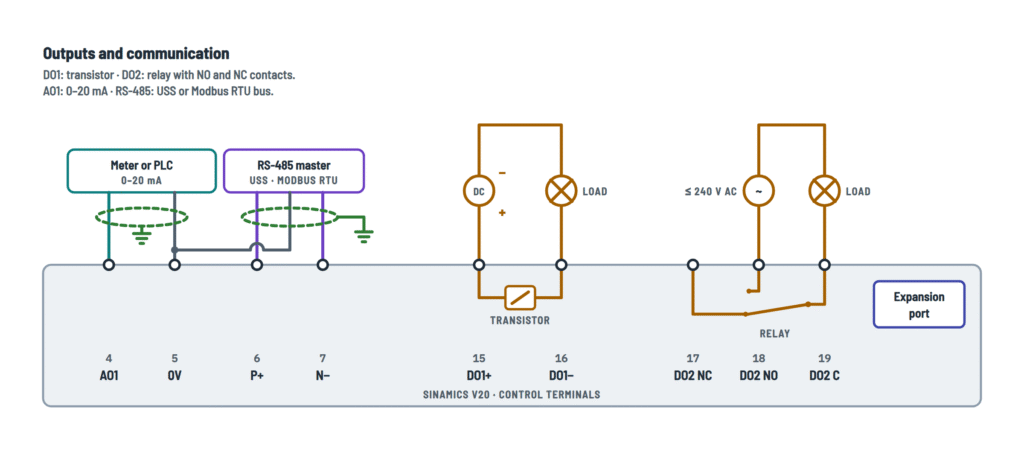
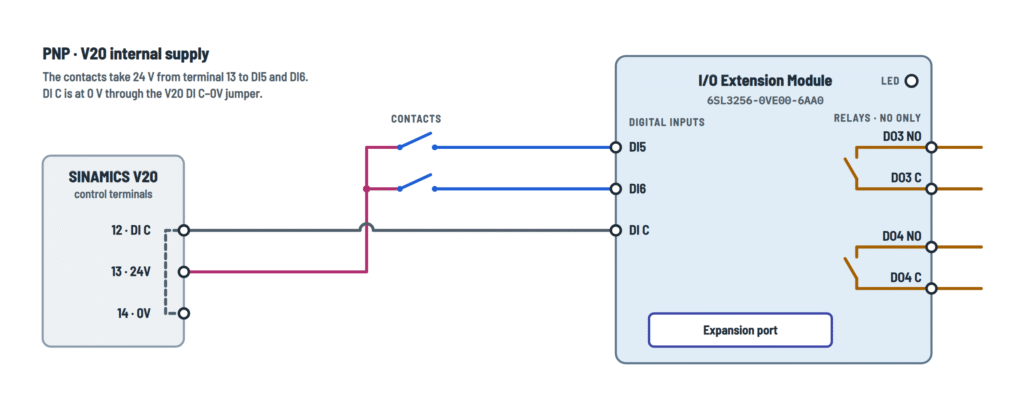
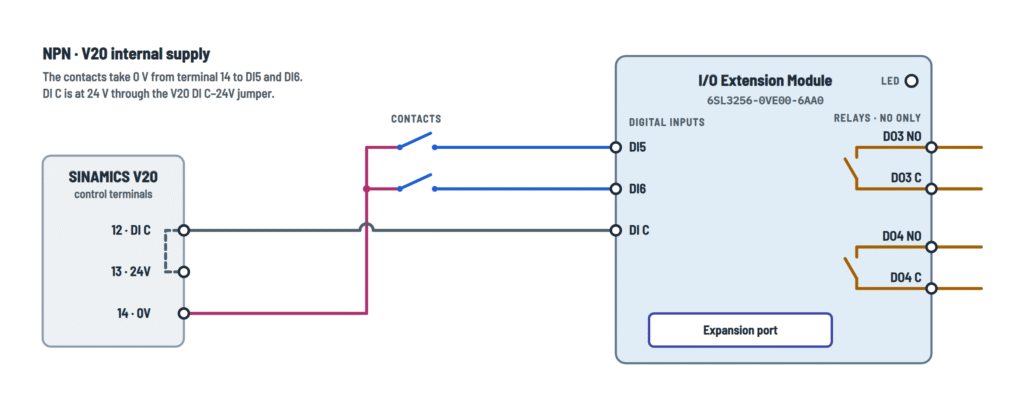

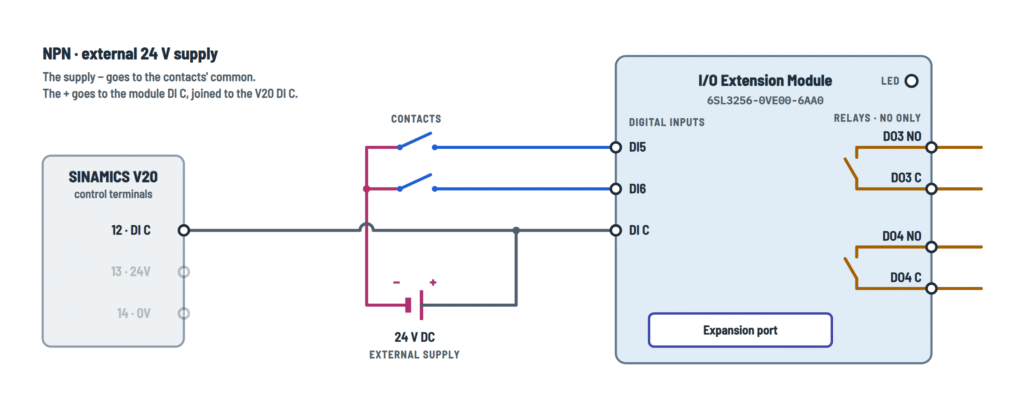


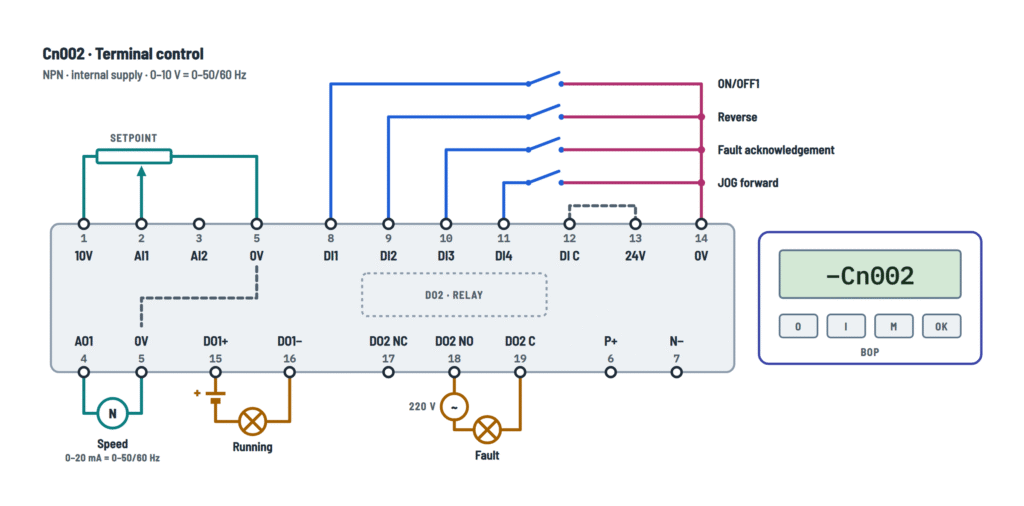


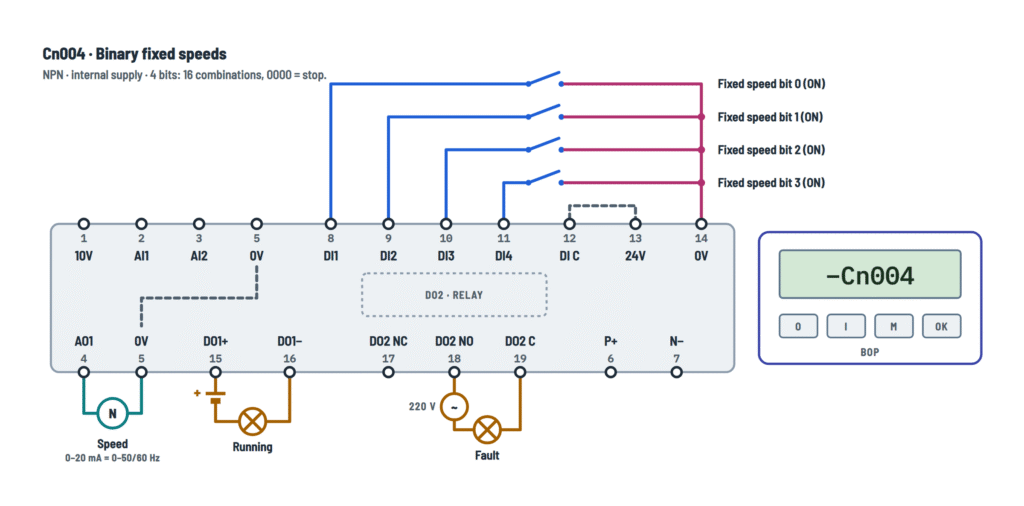
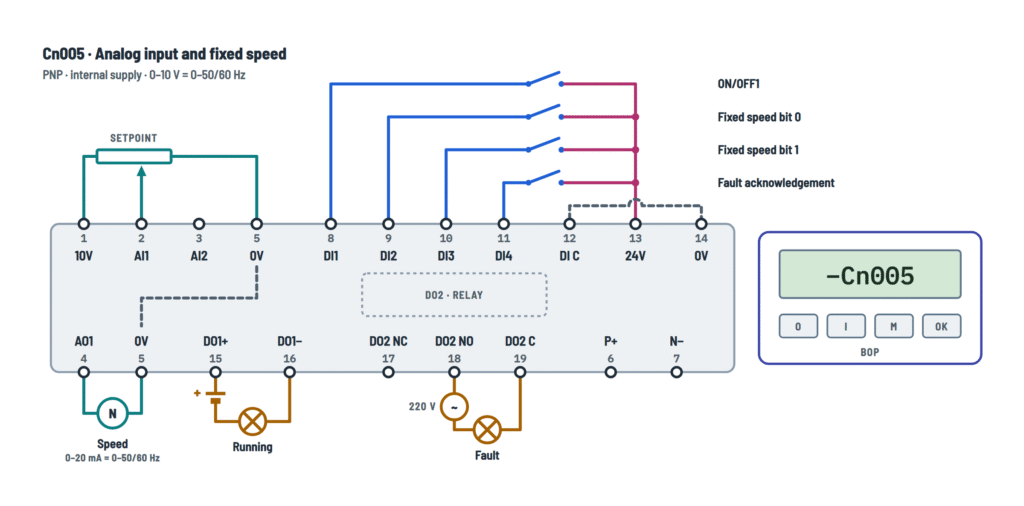


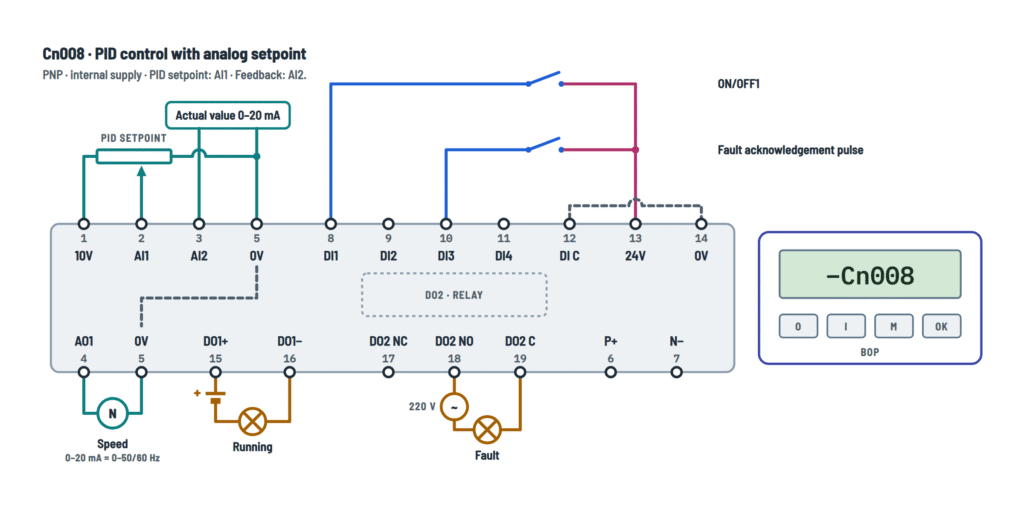
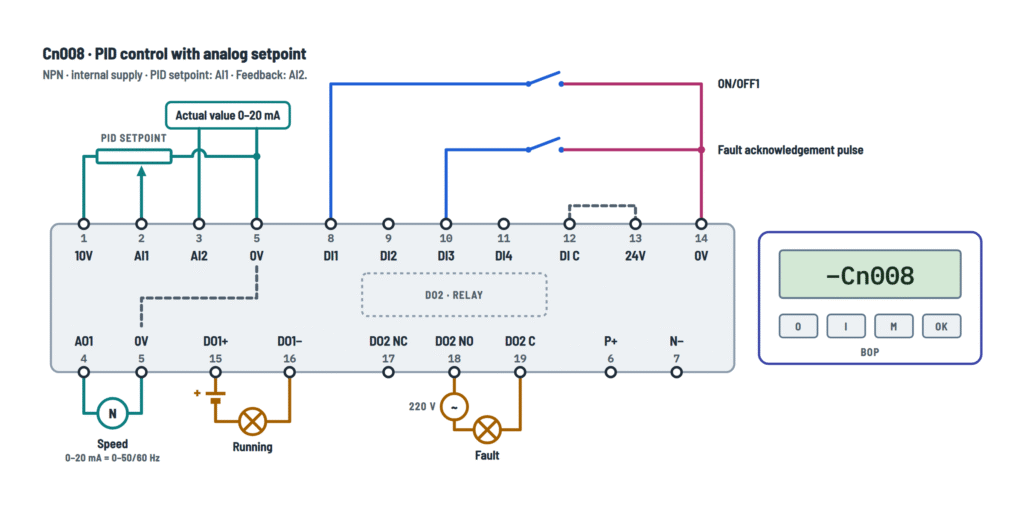
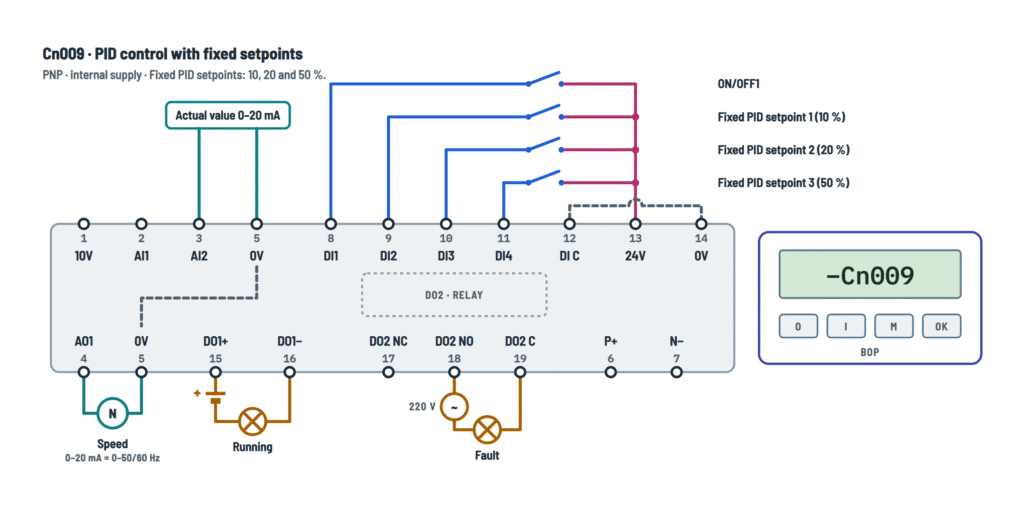


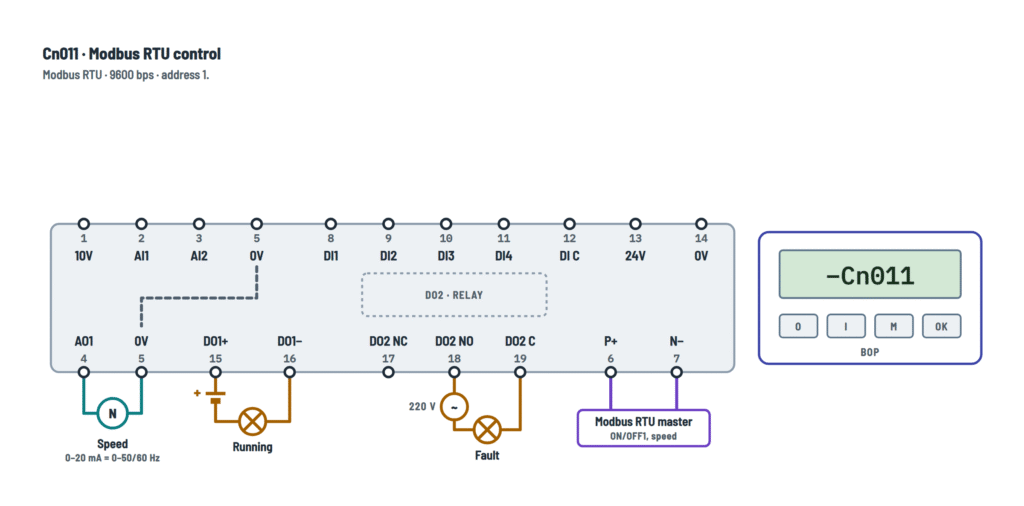


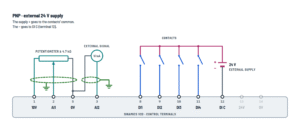
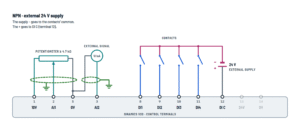
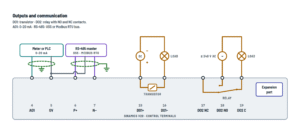
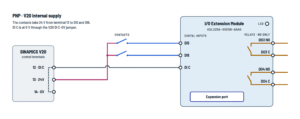

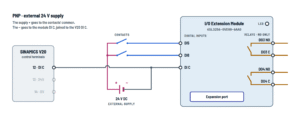
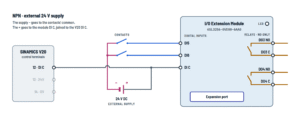


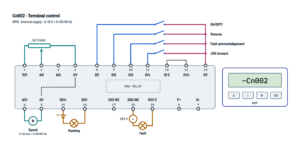


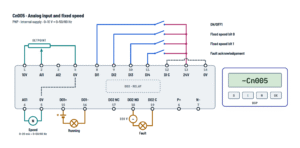
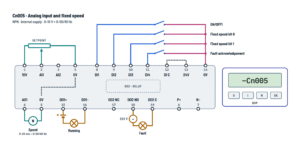


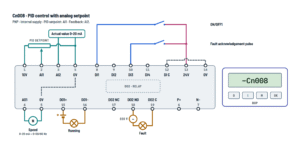

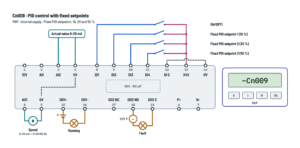


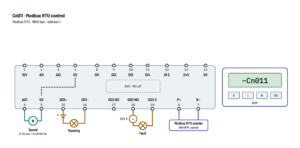
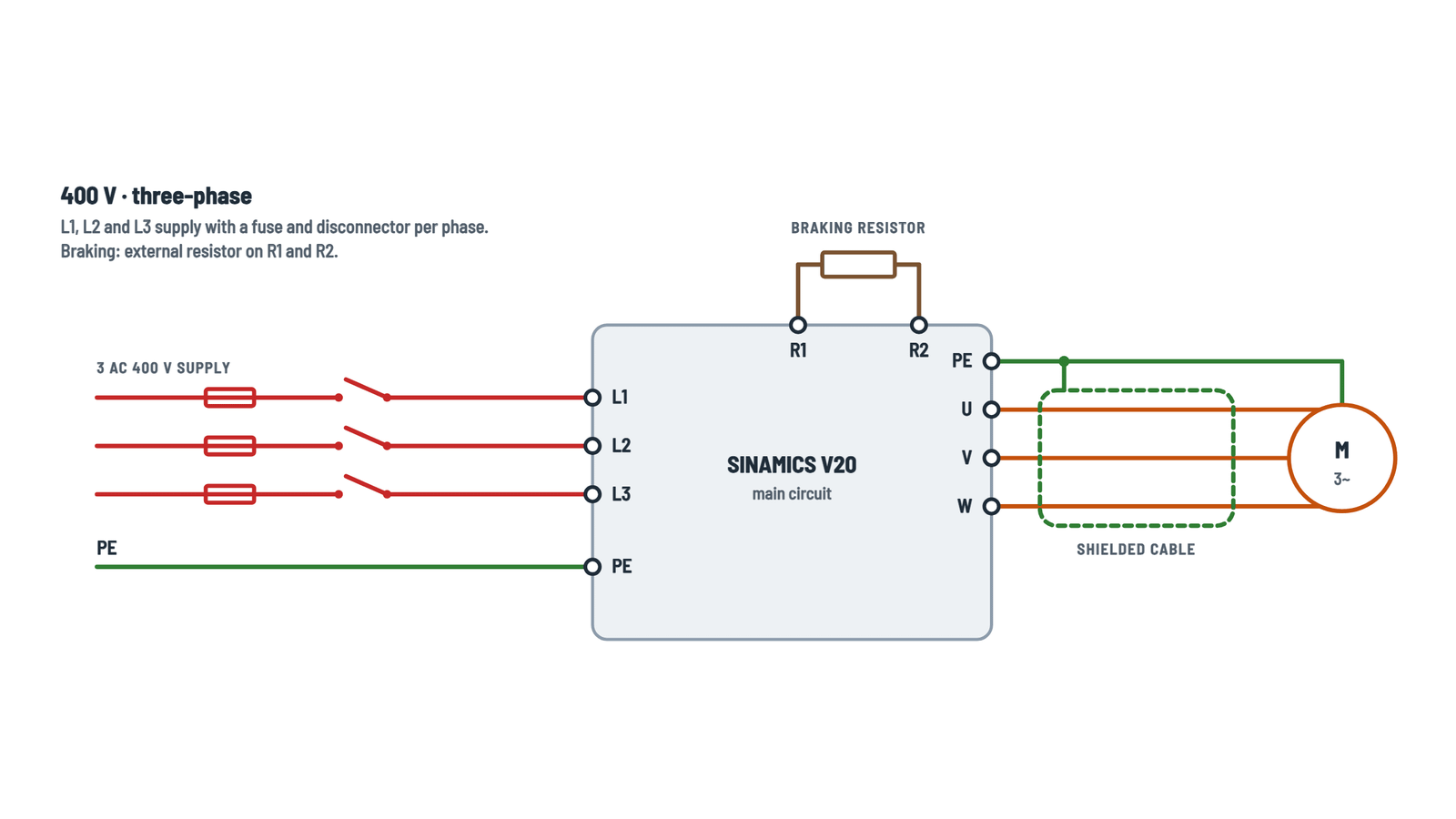
Wiring Instructions
Before you start
First, pick the Siemens Sinamics V20 diagram options that match your installation. On the Main circuit tab, choose 400 V · three-phase or 230 V · single-phase to match the rating plate on your unit. On Control: inputs, choose PNP or NPN. Then choose internal if your contacts take power from the V20 24V terminal, or external if they take it from your own 24 V DC supply. If you will use a connection macro, open the macro tab with the same Cn number you plan to select during quick commissioning. The I/O Extension Module tab applies only to 400 V units with firmware V3.94 or later.
Tools and materials you need:
- Insulated screwdrivers and a torque screwdriver
- A crimp tool with UL/cUL-certified fork crimps (ring crimps on frame size E mains)
- A true-RMS multimeter
- Shielded motor cable
- Shielded twisted-pair cable for analog and RS-485 signals
Use 75 °C copper wire. Power conductors run from 14 AWG on the smallest frames up to 3 AWG for the mains of the 30 kW frame E, so size them for your frame and kW rating. Control wiring is 20 to 18 AWG solid or stranded wire, or 24 AWG with an insulated ferrule.
Work on a 230 V or 400 V drive should be done by a qualified electrician, and a new branch circuit usually needs a permit and an inspection. If the unit was built more than a year ago and has never been used, form the DC link capacitors before normal operation. The production year is coded in the 3rd and 4th digits of the serial number.
Step-by-step wiring
- Open the disconnector and lock it off. Wait 5 minutes, then confirm zero voltage between all power terminals and between each terminal and PE.
- Install the Fuses and disconnector upstream of the V20: one fuse per line, using the protective device types Siemens lists for your exact model. On TT systems where a ground fault may not trip the fuse, add an RCD.
- Land the Supply PE first, as a fixed connection. Leakage current exceeds 3.5 mA AC, so a plain plug-in cord is not acceptable.
- Connect L1 L2 L3 (400 V) or L1 L2/N (230 V), and tighten to the torque specified for your frame size.
- Configure the motor in star or delta to match its nameplate for the inverter voltage. Use delta for a 230/400 V motor on a 400 V unit only if you intend to run it on the 87 Hz characteristic.
- Run shielded cable to U V W and keep within the maximum motor cable length for your frame and filter. Bond the shield to the inverter PE with the shield connection kit or a conductive mounting plate, and land the Motor PE on the inverter PE.
- If you need dynamic braking:
- 400 V units: connect an approved Braking resistor to R1 R2.
- 230 V units: connect the DC link and braking module to DC+ DC−. Watch the polarity.
- Wire the input reference first. For internal supply, fit the DI C jumper (12–14 for PNP, 12–13 for NPN). For external supply, connect your SELV/PELV supply to DI C as the diagram shows. Then wire the contacts, the potentiometer (4.7 kΩ or more), the transmitters and the RS-485 pair.
- Keep digital input and 24 V cables to 30 m or less. Route signal cables away from power cables, crossing them at 90° where needed, and bond the analog and bus shields to earth.
- Wire the output loads within their ratings:
- DO1 is polarized, with + on terminal 15: ±35 V, 100 mA maximum.
- DO2 switches up to 240 V AC or 30 V DC at 0.5 A. If it carries mains voltage, keep that wiring physically separate from the SELV terminals 1 to 16.
- Tug-test every conductor and re-torque the power screws. Make sure no stray strands remain, then refit the covers.
Testing and start-up
If you insulation-test the motor or cables, disconnect the V20 first. Keep low-voltage circuits at 500 V DC or less, and SELV circuits at 250 V DC or less.
Power-up checks:
- Measure the supply at the line terminals.
- The status LED should go orange, then green.
- Terminal 1 (10V) to terminal 5 should read about 10 V.
- Terminal 13 (24V) to terminal 14 should read between roughly 20.4 V and 28.8 V.
Commissioning steps:
- On first power-up, the 50/60 Hz menu appears. Choose 60 Hz (hp) (P0100 = 1) for North American motors.
- Enter the motor nameplate data, making sure voltage and current match the star or delta connection you wired.
- Select the connection macro, then the application macro.
- With P0700 = 1, run a short test in HAND or JOG mode and check the direction of rotation. If it is wrong, isolate the supply and swap two motor leads.
- Switch to terminal or bus control and test each input. Check that the "Running" and "Fault" lamps respond.
A red LED flashing at 2 Hz means a fault is active.
Safety notes
- The DC link holds a hazardous voltage for up to 5 minutes after switch-off. Always verify it is dead before touching any terminal.
- Never open the motor circuit while the inverter is running and output current is flowing.
- Under terminal or RS-485 control in AUTO mode (P0700 = 2 or 5), a single press of the BOP stop button is inactive. Provide a hardwired stop and an emergency stop.
- Braking resistors get very hot. Use only approved types, monitor their temperature, and set P1240 = 0 so dynamic braking can work.
- Use DO3 and DO4 on the I/O Extension Module only on systems that do not exceed overvoltage category II.
- Where several single-phase units share a neutral, harmonic currents add up. Size the neutral for about 1.45 times the line conductor capacity.
- The heatsink stays hot after shutdown. Drives also emit electromagnetic fields that can affect people with active implants.
Troubleshooting
| Symptom | Probable Cause | What to Check |
|---|---|---|
| Display and LED stay dark when the supply is switched on | Blown fuse, open disconnector, or a loose line conductor | Measure at the L1 L2 L3 or L1 L2/N terminals: you should see your nominal 400 V or 230 V. If not, check each fuse for continuity with the supply isolated, and re-torque the line terminals. |
| Switches and pushbuttons do nothing, but the drive runs from the keypad | DI C jumper missing or on the wrong terminal for PNP or NPN, or the contacts' common is on the wrong supply terminal | For PNP, jumper 12 to 14 and put the common on 13. For NPN, jumper 12 to 13 and put the common on 14. With a contact closed, measure between the DI terminal and DI C: above 11 V means the input is on, below 5 V means it is off. |
| Inputs drop out at random, or the 24V terminal voltage sags | Sensors or lamps are drawing more than the 50 mA available from terminal 13 | Measure terminal 13 to 14 under load: it should stay within 24 V −15 % / +20 %. Move the extra loads to an external SELV/PELV 24 V DC supply wired as in the external variant. |
| Turning the speed pot does nothing, or the speed is stuck at zero or maximum | Wiper not on AI1, a missing return to 0V (terminal 5), a pot under 4.7 kΩ, or a macro that does not use the analog setpoint | Measure terminal 1 to 5: about 10 V. Measure AI1 (terminal 2) to 5 while turning the pot: it should sweep 0 to 10 V. Confirm the pot is 4.7 kΩ or more and that the selected macro uses AI1. |
| Motor runs in the wrong direction | Two motor phases are reversed, or the Reverse input (DI2 in Cn002) is closed | Check that DI2 is open. If the direction is still wrong, isolate the supply, wait 5 minutes, and swap any two of U V W. |
| Drive trips or shows A911 when slowing down | No braking resistor or module, the Vdc controller still active, or a ramp-down that is too short for the load inertia | Check the resistor on R1 R2 (400 V) or the module on DC+ DC− (230 V). Set P1240 = 0 and P1237 to the resistor duty cycle (400 V). Otherwise lengthen P1121. |
| Drive trips on overcurrent or shows A501 on start-up | Motor wired in the wrong star or delta connection, motor data that does not match the wiring, too short a ramp-up, or a motor that is still spinning when started | Compare the motor terminal links with the nameplate and with P0304/P0305. Lengthen P1120. If the load can be turning at start, enable flying start with P1200. |
| Display shows A922 and the motor does not turn | Motor not connected, or an open phase in the motor cable or terminal box | Isolate the supply and measure resistance phase to phase at U V W through to the motor: the three readings should be equal and low. Look for a loose lug or a missing link. |
| Tingle from the enclosure, or the upstream RCD trips | Missing or high-resistance PE. Leakage current exceeds 3.5 mA AC. | Check continuity from the inverter PE to the supply earth and to the motor PE with the supply isolated. Use a fixed earth connection, and an RCD type suited to drive leakage. |
| PLC or HMI cannot talk to the drive | P+ and N− swapped, wrong protocol or baud rate, or no power cycle after changing P2023 | Check P+ on 6 and N− on 7, plus a 0V reference on 5. Check the settings: Cn010 is USS at 38,400 bps, address 1; Cn011 is Modbus RTU at 9600 bps, address 1. After changing P2023, power down until the display goes blank, then power up again. |
| "Running" lamp on DO1 never lights | Reversed polarity on the transistor output, or no external DC supply in the lamp circuit | The supply + must reach terminal 15 and the lamp return must go through 16. Check that the lamp circuit stays within ±35 V and 100 mA. |
| Under PID control the motor runs straight to maximum speed | No feedback signal on AI2, a broken transmitter loop, or AI2 not set to current mode | Put a meter in series with the AI2 loop: you should see 0–20 mA that changes with the process. Confirm P0756(1) = 2 and the return to terminal 5. |