
Garmin Livescope LVS34 Transducer Wiring Diagram
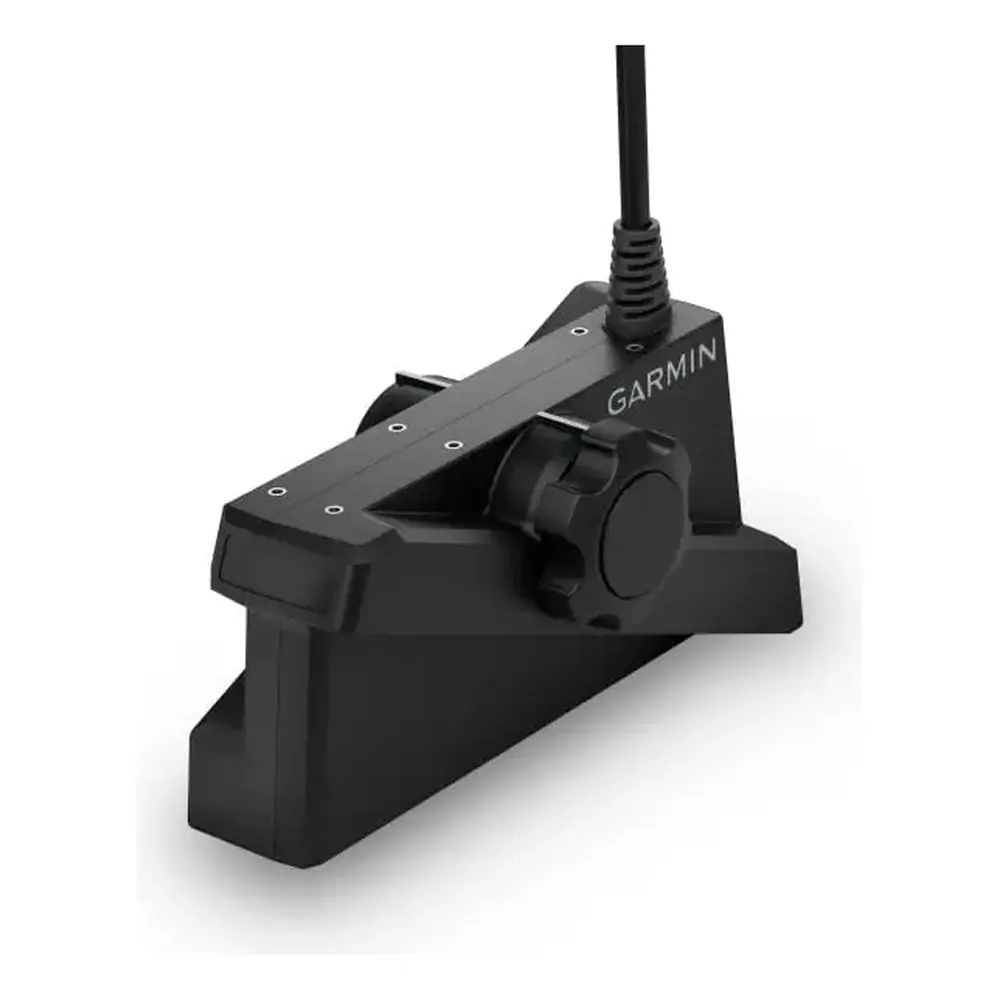
Installation diagram
Chartplotter, GLS 10 sonar module, battery power, water ground and LVS34 transducer.
Terminals and components · 11
- Network and plotter
- Sonar module
- +12 V
- Negative
- Water ground
- Transducer
Chartplotter connections
The chartplotter's own power and other connections depend on the model.
Status LED
LED Status Green, blinking Connected to the chartplotter and working properly. Red, blinking On but not connected to the chartplotter (or waiting). If it persists, check the wiring. Orange, blinking Software update in progress. Red ×2 + pause Other sonar failure. Red ×3 + pause Transducer not detected: check the XDCR connection. Red ×5 + pause Input voltage above the maximum. Notice
Connect the sonar module and the chartplotter to the same ground.
Switch
In the drawing, the positive wire runs through a switch before the fuse.
Longer run
To lengthen it, see the «Extension» tab.
Notice
Do not remove the fuse: the device may malfunction and the warranty is void.
If not detected
Three red blinks and a pause = the module does not detect the transducer: check this connection.
After installing
On the chartplotter: Sonar > LiveScope > Options > Sonar Setup > Installation > Orientation. If you will change views, choose Auto.
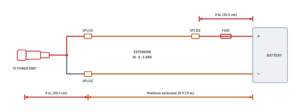
Power cable extension
How to lengthen the module's power cable and which wire gauge to use for each length.
Terminals and components · 5
- Positive and cable
- Negative and battery
- Extension and splices
Gauge by length
Gauge Maximum extension 10 AWG (5.26 mm²) Up to 15 ft (4.6 m) 8 AWG (8.36 mm²) Up to 23 ft (7 m) 6 AWG (13.29 mm²) Up to 36 ft (11 m) Gauge by length
Gauge Maximum extension 10 AWG (5.26 mm²) Up to 15 ft (4.6 m) 8 AWG (8.36 mm²) Up to 23 ft (7 m) 6 AWG (13.29 mm²) Up to 36 ft (11 m) Notice
Do not remove the fuse when adding the extension.
About This Diagram
These diagrams are redrawn from pages 16–17 of the Garmin Livescope LVS34 Transducer manual, and we offer them completely free and in English. We have also categorized it in the Boat Wiring (Marine) section on Diagramverse, and it has been rated by 1 user with an average rating of 5.0. If you have any specific questions about the Garmin Livescope LVS34 Transducer Wiring Diagram, we suggest checking the Frequently Asked Questions (FAQs) section.
Printable Garmin Livescope LVS34 Wiring Diagrams




Wiring Instructions
Before you start
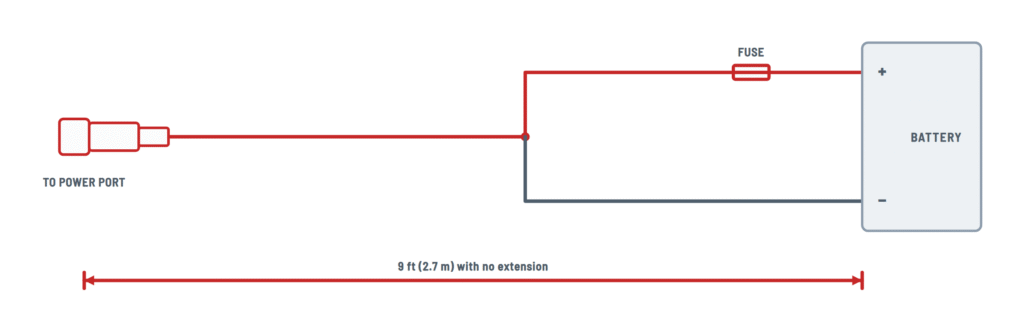
The Garmin Livescope LVS34 installation has three electrical connections at the LiveScope GLS 10 sonar module: XDCR for the transducer, POWER for the battery feed and NETWORK for the link to your chartplotter. Use the Complete tab if the stock 9 ft (2.7 m) GLS 10 power cable reaches your battery. If it doesn't, use the Extension tab and pick With extension.
Tools and materials:
- A drill and a bit that suits the module's mounting hardware and the surface. On fiberglass, also use a countersink bit.
- A flat screwdriver or an 8 mm wrench or socket for the barrel-mount hose clamp. The 5 mm hex wrench comes in the parts bags.
- Black electrical tape (preferred) or cable ties.
- The ferrite bead supplied with the transducer.
- The Garmin Marine Network cable and the 010-12531-01 adapter cable, if your chartplotter needs it.
- For an extension: extension wire of the correct gauge (10 AWG up to 15 ft, 8 AWG up to 23 ft, 6 AWG up to 36 ft), plus crimp splices. Sealed, marine-grade heat-shrink butt connectors are general good practice.
Before you install the sonar, update your chartplotter software. Before you touch any wiring, turn the chartplotter off and disconnect the battery or open its main switch. This is a 10 to 32 Vdc system, so a permit or a licensed electrician is not normally required. Get a marine electrician (ABYC-trained in the US) if you are unsure about your boat's DC distribution or grounding.
Choose a dry, ventilated spot for the module, away from extreme heat. It must not be submerged, its LEDs must be visible, and you need room to plug in all three cables. Keep the module at least 7 in. (178 mm) from any compass.
Step-by-step wiring
- Mount the Garmin Livescope LVS34 transducer using your chosen method: perspective mount, shaft mount, barrel mount or pole. Leave the knobs loose for now so you can adjust the angle later.
- Make a service loop in the transducer cable at the trolling motor's rotating joint. Leave at least 10 in. (25 cm) of cable, with the joint centered on the loop. Tape the cable above and below the joint. If you use zip ties, don't overtighten them.
- Rotate the trolling motor fully in both directions. Then stow it and deploy it again. The cable must never pull tight, get pinched or come near the propeller.
- Run the cable to the module, keeping it away from other electrical wires. If you have to pass the connector through a small hole, cut off the solid locking collar first. Fit the split collar and the O-ring once the cable is in place.
- Snap the ferrite bead onto the transducer cable close to the connector.
- Mount the GLS 10. Drill one corner pilot hole, fasten that corner loosely and check the other three marks before you drill them.
- Plug the Transducer cable into the XDCR port and lock the collar.
- Plug the small connector of the Garmin Marine Network cable into the NETWORK port. Connect the other end to the chartplotter, using the 010-12531-01 adapter if your chartplotter needs it.
- Plug the GLS 10 power cable into the POWER port.
- If you need an extension, cut the power cable 8 in. from the connector, as shown on the Extension tab. Splice the extension wire to both the Positive (+) and the Negative (−) conductors. The 7.5 A fast-acting fuse stays on the positive wire, within 8 in. (20.3 cm) of the battery. The extension can be no longer than 36 ft (11 m).
- Connect Positive (+) to the battery + post, through your switch if you have one and through the fuse. Connect Negative (−) directly to the battery − post.
- Make sure the module and the chartplotter share the same ground. In practice, the chartplotter's negative should go back to the same battery negative or the same common ground bus.
- Reconnect the battery or close the main switch.
Testing and start-up
The module has no power switch of its own. It turns on when the chartplotter turns on. Turn the chartplotter on and watch the module's status LED:
- Blinking green: the module is talking to the chartplotter and you should see sonar.
- Blinking red: the module has power but no chartplotter link yet.
- Blinking orange: a software update is running. Don't turn anything off.
- Two, three or five red blinks, then a pause: the module is reporting a fault. See the troubleshooting table.
If the module doesn't turn on, measure the voltage at the battery end of the power cable with a multimeter. You should read 10 to 32 Vdc. Under load the module typically draws 21 W, and up to 58 W.
Next, on the chartplotter go to Sonar > LiveScope > Options > Sonar Setup > Installation > Orientation. Choose the viewing mode you set on the bracket, or choose Auto if you will switch views while fishing. Loosen the knobs, line up the notches for perspective, forward or downward view, and tighten the knobs again. Finally, put the transducer in the water and calibrate the compass under Installation > Calibrate Compass. During calibration you have to turn the boat through 1.5 full circles.
Safety notes
- Never remove the 7.5 A fuse or bypass it. Without it, a short in the cable can start a fire, the module may malfunction and the warranty is void.
- Don't use a fuse of a different rating. If it blows, find the cause before you replace it.
- A boat battery can deliver very high short-circuit current. Connect the battery posts last, and keep tools away from the + post.
- Check the supply voltage before you connect. A system above 32 Vdc is outside the module's input range.
- Keep the trolling motor unpowered while you work around the propeller and the transducer bracket.
- Sonar is a navigation aid. Keep watching the water around your boat.
Troubleshooting
| Symptom | Probable Cause | What to Check |
|---|---|---|
| The module LED never lights up, even with the chartplotter on | No power reaching the module: blown or loose 7.5 A fuse, open switch, reversed polarity, or a POWER connector that isn't fully seated | Measure at the power cable's battery end. You should read 10 to 32 Vdc, with + on the fused wire. Check the fuse for continuity and make sure the POWER connector is locked. |
| The LED keeps blinking red and the chartplotter shows no LiveScope | No network link to the chartplotter, or the chartplotter software is out of date | Reseat the small network connector in the NETWORK port. Check the 010-12531-01 adapter at the chartplotter end. Update the chartplotter software. |
| Three red blinks, then a pause | The module can't detect the transducer | Check that the transducer cable is fully seated in the XDCR port with the collar locked and the O-ring in place. Look for a crushed or cut cable at the pivot joint or the stow bracket. |
| Five red blinks, then a pause | The supply voltage is above the module's maximum input | Measure the battery voltage. It must not exceed 32 Vdc. Make sure the cable isn't connected across a higher-voltage trolling motor battery bank. |
| Two red blinks, then a pause | Other sonar failure | Power everything off, reseat all three connectors and restart. If the code comes back, contact Garmin support. |
| The screen fills with noise or interference lines | Missing ferrite bead, transducer cable run next to power wires, or the module and chartplotter on different grounds | Fit the ferrite bead near the transducer connector. Move the cable away from motor and power leads. Confirm both units return to the same battery negative. |
| The module drops out or restarts when the trolling motor runs | Undersized or overly long extension, a poor splice, or a loose battery terminal causing voltage sag | Measure voltage at the POWER connector end while the motor runs. Check the extension gauge against its length (10 AWG up to 15 ft, 8 AWG up to 23 ft, 6 AWG up to 36 ft). Redo any warm or loose crimps. |
| The image cuts out when you steer or stow the motor | The transducer cable is stretched or pinched at the rotating joint | Check that the service loop is at least 10 in. (25 cm) and centered on the joint. Turn the motor fully both ways and look for tension or pinch points. |
| The image looks wrong or reversed for the view you picked | The orientation setting doesn't match the bracket position, or the notches aren't aligned | Go to Sonar Setup, Installation, Orientation and pick the mode you mounted for, or Auto. Realign the notches for port or starboard before you tighten the knob. |
| The heading or compass is erratic or won't enable | The transducer is too close to the motor, or the compass hasn't been calibrated | Move the transducer up the shaft, away from the motor. Run Calibrate Compass with the transducer in the water, turning the boat through 1.5 full circles. |