
Liftmaster Logic 5.0 Garage Door Opener Wiring Diagram
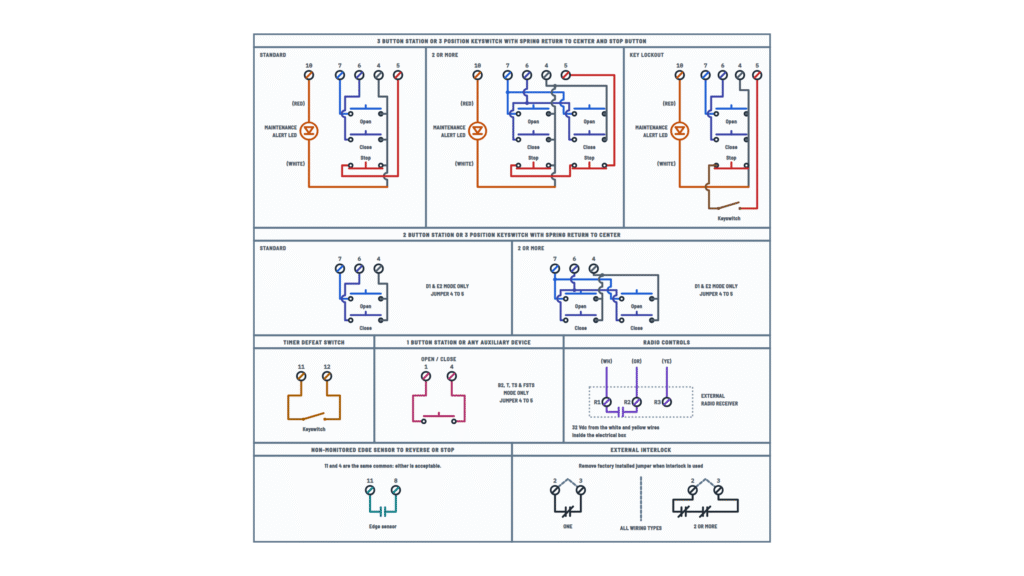
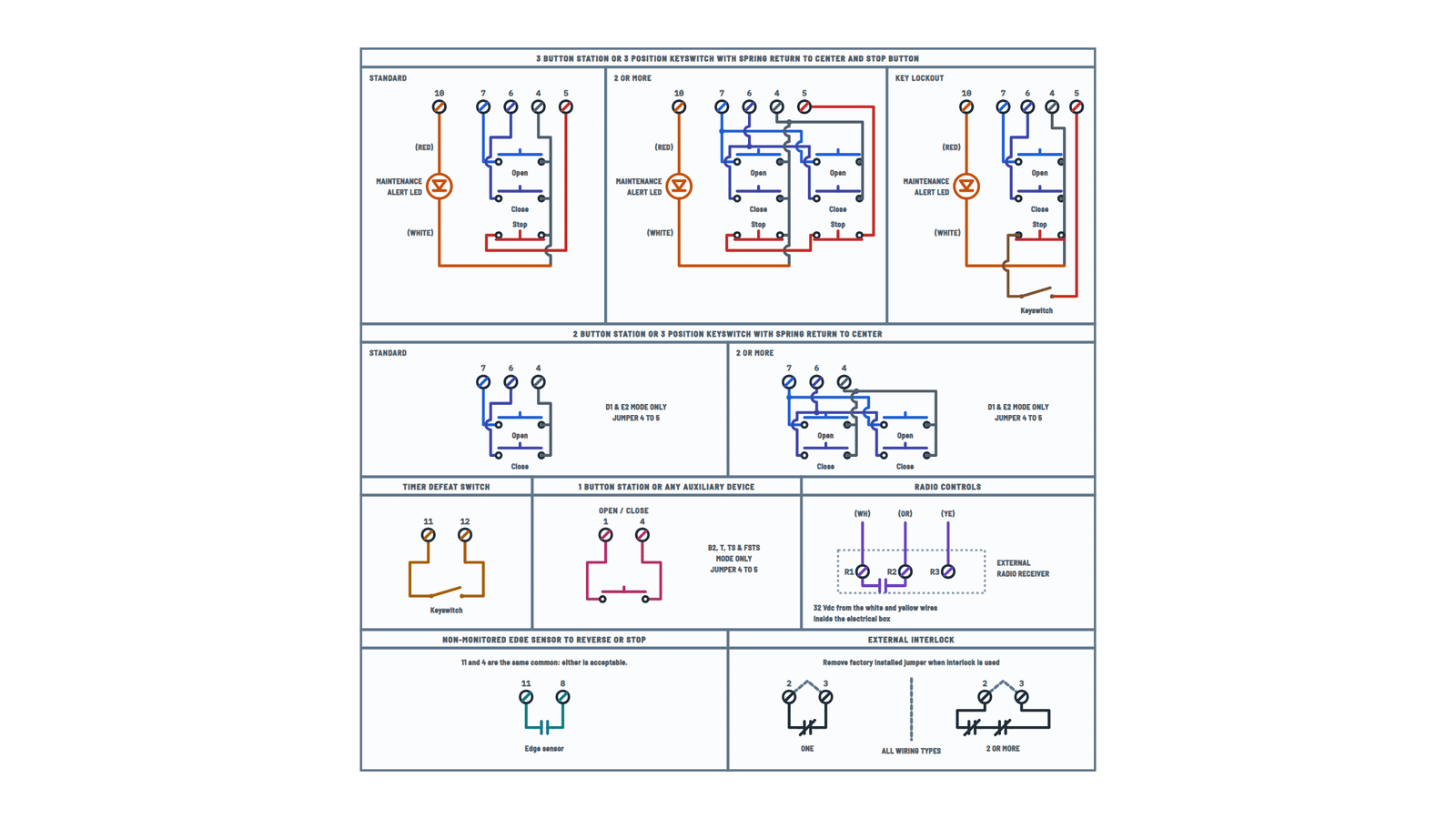
Control connection diagram
3, 2 and 1 button stations, key lockout, timer defeat, radio, edge sensor and interlock.
Terminals and components · 11
- Open
- Close
- Stop
- Common
- LED
- Radio
- Edge sensor
- Interlock
Control terminals
Terminal Function 10 Maintenance alert LED (red) 7 Open 6 Close 4 · 11 Common 5 Stop 1 Single button / auxiliary 8 Edge sensor 12 Timer defeat 2 · 3 External interlock R1 · R2 · R3 External radio receiver Several stations
Open and Close buttons are wired in parallel (to 7 and 6); Stop buttons in series between 4 and 5.
Several stations
Open and Close buttons are wired in parallel (to 7 and 6); Stop buttons in series between 4 and 5.
Several Stop buttons
They must be wired in series for all of them to work; you may need to remove the factory jumper bar in the 3-button station.
Required station
The 3-button control station provided must be connected for operation.
Power
The 32 Vdc power comes from the white and yellow wires inside the electrical box.
Factory jumper
Remove the 2–3 jumper only when an interlock is connected.
About This Diagram
This diagram is redrawn from page 38 of the Liftmaster Logic 5.0 Garage Door Opener manual, and we offer it completely free and in English. We have also categorized it in the Doorbells, Garage Doors & Detectors (Home Electrical) section on Diagramverse, and it has been rated by 1 user with an average rating of 5.0. If you have any specific questions about the Liftmaster Logic 5.0 Garage Door Opener Wiring Diagram, we suggest checking the Frequently Asked Questions (FAQs) section.
Printable Liftmaster Logic 5.0 Wiring Diagrams
Wiring Instructions
Before you start
The Liftmaster Logic 5.0 is a commercial door operator, not a residential opener. It should be installed and serviced only by a trained door systems technician. All line-voltage connections must be made by a qualified person under national and local electrical codes. Ask your local authority whether you need a permit.
- Power wiring: use copper only, 14 AWG or heavier, sized by run length: 14 AWG up to 50 feet, 12 AWG up to 100 feet and 8 AWG up to 200 feet. The operator terminals take 12 AWG at most, so a heavier run must be reduced to 12 AWG at the operator.
- Control wiring: use insulated wire, 20 AWG or larger. The Maintenance alert LED needs one extra conductor to the station.
- Circuit: use a dedicated, separately fused line of adequate capacity, with a disconnect that is easy to see and clearly labeled. Check the motor nameplate for voltage, phase and current.
- Conduit: run power wiring and control wiring in separate conduit.
Turn off and lock out power at the fuse box before you remove the operator cover. Keep it off until every control connection is finished.
Step-by-step wiring
- Decide which controls you are installing. A 3-button station with Open, Close and Stop is the standard setup and works in every mode. A 2-button station without Stop is for D1 and E2 modes only. The Single button or auxiliary device input works only in B2, T, TS and FSTS modes, and those modes require a LiftMaster Monitored Entrapment Protection (LMEP) device.
- Run line power through the conduit knockouts marked on the electrical box labels. For single phase, connect hot, neutral and ground. For three phase, connect L1, L2, L3 and ground. The operator must be grounded.
- Push the motor harness into the power board receptacle that matches your line voltage (115V or 230V on single phase) until it locks. Then stick the voltage label inside the electrical box. On 575V three-phase units the harness comes connected from the factory.
- Mount the control station within sight of the door, away from moving parts, at least 5 feet above floors, landings or steps.
- Wire the Stop button as a normally closed contact between Control common 4 and terminal 5. Then wire the Open button to 7 and the Close button to 6. If you have several stations, wire every Stop button in series. You may need to remove the factory jumper bar in the 3-button station to do this. If there is no Stop button at all, jumper 4 to 5; without it, even the logic board buttons will not work.
- For a Key lockout, put the keyswitch in series with Stop, between Stop and terminal 5.
- Connect the Maintenance alert LED: red wire to terminal 10, white wire to common.
- Add accessories one at a time, powering up and testing after each one:
- Timer defeat keyswitch across 11 and 12
- Single button or auxiliary device across 1 and 4
- Non-monitored edge sensor across 11 (or 4) and 8
- External radio receiver contact across R1 and R2, with the receiver powered from the 32 Vdc white and yellow wires
- For an External interlock, remove the factory jumper from 2 and 3 and connect the normally closed contacts there. If there are two or more interlocks, wire them in series.
- Connect the LMEP device to the logic board following its own instructions. Only one LMEP device connects directly to the board; a second one needs a CPS3CARD.
- Set the selector dial to the wiring type you need (operators ship set to C2) and put the covers back on.
Testing and start-up
Before you switch power on, measure the supply at the line terminals. It should be within plus or minus 10 percent of the nameplate voltage. When power comes on, all logic board LEDs light for 2 to 3 seconds. After that, only these should stay on:
- Between limits: 24Vac and STOP
- Fully closed: 24Vac, STOP, CLS and SLS
- Fully open: 24Vac, STOP and OLS
If the STOP LED is dark, the circuit between common and terminal 5 is open.
Press Open and the door should open. Press Stop and it should stop. Press and hold Close and it should close. When you let go of Close, the door stops in C2 or D1, reverses to full open in E2, and keeps closing in the other modes. The Open, Close and Edge LEDs should light as you press each input. On three-phase units, if the door runs the wrong way, lock out power and swap the incoming L1 and L2 wires. Last, open the door and block the photo eyes. The LMEP LED should blink and the door should not close. If you break the beam while the door is closing, it should reverse.
Safety notes
- Line voltage can be 115V, 230V, 208/230V, 460V or 575V. Treat the electrical box as live until a meter shows zero voltage.
- Never wear a watch or rings inside the enclosure with power on. Use only one hand when pressing logic board buttons.
- Never bypass the LMEP device in B2, T, TS or FSTS modes. Keep the photo eye beam no higher than 6 inches above the floor.
- Put the entrapment warning placard next to the control station. Test entrapment protection every month and after every adjustment.
- Install the operator only on a properly balanced door. Leave spring and cable work to a door technician.
Troubleshooting
| Symptom | Probable Cause | What to Check |
|---|---|---|
| Nothing responds, not even the buttons on the logic board | Stop circuit open: no Stop button and no jumper on 4 and 5, a Stop or Key lockout contact left open, or Stop buttons wired in parallel instead of series | The green STOP LED must be on. With power off, check for continuity between 4 and 5. Fit the jumper or rewire all Stop contacts in series. |
| The operator stopped working right after I added a door lock interlock | Interlock contact open, factory jumper on 2 and 3 removed with nothing in its place, or two interlocks wired in parallel | With the door unlocked, check for continuity between 2 and 3. Interlocks must be normally closed and wired in series. If none is used, refit the factory jumper. |
| The power LED on the board is off | No line power, motor harness in the wrong voltage receptacle, loose secondary wiring or faulty transformer, or hoist interlock engaged | Measure the supply at the line terminals and compare it with the nameplate. Confirm the harness is locked into the receptacle that matches your line voltage. Check that the 24Vac secondary connections are tight and that the manual release chain is not engaged. |
| The door goes up when I press Close and down when I press Open | Wrong phasing on a three-phase supply, or a motor direction jumper setting that doesn't match the mounting | On three-phase units, lock out power and swap the incoming L1 and L2. On through-wall installations, check that the MOTOR DIRECTION jumper is set to the correct STD or REV position. |
| One button on the station does nothing while the others work | Wire on the wrong terminal, loose wire, or broken conductor | Press the button and watch the board: the Open LED should light for terminal 7 and the Close LED for terminal 6. If the LED stays off, check the wire and the terminal screw at both ends. |
| The door only closes if I hold Close for 5 seconds | The LMEP device is misaligned, blocked, disconnected or shorted, so the operator has dropped into Restricted Close | If the LMEP LED is flashing, clear the beam, realign the sensors, and check the sensor wires for continuity and shorts. If the sensors were removed on purpose, unlearn them. |
| The single button station or external radio receiver does nothing | Selector dial set to C2, D1 or E2, receiver not powered, or contact on the wrong terminals | The Single button or auxiliary device input works only in B2, T, TS and FSTS modes, and the SBC LED should light when it's pressed. Check that the receiver gets 32 Vdc from the white and yellow wires and that its contact is on R1 and R2. |
| The door never closes on its own even though Timer-to-Close is set | Timer defeat circuit closed or shorted, or dial not set to T, TS or FSTS | If the Timer Defeat LED is solidly on, 11 and 12 are closed. Check the keyswitch and its wiring for a short, and confirm the selector dial position. |
| The maintenance light on the wall station never lights | Missing fifth conductor, or red and white LED wires swapped | Confirm the red wire is on terminal 10 and the white wire is on common. Check that the fifth conductor is continuous from the operator to the station. |
| Maintenance light flashes 8 times, then pauses | Brownout from an undersized or overly long power run, a low supply, or too many accessories on the transformer | Measure the AC line and the transformer secondary while the motor is running. Upsize the power wire for the run length, and remove accessories one at a time to find the overload. |
| Maintenance light flashes 5 times and the wall station is ignored | A control input has been held closed for more than 2 minutes, usually a stuck button or shorted control cable | Disconnect the station wires one at a time and check them for shorts between each other and to common. Repair or replace the station before it will be accepted again. |
| The door doesn't react when the bottom edge is pressed | Edge wired to the wrong terminal, or a normally closed edge used where a normally open contact is needed | Press the edge and watch the Edge LED, which should light. A non-monitored edge needs a normally open dry contact between 11 (or 4) and 8. |