
Liftmaster MT5011 Garage Door Opener Wiring Diagram
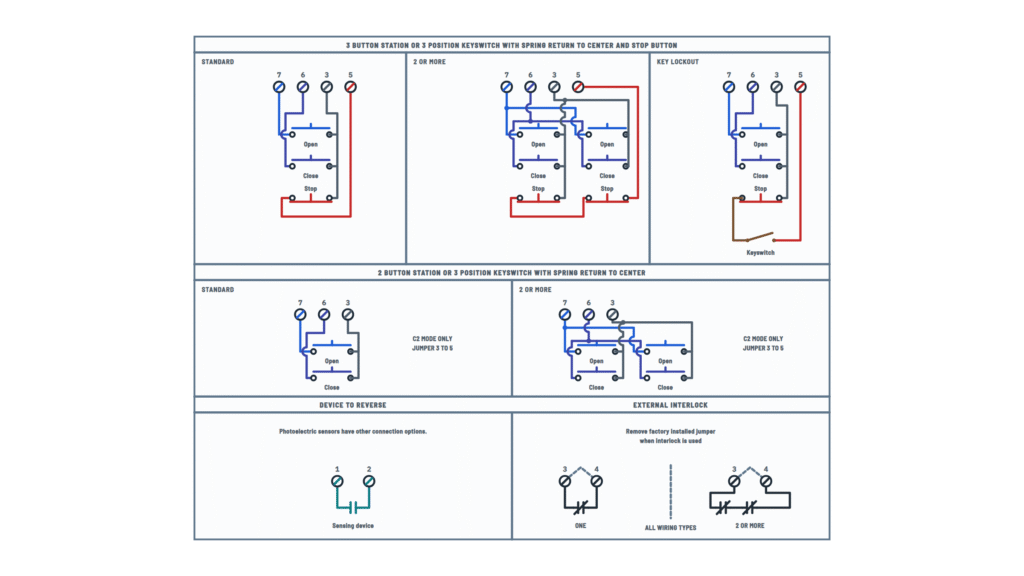
Control connection diagram
3 and 2 button stations, key lockout, device to reverse and external interlock.
Terminals and components · 7
- Open
- Close
- Stop
- Common
- Keyswitch
- Reverse
- Interlock
Control terminals
Terminal Function 7 Open 6 Close 3 Common 5 Stop 1 · 2 Device to reverse 3 · 4 External interlock Several stations
Open and Close buttons are wired in parallel (to 7 and 6); Stop buttons in series between 3 and 5.
Several stations
Open and Close buttons are wired in parallel (to 7 and 6); Stop buttons in series between 3 and 5.
2-button station
Without a Stop button it works only in C2 mode and with a jumper between 3 and 5.
Required station
The 3-button control station provided must be connected for operation.
Photo eyes
Photoelectric sensors have their own connection options, different from this contact.
Factory jumper
Remove the 3–4 jumper only when an interlock is connected.
About This Diagram
This diagram is redrawn from page 28 of the Liftmaster MT5011 Garage Door Opener manual, and we offer it completely free and in English. We have also categorized it in the Doorbells, Garage Doors & Detectors (Home Electrical) section on Diagramverse, and it has been rated by 1 user with an average rating of 5.0. If you have any specific questions about the Liftmaster MT5011 Garage Door Opener Wiring Diagram, we suggest checking the Frequently Asked Questions (FAQs) section.
Printable Liftmaster MT5011 Wiring Diagrams

Wiring Instructions
Before you start
The Liftmaster MT5011 and the BMT5011 brake version are medium-duty commercial trolley operators. They are not residential openers, and a trained door systems technician should install them. A qualified person must do all line-voltage work, following national and local electrical codes. Ask your local building authority whether the new circuit needs a permit.
- Supply: 115 Vac, single phase, 60 Hz. The operator draws 11.2 A. Feed it from a dedicated, fused circuit of adequate capacity, with a power disconnect that is visible and clearly labeled.
- Power wire: Use copper only, 14 AWG or heavier. Size it by the length of the run: 14 AWG up to 50 feet, 12 AWG up to 100 feet, 8 AWG up to 200 feet, 6 AWG up to 350 feet, 4 AWG up to 500 feet and 2 AWG up to 1000 feet. The terminals take 12 AWG at most, so you must step a heavier run down to 12 AWG before it reaches the operator.
- Control wire: 16 to 22 AWG, in its own conduit. Never run it in the same conduit as the power wiring.
- Tools: screwdrivers, wire strippers, a multimeter with continuity and AC voltage ranges, a lockout kit and short jumper wires.
Decide which control layout matches your hardware before you pull any wire:
- Standard: a 3-button station with Open, Close and Stop.
- No Stop button: a 2-button station, or a spring-return keyswitch without a Stop, needs a jumper between 3 and 5 and works in C2 mode only.
- Key lockout: wire it in series with the Stop.
- Door lock interlock switch: it takes the place of the factory jumper on 3 and 4.
- Reversing device: a sensing edge or photo eyes connect to 1 and 2.
Step-by-step wiring
- Check that the door is balanced and moves smoothly by hand. Disable all locks and remove any ropes. Mount and secure the operator before you start on the wiring.
- Switch off the circuit at the panel and lock it out. Use your meter to confirm there is no voltage at the operator feed.
- Remove the electrical box cover. Bring power and control wiring in through the separate knockouts marked on the box labels, each run in its own conduit.
- Connect Hot, Neutral and Ground to the high-voltage terminal strip. The ground is required: an ungrounded operator can give a serious electric shock.
- Mount the 3-button control station at least 5 feet above the floor, within sight of the door and away from moving parts. Place it far enough away that nobody can touch the door while pressing a button. Fasten the entrapment warning placard next to it.
- Run the control cable to the logic board. Connect the common to terminal 3, Open to 7, Close to 6 and Stop to 5. Write down which wire color you used on each terminal.
- If you have no Stop button, put a jumper from 3 to 5. If you use a key lockout, wire the keyswitch in series with the Stop circuit.
- If you use an external interlock, remove the factory jumper from 3 and 4 and connect the interlock's normally closed contacts there. Wire two or more interlocks in series. If you have no interlock, leave the jumper in place.
- Connect the reversing device to 1 and 2. On CPS-UN4 photo eyes, brown goes to 1 and blue goes to 2. Mount photo eyes facing each other across the door, no higher than 6 inches above the floor, and fix their wire with insulated staples.
- Route the antenna so it sits 4 inches away from the front of the electrical box. Then put the station cover and the box cover back on.
Testing and start-up
Before you restore power, check continuity on the logic board terminals:
- 3 to 5 reads closed with Stop released.
- 3 to 4 reads closed.
- 3 to 6 and 3 to 7 read open, and close only while you press their button.
Then turn the power on. The logic board LED flashes 4 times at power-up, then shows the mode: one flash for C2 (the factory default) or two for B2. Connecting a monitored entrapment protection device switches the operator to B2 automatically.
- Press OPEN and the door should open. Press STOP and it should stop.
- Press and release CLOSE. In C2 the door stops when you release the button; in B2 it keeps closing.
- Run full open and close cycles. If the door goes too far or stops short, switch the power off and adjust the limits.
- Block the photo eyes or the sensing edge and press CLOSE. With photo eyes the door must not close. With an edge it must close onto the obstruction and reverse.
Add accessories one at a time and repeat these tests after each one. Do not leave the power on unless every entrapment protection device has been tested and works.
Safety notes
- The operator runs on 115 Vac. Always disconnect and lock out power before you remove a cover, adjust the limits or clutch, or change any wiring.
- Never run 115 Vac power and low-voltage control wiring in the same conduit or bundle.
- Monitored entrapment protection is required for B2, Timer-to-Close and closing the door by remote control. Never jumper terminals 1 and 2 to defeat a sensor.
- Springs, cables and brackets are under extreme tension. Leave repairs to door hardware to a trained door technician.
- Test the entrapment protection every month and after any adjustment.
Troubleshooting
| Symptom | Probable Cause | What to Check |
|---|---|---|
| Nothing happens and the board LED is dark | No line power: breaker off, a loose Hot or Neutral, or a dead feed | Measure AC voltage at L1 and L2. You should read about 120 Vac. When power is present, the LED flashes. |
| LED is on but no button does anything | Stop circuit open: missing 3–5 jumper, broken Stop wire, stuck Stop button or key lockout turned off | With power off, check continuity from 3 to 5. It must read closed with Stop released and the keyswitch in the run position. |
| Operator stopped working after an interlock was installed | Factory 3–4 jumper removed with no interlock fitted, interlock contacts open, or several interlocks wired in parallel instead of series | With the door unlocked, check continuity from 3 to 4. It must read closed. If there is no interlock, put the jumper back. |
| Pressing Close opens the door and Open closes it | Open and Close wires swapped at terminals 6 and 7 | Swap the wires so Close is on 6 and Open is on 7. Both share common 3. |
| LED flashes 3 times and the door misbehaves | Stuck CLOSE button, or the Close wire shorted to common | Disconnect the wire on 6. If the fault clears, look for a pinched or stapled-through conductor, or a jammed Close button. |
| Door only closes while I hold Close, after about 5 seconds | Restricted close mode: the monitored sensor is disconnected, misaligned or wired wrong (LED flashes 4 times) | Check the sensor wires on 1 and 2, polarity included (on CPS-UN4, brown to 1 and blue to 2). Both sensor LEDs should glow steady. |
| Door reverses on its own for no visible reason | Intermittent entrapment device signal from a loose terminal or damaged sensor wire | Tighten terminals 1 and 2, inspect the run for staples through the insulation, and recheck photo eye alignment. |
| Door stops as soon as I let go of Close | Operator is in C2 mode because no monitored entrapment device is connected | One LED flash confirms C2. This is normal in C2. Install a monitored device for B2 momentary close. |
| Remote opens the door but will not close it | C2 mode: remotes only open the door in C2 | Connect a monitored entrapment device so the operator runs in B2, then retest the remote. |
| Remote only works when standing right under the operator | Antenna not set up, or a low remote battery | Route the antenna 4 inches from the front of the box and replace the battery. Use the EXT-ANT kit if range is still poor. |
| LED flashes 5 times and the door moves the wrong way | Motor direction reversed | With power locked out, reverse the yellow and red motor wires on the capacitor. |