
Victron Multiplus-II 12 3000 Inverter Charger Wiring Diagram
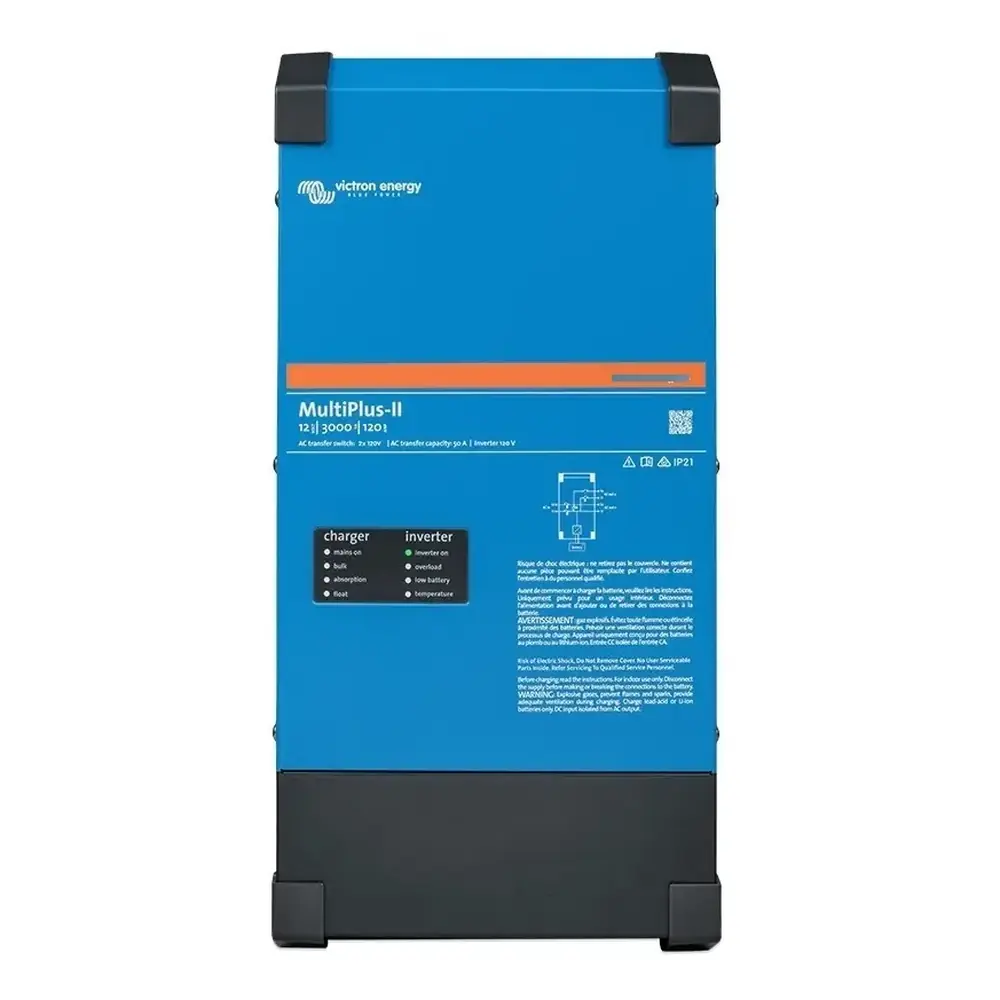
Victron Multiplus-II 12 3000 Inverter Charger Wiring Diagram
Power connections
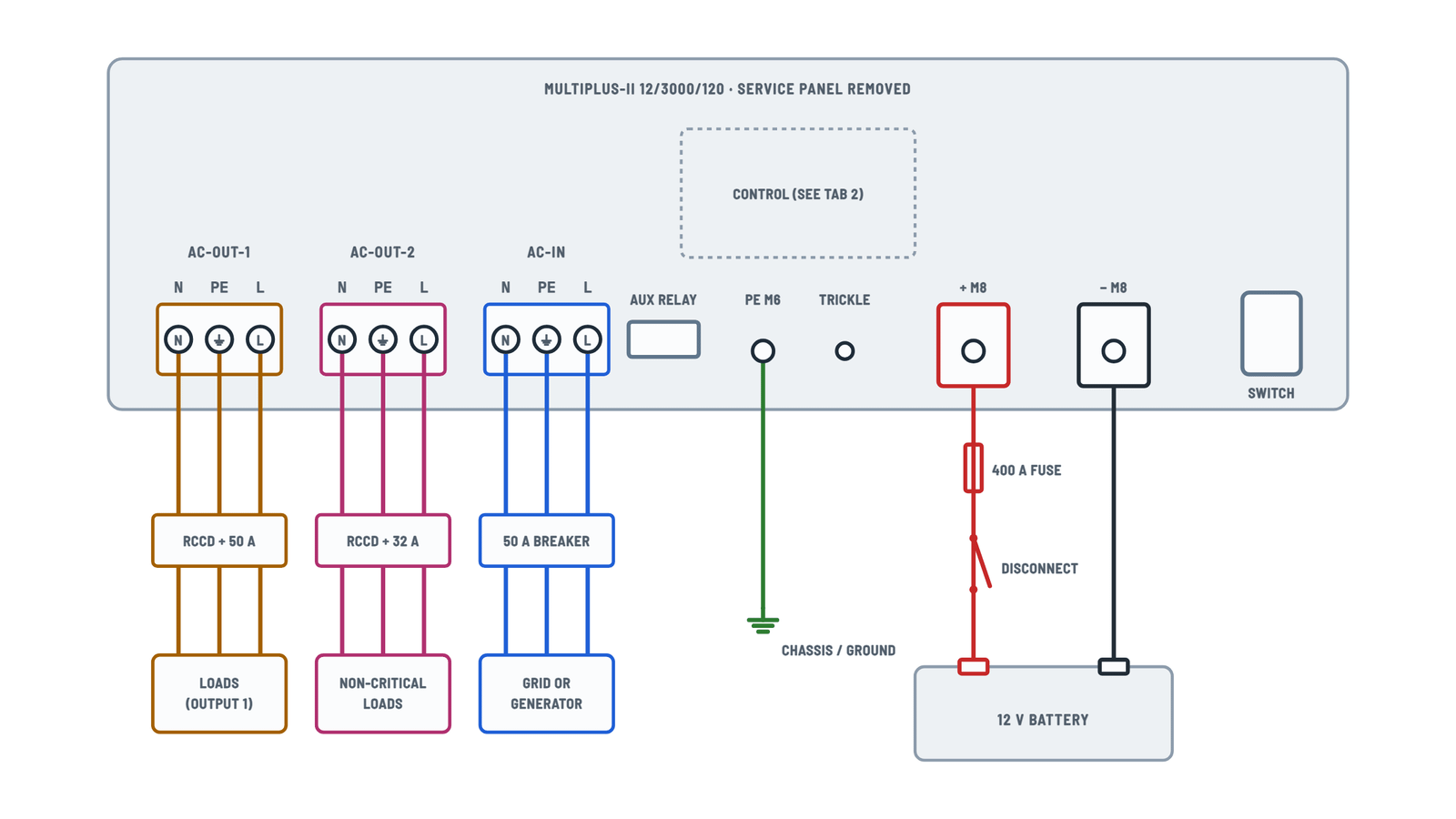
AC, ground and battery terminals, left to right as on the unit.
Terminals and components · 6
- AC-IN
- AC-OUT-1
- AC-OUT-2
- Ground
- Battery +
- Battery −
How to connect it
Three-conductor 90 °C copper cable with ferrules, 0.7 in (18 mm) stripped. Max torque: 2 Nm. Protect it with a fuse or magnetic breaker rated 50 A or less.
Caution
Do not swap neutral and phase.
How to connect it
Put a UL 943 residual current breaker (RCCD) and a fuse or breaker sized for the load in series. Max torque: 2 Nm.
PowerAssist
The inverter can add up to 25 A to the 50 A input: the output can supply up to 75 A.
What it's for
For loads that should only run on grid or generator, such as an electric water heater or air conditioner.
How to connect it
Put a UL 943 RCCD and a fuse or breaker rated 32 A max in series.
Depending on the installation
- Fixed: ground can come through the AC input cable; otherwise ground the case.
- Mobile (shore plug): connect the case to the vehicle chassis or to the boat hull or ground plate.
Boats
Direct connection to shore ground is not recommended because of galvanic corrosion: use an isolation transformer.
How to connect it
- Remove the two bottom screws and the service panel.
- Bolt order: lug, flat washer, lock washer, nut.
- Torque: 12 Nm, with an insulated wrench.
Data
Item Value Battery 400 - 1200 Ah DC fuse 400 A Cable Copper 90 °C, not in closed conduit Caution
Not for direct connection to a vehicle electrical system: it needs its own fused house battery.
Caution
Avoid shorting the battery cables while tightening the nuts.
Control and signal terminals
12-terminal strip, remote, VE.Bus, current sensor and alarm relay.
Terminals and components · 10
- Remote
- VE.Bus
- Relay
- Temperature
- Voltage
Condition
Works only with the unit switch set to “on”. Only one remote control (panel or switch) per system.
In parallel
Link units directly with UTP cables, no splitter boxes. Connect the negative battery cables first.
How to connect it
Remove the INT-COM wire bridge, connect the sensor red wire to EXT and the white wire to COM.
Rating
AC: 120 V / 4 A. DC: 4 A up to 35 V DC, 1 A up to 60 V DC.
How to use it
First disable the internal ground relay in the settings; then wire the external relay to these terminals.
Check
The manual list puts AUX 1 on terminals 5-6 and AUX 2 on 7-8, but the drawing label shows AUX 2 above AUX 1. Check the markings on the unit.
Ordering
Supplied with 12 and 24 V models. Order number: ASS000001000.
Operation
Compensates up to 1 V on the positive and 1 V on the negative; if the drop is larger, it limits the charging current.
Internal block diagram
How the input, both outputs and the battery connect inside.
Terminals and components · 5
Operation
With external AC, the ground relay opens before the input relay closes, so an RCD on the output works correctly.
About This Diagram
These diagrams are redrawn from pages 13–16 and 31–34 of the Victron Multiplus-II 12 3000 Inverter Charger manual, and we offer them completely free and in English. We have also categorized it in the Inverters (Solar & Batteries) section on Diagramverse, and it has been rated by 1 user with an average rating of 5.0. If you have any specific questions about the Victron Multiplus-II 12 3000 Inverter Charger Wiring Diagram, we suggest checking the Frequently Asked Questions (FAQs) section.
Printable Victron Multiplus-II 12 3000 Wiring Diagrams


Wiring Instructions
Before you start
The Victron Multiplus-II 12 3000 diagram has three tabs. Complete shows the power connections that every installation needs. Control shows the optional signal terminals. Block diagram shows how the internal relays route power. This guide covers the 12 V, 3000 VA, 120 V model (12/3000/120). Check the rating label on your unit first: the 24 V, 48 V, 4k and 5k versions need different fuses and cable sizes.
A qualified electrician should install this unit. Fixed 120 V wiring must follow the NEC (ANSI/NFPA 70) or the Canadian Electrical Code, and most jurisdictions require a permit. You will need:
- A torque wrench with an insulated box spanner for the M8 battery nuts, and a screwdriver for the AC terminal blocks.
- Copper cable rated 90 °C (194 °F). For the battery, use two AWG 1/0 per pole on runs up to 16 ft, or two AWG 2/0 per pole on runs of 16 to 33 ft.
- A 400 A DC fuse, and a battery disconnect rated for at least that fuse current.
- Three-wire AC cable: AWG 6 minimum for AC-IN and AC-OUT-1, and AWG 10 for AC-OUT-2. Fit ferrules, with the wire stripped 0.7 inch (18 mm).
- A 50 A breaker for the input. For AC-OUT-1, a 50 A breaker plus a UL 943 residual current device. For AC-OUT-2, a breaker of 32 A maximum plus a UL 943 residual current device.
- A ground conductor of at least 4 mm² for the PE M6 stud.
Mount the unit on a solid wall in a dry, well-ventilated spot, as close to the battery as practical. Never mount it above a battery, and keep flammable materials away. Before you touch any terminal, set the front switch to off (middle position), open the AC supply breaker and remove the battery fuse.
Step-by-step wiring
- Remove the two screws at the bottom of the enclosure and take off the service panel.
- Connect the Primary ground to the PE M6 stud. In a vehicle or boat, bond it to the chassis, hull or grounding plate. Unplugging shore power also disconnects the input ground, so the case needs its own ground path.
- Run the battery cables while the fuse and disconnect are open. Stack each connection on the + M8 and − M8 bolts in this order: cable lug, flat washer, lock washer, nut. Torque each nut to 12 Nm. Put the 400 A fuse and the disconnect in the positive line. Keep the positive and negative cables the same size, and do not run them in a closed conduit.
- Wire AC-IN from the grid or generator breaker: N, PE, L, from left to right. Never swap neutral and phase. Tighten the terminals to no more than 2 Nm.
- Wire AC-OUT-1 to your critical-loads panel through its residual current device and breaker, again in the order N, PE, L.
- Wire loads that must never run from the battery, such as a water heater or air conditioner, to AC-OUT-2. Feed them through their own residual current device and a breaker of 32 A maximum.
- Add any optional control wiring from the Control tab. Connect a remote switch across Remote. Connect the temperature sensor to 9 · 10 and mount it on the battery negative. Run AWG 18 voltage sense wires from 11 · 12 straight to the battery posts. If you use lithium, connect the BMS to the aux inputs. To charge a starter battery, connect Trickle to its positive. Both batteries must share a negative, on the load side of any shunt.
- If you use an external current sensor, remove the factory bridge between INT and COM. Then connect the red wire to EXT and the white wire to COM.
- Check every terminal, refit the service panel and insert the battery fuse.
Testing and start-up
Before you close the disconnect, check polarity on the cable ends with your meter rather than trusting wire color. The battery voltage should sit well inside the 9.5 to 17 V input range. Close the disconnect and set the switch to on with no AC connected. The inverter LED should light. You should read about 120 V between L and N at AC-OUT-1, and AC-OUT-2 should stay dead.
Now close the input breaker. With 90 to 140 VAC at AC-IN, the unit synchronizes and the mains on LED lights. The bulk, absorption or float LED shows the charge stage. AC-OUT-2 comes back after about 2 minutes. Press the test button on each residual current device twice: once on grid power and once on inverter power. This confirms that the internal ground relay bonds neutral correctly.
The default charge voltages are 14.4 V absorption and 13.8 V float, which suit gel and AGM batteries. If your battery needs other values, change the settings with VictronConnect or VEConfigure. Connect through an MK3-USB interface on a VE.Bus port, and disconnect the AC input while you configure.
Safety notes
- A 12 V bank can deliver enormous short-circuit current. Remove rings and watches, use insulated tools, and never let a wrench bridge the battery posts.
- The battery keeps the unit powered, so dangerous voltage can remain on the AC terminals after you switch it off. Open both the battery disconnect and the AC breaker before any work.
- The unit is class I, so its ground must never be interrupted. If the grounding is damaged, take the unit out of service.
- Lead-acid batteries vent explosive gas. Keep sparks and flames away, and ventilate the battery space.
- You cannot replace the internal fuses yourself. If you suspect one has blown, take the unit to a service center.
Troubleshooting
| Symptom | Probable Cause | What to Check |
|---|---|---|
| Loads on the second output go dead during a power outage | Normal behavior: AC-OUT-2 disconnects whenever the unit runs on battery | Move loads that must stay on during outages to AC-OUT-1. After AC returns, AC-OUT-2 should come back in about 2 minutes. |
| Nothing happens when I switch the unit on | Battery fuse blown, disconnect open, or battery voltage out of range | Measure between the + M8 and − M8 studs. You should read 9.5 to 17 V. If you don't, check the 400 A fuse, the disconnect and the cable lugs. |
| The cable lugs or battery cables get hot under load | Undersized cable or loose connection | Use two AWG 1/0 per pole (two AWG 2/0 for runs over 16 ft). Make sure each lug sits directly on the stud with the washers on top, and torque to 12 Nm. |
| The low battery and overload LEDs flash at the same time | Ripple voltage on the DC connection is above 1.5 Vrms | Check for loose battery terminals and undersized or overlong cables. Use shorter or thicker cables, or more battery capacity. |
| The grid or generator is connected but the unit won't switch over or charge | Input breaker tripped, or input voltage or frequency outside the accepted range | Measure L to N at AC-IN. It must be within the set range (90 to 140 VAC by default). Clear any overload or short on the outputs and reset the input breaker. |
| On generator, the unit keeps dropping back to inverter or barely charges | Distorted or unstable generator output | Turn off the UPS feature. Turn on WeakAC and the dynamic current limiter. With large AVR generators, raise the lower input voltage limit to 110 VAC. |
| The output residual current device trips as soon as the grid connects | Neutral and phase swapped, or an extra neutral-to-ground bond downstream | Check the N, PE, L order at AC-IN and AC-OUT-1. Remove any neutral-to-ground bond in the load panel; the internal ground relay provides the bond on inverter power. |
| The bulk and absorption LEDs flash together | Voltage sense error: the sensed voltage differs from the stud voltage by more than 7 V | Check the sense wires on 11 · 12: correct polarity, firm connections, and both wires landed on the battery posts. |
| The absorption and float LEDs flash together | Temperature sensor miswired or defective | Check the sensor on 9 · 10 and make sure it is mounted on the battery negative terminal. |
| Charging drops to zero as soon as absorption starts | Battery above 50 °C, or a defective temperature sensor | Disconnect the sensor. If charging works after about 1 minute, replace the sensor. Otherwise cool the battery and check it for a shorted cell. |
| My remote on/off switch does nothing | Front switch not set to on, or a second remote device is connected | Set the front switch to on. Make sure the switch shorts the two Remote terminals, and that only one remote device (switch or panel) is connected. |