
Victron Orion 12 12-30 Charge Controller Wiring Diagram
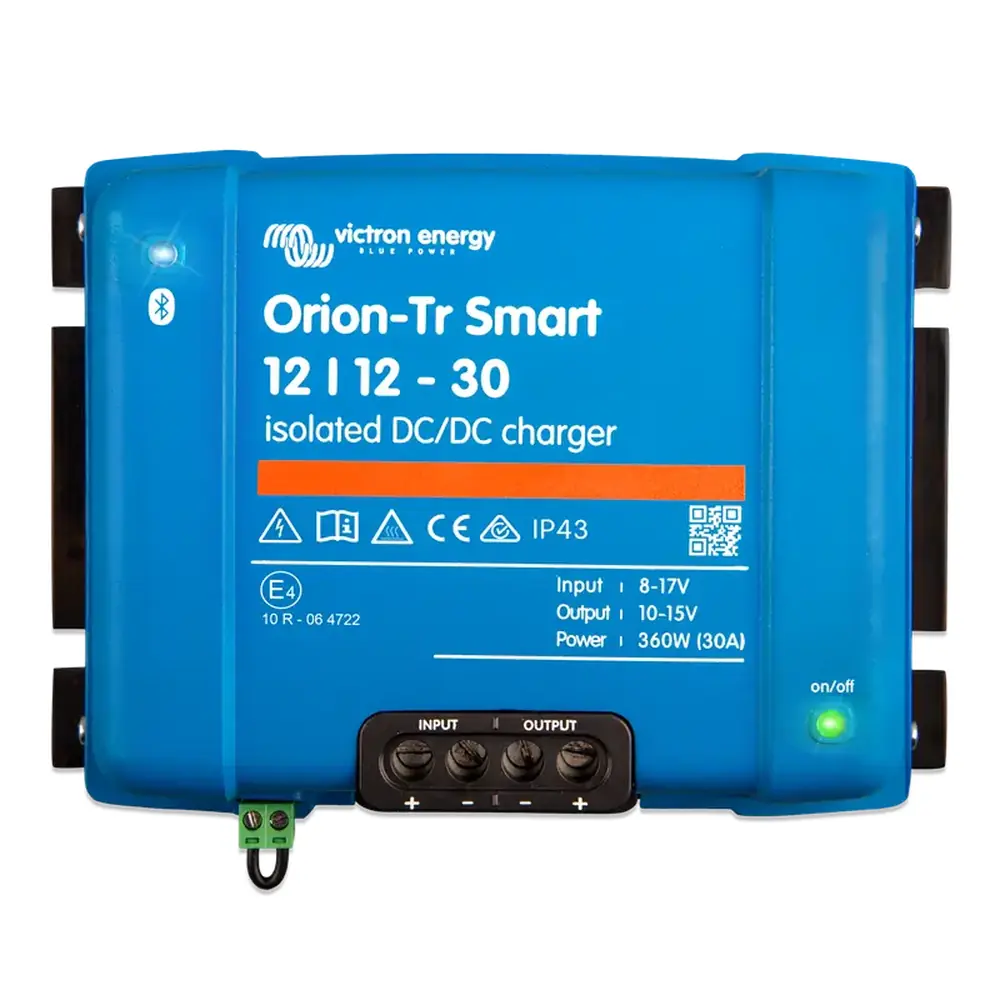
Victron Orion 12 12-30 Charge Controller Wiring Diagram
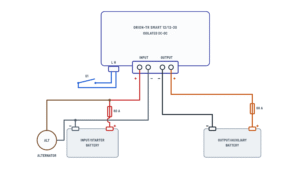
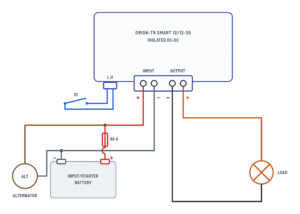
Orion-Tr Smart hookup
As an auxiliary battery charger or as a DC-DC power supply.
Terminals and components · 7
- Input +
- Input −
- Output +
- Output −
- Remote
Connection order
- Disconnect the remote (remove the wire bridge or unplug the terminal block).
- Connect the input cables.
- Set the mode in VictronConnect before connecting the output.
- Connect the battery or load, then reconnect the remote.
Mounting
Vertical on a non-flammable surface, terminals facing down, with 10 cm (4 in) clearance.
Fuses and cables (12 V)
Length Min. cross-section 0,5 m 6 mm² 1 - 2 m 10 mm² 5 - 10 m 16 mm² Fuse 60 A Caution
Connect the cables to the Orion first, check polarity again and only then connect the battery. A unit damaged by reverse polarity cannot be repaired.
Isolation
Input and output are galvanically isolated: the negatives don't have to be joined.
Charger mode
Set the correct charge algorithm in VictronConnect before connecting the battery.
Fuses and cables (12 V)
Length Min. cross-section 0,5 m 6 mm² 1 - 2 m 10 mm² 5 - 10 m 16 mm² Fuse 60 A Power supply mode
Set the output voltage in VictronConnect before connecting in parallel or connecting a battery.
More options
The “Remote on/off” tab shows the other wiring options.
Remote on/off and engine signal
The four ways to wire the L-H connector, plus the engine running signal.
Terminals and components · 2
- L · H
- Control
It is on when
- L and H are joined (loop or switch).
- H is pulled to the input battery positive (over 3 V).
- L is pulled to negative or ground (under 5 V).
- An external device enables it through the isolated remote cable.
Reference
The remote is referenced to the input battery; input and output are isolated.
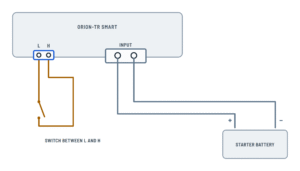
Option a)
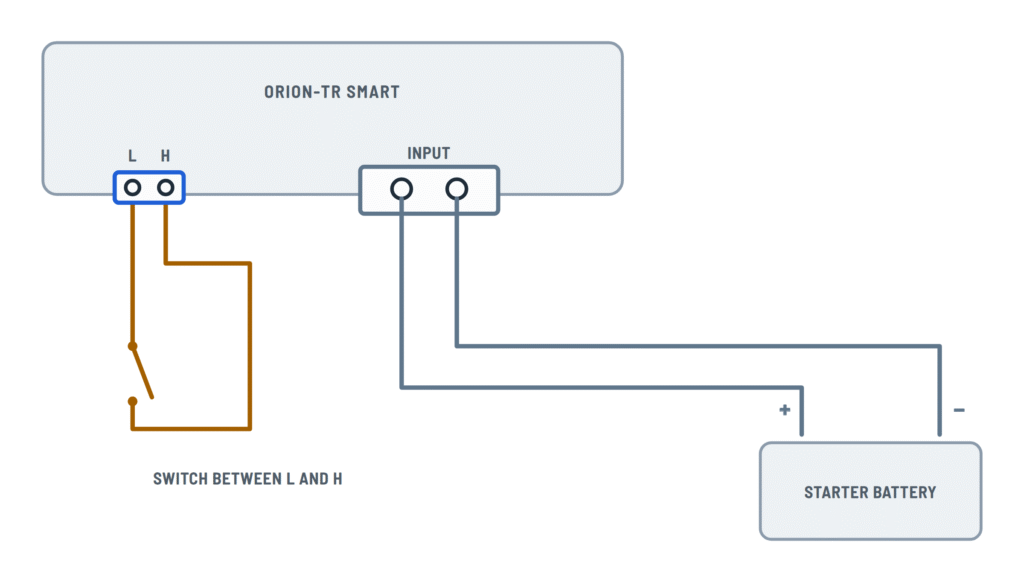
The simplest: a switch or relay contact between L and H, with no connection to the batteries (on-level impedance under 500 kΩ).
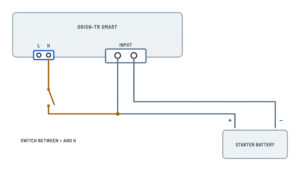
Option b)
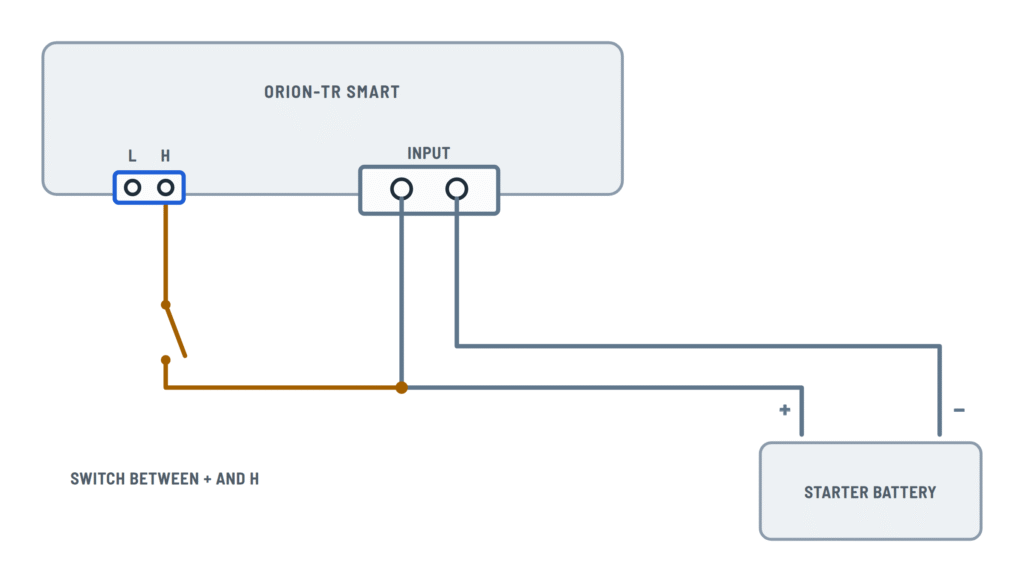
A switch between the input battery positive and H. Useful when a switched positive exists, such as a BMS charge (ATC) contact.
Option c)
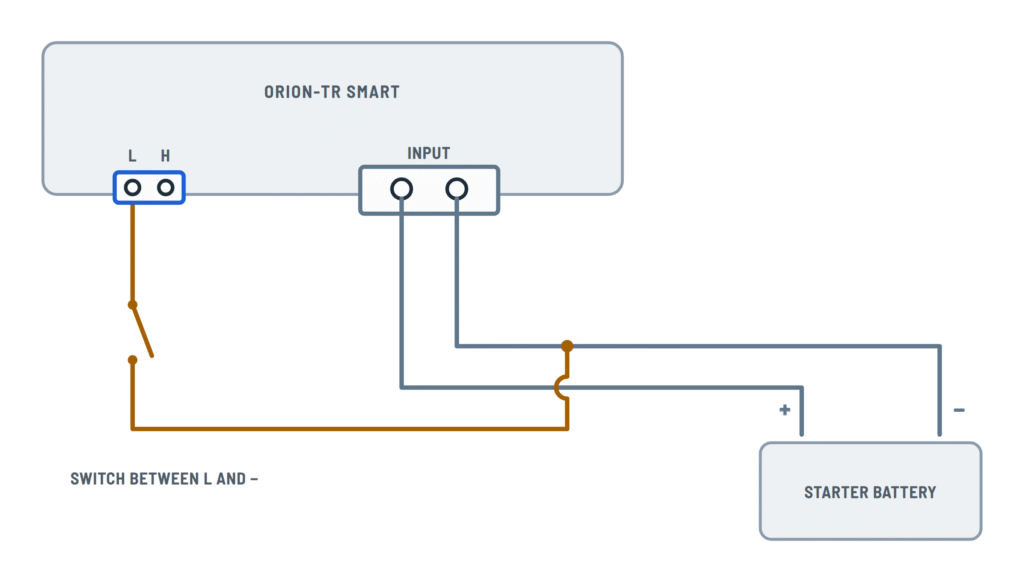
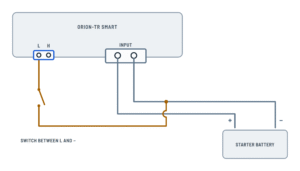
A switch between L and the input negative or chassis. Useful with a signal switched to ground.
Caution
Cannot be combined with an engine running signal: both use the L-pin and it would cause a short circuit.
Option d)
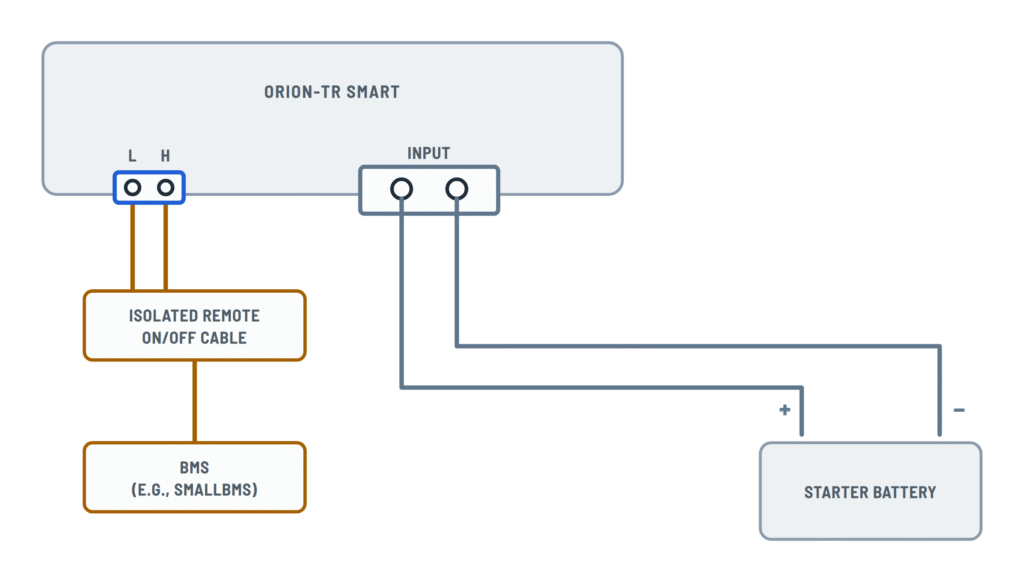
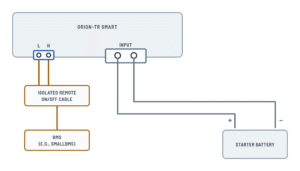
An isolated remote on/off cable, controlled e.g. by a BMS (smallBMS), enables charging.
Engine running signal
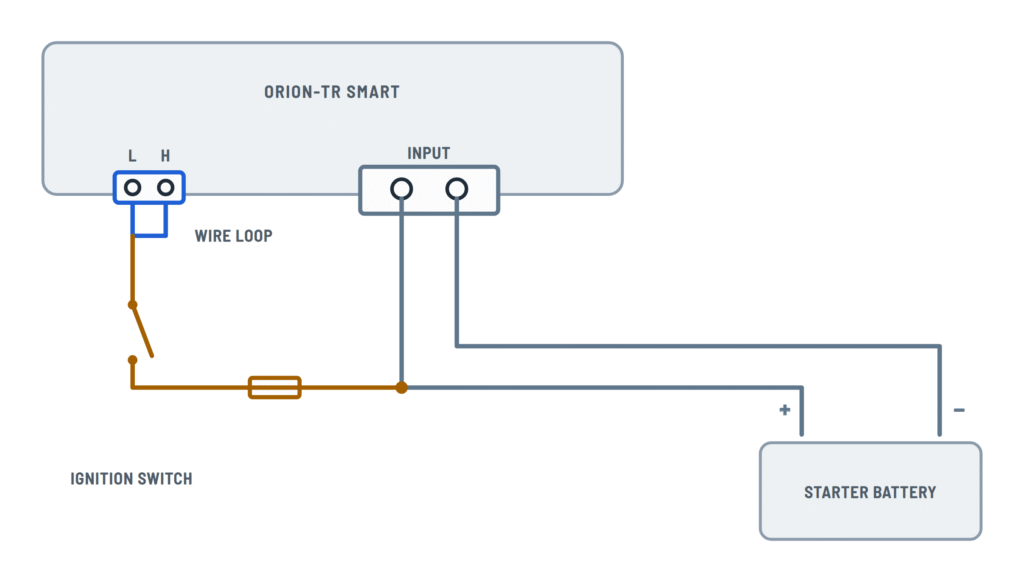
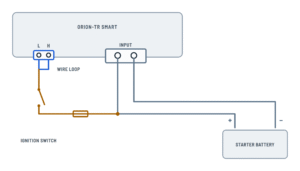
With the L-H loop (or option a, b or d) in place, over 7 V on the L-pin from the ignition switch activates the charger even if engine shutdown was detected.
Ground-switched signal
If the vehicle signal is pulled to ground while running, use a relay: coil between the fused + and that signal, NO contact between the fused + and the L-pin.
Caution
The signal must come from the input battery side; one referenced to the auxiliary battery has no effect.
About This Diagram
These diagrams are redrawn from pages 5 and 7–9 of the Victron Orion 12 12-30 Charge Controller manual, and we offer them completely free and in English. We have also categorized it in the Solar Panels & Charge Controllers (Solar & Batteries) section on Diagramverse, and it has been rated by 1 user with an average rating of 5.0. If you have any specific questions about the Victron Orion 12 12-30 Charge Controller Wiring Diagram, we suggest checking the Frequently Asked Questions (FAQs) section.
Printable Victron Orion 12 12-30 Wiring Diagrams
Wiring Instructions
Before you start
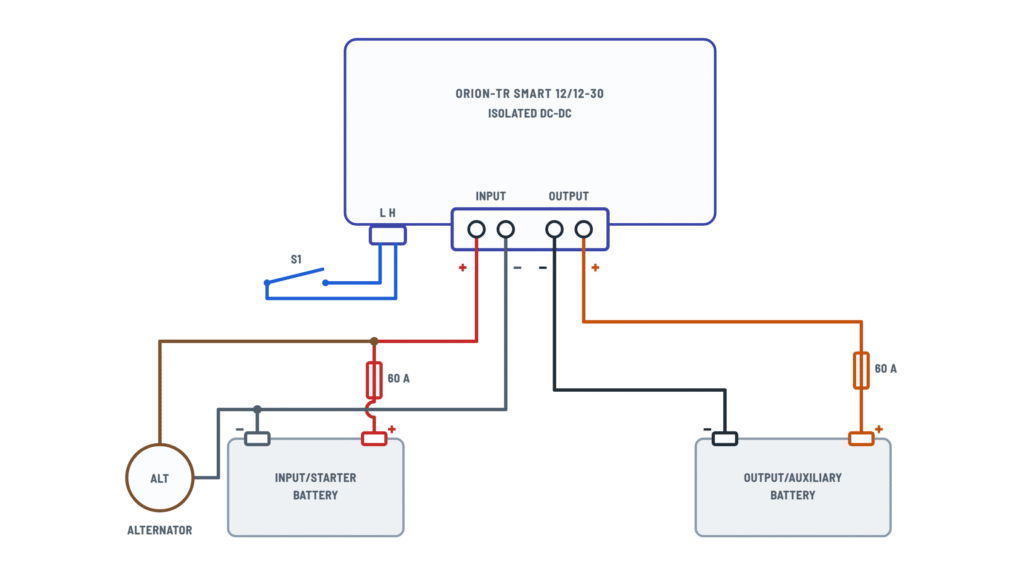
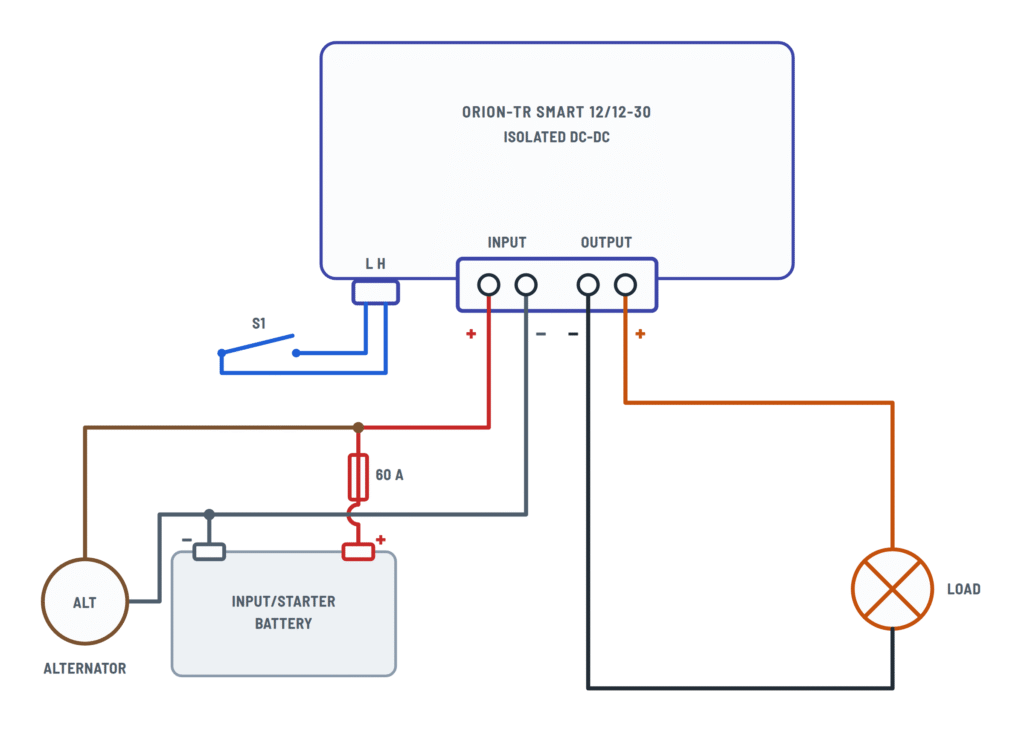
First pick the Victron Orion 12 12-30 diagram variant that fits your job. Choose Charger if the Orion-Tr will charge an auxiliary (house) battery from the starter battery. Choose DC-DC power supply if it will feed a load at a fixed voltage. For the Remote on/off tab, pick the option that matches what turns the unit on in your system:
- a) L-H: a plain switch or relay contact.
- b) H: a switched positive.
- c) L: a switched negative or chassis signal.
- d) Isolated: a BMS charge contact.
- Ignition: an engine-running signal on L.
Tools and materials:
- A torque screwdriver that can be set to 1.6 Nm.
- A multimeter.
- Good wire cutters and strippers.
- Two 60 A fuses (one for the input, one for the output in charger mode).
- Flexible, multi-stranded copper cable. Each strand must be no thicker than 0.4 mm (AWG26), and the cable must be rated for 90°C (194°F). Class 5 "Tri-rated" cable is a good choice.
Choose the cable size from the run length:
- Up to 0.5 m: 6mm².
- 1 m or 2 m: 10mm².
- 5 m or 10 m: 16mm².
The terminals accept 16mm² (AWG6) at most. Never use stiff cable with thick strands: the contact area is too small, the terminal overheats and can start a fire.
Mount the unit vertically on a non-flammable surface with the power terminals facing down. Leave at least 10 cm of clearance above and below it. Put it close to the batteries but never directly above one. Before touching any cable, turn the engine off and isolate both batteries. Work on a vehicle or boat electrical system may be subject to local rules or inspection. If you are not confident working near high-current batteries, hire a qualified installer.
Step-by-step wiring
- Remove the wire bridge between L and H, or unplug the remote terminal block. With the bridge in place the unit is always on.
- Prepare each cable end. Cut it straight with no loose or staggered strands, and strip it without nicking any fine wires.
- Fully open each terminal screw so no strands get trapped behind it. Then tighten to 1.6 Nm and hold that torque for at least 5 seconds so the screw settles. Never use less than the recommended torque.
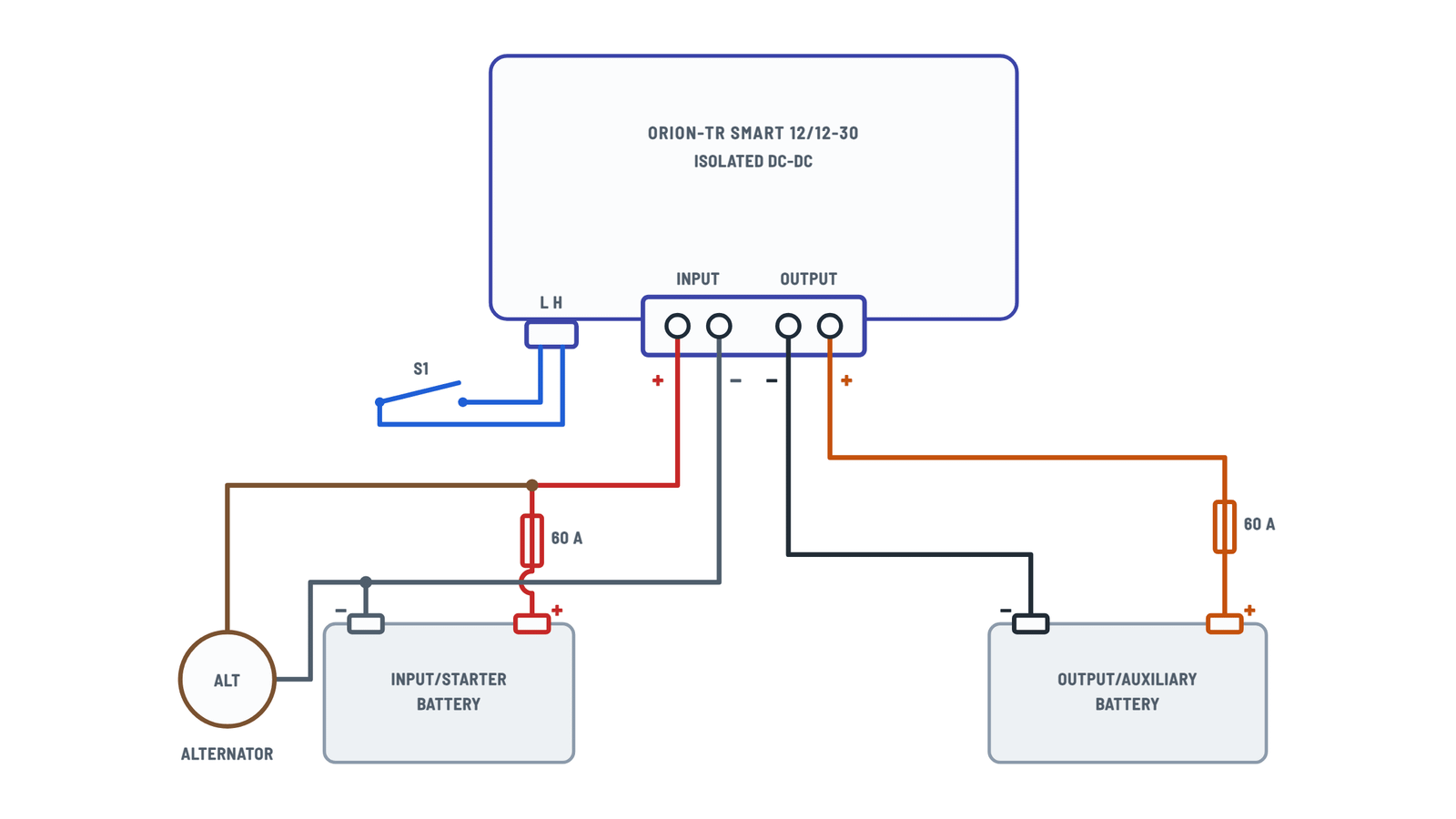
- Connect the INPUT + and INPUT − cables to the Orion-Tr first, leaving the battery ends free. Fit the 60 A fuse in the INPUT + cable close to the starter battery.
- Check polarity with your multimeter. Then connect INPUT − to the starter battery and alternator negative, and the fused INPUT + to the starter battery positive, which the Alternator charges. Don't trust cable colors: a red cable can still be on the wrong pole.
- Open VictronConnect over Bluetooth. Select Charger or Power supply mode, then either set the battery charge algorithm or set the output voltage. Do this before any battery or load is connected.
- Connect the OUTPUT + and OUTPUT − cables to the unit, again leaving the far ends free.
- In charger mode, fit the second 60 A fuse in OUTPUT + near the auxiliary battery.
- Size OUTPUT − the same as OUTPUT +.
- Check polarity again, then connect the auxiliary battery or the load. The input and output are galvanically isolated. Only bond the two negatives if your system design calls for it.
- Wire your remote control option on the L-H connector, or refit the bridge to activate the unit.
- Option c) cannot be combined with an engine-running signal on L.
- An engine-running signal must come from the starter battery side.
Testing and start-up
Once the input has power, the blue LED comes on. The green LED shows what the unit is doing:
- Blinking every 0.8 seconds: bulk or absorption charging.
- Steady on: float, or the output is active in power supply mode.
- Off: no input voltage, remote off, lock-out, or engine off detected.
Check these readings:
- Measure the voltage directly at the input terminals. It must be inside the 8-17 V input range.
- In charger mode, start the engine. With the default Smart Alternator settings, charging starts immediately above 14V. At 13.3V it starts after a 120 s delay. If the input stays below 13.1V for one minute, the unit decides the engine is off.
- In VictronConnect, confirm the charge state and read the input and output voltages.
- During full-current bulk charging, compare the output voltage at the Orion-Tr with the voltage at the battery posts. A large difference means cable or connection losses.
At full output the 12/12-30 draws about 35 A from the input, so your input cabling and alternator must handle that.
Safety notes
- The Orion-Tr has no reverse polarity protection. A reversed battery destroys it permanently, the damage is not covered by warranty, and there is no internal fuse you can replace.
- A 12 V battery can deliver enough current to weld tools and ignite cables. Keep metal tools and jewelry clear of the battery terminals.
- Batteries on charge can release explosive gas, so avoid sparks near them.
- The unit runs hot. Don't cover it, keep heat-sensitive materials away, and ventilate any enclosure.
- Full output is available up to 40°C ambient. Above that it derates 3% per °C, and it operates up to 55°C.
- A noticeable smell at high power is normal for the potted unit.
- Never install it in a wet location or anywhere gas or dust could explode.
Troubleshooting
| Symptom | Probable Cause | What to Check |
|---|---|---|
| No LEDs at all and the app can't find the unit | No input voltage: blown input fuse, loose cable, or bad crimp | Measure the voltage at INPUT + and INPUT − on the unit. It should read the starter battery voltage. If it reads 0 V, check the 60 A input fuse and the lugs, and pull-test each connection. |
| Correct voltage at the input terminals but the unit stays dead | Reverse polarity on the input, which permanently damages the unit | Confirm with a meter that INPUT + goes to battery positive, ignoring cable colors. If it was reversed, the unit cannot be repaired and must be replaced. |
| Green LED off, app shows "Remote input inactive" | Bridge removed, remote plug not fully seated, or the control device is open | Push the L-H plug fully home and check the bridge or switch for continuity. As a test, place a wire link from L to H. If the unit starts, the fault is in your switch, relay or BMS wiring. |
| A switched positive on H or an ignition signal on L does nothing | The signal comes from the auxiliary battery side, but the remote circuit is referenced to the input battery | Take the signal from the starter battery side. Check for more than 3 V on H, or more than 7 V on L for an engine-running signal, measured against INPUT −. |
| Fuse blows or wiring overheats when the ignition signal is connected | The engine-running signal was combined with option c), which switches L to ground | Never combine option c) with a signal on L. Rewire the remote as option a), b) or d), and feed the engine signal to L alone. |
| Engine is running but the app shows "Engine shutdown detected" and nothing charges | Smart alternator voltage too low for the start setting, or wrong alternator type selected | Read the input voltage in the app with the engine running. Default start voltage is 14V and default shutdown is 13.1V. Select the correct alternator type, or use an external engine running signal. |
| Charging switches on and off repeatedly while driving | Input voltage sags under load: undersized or long input cable, or an alternator that can't supply about 35 A | Compare the input voltage with charging on and off. Check the cable size against its length (16mm² for 5 m). Retest at higher engine speed. |
| "Input voltage lock-out" appears even though the battery seems fine | Voltage drop in the input cable at full current trips the lock-out (default 12.5V in charger mode) | Measure the voltage at the unit's input terminals during charging. Tighten the connections and check the fuse holder. Set the lock-out no higher than the shutdown voltage minus the cable drop. |
| Auxiliary battery never reaches full charge | Voltage drop in the output cables or fuse, or charge voltages set too low | During full-current bulk charging, compare the voltage at OUTPUT + and OUTPUT − with the voltage at the battery posts. Fix loose lugs or undersized cable, and check the absorption and float settings. |
| Terminals hot or discolored, error 26 | Stiff thick-strand cable, terminal screws under-torqued, or stray strands caught in the terminal | Use fine-strand cable with strands of 0.4 mm or less. Re-terminate the cable and torque it to 1.6 Nm, holding the torque for 5 seconds. |
| Error 27 right after connecting the output | The battery is connected through a contactor, or the unit started into a large inverter capacitance with no battery | Connect the battery before the inverter. If the error doesn't clear, disconnect all power, wait 3 minutes, and power up again. |