Aprilaire 700 Humidifier Wiring Diagram
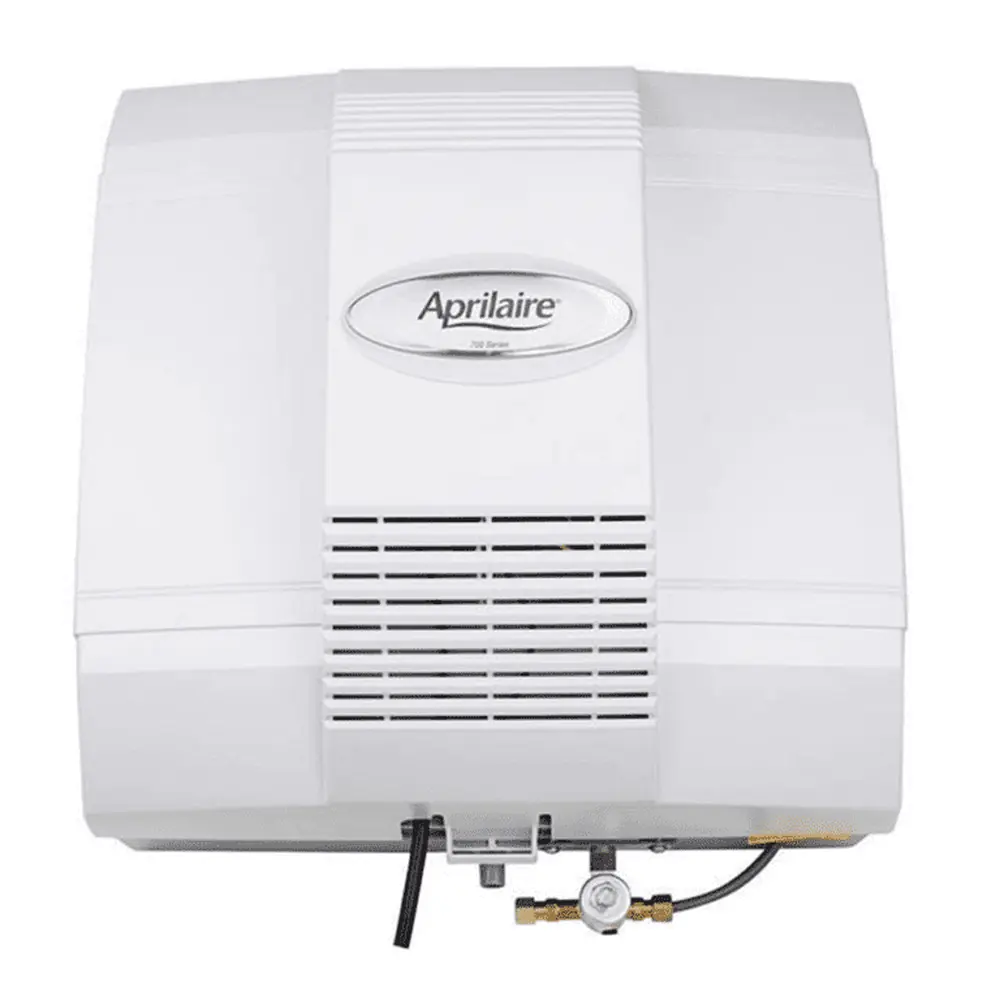
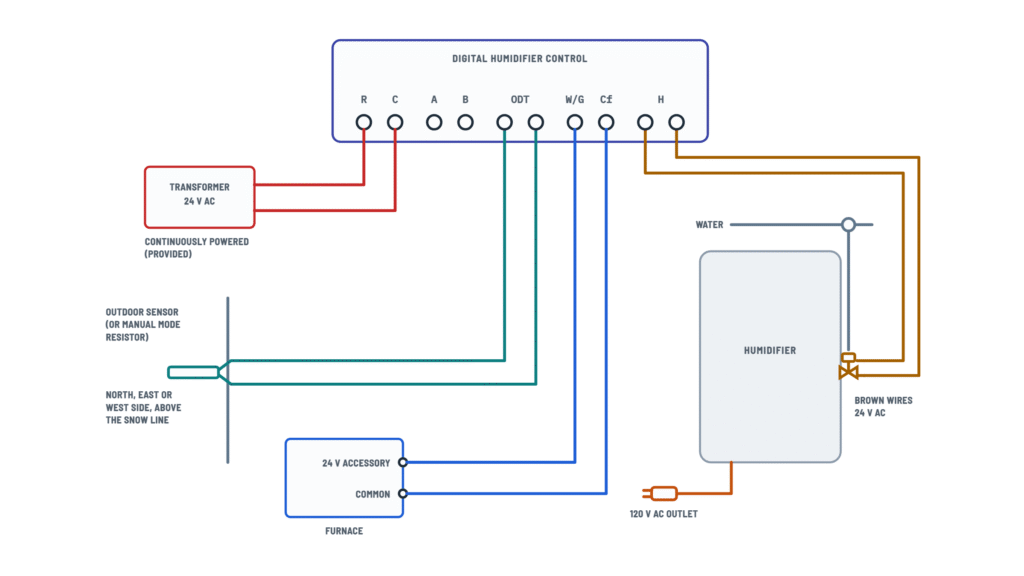
Aprilaire 700 wiring
Choose the control type; tap any terminal or component to see how it connects.
Terminals and components · 6
- 24 V AC
- Control
- Outdoor sensor
- Furnace signal
- Humidifier
- Model 50
- 120 V AC
Terminals
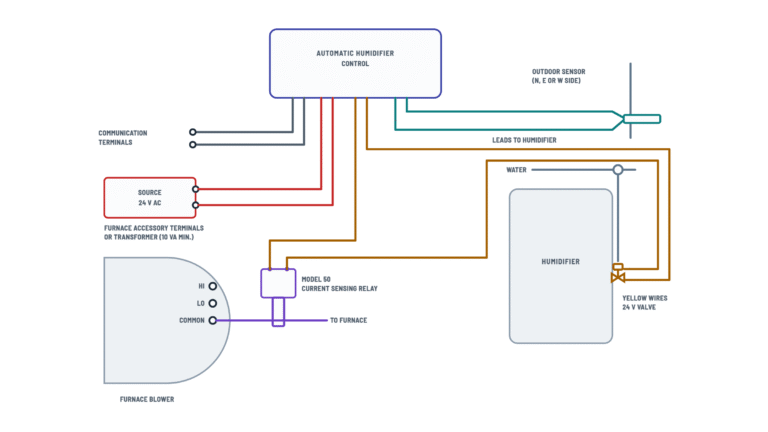
Terminal Goes to R · C Humidifier 24 V transformer ODT Outdoor sensor (or manual mode resistor) W/G · Cf Furnace 24 V accessory terminal and common H · H The brown wires Other options
The control instructions include other wiring options.
Caution
Do not wire the transformer primary into the furnace blower circuit.
Location
On the north, east or west side of the home, above the expected snow line.
Manual mode
Without an outdoor sensor, install the manual mode resistor on ODT.
Furnace terminals
They may be labeled “HUM”, “ACC” or “EAC”. Check the furnace manufacturer for voltage and operation.
Caution
If the accessory terminal is 120 V, install a 24 V transformer.
How to connect it
Connect each H terminal to one of the two brown wires.
Caution
Do not use an external 24 V or 120 V source on these wires: it can damage the humidifier.
Setting
The dial shows the recommended humidity for the outdoor temperature.
Caution
Power the transformer from a 120 V AC circuit other than the blower motor circuit; it can be fed from the hot 120 V line before it enters the furnace.
Without Model 50
Some furnaces have accessory terminals that are powered only while the blower runs; then the Model 50 may not be needed. Check with the furnace manufacturer.
How to connect it
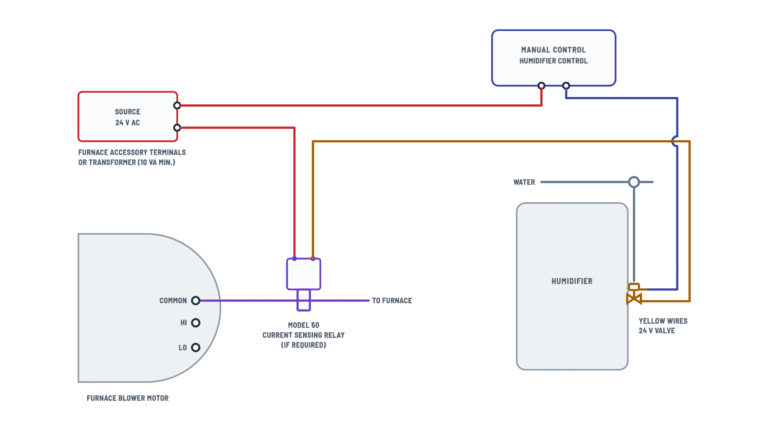
Connect one of the brown wires to the second control terminal and the other to the Model 50 (or straight to the source if not used).
Caution
Do not use an external 24 V or 120 V source on these wires: it can damage the humidifier.
How to connect it
- Run the blower motor common wire through the Model 50 sensor.
- Connect its two leads in the 24 V loop, between the source and the humidifier.
Caution
Install it only in the 24 V humidifier control circuit, never in the transformer primary circuit.
Caution
Do not connect the power cord to multi-speed blower motors or motors other than 120 V AC.
About This Diagram
This diagram is redrawn from page 1 of the Aprilaire 700 Humidifier manual, and we offer it completely free and in English. We have also categorized it in the Humidifiers (HVAC & Water Heating) section on Diagramverse, and it has been rated by 1 user with an average rating of 5.0. If you have any specific questions about the Aprilaire 700 Humidifier Wiring Diagram, we suggest checking the Frequently Asked Questions (FAQs) section.
Printable Aprilaire 700 Wiring Diagrams


Wiring Instructions
Before you start
First, work out which variant you have. The Aprilaire 700 · Digital tab is for the Model 700, which comes with a Digital humidifier control that mounts on the return duct and connects to an outdoor temperature sensor. The 700M · Manual tab is for the Model 700M, which uses a Manual humidifier control mounted on the return duct or on an interior wall. The two controls wire differently, so follow only the drawing that matches the control in your box.
Tools and materials:
- Screwdrivers, wire strippers, a multimeter that reads AC volts, and a drill with a 3/4 in bit (the Digital control's sensor needs this hole)
- Low-voltage control wire, which is not included. Standard 18 AWG thermostat cable is the usual choice. Use enough conductors for each run.
- The supplied 24 V transformer and a Model 50 current sensing relay if your furnace needs one
- A 120 V AC outlet for the humidifier power cord
Shut off power to the furnace at its switch or breaker and confirm it is dead with your meter. Turn the humidifier control to OFF. This humidifier should be installed by a qualified heating and air conditioning contractor. Installation must also meet local, state and federal codes. If a new 120 V outlet or circuit is needed, have a licensed electrician add it, and check whether your area requires a permit.
Step-by-step wiring
Model 700 (Digital):
- Mount the Digital humidifier control on the return duct so the RH sensor sits in the 3/4 in hole, with the gasket around the sensor cage.
- Run the 24 V transformer's secondary to R and C. The control must have power all the time, so feed the transformer primary from a constant 120 V source. Never connect it to the furnace blower circuit. You can take it from the hot 120 V AC line before that line enters the furnace.
- Mount the Outdoor temperature sensor on the north, east or west side of the house, above the expected snow line. Run two wires to the ODT terminals. Polarity does not matter.
- Connect W/G to the furnace's 24 V accessory terminal (often labeled HUM, ACC or EAC) and Cf to the furnace common. If those accessory terminals put out 120 V instead of 24 V, add a 24 V transformer. Check the furnace manufacturer's data for the voltage at those terminals and when they are powered.
- Connect the two H terminals to the humidifier's two brown wires. Polarity does not matter. Leave A and B empty.
Model 700M (Manual):
- Mount the Manual humidifier control. If it goes on the return duct, keep the foam gasket. If it goes on a wall, throw the gasket away and pick a spot away from drafts and heat sources.
- Connect one side of the 24 V source to Terminal 1 of the control. The source can be the furnace accessory terminals or a transformer rated at least 10 VA.
- Connect Terminal 2 to one of the humidifier's brown wires.
- Run the other brown wire through the Model 50 relay contact and back to the other side of the 24 V source. This closes the loop. The Model 50's current sensor goes around the blower motor's common wire. Wire the Model 50 only into the 24 V control loop, never into the transformer primary. If you use a transformer, it must not be fed from the blower circuit.
- If your furnace accessory terminals already switch 24 V with the blower, you may not need the Model 50. In that case the second brown wire goes straight back to the source.
Both models: Plug the humidifier fan's power cord into a 120 V AC outlet on a circuit other than the furnace motor circuit. Never connect the cord to a multi-speed blower motor or to a blower that doesn't run on 120 V AC.
Testing and start-up
- Open the saddle valve all the way, restore furnace power and plug in the humidifier.
- Check for about 24 V AC between R and C on the Digital control. It should be there whether or not the furnace is running. With the furnace running, check for about 24 V AC between W/G and Cf.
- Start a heat or fan call at the thermostat. On the Model 700, turn the knob to Test/Reset. You should hear the solenoid click and see the green Humidifier On light. The humidifier runs for only one minute in this mode. On the Model 700M, turn the knob to its highest setting.
- Let the unit run until water flows from the drain. Confirm the fan runs and every connection is tight and dry.
- Set the control to the right humidity level. On the Digital control, a dial setting of 5 is a good starting point. Don't leave the knob on Test/Reset.
Safety notes
- The humidifier fan runs on 120 V AC. Always unplug the cord and shut off the furnace before you open the cover or touch any wiring.
- Keep the 24 V wiring separate from 120 V conductors. Never connect the transformer secondary or the Model 50 contact to line voltage.
- If you tap a hot water line, shut off the hot water first. Water above 125°F can scald instantly.
- Route all wiring away from sheet metal edges and the hot surfaces of the furnace.
Troubleshooting
| Symptom | Probable Cause | What to Check |
|---|---|---|
| Control display is blank or keeps resetting | Transformer wired into the furnace blower circuit, or a loose R or C wire | Measure between R and C. You should read about 24 V AC all the time, not only while the blower runs. Move the transformer primary to a constant 120 V source. |
| Humidifier never runs, even on Test/Reset | No furnace signal at W/G and Cf | With the furnace running, measure between W/G and Cf. You should read about 24 V AC. If not, confirm W/G is on the HUM, ACC or EAC terminal and Cf is on furnace common. |
| Fan spins but no water reaches the panel | Brown wires not connected to H and H, or a loose spade connection | Recheck both brown wires on the H terminals. During Test/Reset, measure for about 24 V AC across them and listen for the solenoid click. Also make sure the saddle valve is fully open. |
| Water flows but the fan doesn't turn | Power cord not plugged in, or the outlet is dead | Check for 120 V AC at the outlet. Make sure it isn't on the furnace motor circuit or behind a switch that is turned off. |
| Accessory terminal reads 120 V, or the control burned out | Furnace accessory terminals put out line voltage, not 24 V | Measure the accessory terminals. If they read 120 V, don't connect W/G or the manual loop directly. Add a 24 V transformer as shown. |
| Model 700M runs when the blower is off, or never runs | Model 50 sensing the wrong wire, or installed in the transformer primary | Check that the blower common wire passes through the Model 50 sensor and that its contact is wired in series in the 24 V loop only. |
| Manual control loop has no voltage | 24 V source too small or not wired to Terminal 1 | Measure for 24 V AC at Terminal 1. If you use a separate transformer, make sure it is rated at least 10 VA. |
| Red Service Required light flashes with an E code | Wiring or sensor fault the control has detected | Write down the code (E1 to E4). Power down and check the ODT wiring and all terminal screws. If the code comes back, call your contractor or Aprilaire Technical Support. |
| Windows fog up in cold weather on the Model 700 | Outdoor temperature sensor disconnected or badly placed | Check both ODT wires. Make sure the sensor is on a north, east or west wall, out of the sun and above the snow line. |
| Humidifier won't shut off | H terminals shorted, or the furnace signal is miswired | Turn the dial to OFF. If the unit keeps running, power down and look for a short between the brown wires or a bare wire touching another terminal. |