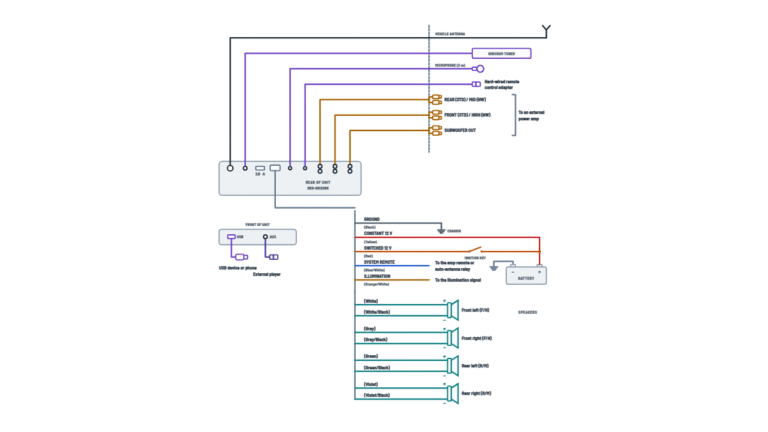
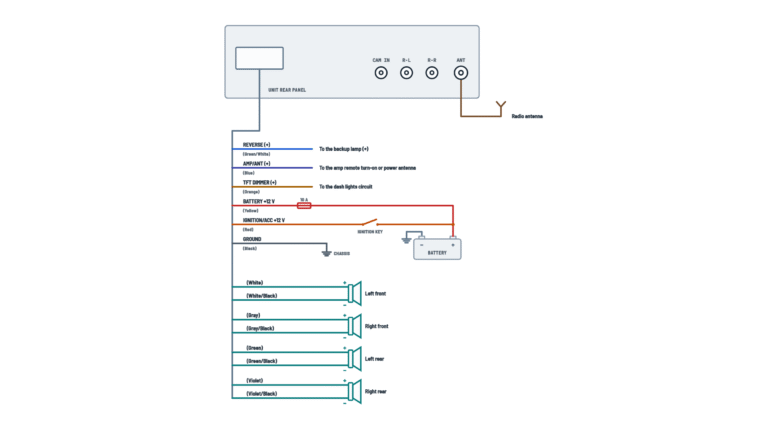
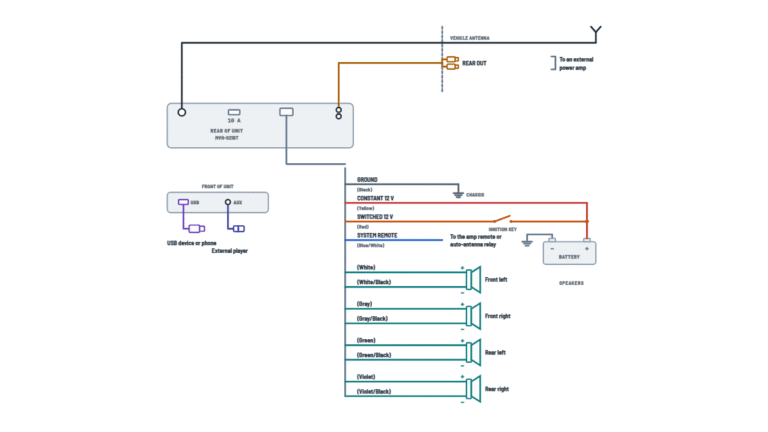
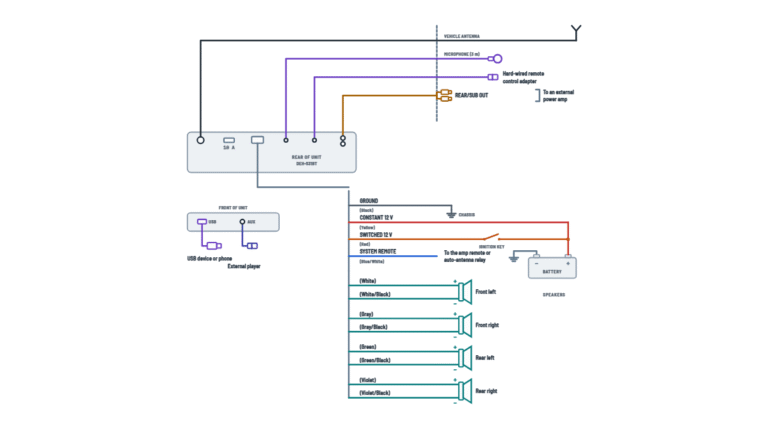
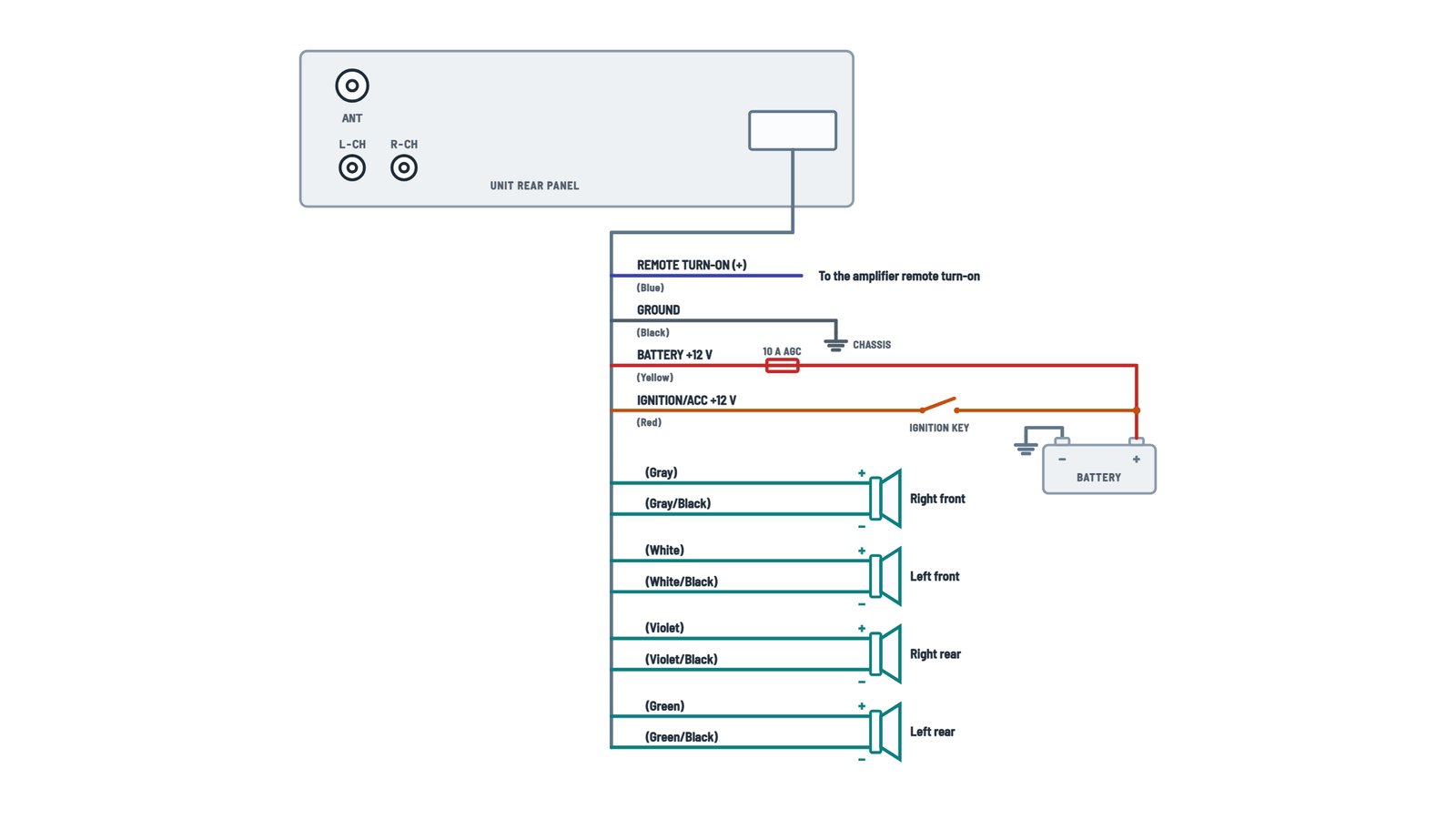
Dual XDM17BT Audio Receiver Wiring Diagram
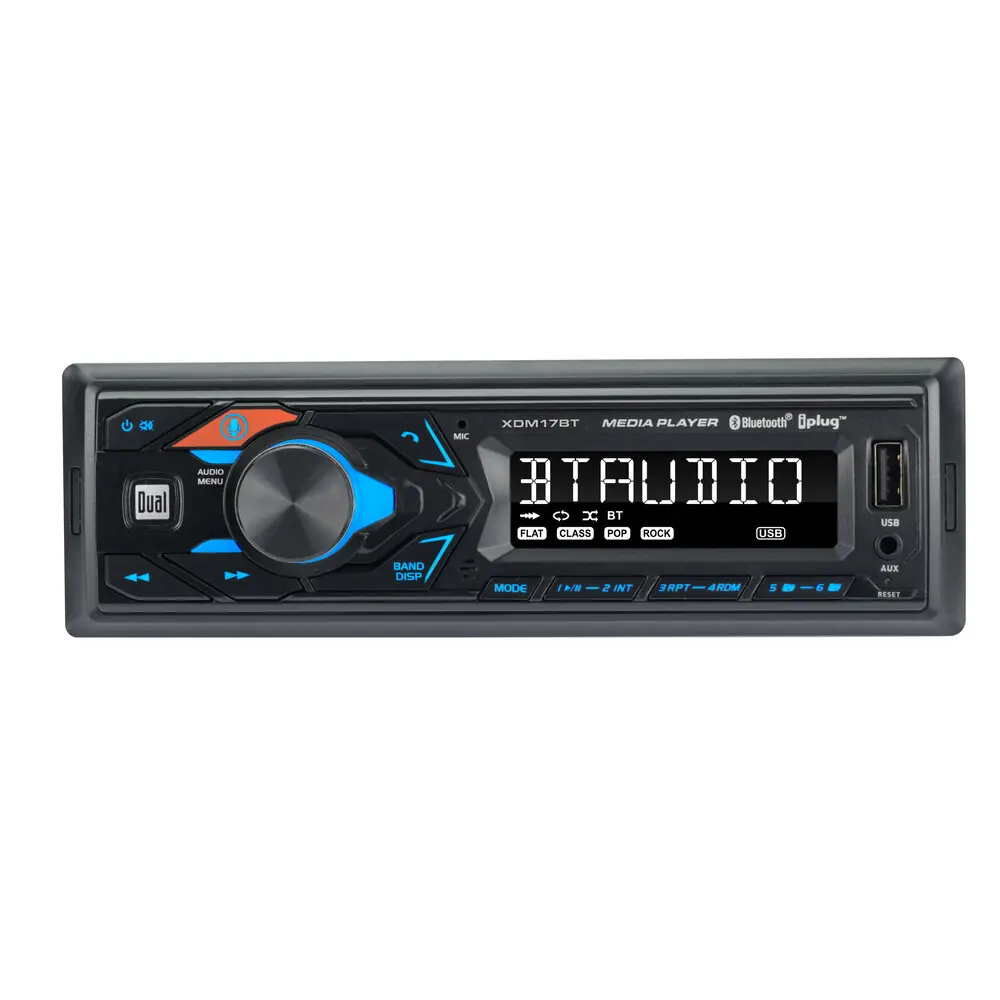
Unit connections
Power, remote turn-on, speakers, line output and antenna.
Terminals and components · 10
- Battery
- ACC
- Ground
- Remote turn-on
- Speakers
- Line output
Fuse
The unit uses one 10 A AGC fuse. The drawing shows it on the yellow wire and the sheet's note places it beside the heat sink: look in both places and replace it only with the same type.
If the unit won't turn on
Check that this wire has 11 to 16 V and that the fuse is not blown.
Caution
Tape any unused wires and keep the speaker wires away from the chassis.
Impedance
4 to 8 Ω speakers.
Caution
Tape any unused wires and keep the speaker wires away from the chassis.
Impedance
4 to 8 Ω speakers.
Caution
Tape any unused wires and keep the speaker wires away from the chassis.
Impedance
4 to 8 Ω speakers.
Caution
Tape any unused wires and keep the speaker wires away from the chassis.
Impedance
4 to 8 Ω speakers.
With an amplifier
Also connect the blue remote turn-on wire to the amplifier's REM terminal.
About This Diagram
This diagram is redrawn from page 3 of the Dual XDM17BT Audio Receiver manual, and we offer it completely free and in English. We have also categorized it in the Car Audio & Stereo (Automotive) section on Diagramverse, and it has been rated by 1 user with an average rating of 5.0. If you have any specific questions about the Dual XDM17BT Audio Receiver Wiring Diagram, we suggest checking the Frequently Asked Questions (FAQs) section.
Printable Dual XDM17BT Wiring Diagrams
Wiring Instructions
Before you start
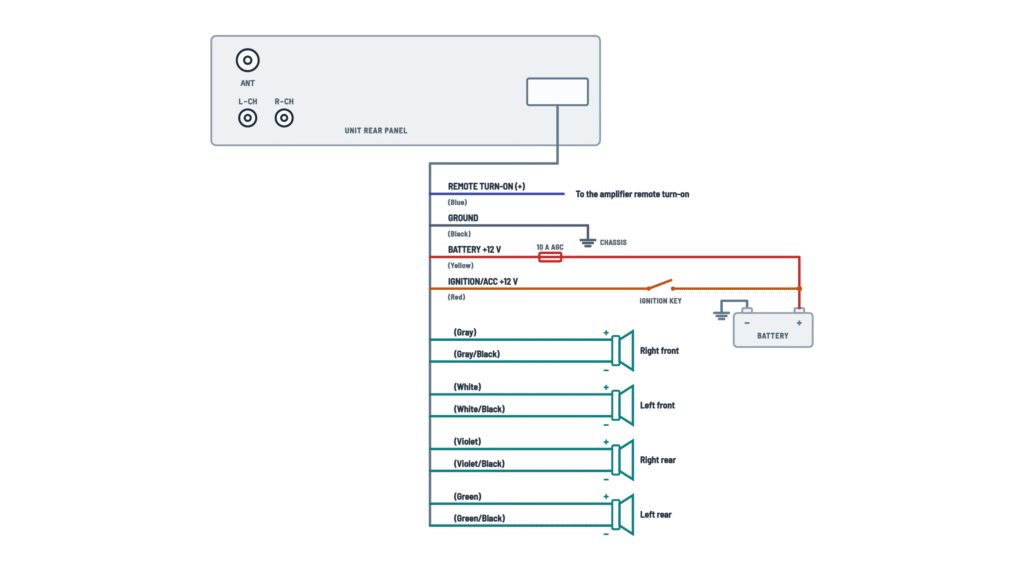
The Dual XDM17BT is a 12 V DC car receiver with a fixed face. It runs on a 12 V negative-ground system, and you will find all of its connections on one wiring layout. You will use some or all of the harness wires, depending on your system. If you power your speakers directly from the head unit, connect the four speaker pairs and leave the blue REM wire and the L-CH and R-CH jacks unused. If you add an external amplifier, also connect the REM wire and the RCA line outputs.
Gather these tools and materials:
- A wire stripper, a crimp tool, and insulated butt connectors or a vehicle-specific harness adapter
- Electrical tape or heat-shrink tubing
- A digital multimeter
- A wrench for the battery terminal
- A spare 10 A AGC fuse
- Your vehicle's dash kit, if you need one
The harness wires come pre-sized, so match them with wire of equal or heavier gauge if you extend any run. The ground and power leads matter most. As general good practice, keep power and ground extensions short, and use the same gauge or one size thicker.
Mount the unit away from direct sunlight, heat, dust, dirt and heavy vibration. Make sure your speakers are rated 4 to 8 Ω. No permit is normally needed for a head unit swap. If your vehicle has a factory amplifier, a data-bus (CAN) radio harness, airbag wiring behind the dash, or steering-wheel controls you want to keep, hire a qualified car audio installer.
Disconnect the negative battery terminal before you touch any wiring, and keep it disconnected until every connection is made and insulated.
Step-by-step wiring
- Remove the old radio and identify the vehicle's wires. Use a wiring adapter or the vehicle's service information. If you are unsure which wire is constant and which is switched, reconnect the battery briefly and check with the multimeter. Then disconnect the battery again before you go on.
- Connect the black Ground wire first. Run it to a clean, bare-metal point on the vehicle chassis. Scrape off paint or rust, and secure the wire with a ring terminal and a screw or bolt. Don't use plastic dash parts or painted brackets.
- Connect the yellow Memory (constant +12 V) wire to the vehicle wire that has +12 V at all times, even with the key off. This wire keeps your clock, presets and settings.
- Connect the red Ignition (switched +12 V) wire to the vehicle wire that has +12 V only when the key is in ACC or ON. If you swap red and yellow, the unit may drain the battery or lose its memory.
- Connect the four speaker pairs. Observe polarity on every pair: the solid-color wire goes to the speaker's + terminal and the black-striped wire goes to its − terminal.
- FR: gray and gray/black
- FL: white and white/black
- RR: violet and violet/black
- RL: green and green/black
Never connect any speaker wire to chassis ground, and never join speaker negatives together.
- If you use an external amplifier, connect the blue Remote turn-on REM wire to the amplifier's REM terminal. Then plug RCA cables into the L-CH and R-CH line outputs and run them to the amplifier's input. Route the RCA cables away from power wires to reduce noise. If you don't use an amplifier, tape off the end of the blue wire on its own.
- Plug the vehicle's antenna cable into the ANT jack. You may need an antenna adapter for some vehicles.
- Insulate every splice, and tape the end of each unused wire individually. Check that no bare copper is showing.
- Check that the 10 A AGC fuse is seated in its holder beside the heat sink. Then dress the harness so no wire can be pinched when you slide the unit into the dash.
Testing and start-up
Leave the unit hanging out of the dash for testing. Reconnect the negative battery terminal, and set the multimeter to DC volts.
- With the key off, measure between the yellow wire's connection and chassis ground. You should read 11 to 16 VDC.
- With the key in ACC, the red wire should also read 11 to 16 VDC.
- With the key off, the red wire should read close to 0 V.
Turn the key to ACC and press Power. The display should light up. Tune an FM station to confirm the antenna works, then use balance and fader to check that each speaker plays from the correct position. If you installed an amplifier, confirm that its power LED comes on with the unit and goes off when you switch the unit off.
Set the clock. Then turn the key off and back on to confirm the unit kept the clock and your presets, which proves the yellow wire is correct. Pair your phone, which shows up as "Dual Media Player", and play a track over Bluetooth. Once everything works, mount the unit in the dash. Keep the removal keys in case you need to pull the unit out later.
Safety notes
- The voltage is low, but a car battery can deliver hundreds of amps into a short circuit. A bare yellow or red wire touching the chassis can melt insulation and start a fire. That is why you work with the negative terminal disconnected.
- Replace the fuse only with a 10 A AGC fuse. A larger fuse or a bypass removes the radio's protection and can damage it.
- If you take power directly from the battery, add a fuse holder close to the battery on that new wire.
- Don't run wires over sharp metal edges or through moving parts such as seat tracks or steering columns, and keep them clear of airbag components.
- Leave space around the heat sink for airflow.
Troubleshooting
| Symptom | Probable Cause | What to Check |
|---|---|---|
| The radio won't turn on at all | The yellow or red wire is not connected or has low voltage, the black ground is loose, or the fuse is blown | Measure yellow and red to chassis ground: you should see 11 to 16 VDC with the key in ACC. Check that the black wire is bolted to bare metal, and inspect the 10 A AGC fuse beside the heat sink. |
| It loses the clock and presets every time I turn off the car | The yellow Memory wire is connected to a switched source, or red and yellow are swapped | With the key off, yellow must still read 11 to 16 VDC. If it reads 0 V, move it to a constant +12 V feed. |
| The radio stays on with the key off, or my battery goes dead overnight | The red Ignition wire is connected to constant +12 V, or the red and yellow wires are tied together | With the key off, red should read close to 0 V. Connect it to a feed that is live only in ACC or ON. |
| The fuse blows as soon as I turn the radio on | A yellow or red wire is pinched against the chassis, a speaker wire is touching ground, or the wrong fuse is fitted | Pull the unit out and look for pinched or bare wires behind the dash. Check each speaker lead for continuity to chassis: there should be none. Fit only a 10 A AGC fuse. |
| The display works but there is no sound | Speaker wires are not connected, or bare speaker wires are touching each other or the chassis | Check every speaker pair at the unit and at the speaker. Insulate all bare ends separately, and make sure no speaker − wire goes to ground. |
| One speaker is silent, or the balance and fader controls don't match where the sound is coming from | A speaker pair is disconnected or connected to the wrong channel | Use balance and fader to isolate each speaker. Gray goes to the right front, white to the left front, violet to the right rear and green to the left rear. |
| Thin sound with very little bass | Reversed polarity on one or more speakers | Check that each solid-color wire goes to + and each black-striped wire goes to − at every speaker. |
| My external amplifier doesn't turn on | The blue REM wire is not connected, or the amplifier's power or ground is faulty | With the head unit on, measure about +12 V on the blue wire at the amplifier's REM terminal. Then check the amplifier's own fuse and ground. |
| Whining or buzzing noise through the amplifier that changes with engine speed | Poor ground at the head unit or amplifier, or the RCA cables run next to power wires | Move the black ground to clean bare metal, and reroute the L-CH and R-CH cables away from power wiring. |
| Poor or no radio reception | The antenna plug is not fully seated in the ANT jack, or a required antenna adapter is missing | Push the antenna plug fully into the ANT jack, and fit an adapter if your vehicle's connector is different. |