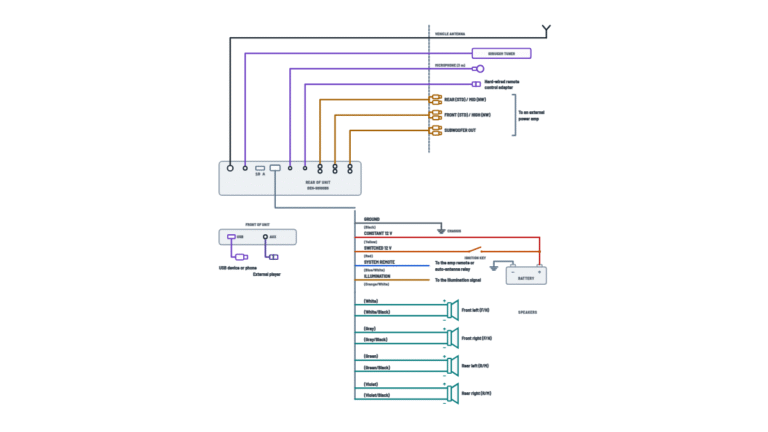
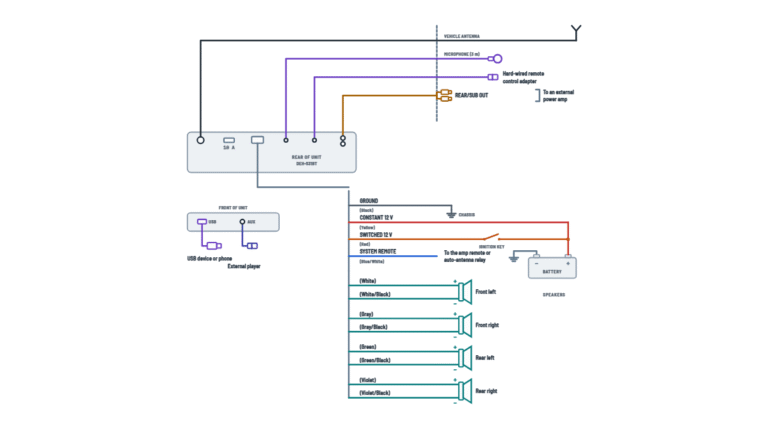
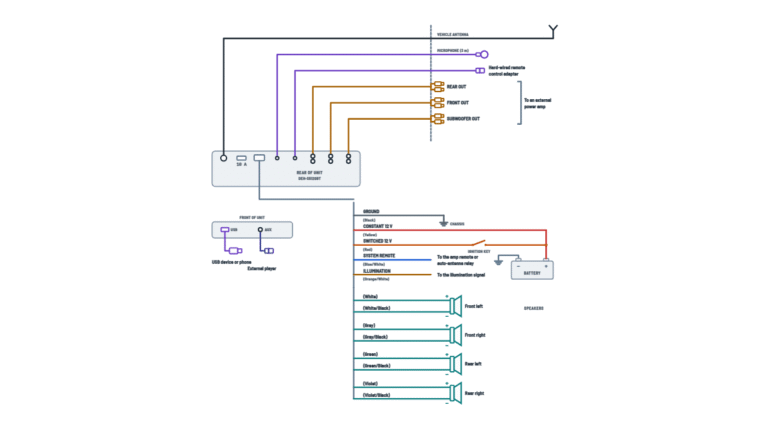
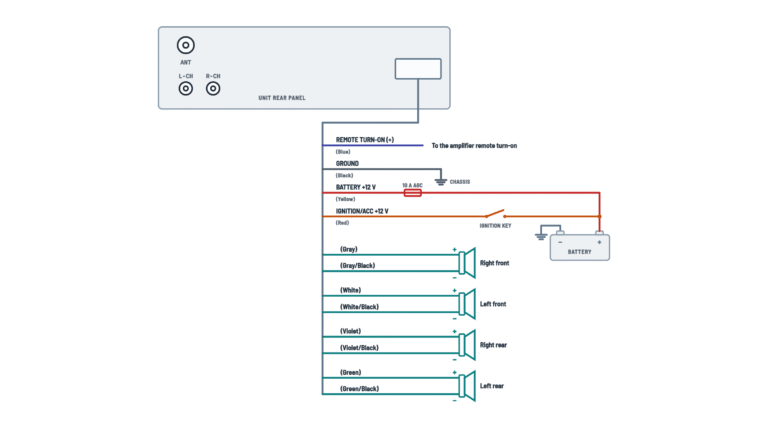
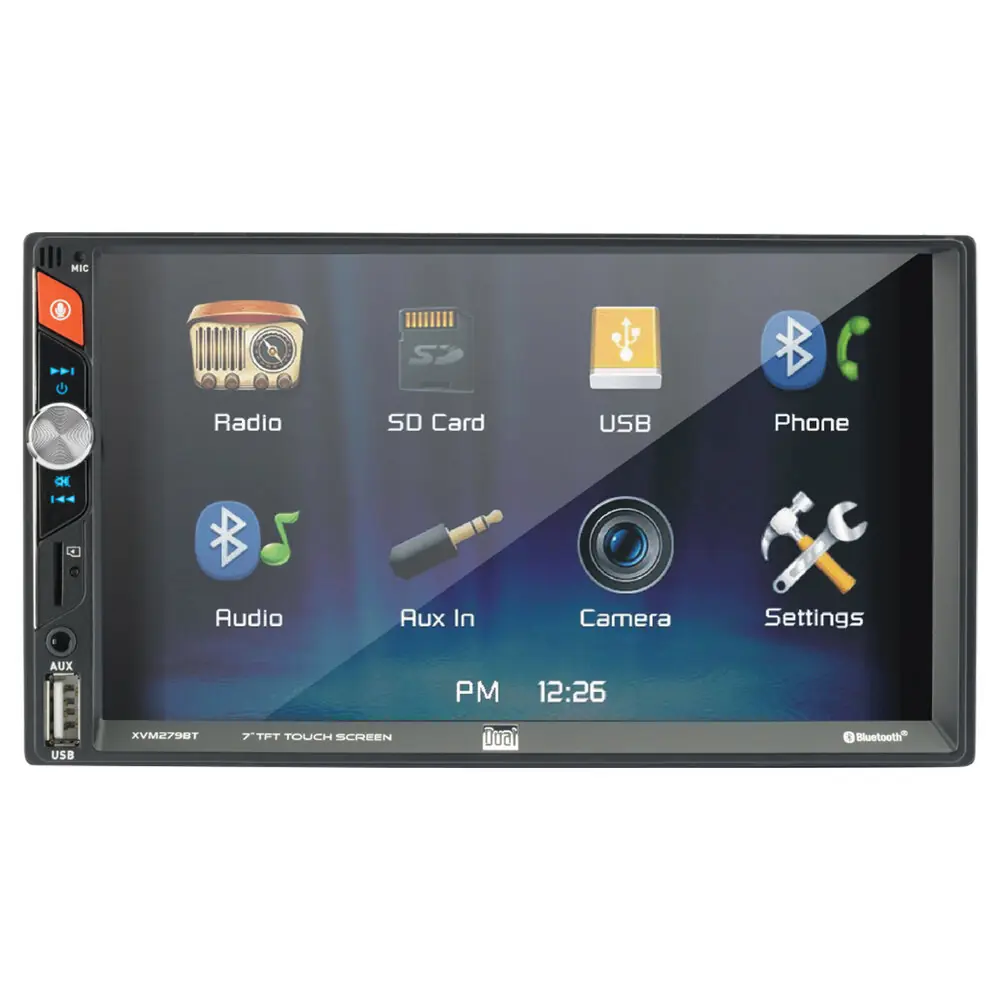
Dual XVM279BT Multimedia Receiver Wiring Diagram
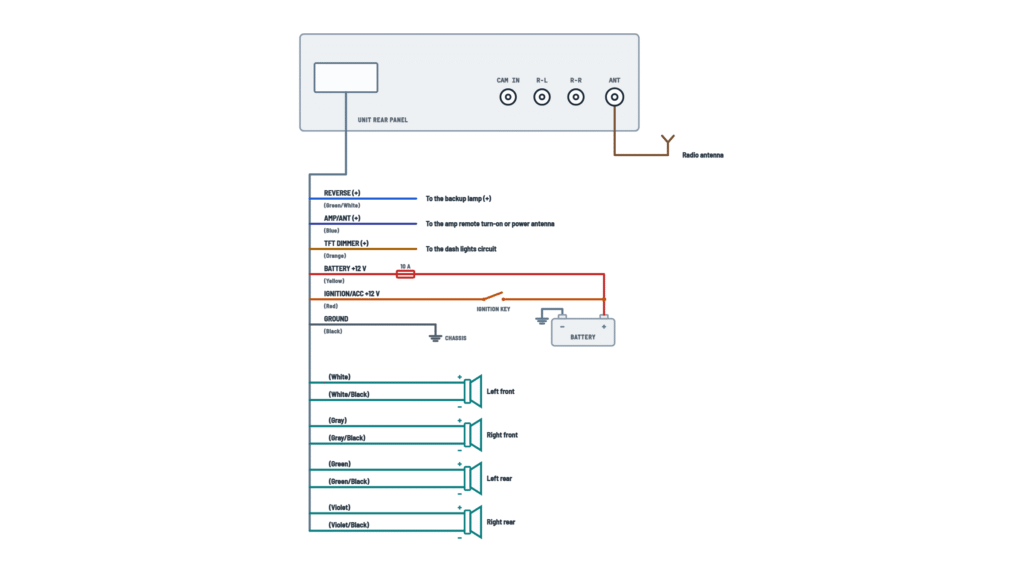
Unit connections
Power, reverse, amp turn-on, dimmer, speakers, camera, outputs and antenna.
Terminals and components · 13
- Battery
- ACC
- Ground
- Reverse
- AMP/ANT
- Dimmer
- Speakers
- Camera
Fuse
The unit uses one 10 A ATC mini fuse on the power connector. Replace it only with the same type and rating.
If the unit won't turn on
Check that this wire has 11 to 16 V and that the fuse is not blown.
Caution
Tape any unused wires and keep the speaker wires away from the chassis.
Impedance
4 Ω speakers.
Caution
Tape any unused wires and keep the speaker wires away from the chassis.
Impedance
4 Ω speakers.
Caution
Tape any unused wires and keep the speaker wires away from the chassis.
Impedance
4 Ω speakers.
Caution
Tape any unused wires and keep the speaker wires away from the chassis.
Impedance
4 Ω speakers.
Manual mode
The camera can also be selected from the menu, but that mode is for always-on cameras, not for cameras wired to the backup lamp.
Video output
The external video output is not active while the camera is in use.
Check
The sheet also mentions a subwoofer preamp output (black jacket, green RCA) that is not shown in the drawing: identify it on the unit by its label.
About This Diagram
This diagram is redrawn from page 4 of the Dual XVM279BT Multimedia Receiver manual, and we offer it completely free and in English. We have also categorized it in the Car Audio & Stereo (Automotive) section on Diagramverse, and it has been rated by 1 user with an average rating of 5.0. If you have any specific questions about the Dual XVM279BT Multimedia Receiver Wiring Diagram, we suggest checking the Frequently Asked Questions (FAQs) section.
Printable Dual XVM279BT Wiring Diagrams
Wiring Instructions
Before you start
The Dual XVM279BT works only in vehicles with a 12 VDC negative ground electrical system, so confirm that before you buy any parts. A professional installer or authorized dealer is the recommended choice, especially if your vehicle has a factory amplifier, steering wheel controls or a data-bus harness. You don't need a permit for a car stereo installation. The diagram has a single layout that covers every installation. Skip the optional circuits you won't use.
Gather these before you begin:
- The supplied keys, mounting sleeve and wiring harness
- A vehicle-specific installation kit and harness adapter, if your dash or factory plug needs them (sold separately)
- Wire strippers, plus a crimp tool with butt connectors, or solder and heat-shrink
- Electrical tape, a digital multimeter, and a socket set for the chassis ground
If you extend the Yellow, Red or Black wires, use automotive-grade wire of 18 AWG or heavier to prevent voltage drop. Disconnect the negative battery terminal before touching any wiring. Mount the unit away from direct sunlight, heat, dust, water splash and heavy vibration.
Step-by-step wiring
- Insert the supplied keys into the slots and slide the unit out of its mounting sleeve. Install the sleeve in the dash opening and bend the tabs to lock it, or use the brackets from your installation kit.
- Identify the vehicle's power feeds with your multimeter, with the battery temporarily reconnected for this test. The constant feed reads battery voltage with the key off. The switched feed reads 0 V with the key off and battery voltage in ACC or ON. Mark both wires, then disconnect the battery again.
- Connect Ground (GND) first. Run the Black wire to a clean, bare-metal chassis point. Scrape off any paint, use a ring terminal and a star washer, and tighten it firmly.
- Connect Memory (constant +12 V): Yellow goes to the constant feed. Then connect Ignition (switched +12 V): Red goes to the switched feed. Don't swap them, or the unit will lose its settings or drain the battery.
- Wire the four speakers: FL White and White/Black, FR Gray and Gray/Black, RL Green and Green/Black, RR Violet and Violet/Black. The plain color always goes to + and the black-striped wire to −. Use 4 Ω speakers, and never let a speaker lead touch the chassis.
- If you add an amplifier, run RCA cables from the R-L and R-R jacks to its input. Connect the Blue AMP/ANT wire to its REM terminal, or to a power antenna lead. If you don't use the Blue wire, tape the end.
- Optional: connect the Orange DIMMER wire to the dash lights circuit, which shows +12 V only when the headlights are on. Tape it if you don't use it.
- For a rear camera, plug its video lead into CAM IN. Connect the Green/White REV wire to the backup lamp + wire, which is live only in reverse. Power the camera as its own instructions describe.
- Plug the vehicle antenna into ANT. Use an antenna adapter if the plug doesn't fit.
- Insulate every splice and tape each unused wire end separately. Route the harness so the sleeve and brackets can't pinch it.
Testing and start-up
Reconnect the negative battery terminal before you slide the unit fully in, so you can still reach the harness. Then check the following:
- With the key in ACC or ON, briefly press the power button. The screen should light. Yellow and Red should each read between 11 and 16 VDC to Black.
- With the key off, Yellow should still read battery voltage and Red should drop to 0 V. Turn the key back on and confirm the clock and presets were kept.
- Use the Balance and Fader settings to confirm each speaker plays from its correct position. If the bass sounds thin, one speaker's polarity is probably reversed.
- With the unit on, Blue should read about +12 V and the amplifier should switch on.
- Set the parking brake, turn the key on and shift into reverse. The camera image should appear automatically. The Camera option in Settings must be on.
- If you wired Orange, turn on the headlights and confirm the display dims.
- Tune an AM and an FM station. Set Radio Area to USA if you live in the United States.
When everything works, snap the trim ring into place if your installation needs it, and slide the unit into the sleeve until it locks.
Safety notes
- A car battery can push very high current into a short circuit, enough to melt wiring and start a fire. Keep the negative terminal disconnected until every connection is insulated.
- One 10 A ATC mini fuse on the power connector protects the unit. Disconnect the harness before you change it, and replace it only with the same type and rating. Never bypass or upsize it.
- If you take constant power directly from the battery, add an inline fuse close to the battery, sized for the wire you use. This is general good practice.
- Don't remove the unit's top or bottom covers.
- Video can't be viewed while the vehicle is moving. Don't try to defeat this safety feature.
- If the screen breaks, don't touch the liquid crystal fluid. If it gets on your skin or clothing, wash it off with soap immediately.
Troubleshooting
| Symptom | Probable Cause | What to Check |
|---|---|---|
| Screen stays completely dark when I turn the key | Yellow or Red wire not connected or getting the wrong voltage, or the 10 A fuse is blown | Measure Yellow and Red to Black: both should read 11 to 16 VDC with the key in ACC or ON. Inspect the 10 A ATC mini fuse on the power connector and replace it if blown. |
| Radio is dead or flickers even though the power wires show voltage | Poor or missing ground on the Black wire | Measure resistance from the Black wire to bare chassis metal: it should read close to 0 Ω. Move the ground to clean, unpainted metal and tighten it with a ring terminal. |
| Fuse blows as soon as I turn the radio on | Yellow or Red wire touching chassis ground, a speaker wire touching the chassis, or the wrong fuse rating | Look for pinched or bare wires behind the dash and in the mounting sleeve. Insulate every speaker lead. Fit only a 10 A ATC mini fuse. |
| Clock and radio presets are lost every time I shut the car off | Yellow and Red swapped, or Yellow connected to a switched feed | With the key off, Yellow should still read battery voltage. If it reads 0 V, swap the Yellow and Red connections. |
| Battery goes flat after the car sits overnight | Red wire connected to constant power, so the unit and the amplifier turn-on signal never switch off | With the key off, Red should read 0 V and Blue should read 0 V. Move Red to a feed that is switched by the ignition. |
| Unit turns on and shows the source, but there's no sound | Speaker wires not connected, or speaker wires touching each other or the chassis | Check every speaker connection at both ends. Make sure no strands bridge + to − or touch metal. Insulate all bare ends. |
| Sound is thin, with weak bass | Polarity reversed on one or more speakers | Confirm the plain color goes to + and the black-striped wire goes to − at every speaker, for example Gray to + and Gray/Black to − on FR. |
| Fader or balance works backwards, or sound comes from the wrong speaker | FL, FR, RL and RR pairs swapped | Use Balance and Fader to find each speaker, then match the wire colors: White to FL, Gray to FR, Green to RL, Violet to RR. |
| Backup camera doesn't appear when I shift into reverse | Green/White REV wire not connected to the backup lamp +, camera not plugged into CAM IN, or Camera turned off in Settings | In reverse, measure about +12 V on Green/White. Check that the camera's RCA lead is in CAM IN and that the Camera setting is on. |
| External amplifier never turns on | Blue AMP/ANT wire not connected to the amplifier's REM terminal, or RCA cables not plugged into the R-L and R-R jacks | With the radio on, measure about +12 V at the amplifier's REM terminal. Check the RCA cables at both ends. |
| Display is always dim, or never dims at night | Orange DIMMER wire on the wrong circuit, or not connected | The Orange wire should read +12 V only when the headlights are on. Reconnect it to the dash lights circuit. |
| Radio picks up few or no stations | Antenna plug not fully seated in ANT, missing antenna adapter, or the tuner set to Local | Reseat the antenna plug, fit an adapter if needed, switch the tuner to Distance, and check that Radio Area matches your region. |