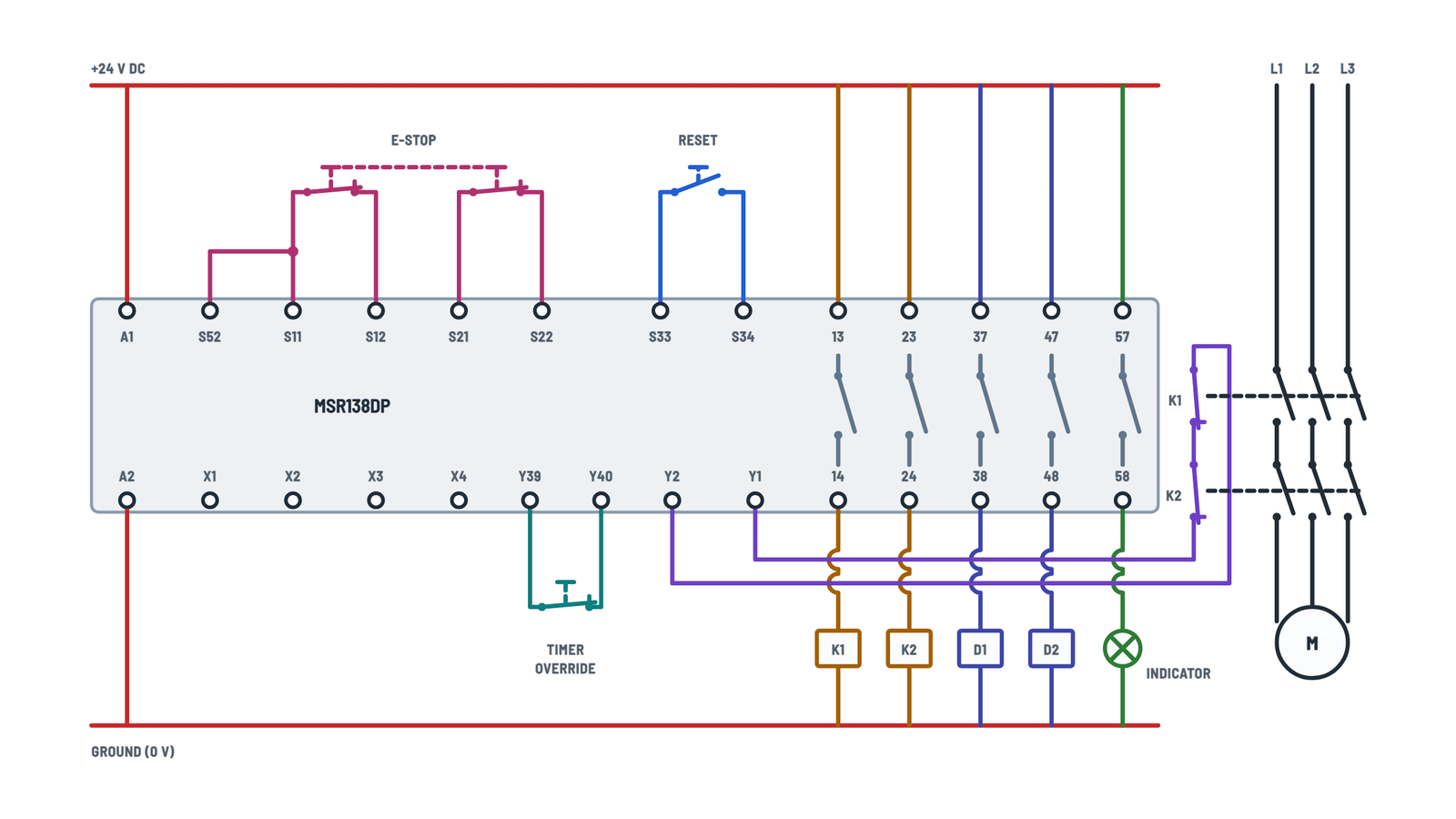
Minotaur MSR138DP Monitoring Safety Relay Wiring Diagram
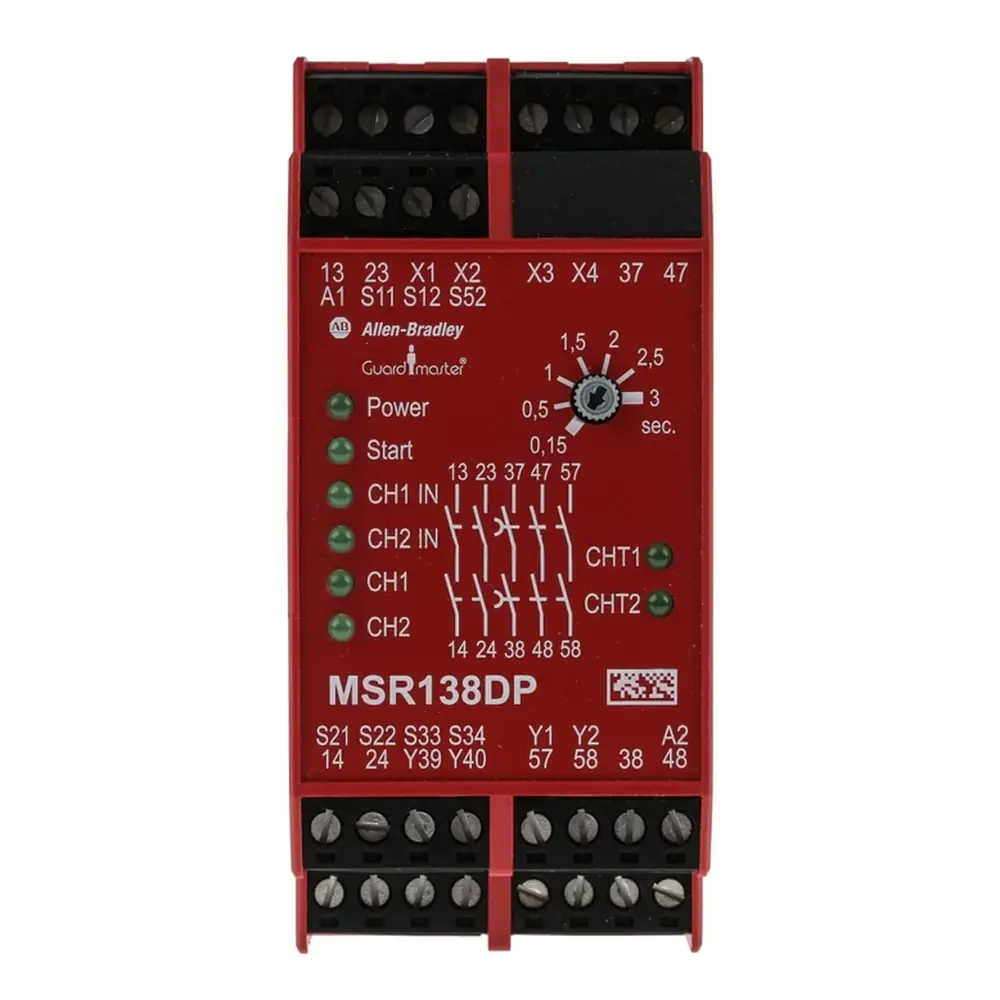
Minotaur MSR138DP Monitoring Safety Relay Wiring Diagram
MSR138DP typical wiring
Choose the example; tap any terminal to see what connects to it.
Terminals and components · 10
- Power
- Inputs
- Reset
- Feedback
- Outputs
- Delayed
- Motor
Wiring
Copper rated 60/75 °C, 0.2 to 2.5 mm² (24 to 12 AWG). Terminal screw torque: 0.6 to 0.8 Nm.
Cross-fault monitoring
With dual channel in a 4-wire connection (S11-S12, S21-S22) cross faults are monitored (up to PLe). Not with single channel or 3-wire.
24 V DC signals
For external 24 V DC signals (such as light curtain outputs), the negative must connect to S21.
Model
This figure is for the MSR138.1DP (delayed output 3 with N.C. contact 55-56).
Conditions
Reset works only with the feedback (Y1-Y2) and timer override (Y39-Y40) circuits closed. A reset during the time delay causes a fault.
MSR138.1DP
To avoid a lockout on reset, the N.C. contact 55-56 can be wired in series with this feedback.
Delay ranges
Per model: 1 s fixed, 0.15-3 s, 0.5-10 s or 1.5-30 s.
About This Diagram
This diagram is redrawn from pages 2–3 of the Minotaur MSR138DP Monitoring Safety Relay manual, and we offer it completely free and in English. We have also categorized it in the Control Relays & Timers (Motors & Industrial) section on Diagramverse, and it has been rated by 1 user with an average rating of 5.0. If you have any specific questions about the Minotaur MSR138DP Monitoring Safety Relay Wiring Diagram, we suggest checking the Frequently Asked Questions (FAQs) section.
Printable Minotaur MSR138DP Wiring Diagrams


Wiring Instructions
Before you start
The Minotaur MSR138DP is part of a machine's safety function. Only qualified personnel should install and start it up. Before you begin, carry out a risk assessment and confirm that this relay, its input wiring and its stop behavior fit the machine. Lock out and tag out every energy source first: the relay supply, the contactor coil supply and the motor's three-phase feed. If the work is part of a new machine or a modification, check whether local codes or your company's machine safety procedures require approval or documentation.
Use the diagram tabs to pick your layout. 24 V DC · E-stop shows a dual-channel E-stop on a 24 V DC unit with the MSR138DP's N.O. third delayed output, 57-58. 115/230 V AC · light curtain shows an AC-supplied unit monitoring a 24 V DC light curtain, with the MSR138.1DP's N.C. output, 55-56. Read the label on your unit to confirm three things: the model (MSR138DP or MSR138.1DP), the supply voltage (24 V AC/DC, 115 V AC or 230 V AC) and the delay range.
- Mount the relay on a 35 mm DIN rail inside an enclosure rated IP54 or better. The relay housing is only IP40 and the terminals are only IP20.
- Use copper wire rated 60/75 °C (140/167 °F), sized 24 to 12 AWG (0.2 to 2.5 mm2).
- Have a small screwdriver and a torque driver ready. Tighten terminal screws to 5 to 7 lb·in (0.6 to 0.8 N·m).
- Fit external fuses to the output circuits: 6 A slow blow or 10 A quick blow.
- Have a multimeter on hand to check continuity, loop resistance and supply voltage.
Step-by-step wiring
- Snap the relay onto the DIN rail and leave room to route wiring cleanly. On P versions the terminal blocks unplug, which makes pre-wiring easier. Lever them out slowly with a screwdriver.
- Wire Relay power. On a 24 V DC unit, connect +24 V DC to A1 and 0 V to A2. On an AC unit, connect L1 to A1 and N to A2. The supply must stay between 0.85 and 1.1 times the rated voltage.
- Wire the Safety inputs for one safety device only. For a dual-channel E-stop, put one N.C. contact across S11-S12 and the other across S21-S22, and fit the S52-S11 jumper. This 4-wire connection enables cross-loop monitoring. For a light curtain, connect OUT1 to S12 and OUT2 to S52. Connect the Light curtain supply negative to S21 and S22, and its + to the curtain.
- Keep each input loop's resistance at 135 Ω or less. On long runs, measure the loop resistance before you connect the device.
- Wire the Reset button, an N.O. pushbutton, across S33 and S34. Mount it where the operator can see the hazard zone.
- Set the Start mode jumpers. With no jumpers on X1 to X4, the relay uses monitored manual reset, as in both figures. Fit the X1-X2 and X3-X4 jumpers only if your risk assessment allows automatic/manual start.
- Wire the Timer override across Y39 and Y40. Use an N.C. contact if you want to cut the delay short, or a jumper if you don't use this function.
- Wire the K1 and K2 feedback: connect the N.C. auxiliary contacts of K1 and K2 in series across Y1 and Y2. On the MSR138.1DP, you can also put 55-56 in series with this loop. That stops a reset pressed during the delay from locking the relay out.
- Wire the Immediate safety outputs. Run the coil supply through 13-14 to K1 and through 23-24 to K2, with the external fuse in each path.
- Wire the Delayed outputs: 37-38 feeds load D1 and 47-48 feeds D2. Then wire the Third delayed output, 57-58 or 55-56 depending on your model. Every load must stay within the contact ratings and must draw at least 10 mA at 10 V.
- Wire the main contacts of Contactors and motor K1 and K2 in series in all three motor phases.
- Torque every screw, tug-test each conductor and label the wires.
Testing and start-up
Before you apply power, measure continuity across each input channel with the safety device closed, and confirm that each channel opens when the device trips. Check that Y1-Y2 shows continuity with both contactors released.
Apply power and give the relay its 1 s power-on delay. PWR should be steady green. With the E-stop released or the light curtain clear, CH1 IN and CH2 IN should light. Press and release reset. Start lights while the button is closed, then CH1, CH2, CHT1 and CHT2 light and K1 and K2 pull in.
Now trip the safety device:
- CH1 and CH2 should go out within the 18 ms response time, and the contactors should drop out.
- CHT1 and CHT2 should go out only when the set delay has run out.
- If you fitted a Y39-Y40 contact, open it during the delay. The delayed outputs should open at once.
Finally, check that the machine does not restart when you release the E-stop until you press reset again.
Safety notes
- On AC units, A1 and A2 carry 115 or 230 V AC, and the output contacts may switch mains voltage. Treat every terminal as live until you have proved it dead.
- With a 24 V DC supply, never connect S21 to PE.
- Do not bypass, jumper out or tamper with the safety inputs or the feedback loop. If the unit is damaged or faulty, replace it. Do not repair or open it.
- Demand the safety function at least once every six months to keep its rated safety performance.
- Re-test the whole function after any wiring change.
Troubleshooting
| Symptom | Probable Cause | What to Check |
|---|---|---|
| No status lights at all when power is on | No supply at A1-A2, wrong voltage model, or an open breaker or fuse upstream | Measure the voltage across A1 and A2. It must be 0.85 to 1.1 times the rating on the label (24 V AC/DC, 115 V AC or 230 V AC). Check the polarity on DC: + to A1. |
| PWR light is flashing green | Cross-loop fault: the two input channels are touching, or S21 is tied to PE on a 24 V DC unit | Power down and check the S11-S12 and S21-S22 wiring for pinched or shorted conductors. Remove any S21-to-PE link on a 24 V DC supply. Then clear the fault with a fault reset. |
| E-stop is released but CH1 IN or CH2 IN stays dark | Open channel, loose terminal, missing S52-S11 jumper, or loop resistance too high | With the power off, measure continuity across S11-S12 and S21-S22 with the E-stop released. Loop resistance must not exceed 135 Ω. Confirm that the S52-S11 jumper is in place. |
| Light curtain is clear but the relay inputs never close | Curtain negative not on S21 and S22, or OUT1 and OUT2 landed on the wrong terminals | Confirm OUT1 goes to S12, OUT2 goes to S52, and the supply negative goes to S21. Measure about 24 V DC from each output to S21 with the curtain clear. |
| Inputs are lit but pressing reset does nothing | Feedback loop Y1-Y2 is open, or Y39-Y40 is open with no jumper | With K1 and K2 released, measure continuity across Y1-Y2. You must use the N.C. auxiliary contacts, not the N.O. ones. Check that Y39-Y40 has its jumper or that its N.C. contact is closed. |
| Machine restarts by itself as soon as the E-stop is released | X1-X2 and X3-X4 jumpers fitted (automatic/manual start), or S33-S34 jumpered | For monitored manual reset, remove the X1 to X4 jumpers and connect only an N.O. pushbutton across S33-S34. |
| Relay goes into a reset fault and won't start | Reset circuit is closed while the inputs are open: an N.C. button used by mistake, a stuck button, or reset held before releasing the E-stop | Check that the button is N.O. and reads open across S33-S34 when not pressed. Close the inputs first, then press and release reset. |
| MSR138.1DP locks out if reset is pressed during the delay | Reset pressed during the time delay; 55-56 not in the feedback loop | Wait until the delay has ended before resetting, or wire 55-56 in series with the K1 and K2 contacts across Y1-Y2. |
| Delayed loads drop at the same moment as the contactors | Timer override Y39-Y40 is opening, or the unit has a short delay range | Check the Y39-Y40 contact or jumper for continuity during a stop. Check the delay range on the label. |
| CH1 and CH2 are lit but K1 or K2 does not pull in | Blown external output fuse, no coil supply, or the coil wired to the wrong terminal | Check the 6 A slow blow or 10 A quick blow fuse. Confirm that 14 feeds K1 and 24 feeds K2, and measure the coil voltage at each contactor. |
| Small-signal load on a delayed output, such as a PLC input, reads unreliably | Current below the contacts' minimum switching level | Make sure the load draws at least 10 mA at 10 V, or use a contactor or interposing relay. |
Frequently Asked Questions (FAQs)
1. Press the E-stop or break the light curtain.
2. Confirm that K1 and K2 drop out immediately and that the delayed loads switch off after the set delay.
3. Check that the machine does not restart until you press reset.
Re-test the whole circuit after any wiring change, part replacement or new installation.