Aprilaire 400M Humidifier Wiring Diagram
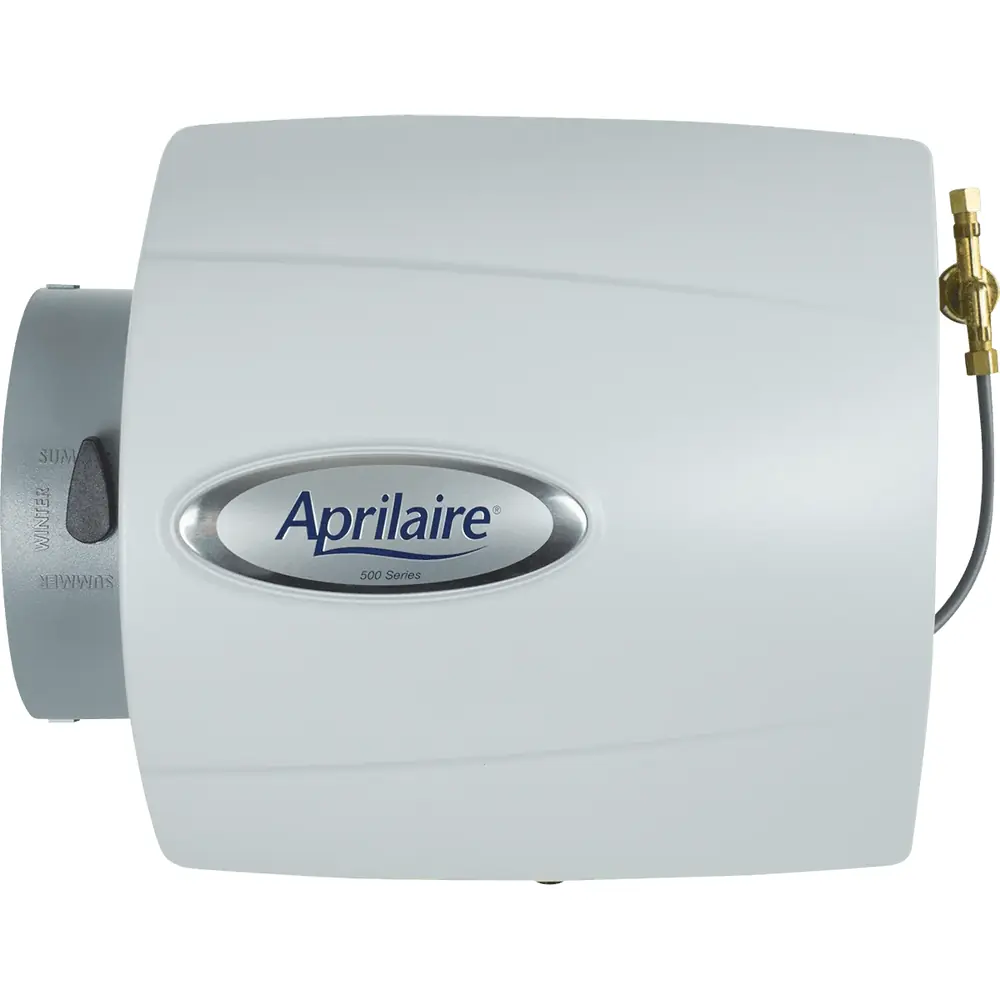
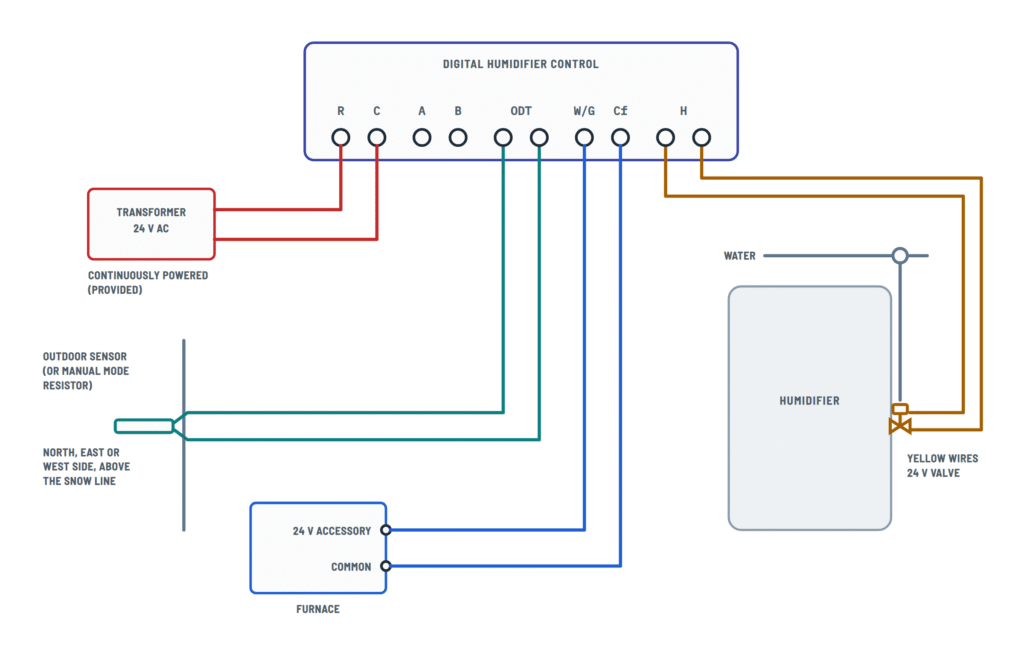
Aprilaire 400M wiring
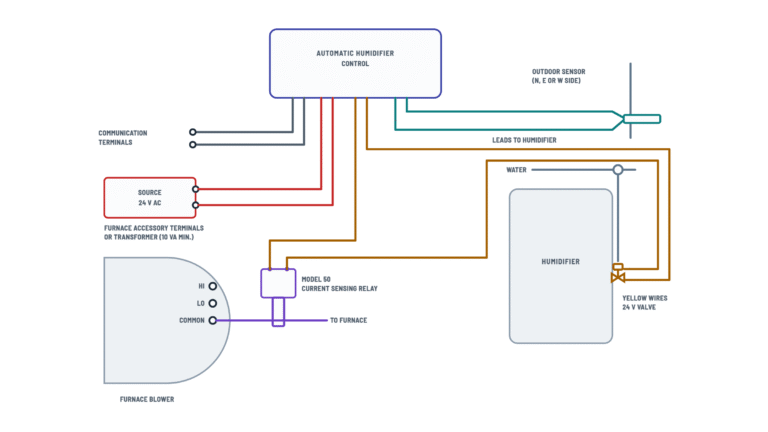
Choose the control type; tap any terminal or component to see how it connects.
Terminals and components · 4
- 24 V AC
- Control
- Outdoor sensor
- Furnace signal
- Humidifier
- Model 50
Setting
The dial shows the recommended humidity for the outdoor temperature.
Caution
Power the transformer from a 120 V AC circuit other than the blower motor circuit; it can be fed from the hot 120 V line before it enters the furnace.
Without Model 50
Some furnaces have accessory terminals that are powered only while the blower runs; then the Model 50 may not be needed. Check with the furnace manufacturer.
How to connect it
Connect one of the yellow valve wires to the second control terminal and the other to the Model 50 (or straight to the source if not used).
Caution
Do not use an external 24 V or 120 V source on these wires: it can damage the humidifier.
How to connect it
- Run the blower motor common wire through the Model 50 sensor.
- Connect its two leads in the 24 V loop, between the source and the humidifier.
Caution
Install it only in the 24 V humidifier control circuit, never in the transformer primary circuit.
Terminals
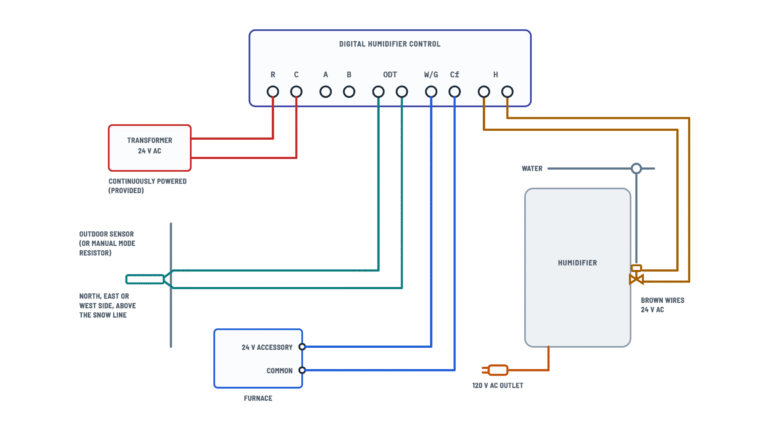
Terminal Goes to R · C Humidifier 24 V transformer ODT Outdoor sensor (or manual mode resistor) W/G · Cf Furnace 24 V accessory terminal and common H · H The yellow valve wires Other options
The control instructions include other wiring options.
Caution
Do not wire the transformer primary into the furnace blower circuit.
Location
On the north, east or west side of the home, above the expected snow line.
Manual mode
Without an outdoor sensor, install the manual mode resistor on ODT.
Furnace terminals
They may be labeled “HUM”, “ACC” or “EAC”. Check the furnace manufacturer for voltage and operation.
Caution
If the accessory terminal is 120 V, install a 24 V transformer.
Signal
The accessory terminal must be energized with 24 V on each heat call.
How to connect it
Connect each H terminal to one of the two yellow valve wires.
Caution
Do not use an external 24 V or 120 V source on these wires: it can damage the humidifier.
Splices
In this model's figure, the yellow valve wires are spliced to two white wires that run to the H terminals.
About This Diagram
This diagram is redrawn from page 1 of the Aprilaire 400M Humidifier manual, and we offer it completely free and in English. We have also categorized it in the Humidifiers (HVAC & Water Heating) section on Diagramverse, and it has been rated by 1 user with an average rating of 5.0. If you have any specific questions about the Aprilaire 400M Humidifier Wiring Diagram, we suggest checking the Frequently Asked Questions (FAQs) section.
Printable Aprilaire 400M Wiring Diagrams


Wiring Instructions
Before you start
First, figure out which variant you have. If your Aprilaire 400M came with a knob-type humidistat that has only two terminals, 1 and 2, use the 400M · Manual view. If it came with a digital control that has terminals R, C, A, B, ODT, Cf, W/G and H, plus its own 24 VAC transformer and an outdoor sensor, use the 400A · Digital view. The current Model 400 is the same as the older 400A.
A qualified heating and air conditioning contractor should install this humidifier, and the warranty depends on that. Follow your local codes. If you need a new receptacle or 120 V circuit for a transformer, that work may need a licensed electrician or a permit.
- Low-voltage thermostat cable, which is not supplied. The documents don't give a gauge. 18 AWG multi-conductor thermostat wire is common practice for this kind of run.
- A screwdriver, wire stripper, small wire nuts and a multimeter that reads AC volts.
- Your furnace wiring diagram, so you can find common and the 24 V accessory terminal. That terminal is often labeled HUM, ACC or EAC.
Turn off the furnace at its service switch or breaker, then confirm it is dead before you open any panel. Set the humidifier control to OFF.
Step-by-step wiring: 400M Manual
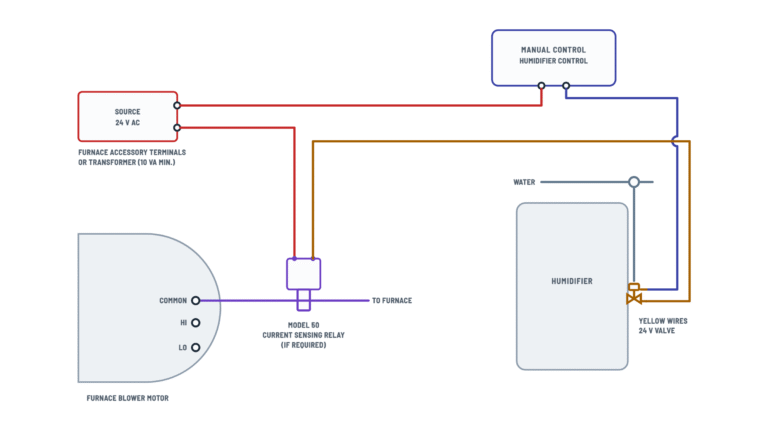
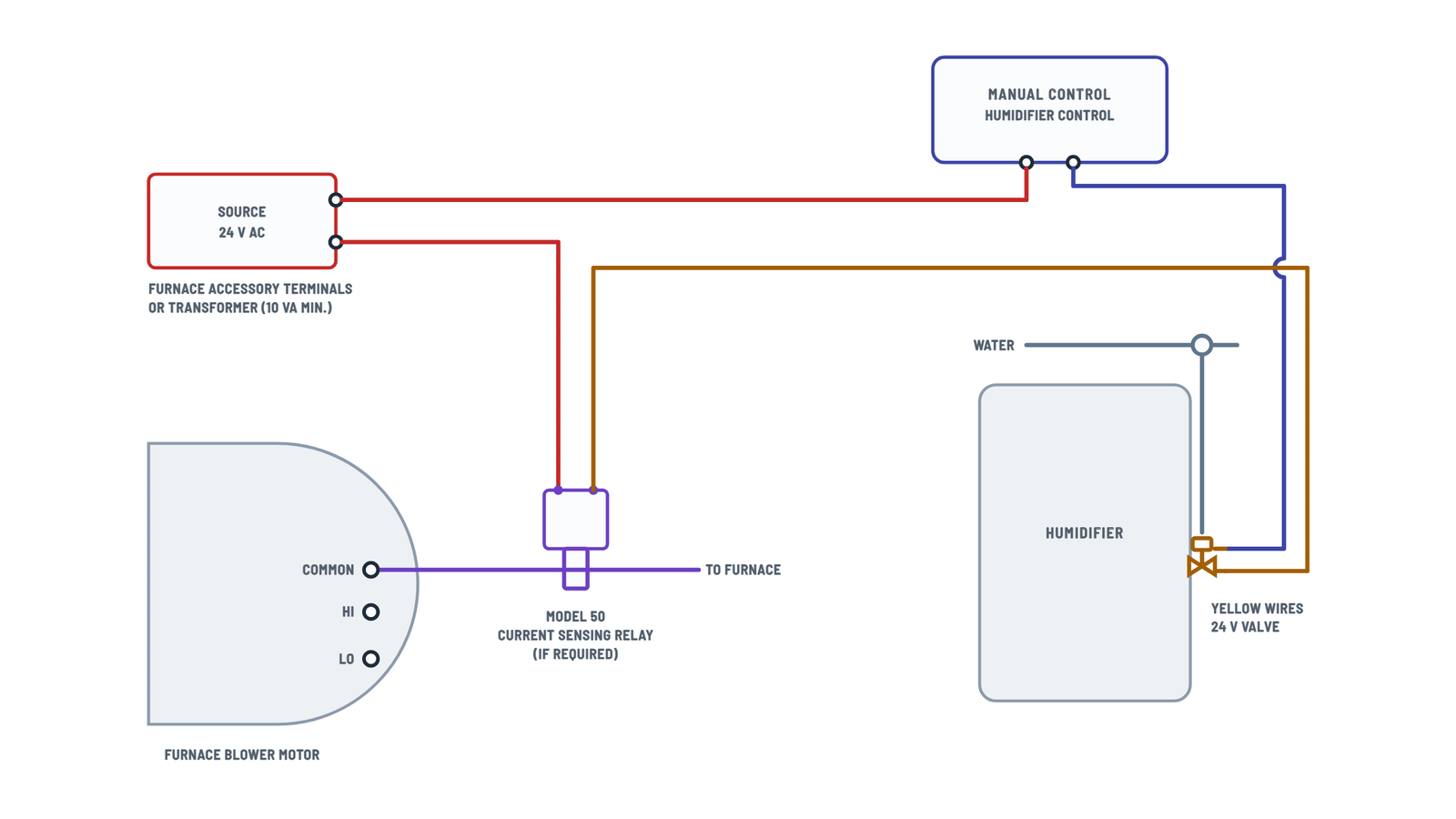
- Choose your 24 V source. You can use the furnace accessory terminals if they supply 24 V AC, or a separate transformer rated at least 10 VA. The humidifier draws 0.5 A at 24 VAC. If the accessory terminal on your furnace is 120 V, don't use it directly. Install a 24 V transformer instead.
- Mount the Manual humidifier control on the return duct or on an interior wall. Run cable from it to the humidifier and the furnace.
- Connect one side of the 24 V source to Terminal 1 of the control.
- Connect Terminal 2 to either Yellow wire of the 24 V solenoid valve. The valve has no polarity.
- Pass the furnace blower common wire through the sensor of the Model 50 current sensing relay.
- Connect the second yellow wire to one side of the Model 50 contact. Connect the other side of the contact to the other side of the 24 V source. This completes the loop, so the valve can open only while the blower is moving air.
Step-by-step wiring: 400A Digital
- Mount the Digital humidifier control on the return duct at least 6 inches upstream of the humidifier or the bypass duct connection. Its RH sensor goes through a 3/4 inch hole, with the gasket in place.
- Connect the secondary of the supplied 24 V transformer to R and C. The transformer must stay powered at all times. Never wire it into the furnace blower circuit, and don't replace it with another external 24 VAC or 120 VAC source.
- Run W/G to the furnace 24 V accessory terminal, which is energized during a heat call. Run Cf to the furnace common.
- Connect the two H terminals to the two yellow wires of the Solenoid valve. Polarity doesn't matter.
- Mount the Outdoor temperature sensor on the north, east or west side of the home, above the expected snow line. Run two wires from it to the ODT terminals. Leave A and B unconnected for this layout.
- Tighten every terminal and give each wire a light tug to check it. Keep the cable away from hot surfaces and sharp sheet-metal edges.
Testing and start-up
Before you restore power, open the saddle valve fully and set the bypass damper to WINTER. Then:
- Restore furnace power and make a heat or fan call at the thermostat. The humidifier won't run unless the blower is running.
- Manual: Turn the control to its highest setting. The solenoid should click and water should flow to the distribution tray. While it is calling, you should read about 24 V AC across the two yellow wires.
- Digital: Turn the knob past 7 to Test/Reset. The green Humidifier On light should come on and the valve should run for one minute. Don't leave the knob in Test/Reset, because the humidifier stops after that minute.
- On the digital control, you should read about 24 V AC across R and C at all times, and across W/G and Cf during a heat call.
- Set the control to its normal setting. On the digital control, 5 is a good starting point. Check all plumbing connections for leaks.
Safety notes
- The furnace contains 120 V wiring that can cause serious injury. Keep its power off whenever a panel is open, even though the humidifier itself runs on 24 V AC.
- Never connect the solenoid valve, the manual control or the digital control to 120 V AC. Doing so damages components and puts dangerous voltage on low-voltage cable.
- On a downflow furnace, make sure the blower keeps running after a heat call ends. Otherwise the heat can damage the control.
- Plenum and duct openings have sharp edges. Wear gloves when you route wires near them.
- If you tap a hot water line, shut it off first. Water over 125°F can scald instantly.
Troubleshooting
| Symptom | Probable Cause | What to Check |
|---|---|---|
| Manual control: the valve never clicks, even at the highest setting with the blower running | No 24 V at the source, or a loose wire at Terminal 1 or Terminal 2 | With the blower running, measure from Terminal 1 to the other side of the 24 V source. You should read about 24 V AC. If you get nothing, check the accessory terminal or transformer and tighten the terminal screws. |
| Manual control: the humidifier never runs, but the control has 24 V | The blower common wire isn't routed through the Model 50 sensor, so its contact never closes | Make sure the blower common wire, not some other conductor, passes through the sensor. With the blower running, check that the Model 50 contact shows continuity. |
| Water runs through the humidifier when the blower is off | The Model 50 contact is bypassed, or the second yellow wire goes straight back to the source | Rewire so the second yellow wire goes through the Model 50 contact before it returns to the 24 V source. |
| Digital control display is blank | The transformer isn't powered, or the R or C wire is loose | Measure across R and C. You should read about 24 V AC at all times. Check that the supplied transformer is powered and its secondary wires are tight. |
| Digital display goes dark whenever the furnace shuts off | The transformer is wired into the furnace blower circuit | Move the transformer primary to a continuously powered source. Never connect it to blower motor wiring. |
| Digital control never humidifies during heat calls, but Test/Reset works | W/G is on a terminal that isn't energized with a heat call, or Cf isn't on common | During a heat call, measure across W/G and Cf. You should read about 24 V AC. Move W/G to the 24 V accessory terminal and Cf to furnace common. |
| The valve or control failed soon after installation | Something was connected to 120 V AC or to an external 24 V source the digital control doesn't allow | With power off, trace every supply wire back to its source. Replace any damaged parts. Feed only 24 V AC, and use the supplied transformer on the digital variant. |
| Furnace low-voltage fuse blows or the transformer gets hot when the humidifier calls | A yellow wire is shorted to sheet metal, or the 24 V source is too small | Inspect the insulation and connections at the valve. Confirm the source is rated at least 10 VA and has spare capacity for the 0.5 A valve. |
| Digital control: red Service Required light flashes | A fault the control has detected, which may be caused by wiring | Note the error code on the display (E1, E2, E3 or E4). Check the ODT, H, R and C connections. If the light keeps flashing, call your HVAC contractor or Technical Support. |
| The humidifier ran for one minute, then never again | The knob was left in Test/Reset | Turn the knob back from Test/Reset to the RH setting you want. |