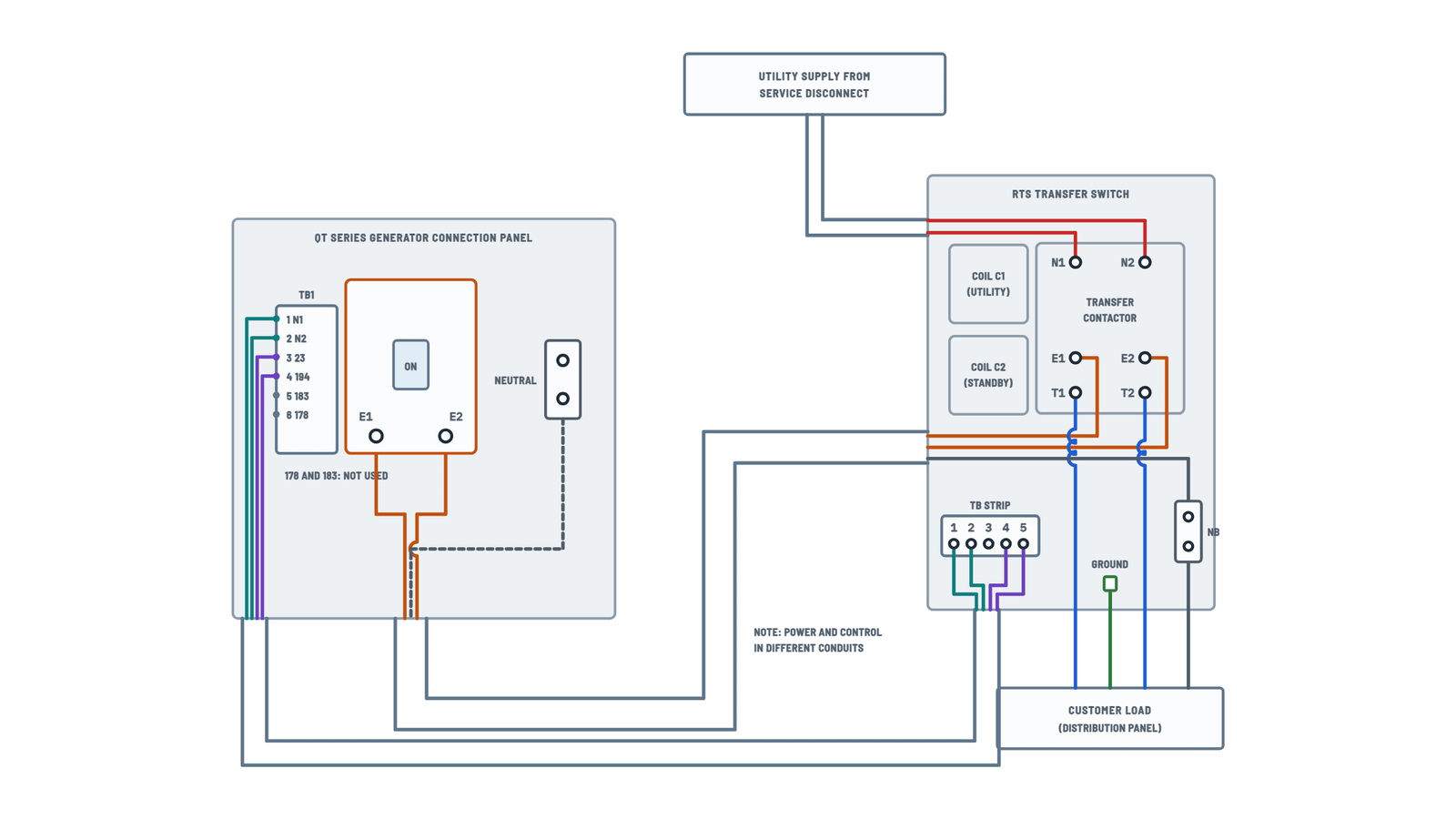
Generac 200 AMP Automatic Transfer Switch Wiring Diagram
Interconnections
Utility, generator, transfer switch and panel, with the power and control leads.
Terminals and components · 7
- Utility (N1, N2)
- Generator (E1, E2)
- Load (T1, T2)
- Neutral
- Ground
- Utility sensing
- Control 23 / 194
Power lugs
- Wire range: #6 AWG to 250 MCM (200 A); 275 in-lbs torque.
- Wire-brush oxides off the ends; with aluminum, apply corrosion inhibitor.
- Size conductors per the 75 °C column.
Check
With utility on, measure across N1 and N2, and from each one to neutral.
Power lugs
- Wire range: #6 AWG to 250 MCM (200 A); 275 in-lbs torque.
- Wire-brush oxides off the ends; with aluminum, apply corrosion inhibitor.
- Size conductors per the 75 °C column.
No-load values
Reading Value E1–E2 240–246 V AC E1 or E2 to neutral 120–123 V AC Frequency 60–62 Hz Position
Handle up: T1/T2 connected to utility (N1/N2). Handle down: connected to the generator (E1/E2).
System
Single-phase with solid neutral: only the two hot leads are switched.
Codes
The installation must comply with the electrical code (NEC / NFPA 70).
Wire size by length
Size Max length 18 AWG 140 m (460 ft) 16 AWG 223 m (730 ft) 14 AWG 354 m (1,160 ft) 12 AWG 565 m (1,850 ft) Separate conduits
Power leads and transfer switch control leads must be run in two different conduits.
Wire size by length
Size Max length 18 AWG 140 m (460 ft) 16 AWG 223 m (730 ft) 14 AWG 354 m (1,160 ft) 12 AWG 565 m (1,850 ft) Not used
Generator panel terminals 178 and 183 are not used in this application.
TB control strip
The five control terminals and what they connect to inside the switch.
Terminals and components · 5
- Utility sensing
- Neutral
- Control 23 / 194
How it works
- With utility: relay TR is at rest and coil C1 keeps the load on utility.
- Utility outage: the generator senses it on TB-1/TB-2, starts and, once voltage and frequency are correct, energizes TR through 23 and 194.
- TR powers coil C2 and the contactor moves the load to the generator.
Fuses
If the generator reports a utility outage with utility present, check F1 and F2.
Use
Connect it only if the generator calls for it.
How it works
- With utility: relay TR is at rest and coil C1 keeps the load on utility.
- Utility outage: the generator senses it on TB-1/TB-2, starts and, once voltage and frequency are correct, energizes TR through 23 and 194.
- TR powers coil C2 and the contactor moves the load to the generator.
Polarity
Match 23 to 23 and 194 to 194 between the generator and the switch.
About This Diagram
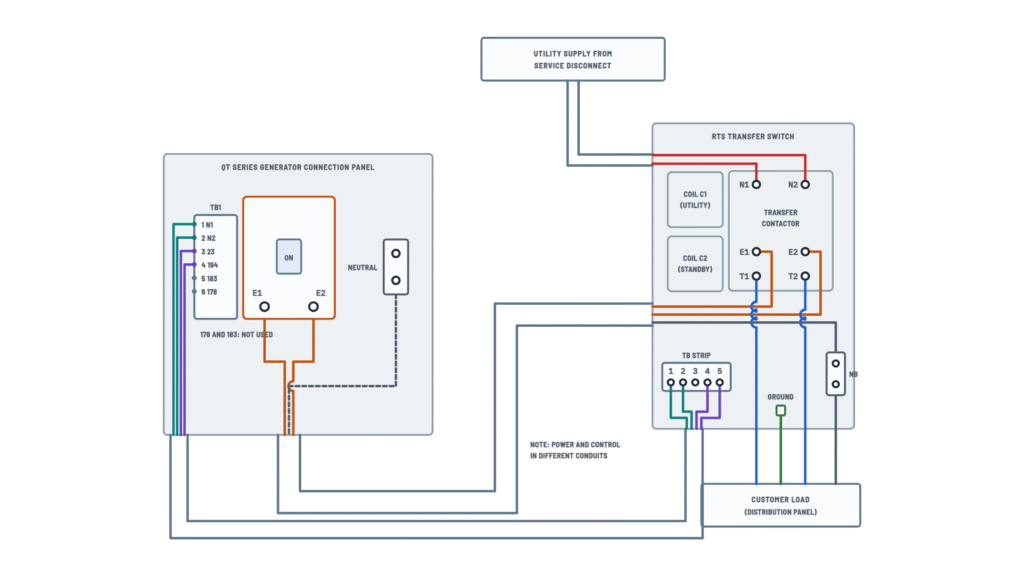
These diagrams are redrawn from pages 11–13 of the Generac 200 AMP Automatic Transfer Switch manual, and we offer them completely free and in English. We have also categorized it in the Generators & Transfer Switches (Home Electrical) section on Diagramverse, and it has been rated by 1 user with an average rating of 5.0. If you have any specific questions about the Generac 200 AMP Automatic Transfer Switch Wiring Diagram, we suggest checking the Frequently Asked Questions (FAQs) section.
Printable Generac 200 AMP Wiring Diagrams


Wiring Instructions
Before you start
The Generac 200 AMP switch carries service-level current and connects to the utility supply. In most areas the job needs a permit and an inspection, and a licensed electrician should do the work or check it. Use the Complete tab to plan the power, neutral, ground and control runs. Use the TB strip tab when you land the control wires on terminals TB-1 to TB-5.
- Tools: torque wrench, wire brush, insulated hand tools, an accurate AC voltmeter and a frequency meter.
- Power conductors: the 200 A lugs accept #6 to 250 MCM. Size the conductors for the load using the 75°C column of the ampacity tables. If you use aluminum conductors, apply corrosion inhibitor to them.
- Control wires (N1, N2, 23 and 194): use No. 18 AWG up to 460 feet, No. 16 AWG up to 730 feet, No. 14 AWG up to 1,160 feet and No. 12 AWG up to 1,850 feet.
- Mounting: mount the NEMA 3R enclosure vertically on a rigid, level surface, as close as practical to the loads. If you need to level it, put washers behind the mounting holes. The knockouts take 1, 1-1/2 and 2 inch conduit.
Before you touch anything, isolate everything:
- Set the generator AUTO-OFF-MANUAL switch to OFF and remove the generator's negative battery cable.
- Open the generator main breaker and the utility service disconnect.
- Tag both the generator and the switch "DO NOT OPERATE".
- Confirm with your meter that N1, N2, E1 and E2 read zero volts.
Step-by-step wiring
- Check the handle position. With the handle UP, T1 and T2 are connected to N1 and N2 (utility). With the handle DOWN, they are connected to E1 and E2 (generator). Leave it UP.
- Bring all power cables into the enclosure next to the transfer mechanism terminals. Strip each conductor and wire-brush the surface oxides off the ends.
- Land the two utility hot leads from the service disconnect on N1 and N2.
- Land the generator hot leads from the generator main breaker on E1 and E2.
- Land the distribution panel hot leads on T1 and T2.
- Connect the generator neutral and the panel neutral to the Neutral block (NB). This 2-pole mechanism never switches the neutral.
- Connect the equipment grounding conductor to the Ground lug (GND) and run it to the distribution panel as your electrical code requires.
- Torque every power lug to the value on the decal inside the door, which is 275 in-lbs for the 200 A switch. Overtightening damages the switch base, and a loose lug overheats. Wipe away any excess inhibitor.
- Check that there is at least 1/2 inch of clearance between live metal and grounded metal.
- Run the control cable to the generator. Connect TB-1 (Utility 1, N1) to generator TB1-1 and TB-2 (Utility 2, N2) to generator TB1-2.
- Connect TB-4 to generator terminal 23 (wire 23) and TB-5 to generator terminal 194 (wire 194). Keep the wire numbers the same at both ends.
- If you have a prepackaged standby generator, leave TB-3 (Neutral, optional) unused.
Testing and start-up
Have the installation inspected before you test it, and run these tests in this order.
- Manual check: with both sources off, insert the handle, move it DOWN, then move it back UP. Hold the handle firmly, because it snaps over once it passes center.
- Utility voltage: close the utility disconnect and measure N1 to N2, N1 to neutral and N2 to neutral. Confirm the voltage is correct and within the switch rating, then open the disconnect again.
- Generator voltage: set the generator to MANUAL and let it warm up at no load for at least five minutes. Close its main breaker CB1 and measure. You should see 60 to 62 Hz, 240 to 246 VAC across E1 and E2, and 120 to 123 VAC from E1 to neutral and from E2 to neutral. Then open CB1 and set the generator to OFF. Do not continue until these readings are correct.
- Load test: with CB1 open, move the handle DOWN. Start the generator in MANUAL, close CB1 and apply loads up to the generator's rated capacity. Across E1 and E2 you should read more than 230 V and more than 59 Hz. Run it for at least 30 minutes and watch for noise, vibration or overheating.
- Restore: open CB1, let the generator run at no load for a few minutes, then set it to OFF. Move the handle UP, close the utility disconnect and set the generator to AUTO.
Safety notes
- The voltages inside the enclosure are lethal. N1, N2, TB-1 and TB-2 stay live whenever utility power is on, even if the generator is off.
- In automatic mode the generator can crank and start without warning. Disable it before you work on the switch.
- Never transfer manually under load, and never jumper or bypass the switch. Its job is to keep the generator from backfeeding the utility lines.
- The 200 A switch is for optional standby systems only. It is rated for circuits up to 10,000 rms symmetrical amperes at 240 VAC. Keep the tungsten (incandescent) load at or below 30% of the switch rating.
- Remove jewelry before working. When you finish, put the handle back in its storage position and keep the door closed and bolted.
Troubleshooting
| Symptom | Probable Cause | What to Check |
|---|---|---|
| Generator starts and runs even though utility power is on | The generator isn't seeing utility voltage: a TB-1 or TB-2 sensing wire is open or loose, or fuse F1 or F2 has blown | With utility on, measure between TB-1 and TB-2. You should read the same voltage as across N1 and N2. If you don't, check fuses F1 and F2 and the wires to generator TB1-1 and TB1-2. |
| Generator does not start when the power goes out | Sensing wires landed on the wrong generator terminals, or the generator isn't in AUTO | Confirm that TB-1 goes to generator TB1-1 and TB-2 goes to TB1-2, and that the AUTO-OFF-MANUAL switch is set to AUTO |
| Generator runs during an outage but the house stays dark | Wire 23 or 194 is missing, loose or swapped, so relay TR never energizes | Check that wire 23 goes from generator terminal 23 to TB-4 and wire 194 goes from terminal 194 to TB-5. Check continuity of each wire end to end. |
| The 5 A fuses keep blowing | Short or nicked insulation in the sensing wiring, or a sensing wire touching neutral or ground | With power off, check TB-1 and TB-2 for shorts to each other, to TB-3 and to ground. Replace the fuses only with 5 A fuses. |
| On generator power, lights flicker or 120 V devices get too much or too little voltage | Open or loose neutral between the generator and the neutral block | Tighten the generator neutral at NB. E1 to neutral and E2 to neutral should each read 120 to 123 VAC at no load. |
| A power lug or cable insulation looks scorched or feels hot | Undertorqued lug, oxidized conductor ends, or aluminum wire without corrosion inhibitor | With power off, clean the conductor, apply inhibitor if it is aluminum, and torque to 275 in-lbs or the value on the door decal |
| Panel is dead on utility power even though the meter shows utility present | Handle left in the DOWN (generator) position, or utility cables landed on E1 and E2 instead of N1 and N2 | With power off, check the handle position (UP means utility) and confirm that utility feeds N1 and N2, the generator feeds E1 and E2, and the panel is on T1 and T2 |
| Voltage sags badly when large loads start on generator | Generator overloaded or power conductors undersized for the run | Under rated load, E1 to E2 should stay above 230 V and the frequency above 59 Hz. Recheck conductor size against the 75°C ampacity column. |
| Correct voltage at no load but the frequency is wrong, or the other way round | Generator setting issue, not switch wiring | If the frequency is outside 60 to 62 Hz, the engine governed speed needs adjustment. If only the voltage is outside 240 to 246 VAC, the voltage regulator needs adjustment. |
| Transfer is erratic on a long run between the switch and the generator | Control wires undersized for the distance | Compare the wire gauge with the run length: No. 18 AWG up to 460 feet, No. 16 up to 730 feet, No. 14 up to 1,160 feet, No. 12 up to 1,850 feet |
| You feel a tingle when you touch the enclosure | Ground lug not connected, or a hot conductor touching the enclosure | Shut off both sources, check the GND conductor back to the panel, and check the 1/2 inch clearance around the live lugs |