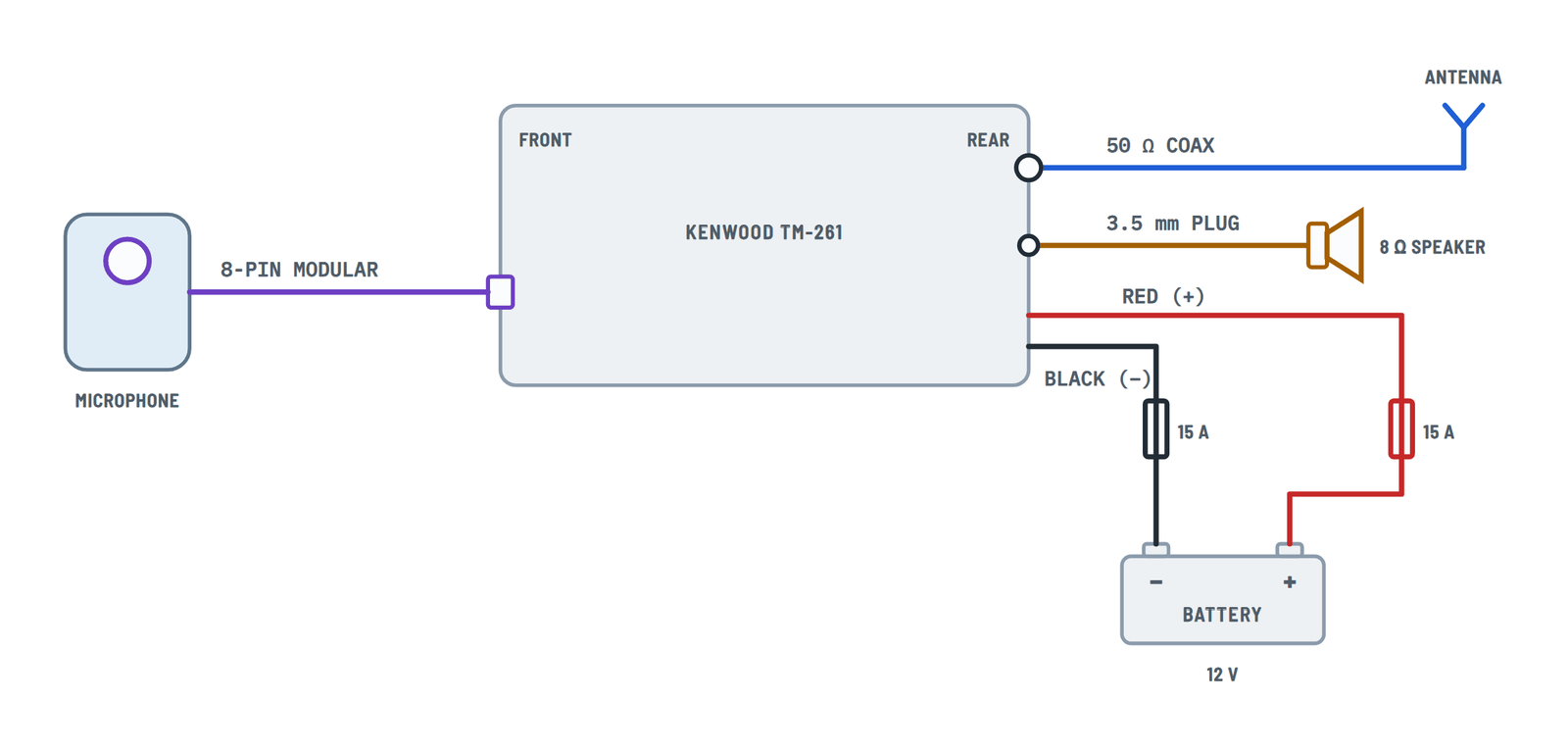
Kenwood TM-261 Mobile Transceiver Wiring Diagram
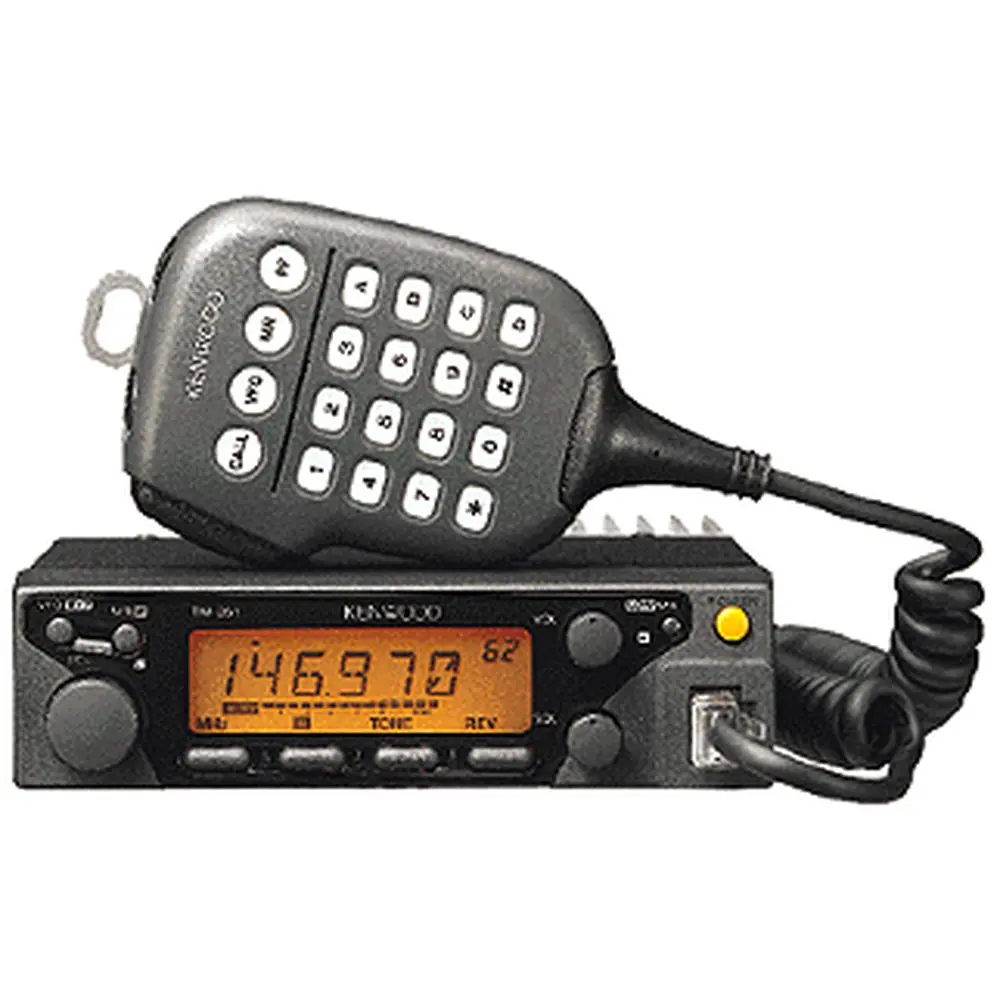
Transceiver connections
12V power in a vehicle or from a regulated supply, antenna, external speaker and microphone.
Terminals and components · 6
- Red (+)
- Black (−)
- Antenna
- Speaker
- Microphone
Fuse holders
Do not cut excess cable or remove the fuse holders; protect them from moisture with heat-resistant tape.
If the fuse blows
Find the cause before replacing it and always use the same rating.
In a vehicle
- Route the cable by the shortest path, away from heat and moisture; use a rubber grommet through the bodywork.
- Before connecting, disconnect other wiring from the negative terminal and reconnect it afterwards.
- Do not use the cigarette lighter socket: some have excessive voltage drop.
Weak battery
If current is insufficient, the display may darken when transmitting or output power may drop.
Before plugging in
Switch the transceiver and the supply off, and do not plug the supply in until all connections are made. Do not use a thinner cable than the one supplied.
Fixed station
Fit a lightning arrester to the antenna to reduce the risk of fire and electric shock.
About This Diagram
This diagram is redrawn from pages 3–6 of the Kenwood TM-261 Mobile Transceiver manual, and we offer it completely free and in English. We have also categorized it in the Car Audio & Stereo (Automotive) section on Diagramverse, and it has been rated by 1 user with an average rating of 5.0. If you have any specific questions about the Kenwood TM-261 Mobile Transceiver Wiring Diagram, we suggest checking the Frequently Asked Questions (FAQs) section.
Printable Kenwood TM-261 Wiring Diagrams

Wiring Instructions
Before you start
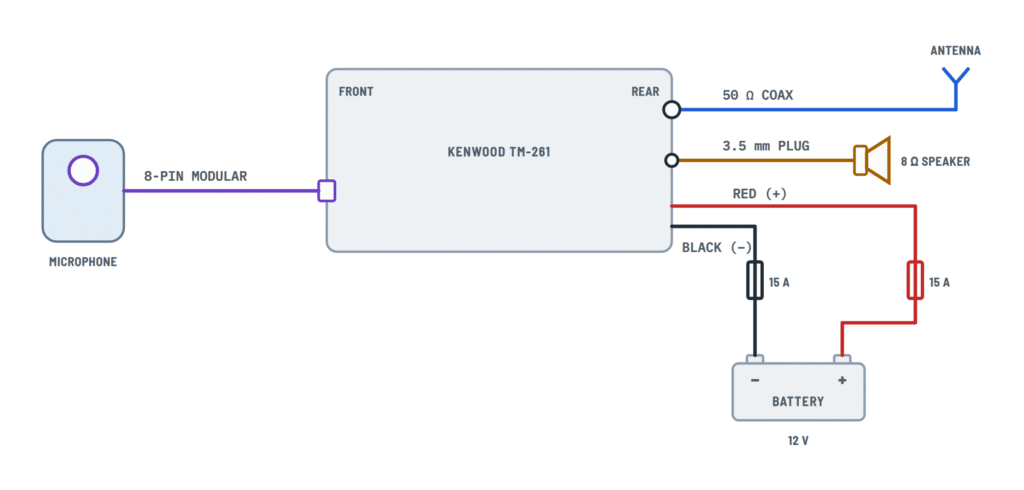
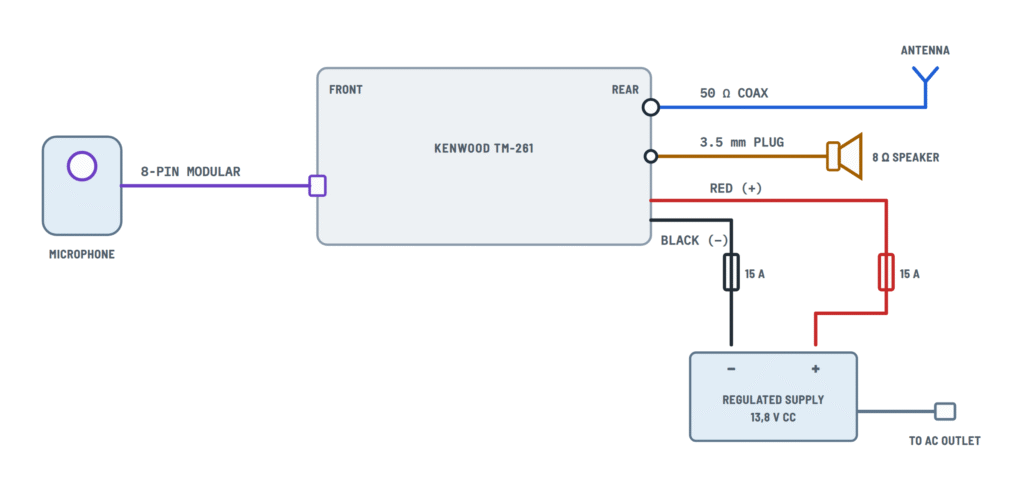
Check which variant of the drawing matches your installation. Choose Mobile (battery) if the radio runs from a vehicle's 12V battery. Choose Fixed station if it runs at home from a regulated 13.8V DC power supply. Every other connection is the same in both variants: the antenna, the external speaker and the microphone.
The TM-261A needs 13.8V DC ±15%, which means 11.7 to 16.0V, on a negative-ground system. On HIGH power the radio draws up to 11.0 A when transmitting and about 0.6 A or less when receiving with no signal. The low-power version draws up to 3.5 A. Plan your power wiring around those currents.
Tools and materials:
- The DC power cord with both fuse holders, and the fuse that came with the radio. The 50 W version uses a 15 A fuse. The low-power version (10 W) ships with a 4 A fuse. Check the label on your unit and the fuse in its holder.
- A 50 Ω antenna made for the 2 m band, and low-loss 50 Ω coaxial cable with the right connector for the rear antenna jack.
- Ring terminals that fit the battery posts, a crimping tool, cable ties, and grommets for any holes through the firewall or bodywork.
- A digital multimeter. An SWR or power meter and a 50 Ω dummy load are strongly recommended.
- For a fixed station: a regulated 13.8V DC supply rated 11 A or more.
The sources don't give a wire gauge. Use the supplied DC cord at its full length and don't shorten it. If you must extend it, general good practice is to use wire at least as heavy as the original cord and to keep the run as short as you can, so the voltage drop stays small at 11 A.
No electrical permit is needed for a 12V mobile radio. To transmit on this band, though, you need an amateur radio license. Have a professional installer do the work if the vehicle has airbags, a CAN-bus system or complex electronics near where you plan to route the wires.
Power isolation: in a vehicle, disconnect the battery's negative terminal before you start. In a fixed station, switch the supply off and unplug it from the outlet. Make sure the radio's POWER switch is off before you connect the power cord.
Step-by-step wiring
- Mount the radio on its bracket, somewhere with free airflow around the rear heat sink and where it won't block controls or airbags. The radio is rated for −4°F to +140°F, so keep it out of direct sun on the dashboard.
- Route the power cord from the radio to the battery or supply. In a vehicle, take it through a grommeted hole in the firewall, away from the ignition system, exhaust and moving parts. Leave the fuse holders where you can reach them.
- Connect the Black lead (−) to the negative terminal of the battery or supply, using a ring terminal crimped firmly in place. In a vehicle, connect it straight to the battery terminal, not to the chassis or a ground bolt.
- Connect the Red lead (+) to the positive terminal, straight to the battery or to the + output of the supply. Don't take power from the fuse box, a cigarette-lighter socket or accessory wiring. Those circuits can't handle 11 A of transmit current.
- Fit the fuses in both fuse holders, using the rating supplied with your version. Never fit a bigger fuse.
- Install the Antenna, then run the 50 Ω coax to the rear antenna connector. Avoid sharp bends and pinched cable. Tighten the connector by hand until it's fully seated.
- Plug in the External speaker if you use one. It needs to be 8 Ω, with a 3.5 mm mono (2-conductor) plug, in the EXT SP jack. The SP-50B and SP-41 are recommended.
- Plug in the Microphone: push the 8-pin modular plug into the MIC socket on the front panel until the locking tab clicks.
- Reconnect power: reconnect the vehicle battery's negative terminal, or plug the fixed supply back into the outlet. Leave the radio switched off for now.
Testing and start-up
- Before you switch on, measure the voltage at the battery or supply with your multimeter. You should read roughly 12 to 14V with the + and − polarity correct. On a fixed supply, confirm it's set to 13.8V.
- Turn the radio on, with VOL and SQL turned low. The display should light up and stay on. Raise VOL and lower SQL until you hear noise from the speaker.
- Do a first transmit test on LOW power, either into a 50 Ω dummy load or through an SWR meter into the antenna. Keep the SWR as close to 1:1 as you can, and adjust the antenna if it's high.
- Measure the voltage at the radio's power connector while transmitting on HIGH. It must stay at 11.7V or above. If it drops more than that, the cord or terminals have too much resistance.
- Expected current: about 0.6 A or less when receiving, and up to 11.0 A when transmitting on HIGH (up to 3.5 A on the low-power version).
Safety notes
- 12V DC only. Never connect the radio to a 24V vehicle system or to an AC outlet.
- Polarity matters: red goes to +, black goes to −. Always check before you switch on.
- Never transmit without an antenna or a matched 50 Ω load connected. Doing so can damage the power amplifier.
- Keep both fuses in place, and replace them only with the same rating. A wire that shorts to the vehicle body without a fuse can start a fire.
- The heat sink gets hot during long transmissions, so keep it clear and don't cover it.
- Mount the antenna where people can't touch it while you transmit, and keep it well away from overhead power lines.
Troubleshooting
| Symptom | Probable Cause | What to Check |
|---|---|---|
| Radio is completely dead and the display won't light | Blown fuse, a loose ring terminal, or reversed polarity | Check both fuse holders and replace any blown fuse with the same rating. Measure 11.7 to 16.0V at the power connector, red positive and black negative. If polarity was reversed, correct it before you fit a new fuse. |
| Fuse blows as soon as I connect power or switch on | Leads reversed, the cord shorted against the vehicle body, or the wrong supply voltage | Confirm red goes to + and black goes to −. Check the cord for chafing where it passes through the firewall. Confirm the system is 12V and not 24V. |
| Radio turns off or resets every time I key the mic | Too much voltage drop under transmit current: power taken from accessory wiring, a long or thin extension, corroded terminals, or an undersized supply | Measure the voltage at the power connector while transmitting on HIGH. It must stay at 11.7V or above. Wire directly to the battery posts, and on a fixed station use a regulated 13.8V supply rated 11 A or more. |
| Loud alternator whine or engine noise in the audio | Black lead connected to the chassis instead of the battery, or the power cord routed alongside ignition wiring | Move the Black lead (−) to the battery's negative terminal. Reroute the cord away from ignition and engine wiring. |
| Weak transmit and receive, with poor range | Wrong antenna impedance, a damaged or poor-quality coax run, or a loose antenna connector | Check the SWR with a meter, and fix the antenna or cable if it's high. Use a 50 Ω antenna and low-loss 50 Ω coax, and check that the rear connector is fully seated. |
| Output power drops right away, or the radio gets very hot when transmitting | Antenna missing, open or shorted, so the protection circuit is cutting the power back | Stop transmitting. Check the coax for continuity and shorts with your multimeter and the antenna disconnected. Test the radio into a 50 Ω dummy load. |
| No sound from my external speaker, or only one side of it works | Stereo plug used in the mono jack, the wrong jack, or a speaker with the wrong impedance | Use an 8 Ω speaker with a 3.5 mm mono (2-conductor) plug in the EXT SP jack. Push the plug all the way in. |
| Microphone PTT or the UP/DOWN keys don't work | Mic plug not latched, or a damaged curl cable or socket | Push the 8-pin plug into the MIC socket until the tab clicks. Inspect the cable and the socket pins, and try a known-good 600 Ω Kenwood microphone. |
| Fixed station hums or drops out under load | Unregulated or undersized power supply, or poor connections at the supply | Check that the supply holds 13.8V while you transmit on HIGH. Tighten the supply's terminals and use a regulated unit rated 11 A or more. |