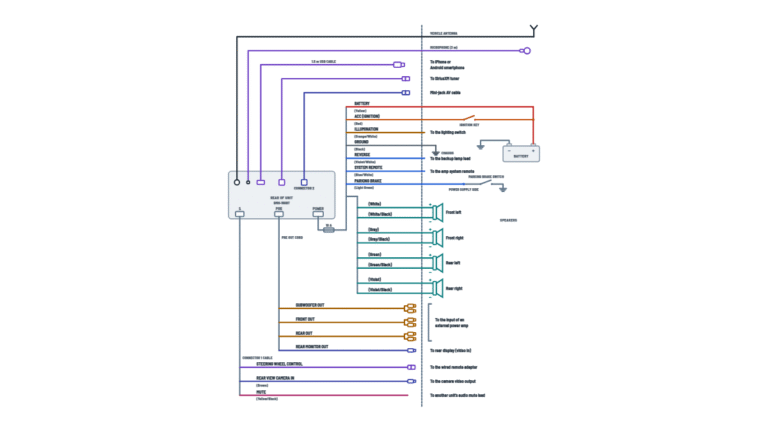
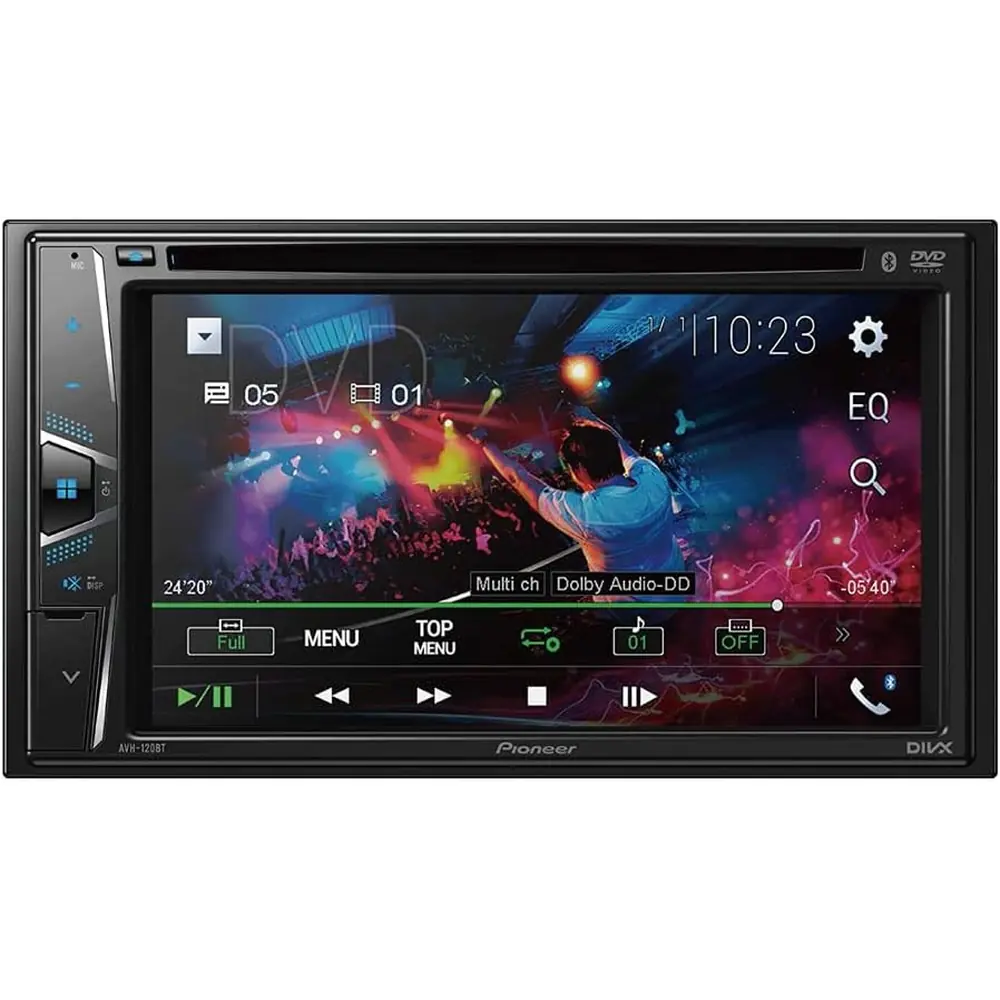
Pioneer AVH-120BT Multimedia Receiver Wiring Diagram
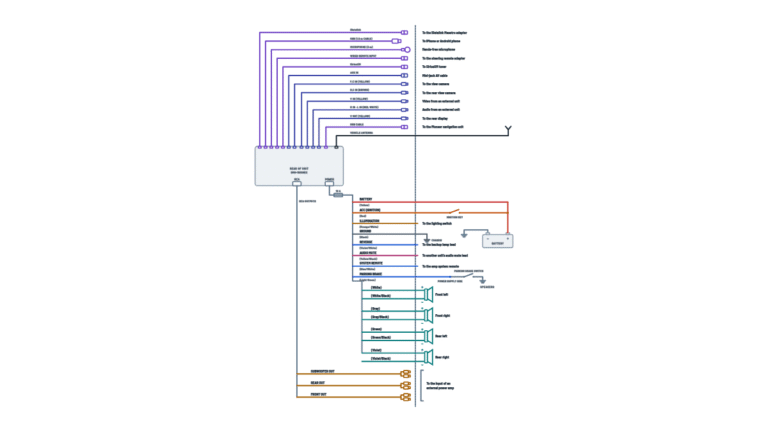
Complete diagram
Every cable and connector on the unit and where each one goes.
Terminals and components · 18
- Battery +
- Switched 12 V
- Ground
- Signals
- Illumination and preamp
- Speakers
- Video and camera
- Connectors
- Antenna and devices
Maximum length
Micro USB: up to 2 m; USB-C: up to 4 m. Longer cables may not work properly.
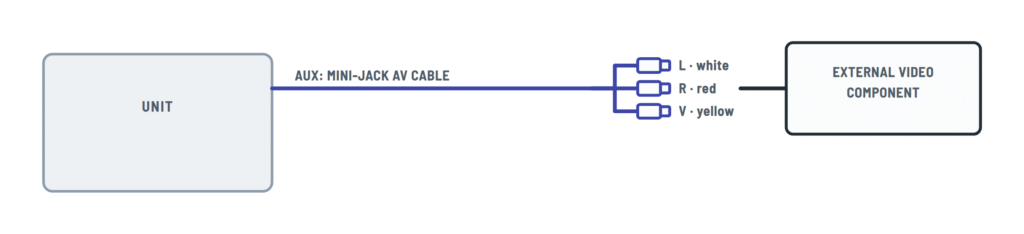
Cable
Use a mini-jack AV cable: with other cables the contact order may differ and disturb picture and sound.
Settings
Turn the AUX input on in the settings to use it.
Warning
Use it only for a reverse or mirror-image rear view camera; do not connect other equipment.
Camera power
Use a camera whose power lead goes to ACC. It needs the violet/white connected and the camera settings.
Caution
Do not connect it straight to the battery: vibration can wear the insulation where it enters the engine bay and cause a short.
Fuse
The rear panel has a 10 A fuse: replace it only with one of the same rating.
No ACC
It cannot be installed in a vehicle without an ACC position on the ignition switch.
Separate screws
The power amp ground and this unit's ground go to the body with different screws. A loose screw can cause smoke, fire or malfunction.
Why
The unit senses whether the car moves forward or backward and shows the rear camera.
Always active
It outputs the signal even if the audio source is off.
Required
This lead must go to the power supply side of the switch. Do not tamper with the parking brake interlock.
Caution
Tape any unused speaker leads. With a two-speaker system, do not connect anything to the spare leads.
With an external amp
With an external amp (without internal amp), these leads are not used.
Caution
Tape any unused speaker leads. With a two-speaker system, do not connect anything to the spare leads.
With an external amp
With an external amp (without internal amp), these leads are not used.
Caution
Tape any unused speaker leads. With a two-speaker system, do not connect anything to the spare leads.
With an external amp
With an external amp (without internal amp), these leads are not used.
Caution
Tape any unused speaker leads. With a two-speaker system, do not connect anything to the spare leads.
With an external amp
With an external amp (without internal amp), these leads are not used.
Plugs
L = left, R = right; connect with RCA cables (sold separately).
Plugs
L = left, R = right; connect with RCA cables (sold separately).
Subwoofer
The subwoofer output is monaural.
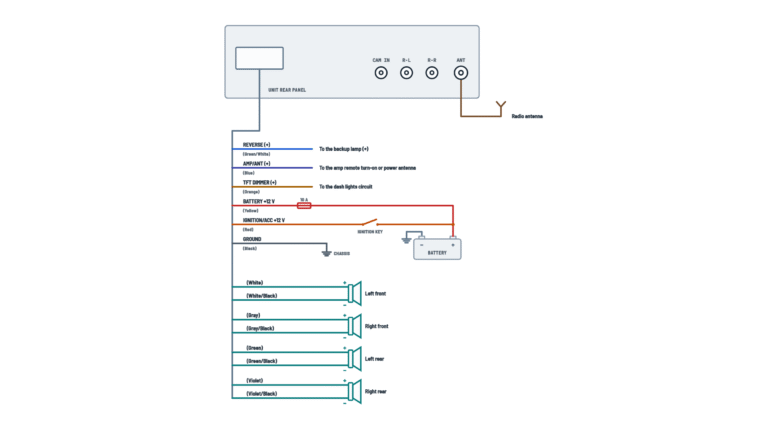
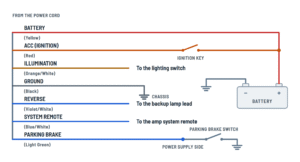
Power cord
Battery, ignition, ground, illumination and vehicle signals.
Terminals and components · 7
- Battery +
- Switched 12 V
- Ground
- Signals
- Illumination and preamp
Caution
Do not connect it straight to the battery: vibration can wear the insulation where it enters the engine bay and cause a short.
Fuse
The rear panel has a 10 A fuse: replace it only with one of the same rating.
No ACC
It cannot be installed in a vehicle without an ACC position on the ignition switch.
Separate screws
The power amp ground and this unit's ground go to the body with different screws. A loose screw can cause smoke, fire or malfunction.
Why
The unit senses whether the car moves forward or backward and shows the rear camera.
Always active
It outputs the signal even if the audio source is off.
Required
This lead must go to the power supply side of the switch. Do not tamper with the parking brake interlock.
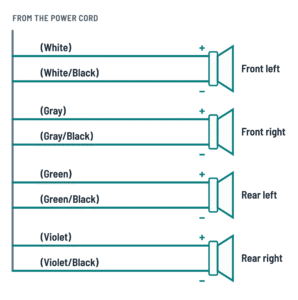
Speaker leads
The eight leads for the four speakers, with their polarity.
Terminals and components · 4
- Speakers
Caution
Tape any unused speaker leads. With a two-speaker system, do not connect anything to the spare leads.
With an external amp
With an external amp (without internal amp), these leads are not used.
Caution
Tape any unused speaker leads. With a two-speaker system, do not connect anything to the spare leads.
With an external amp
With an external amp (without internal amp), these leads are not used.
Caution
Tape any unused speaker leads. With a two-speaker system, do not connect anything to the spare leads.
With an external amp
With an external amp (without internal amp), these leads are not used.
Caution
Tape any unused speaker leads. With a two-speaker system, do not connect anything to the spare leads.
With an external amp
With an external amp (without internal amp), these leads are not used.
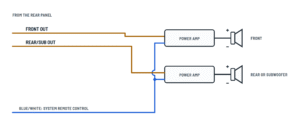
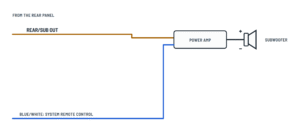
External power amp
RCA outputs to the amplifiers and the lead that turns them on.
Terminals and components · 4
- Preamp
- System remote
- Amplifier
Plugs
L = left, R = right; connect with RCA cables (sold separately).
Plugs
L = left, R = right; connect with RCA cables (sold separately).
Subwoofer
The subwoofer output is monaural.
Amp turn-on
Connect it to the system remote terminal of each amplifier.
Without internal amp
The speaker leads are not used with this connection.
With internal amp
Front and rear speakers still come from the speaker leads; the external amp only drives the subwoofer.
Camera and video
Rear view camera and external video component.
Terminals and components · 2
- Video
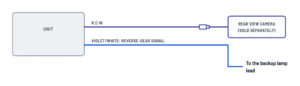
- Reverse
- External device
Warning
Use it only for a reverse or mirror-image rear view camera; do not connect other equipment.
Camera power
Use a camera whose power lead goes to ACC. It needs the violet/white connected and the camera settings.
Why
The unit senses whether the car moves forward or backward and shows the rear camera.
Cable
Use a mini-jack AV cable: with other cables the contact order may differ and disturb picture and sound.
Settings
Turn the AUX input on in the settings to use it.
About This Diagram
These diagrams are redrawn from pages 22–24 of the Pioneer AVH-120BT Multimedia Receiver manual, and we offer them completely free and in English. We have also categorized it in the Car Audio & Stereo (Automotive) section on Diagramverse, and it has been rated by 1 user with an average rating of 5.0. If you have any specific questions about the Pioneer AVH-120BT Multimedia Receiver Wiring Diagram, we suggest checking the Frequently Asked Questions (FAQs) section.
Printable Pioneer AVH-120BT Wiring Diagrams



Wiring Instructions
Before you start
The Pioneer AVH-120BT is made only for 12 V negative ground vehicles whose ignition switch has an ACC (accessory) position. If your vehicle has no ACC wire or circuit, do not install this receiver. The unit runs on 14.4 V DC (10.8 V to 15.1 V allowable), draws up to 10.0 A, and has a 10 A fuse in its power supply. If the fuse ever blows, replace it only with a fuse of the rating printed on the unit.
Tools and materials: a digital multimeter or 12 V test light, wire strippers, crimp connectors or solder and heat shrink, electrical tape, cable ties, and the supplied mounting screws. A vehicle-specific adapter harness and dash kit save you from cutting factory wiring. The manual gives no wire gauge. Splice to wire of the same gauge as the receiver's power cord, and don't extend the power leads with thinner wire.
Pioneer recommends professional installation. Get an experienced mobile-electronics installer if the job means drilling, working near airbags, connecting to a factory backup camera (that needs an adapter, sold separately), or wiring a steering wheel control interface. Before you begin, disconnect the battery negative (–) cable.
Choosing the right diagram
The Complete tab shows everything. Power and Speakers cover a basic install. On Power amp, choose Without internal amp if the external amplifier drives all your speakers. In that case the speaker leads are not used. Choose With internal amp if the receiver still drives the front and rear speakers through its leads while an external amp runs extra speakers or a subwoofer. On Camera and video, choose Rear camera for a backup camera on R.C IN, or External video for a player on the AUX input.
Step-by-step wiring
- Make sure the battery negative cable is disconnected and kept away from the battery post.
- Connect Black: ground first. Run it to clean, bare metal on the vehicle body with its own screw. If you also fit a power amp, ground the amp on a different screw.
- Use the meter to find a terminal that has 12 V all the time and connect Yellow: battery + to it. Do not run the yellow lead straight to the battery. Engine vibration can wear through its insulation at the firewall and cause a short.
- Find a terminal that has 12 V only with the key at ACC or ON, and connect Red: ACC (switched 12 V) to it.
- Connect Orange/white: illumination to the lighting switch terminal so the screen dims when the headlights are on.
- Connect Light green: parking brake to the power supply side of the parking brake switch. Never ground it, bypass it or tie it off.
- If you are adding a camera, connect Violet/white: reverse signal to the backup lamp lead whose voltage changes when the shifter is in REVERSE (R).
- Connect the speaker pairs to FL, FR, RL and RR, keeping + and – correct. Use speakers rated over 50 W and 4 to 8 Ω. With only two speakers, leave the unused speaker leads unconnected and tape each one separately.
- For external amps, run RCA cables from FRONT OUT and REAR/SUB OUT, and connect Blue/white: system remote to the amp's remote terminal. Blue/white supplies 300 mA max, so use a relay for heavier loads.
- Plug the antenna cable into ANT. Connect the camera's RCA cable to R.C IN, and only a rear view camera goes there. Power the camera from an ACC circuit. Connect an external video player through a mini-jack AV cable to AUX.
- Insulate every unused lead with tape. Do not shorten any lead, because that can defeat the built-in protection circuits.
Testing and start-up
Test everything before you screw the unit into the dash. Reconnect the battery negative and turn the key to ACC.
- With the key at ACC, you should measure about 12 V or more on red. Yellow should still read 12 V with the key off. Ground should show near-zero ohms to the body.
- Turn the key off and press RESET with a pen tip. Do this before first use. Then start the engine and pick the language.
- Check that every speaker plays and that Fader/Balance moves the sound to the right place. With a two-speaker system, set Front and Rear to 0.
- Set Preout to Rear or Subwoofer to match your amp wiring. Turn on Back Camera Input and AUX Input if you use them.
- With the parking brake on and your foot on the brake pedal, shift into reverse. The camera image should appear. If it shows while you drive forward, change Camera Polarity.
- Check that the amp turns on and off with the key.
Safety notes
The 12 V system can deliver very high current. A bare yellow lead touching metal can melt wiring or start a fire, so fuse and insulate everything. Don't tap the receiver's power cord to feed other devices, because that overloads it. Route cables away from the steering column, shifter, pedals, seat tracks, airbags and hot surfaces, and secure them with clamps or tape. Leave about 5 cm of clear space behind the unit for ventilation. Never open the receiver: it has high-voltage parts and a laser inside.
Troubleshooting
| Symptom | Probable Cause | What to Check |
|---|---|---|
| The receiver won't turn on at all | Blown 10 A fuse, no 12 V on red or yellow, or a poor ground | With the key at ACC, measure from red to chassis and from yellow to chassis: each should read about 12 V. Check the black lead's screw is tight on bare metal. Replace the fuse only with the rated value. |
| Clock, presets and pairing are lost every time I turn the key off | Yellow is on a switched circuit, or yellow and red are swapped | With the key off, yellow must still read 12 V. Move it to a constant 12 V terminal and put red on the ACC terminal. |
| The stereo stays on with the key out and the battery goes flat | Red is connected to constant 12 V or joined to yellow | With the key off, red should read 0 V. Move it to a terminal controlled by the ignition switch. |
| AMP Error appears and there is no sound | A speaker lead is shorted to metal or to another lead, the speakers are below 4 Ω, or an unused lead is bare | Disconnect the speakers and check each pair for shorts to chassis. Confirm the speakers are 4 to 8 Ω and tape unused leads. If the error remains after an ignition off/on cycle, see a Pioneer service station. |
| Video never plays and a caution message covers the screen even when parked | Light green is not connected, or it is on the ground side of the parking brake switch | Move it to the power supply side of the switch. Then, with your foot on the brake pedal, apply the parking brake, release it, and apply it again. |
| Screen doesn't switch to the camera when I shift into reverse | Back Camera Input is Off, the RCA cable is loose at R.C IN, or violet/white is on the wrong lamp wire | Turn Back Camera Input On, reseat the RCA cable at R.C IN, and check that violet/white goes to the backup lamp lead whose voltage changes in reverse. Confirm the camera is powered from ACC. |
| The camera image pops up while I'm driving forward | Camera Polarity doesn't match how the reverse signal behaves | Park safely with your foot on the brake, shift into reverse, and change Camera Polarity between Battery and Ground. |
| Black screen when I reverse, and no camera is installed | Back Camera Input is set to On | Set Back Camera Input to Off in the system settings. |
| External amplifier never turns on | Blue/white is not connected to the amp's remote terminal, or the amp ground or power is missing | With the key at ACC, measure about 12 V on blue/white. Check the amp has its own ground screw. If blue/white also feeds an antenna booster, keep the total under 300 mA or add a relay. |
| Rear speakers on the amp are silent but the subwoofer works, or the other way round | Preout is set to the wrong mode for your REAR/SUB OUT wiring | With the source off, set Preout to Rear or Subwoofer to match the amp connected to REAR/SUB OUT. Turn Subwoofer On if you use a sub. |
| Thin sound with very little bass | One speaker is wired with + and – reversed | Check each pair: the solid color goes to + and the color with black stripe goes to –, for example white to + and white/black to –. |
| Screen doesn't dim at night, or picture or sound is bad from AUX | Orange/white is not on the lighting switch, or AUX is wired with a non-matching cable | Check for 12 V on orange/white with the headlights on and set Dimmer Trigger to Auto. For AUX, use a mini-jack AV cable (yellow video, red right, white left) and turn AUX Input On. |