Alpine KTP-445U Audio Amplifier Wiring Diagram

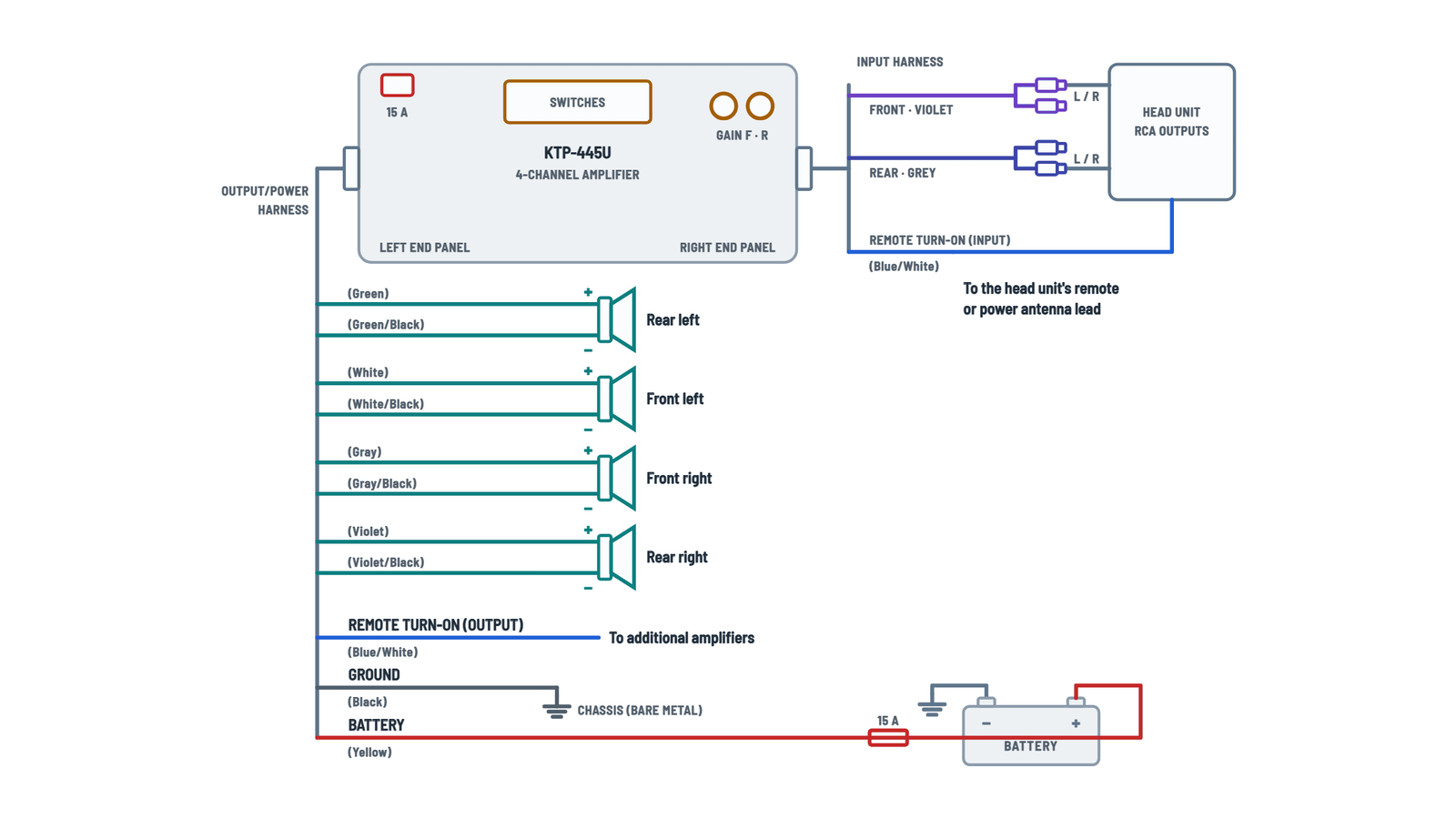
Amplifier connections
Power, ground, remote turn-on, RCA inputs, speaker outputs and settings.
Terminals and components · 12
- Battery +
- Ground
- Remote turn-on
- Front RCA
- Rear RCA
- Speakers
- Settings
Options
- OEM radio circuit: do not use it if its fuse is rated less than 15 A.
- Straight to the battery: with a 15 A fuse (sold separately) as close as possible to the +.
Caution
Connect the yellow last and never to the fuse block. The amp has its own 15 A fuse: replace it only with the same rating.
True ground
Check continuity between that point and the battery −. Ground all audio components at the same chassis point to avoid ground loops.
Speaker level
With speaker level input it is not required (remote sensing), but it may not work depending on the signal; in that case connect it to ACC.
When to use it
If the head unit has no remote lead, if it is only active with the radio on, or if it is a logic-level signal below +12 V.
Caution
Tied to the ignition with a 3 A fuse, the amp stays on with the key; the SPST switch lets you turn it off so it does not drain the battery.
Speaker level
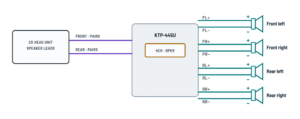
If the head unit has no RCA outputs, cut off the RCA jacks and connect the twisted pairs to its speaker outputs (switch on SPKR).
Caution
Connect each output to its speaker observing + and −; never connect speaker leads together or to the chassis.
Caution
Connect each output to its speaker observing + and −; never connect speaker leads together or to the chassis.
Caution
Connect each output to its speaker observing + and −; never connect speaker leads together or to the chassis.
Caution
Connect each output to its speaker observing + and −; never connect speaker leads together or to the chassis.
High-pass filter (1 and 2)
Cutoff Switches OFF 1 and 2 up (default) 60 Hz 1 down, 2 up 80 Hz 1 up, 2 down 120 Hz 1 and 2 down Input
- Configuration: down = 4 channel (default); up = 2 channel (also for bridged output).
- Type: up = RCA (default); down = speaker level.
How to set it
Gain at minimum; raise the head unit volume until it distorts and back it down one step. Then raise the gain until it distorts and reduce it slightly.
Speaker level
With speaker level inputs, set both gains between minimum and the 9 o'clock position.
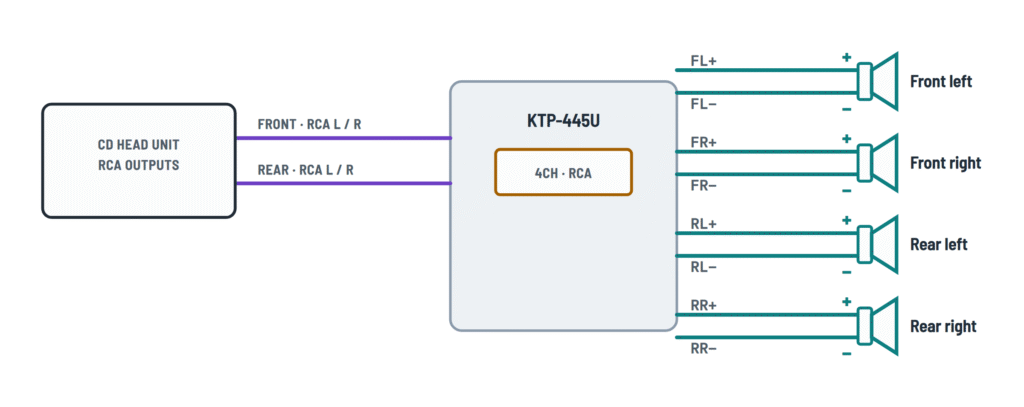
4-channel systems
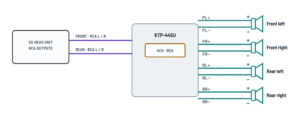
Four speakers with RCA input, speaker level input or a player.
Terminals and components · 4
- Source
- Input
- Switches
- Remote turn-on
- Speakers
Speaker level
Cut off the RCA jacks of the input harness and connect their pairs to the head unit's speaker wires.
Cable
RCA to mini jack cable (sold separately) from the player's output.
2-channel systems (bridged)
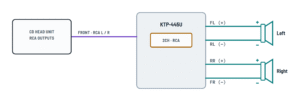
Two speakers with bridged output and two-channel input.
Terminals and components · 4
- Source
- Input
- Switches
- Remote turn-on
- Speakers
Speaker level
Cut off the RCA jacks of the input harness and connect their pairs to the head unit's speaker wires.
Cable
RCA to mini jack cable (sold separately) from the player's output.
Important
With 2-channel input, the input configuration switch must be up (2CH).
Bridged output
- Left: + to front left (+) and − to rear left (−).
- Right: + to rear right (+) and − to front right (−).
About This Diagram
These diagrams are redrawn from pages 6–10 of the Alpine KTP-445U Audio Amplifier manual, and we offer them completely free and in English. We have also categorized it in the Car Audio & Stereo (Automotive) section on Diagramverse, and it has been rated by 1 user with an average rating of 5.0. If you have any specific questions about the Alpine KTP-445U Audio Amplifier Wiring Diagram, we suggest checking the Frequently Asked Questions (FAQs) section.
Printable Alpine KTP-445U Wiring Diagrams








Wiring Instructions
Before you start
Pick the tab that matches your Alpine KTP-445U's system. Use Complete for a standard 4-channel install. Choose With remote lead if your head unit has a +12 V remote turn-on or power antenna lead, or With SPST switch if you have to trigger the amp from an ignition source. Use 4 channels for four speakers or 2 channels for two speakers on bridged outputs. Then choose RCA input, Speaker level or Stand alone (MP3) to match your signal source.
This amplifier works only in 12 V negative-ground vehicles. Besides the supplied harnesses, you need:
- RCA extension cables if you use the RCA inputs
- A 15 A inline fuse holder if you connect to the battery
- A 3 A fuse if you tap an ignition circuit
- Crimp connectors, or solder and heat shrink
- A multimeter, rubber grommets and cable ties
No wire gauge is specified. If you extend the power or ground leads, size the wire for at least the 15 A fuse and the length of the run, and keep the ground short. You normally don't need a permit. If you aren't comfortable working near the battery, airbags or factory wiring, have an authorized installer do the job.
Turn off all audio components and disconnect the cable from the negative battery terminal before you start wiring.
Step-by-step wiring
- Mount the amplifier in one of two ways: with the brackets and M4 x 12 self-tapping screws, or with cable ties through the mounting loops. Before you drill, check behind the surface for fuel lines, tanks and wiring. Keep the vents clear and avoid damp or dusty spots.
- Keep the unit and its leads at least 10 cm (3-15/16 in) from the car harness, and keep the power lead away from signal leads. Use grommets wherever a wire passes through metal.
- Connect Black: ground to a clean, bare metal spot on the chassis, removing any paint or grease. An existing factory screw works well, but never use bolts from the brake, steering or other safety systems. Ground all your audio components to this same point.
- Connect the speaker outputs FL, FR, RL and RR. On each pair, the plain wire goes to the speaker's + and the wire with the black stripe goes to −. On the 2 channels tab, wire each speaker across the bridged channels shown and keep the polarity consistent. Never connect speaker leads together or to the chassis.
- Connect the inputs:
- RCA: plug the Front RCA input (violet sleeve) and the Rear RCA input (grey sleeve) into the head unit's line outs. For 2-channel input, use the front input only.
- Speaker level: cut off the RCA jacks and connect the head unit's speaker outputs to the matching twisted-pair wires, plus to plus.
- MP3 player: use an RCA-to-mini-jack cable.
- Connect the Remote turn-on lead (blue/white in) to the head unit's remote turn-on or power antenna lead. That lead must be a positive +12 V trigger. Use a switched ignition source instead in any of these cases: the head unit has no such lead, the lead is live only in radio mode, or it's a 5 V, negative-trigger or weak output. Fit a 3 A fuse as close to the ignition tap as possible, and add an SPST switch if you want manual control. With speaker-level inputs, remote sensing may make this lead unnecessary. If the amp doesn't turn on, connect the lead to ACC.
- If you have more amplifiers, run the Remote out lead (blue/white out) to their remote turn-on leads.
- Set the switches on the bottom panel and turn both GAIN controls to minimum:
- Input configuration: down for 4CH, up for 2CH. Up is required for bridged output.
- Input type: up for RCA, down for SPKR.
- High-pass filters: off with both switches up, or set to 60 Hz, 80 Hz or 120 Hz for small speakers.
- Connect Yellow: battery (15 A fuse) last. Use either an OEM radio fused circuit rated 15 A or more, or run it straight to battery positive with a 15 A fuse as close to the terminal as possible. Never connect it to the fuse block. Leave the fuse out for now.
- Insert the fuse and reconnect the negative battery cable.
Testing and start-up
Before you power up, measure resistance between your ground point and battery negative. You should read continuity, close to 0 ohms. With the head unit on, the yellow lead should read battery voltage and the blue/white remote lead about +12 V to ground. When the head unit turns off, the amp should turn off too.
Start at low volume and use balance and fader to confirm each speaker plays from the right position. Then set the gain:
- With the amp gain at minimum, play a dynamic CD.
- Raise the head unit volume until the sound distorts, then turn it down one step.
- Raise the amp gain until distortion appears, then turn it back slightly.
With speaker-level inputs, the gain usually ends up between minimum and the 9 o'clock position.
Safety notes
- A short on the battery lead can melt wire and start a fire. Fuse it close to the battery, and never replace the 15 A fuse with a higher rating.
- Keep metal tools and loose parts away from the power terminals, fuses, speaker terminals and RCA connectors.
- If you use an SPST switch, turn it off when the vehicle isn't running. Otherwise the amp stays on and drains the battery.
- Stop using the amp right away if it smells hot, smokes or keeps cutting out.
Troubleshooting
| Symptom | Probable Cause | What to Check |
|---|---|---|
| The amp won't turn on at all | Blown 15 A fuse, an open inline fuse at the battery, or a poor ground | Check both fuses. Measure the voltage between Yellow and Black at the amp: it should be battery voltage. Measure resistance from the ground point to battery negative: it should be close to 0 ohms. |
| Power is present but the amp stays off | No turn-on signal on the Remote turn-on lead | With the head unit on, measure blue/white (in) to ground: you need about +12 V. A 5 V or negative-trigger output won't work. Move the lead to a switched ignition source with a 3 A fuse. |
| The amp works on radio but shuts off on CD or other sources | The remote lead is wired to a power antenna output that's live only in radio mode | Measure the lead in each source mode. If the voltage drops away, connect the remote lead to a switched ignition source with a 3 A fuse. |
| With speaker-level inputs, the amp doesn't turn on | Remote sensing doesn't detect this signal source | Connect the Remote turn-on lead to ACC or a switched +12 V source, and confirm the input type switch is set to SPKR. |
| The amp drains the battery overnight | The remote lead is wired to constant +12 V, or the SPST switch was left on | With the ignition off, measure blue/white to ground: it should read 0 V. Move the lead to a switched source, or turn the SPST switch off. |
| Loud whine or hum that changes with engine speed | Bad ground or a ground loop, or leads routed alongside the car harness | Clean the ground point down to bare metal and ground all audio components to the same point. Keep the leads at least 10 cm (3-15/16 in) from the car harness and away from the power lead. |
| Thin sound with weak bass, or the stereo image sounds odd | Reversed polarity on one speaker | Check each output pair: the plain wire (white, gray, green or violet) goes to the speaker's + and the striped wire to −. |
| Rear speakers are silent with a 2-channel source | The input configuration switch is still set to 4CH | Slide the input configuration switch up to 2CH. Also make sure the source is connected to the front input. |
| Nothing from the speakers even though the amp is on | Wrong input type selected | Set the input type switch up for RCA or down for SPKR to match how the source is connected. |
| Sound distorts at moderate volume | Gain set too high, especially with speaker-level inputs | Repeat the gain setup from minimum. With speaker-level inputs, keep the gain between minimum and 9 o'clock. |
| The 15 A fuse keeps blowing | A speaker lead is shorted to the chassis or to another lead, or the power lead is chafed | Disconnect the speakers and check each output wire for continuity to the chassis: there should be none. Inspect the power lead where it passes through metal. |