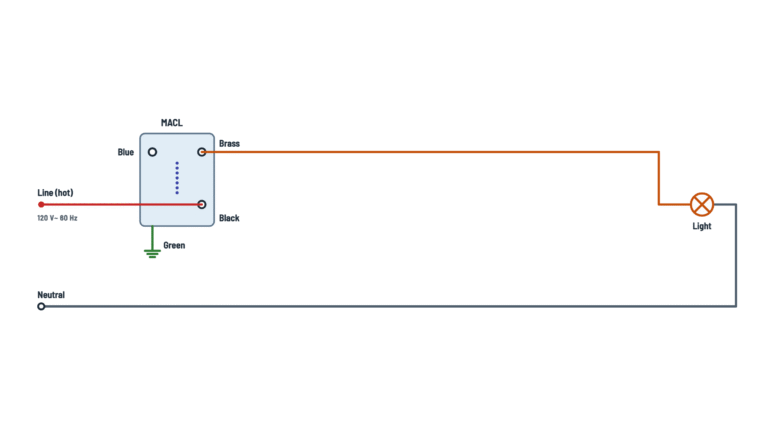
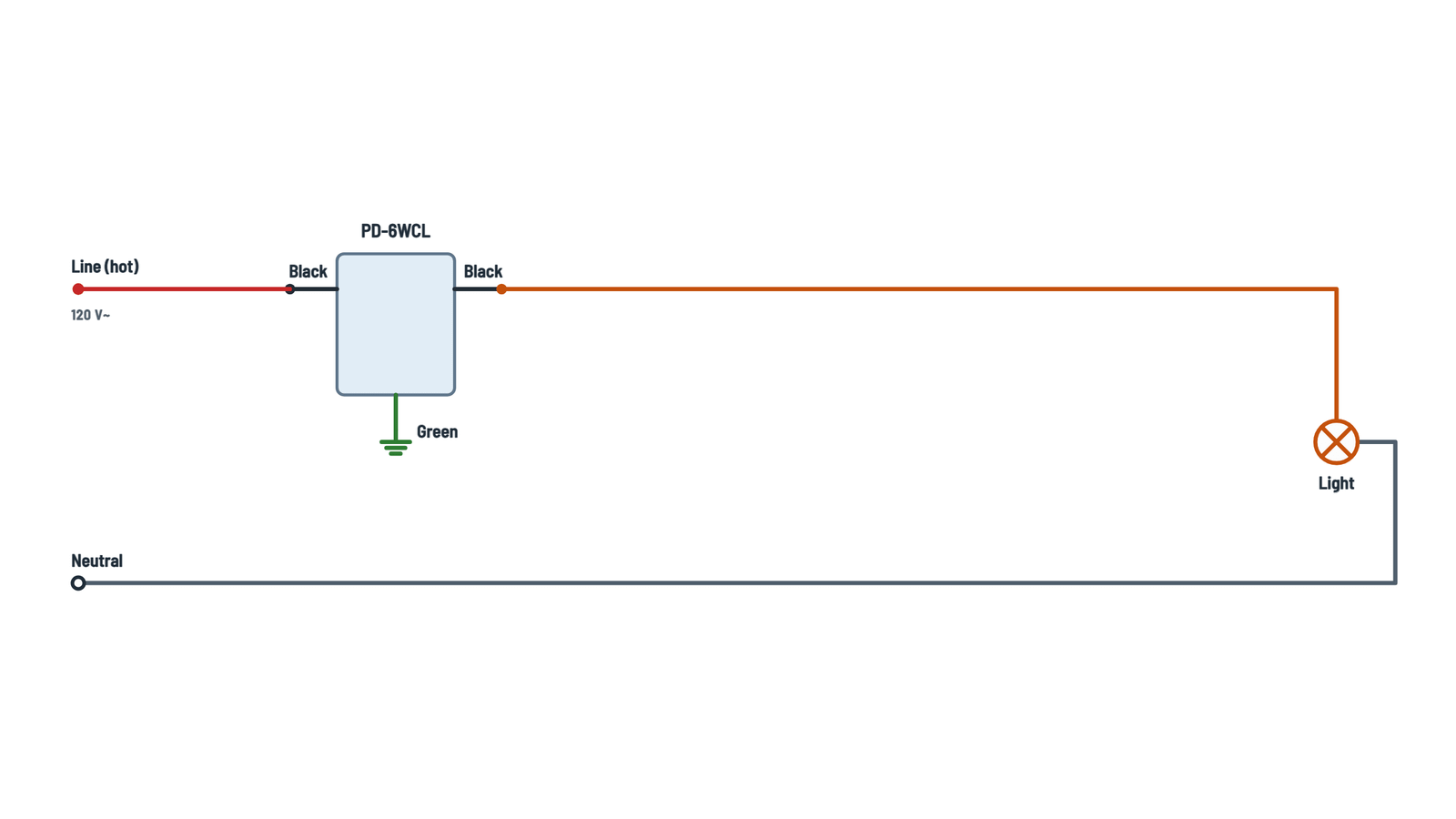
Lutron Caseta PD-6WCL Dimmer Wiring Diagram
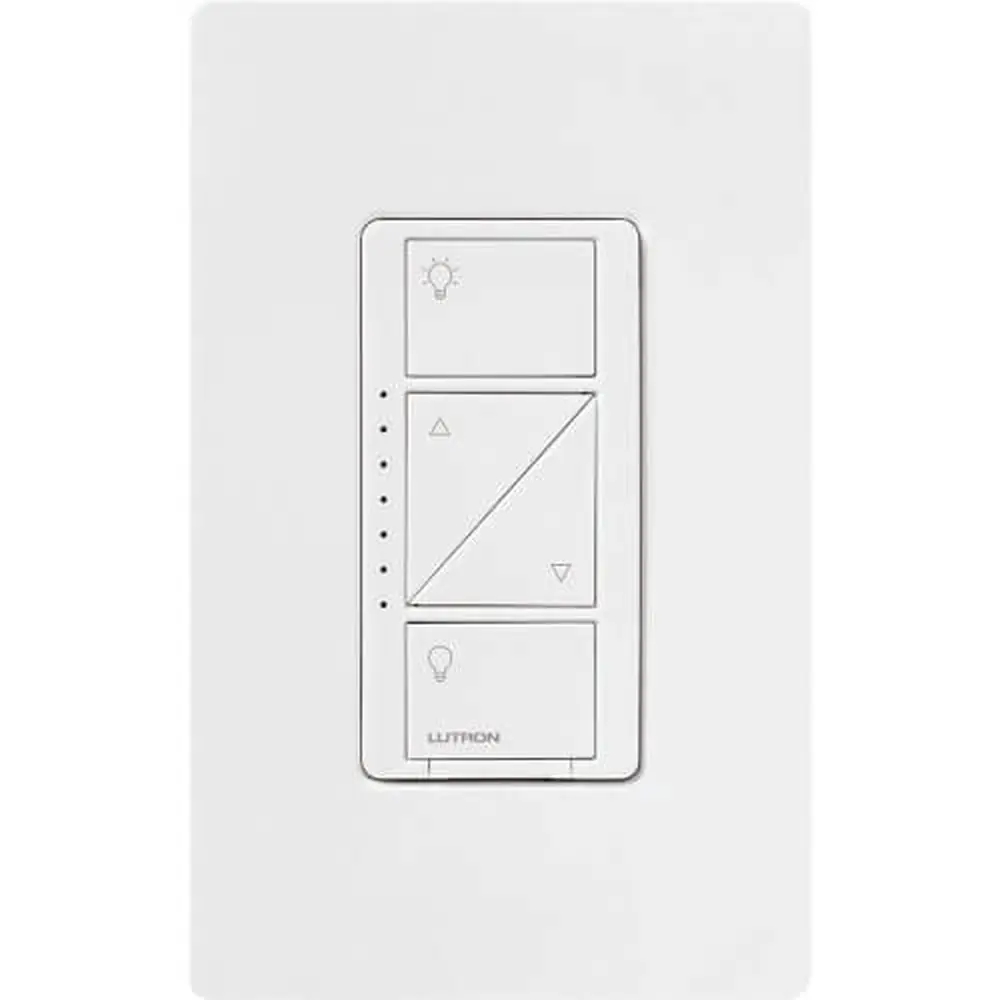
Complete diagram
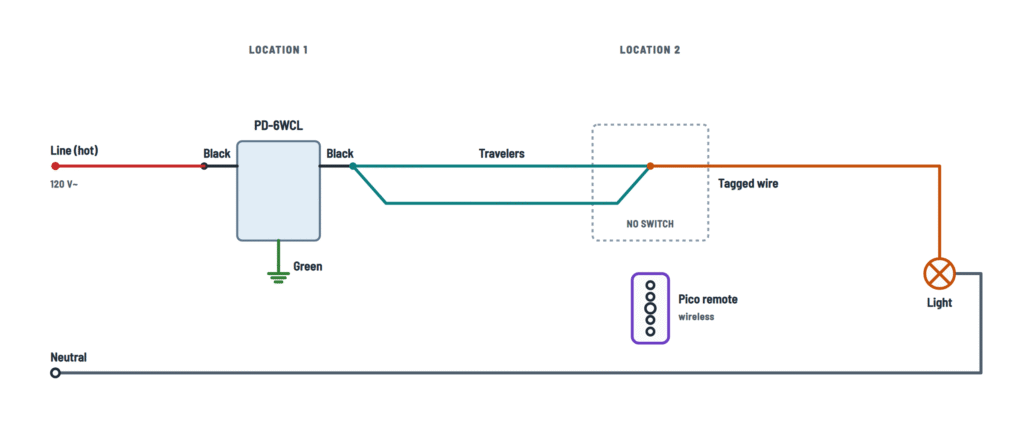
PD-6WCL wiring for one location or 3-way with a Pico remote.
Terminals and components · 6
- Line
- To the light
- Black wires
- Travelers
- Neutral
- Ground
How to connect it
Splice either wire in the box to either dimmer black wire with a wire connector.
Tagged wire
In each box, first tag the wire on the old switch's different-colored screw. The one in the dimmer box goes to a black wire; it may be the line or the one going to the light.
In the box
If there are spliced neutrals in the box, leave them as they are.
Ratings
- Dimmable LED or CFL: up to 150 W
- Incandescent or halogen: up to 600 W
Ganged in one box
Removing side sections lowers the maximum wattage:
Sides removed None One Two LED & CFL 150 W 150 W 150 W Incand. & halogen 600 W 500 W 400 W Replacing bulbs
Pull out the dimmer's FASS switch to remove power at the light socket.
How to connect it
Either black wire to either wire in the box; the other black wire to the remaining wire.
How to connect it
- One black wire → tagged wire.
- The other black wire → both travelers together, under one wire connector.
Location 1
Both travelers with the dimmer's second black wire.
Location 2
Both travelers with the tagged wire, under one wire connector. The old switch is removed.
Where it comes from
From the dimmer's second black wire.
Where it comes from
From the splice at location 2 (tagged wire + travelers).
Pair it with the dimmer
- Hold the dimmer “off” button 6 s, until its LEDs blink.
- Hold the Pico “off” button 6 s, until the lights flash 3 times.
Range
Up to 30 ft (9 m) from the dimmer.
If the box has no ground
It may be installed with a nonmetallic faceplate and screws, or with the circuit protected by a GFCI. In that case, cap or remove the green wire.
About This Diagram
This diagram is redrawn from page 1 of the Lutron Caseta PD-6WCL Dimmer manual, and we offer it completely free and in English. We have also categorized it in the Light Switches & Dimmers (Home Electrical) section on Diagramverse, and it has been rated by 1 user with an average rating of 5.0. If you have any specific questions about the Lutron Caseta PD-6WCL Dimmer Wiring Diagram, we suggest checking the Frequently Asked Questions (FAQs) section.
Printable Lutron Caseta PD-6WCL Wiring Diagrams



Wiring Instructions
Before you start
First work out which version of the Lutron Caseta PD-6WCL diagram matches your box. Remove the wallplate and look at the existing switch. Some switches have just two screws that control the light, plus a ground screw, and are the only switch for that light. For those, use the Single pole variant. If two switches control the same light, each switch has three screws plus a ground, and one of those screws is a different color. For that setup, use the 3-way with Pico remote variant. In that variant the PD-6WCL replaces one switch and a Pico remote replaces the other. If three or more switches control the light, you have a multi-location circuit. That follows the same idea with extra Pico remotes, and it is not covered step by step here.
Tools and materials: a flat-head screwdriver, a Phillips-head screwdriver, pliers, the three wire connectors and two screws that come with the dimmer, masking tape for tags, and a non-contact voltage tester. For the 3-way variant you also need a Pico remote with its wall-mounting kit and a wallplate.
Wire gauge: the dimmer has its own pre-attached leads, so you never change the house wiring. Match the existing conductors. Check that the wire connectors are rated for the number and size of wires you are joining. If you're not sure of the circuit size, check the breaker and the cable jacket markings.
Load check: the PD-6WCL is rated 120 V~ 50/60 Hz. It handles up to 150 W of dimmable LED or CFL, or up to 600 W of incandescent or halogen. If you install it in a box next to other dimmers or switches, you must break off side sections, and that lowers the incandescent/halogen rating. With one side removed it drops to 500 W, and with both sides removed it drops to 400 W. The LED/CFL rating stays at 150 W. Add up the bulb wattage on the circuit before you buy.
When to call a professional: call a licensed electrician if you find aluminum wiring, can't tell which wires do what, or find a box with no ground. Do the same if more wires are in the box than the diagram shows, or if your area requires a permit for device replacement. All work must follow national and local electrical codes.
Step-by-step wiring
- Turn off the breaker or remove the fuse for the circuit. Confirm with a voltage tester that every wire in the box is dead, including at the second switch location in a 3-way circuit.
- Remove the wallplate, unscrew the old switch and pull it out of the box.
- 3-way only: before you disconnect anything, put a tag on the wire attached to the different-color (darker) screw. That is the wire that will join a black lead of the dimmer. The other two wires are the Travelers. Do the same at Location 2 when you get there.
- Disconnect the wires from the old switch. Leave any Neutral bundle (usually white wires joined at the back of the box) exactly as it is. The dimmer has no neutral.
- If you are ganging the dimmer with other devices, break off the inner side sections by bending them back and forth with pliers. Never remove the outer sections of a dimmer at the end of a gang.
- Connect the Green wire of the dimmer to the bare copper or green ground wire in the box with a wire connector.
- Single pole: connect either of the two remaining wires to either Black wire of the dimmer, then the last wire to the other black wire. The black wires are interchangeable.
- 3-way, Location 1: connect the tagged wire to one Black wire. Splice both Travelers together with the other black wire so they act as a single conductor.
- Tug each wire gently to confirm it is held firmly. Fold the wires into the box, mount the dimmer with the screws provided, attach the wallplate adapter and snap on the wallplate.
- 3-way, Location 2: remove the old switch and tag the wire on its different-color screw. Splice the tagged wire and both Travelers together in one connector, and cap the ground neatly. No device stays in this box. Fit the Pico wall bracket and wallplate over it.
Testing and start-up
Turn the breaker back on. The status LEDs on the dimmer should light up, and pressing On should bring the light to full brightness. Use the raise and lower buttons to check that the light dims smoothly across the whole range. If nothing happens, make sure the FASS switch on the front of the dimmer is pushed fully in.
To pair a Pico remote, press and hold Off on the dimmer for about 6 seconds until its status LEDs flash. Then press and hold Off on the Pico for about 6 seconds until the light flashes three times. Repeat this for each extra remote. To use the app instead, follow the setup in the Lutron app with the Smart Bridge, which is sold separately.
With a non-contact tester, you can confirm that the wire running from the dimmer toward the light is dead with the dimmer off. If your LED bulbs flicker or drop out at low levels, adjust the low-end trim. Some bulbs dim poorly no matter what, so use bulbs marked dimmable.
Safety notes
- This is a 120 V device. Always isolate at the breaker. The FASS switch is only for changing bulbs and is not a substitute for turning off the breaker.
- In 3-way circuits, power may come into the box at either location. Test every wire in both boxes.
- Control only permanently installed fixtures with dimmable LED, dimmable CFL, halogen or incandescent lamps. Never use it on receptacles, motors, fans or transformer-supplied appliances.
- The dimmer is for indoor use only, at temperatures between 32 °F (0 °C) and 104 °F (40 °C).
- Never connect the neutral or the ground to a black lead.
Troubleshooting
| Symptom | Probable Cause | What to Check |
|---|---|---|
| Light doesn't turn on and the dimmer LEDs stay dark | Breaker off or tripped, FASS switch pulled out, or a loose connector on the line wire | Check the breaker and push the FASS switch fully in. With power off, retighten the connector on each Black wire. With power on, confirm 120 V at the line wire using a tester. |
| Breaker trips as soon as I turn it back on | A black lead is joined to the neutral or ground, or a bare wire is touching the metal box | Turn the power off and confirm the Neutral bundle is untouched. The green lead should go only to ground, and the black leads only to the line wire and the wire toward the light. Look for exposed copper outside the connectors. |
| In a 3-way, the dimmer LEDs come on but the light never does | The Travelers are not spliced to the tagged wire at Location 2, or the travelers are not joined together at Location 1 | Open both boxes. At Location 1, both travelers must share a connector with one black lead. At Location 2, both travelers and the tagged wire must share one connector. |
| In a 3-way, nothing works at all | The wires were not tagged, so a traveler went where the tagged wire belongs | Turn off the power and use a tester to find the wire that is live with the circuit on. That wire is the line or the light wire. Rewire so the common wire from the old switch's different-color screw is on its own black lead. |
| I kept the old switch at the other end and the light behaves erratically | The PD-6WCL does not work with a mechanical 3-way switch | Remove the old switch, splice its tagged wire to both travelers, and mount a Pico remote in that location instead. |
| Light flickers, flashes or shuts off when dimmed low | Bulbs that aren't dimmable, or the low-end trim is set too low for the LED/CFL bulbs | Make sure every bulb is marked dimmable and adjust the low-end trim. If it still happens, try a different dimmable bulb model. |
| Dimmer gets hot or shuts down in a multi-gang box | The load is over the rating after side sections were removed | Add up the bulb wattage. The limit is 150 W for LED/CFL, and 600/500/400 W for incandescent with none, one or two side sections removed. Reduce the load or separate the devices. |
| Pico remote doesn't control the light | Not paired, more than 30 ft (9 m) away, weak battery, or battery inserted wrong | Repeat the pairing (hold Off on the dimmer, then Off on the Pico, until the light flashes three times). Move the Pico closer and check the battery's orientation and charge. |
| There's no bare or green wire in my box | Older wiring with no grounding means | Install it only with a nonmetallic, noncombustible faceplate and nonmetallic screws, or on a GFCI-protected circuit. In either case, cap or remove the Green wire. Otherwise, have an electrician add a ground. |