Lutron MACL-153M Dimmer Wiring Diagram

Complete diagram
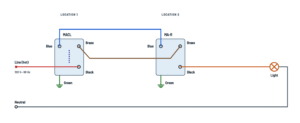
MACL-153M wiring for one, two or more locations.
Terminals and components · 6
- Line
- To the light
- Traveler (blue)
- Brass
- Neutral
- Ground
What it does
Brings 120 V to the dimmer; no neutral is used.
How to connect it
Wrap the wire fully around the screw and tighten it (12 or 14 AWG wire), or strip 1/2 in (13 mm) and push it into the rear push-in terminal (14 AWG wire only).
Marked wire
Before disconnecting the old switches, mark the wire on the different-colored screw (“COMMON” or “COM”, usually black) in each box. That wire goes to the black screw. One of the two marked wires comes from the breaker and the other goes to the light; it does not matter which one is in each box.
How to connect it
Wrap the wire fully around the screw and tighten it (12 or 14 AWG wire), or strip 1/2 in (13 mm) and push it into the rear push-in terminal (14 AWG wire only).
In the box
If there are spliced neutrals in the box, leave them as they are.
Ratings
- Dimmable CFL or LED lamps: up to 150 W
- Incandescent or halogen: up to 600 W
Ganged in one box
If you remove the side sections to gang several devices, the maximum incandescent wattage drops with the CFL/LED load:
CFL/LED None removed One side Both sides 0 W 600 W 500 W 400 W 1–25 W 500 W 400 W 300 W 26–50 W 400 W 300 W 200 W 51–75 W 300 W 200 W 100 W 76–100 W 200 W 100 W 50 W 101–125 W 100 W 50 W 0 W 126–150 W 0 W 0 W 0 W Adjust the range for CFLs or LEDs
- Hold T and L until an indicator light blinks.
- Hold L to the bottom indicator; tap R until all bulbs are on and stable.
- Tap T to save.
Program for the existing switch
- Hold T and R until an indicator light blinks.
- Using L, select indicator IL1.
- Tap T once to save.
Ratings
- Dimmable CFL or LED lamps: up to 150 W
- Incandescent or halogen: up to 600 W
Rules
- Only one MACL per circuit; the other locations use companions.
- Up to 9 companions in 4-way wiring.
- Up to 150 ft (46 m) of wire from the MACL to the last companion.
Programming
No need to program the MACL: the factory setting (IL4) is the one for a Maestro companion.
How to rewire it
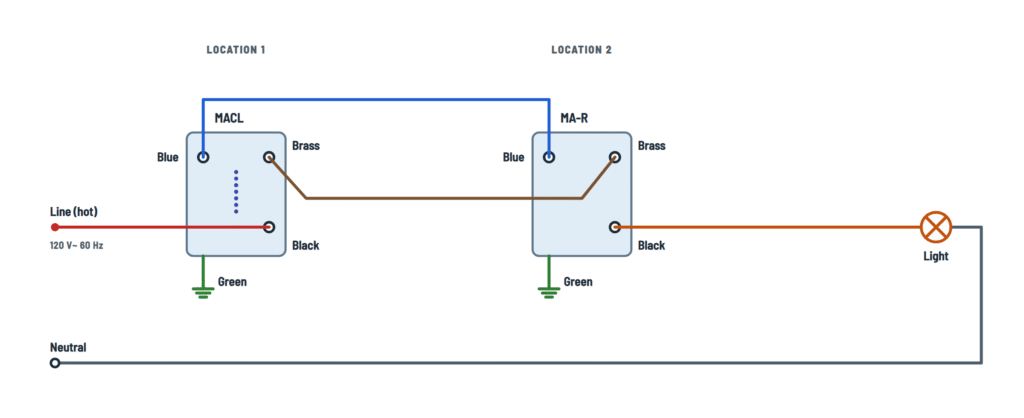
- Wire from the MACL blue screw → one traveler screw.
- Jumper → COM screw.
- The other traveler screw is left unused.
Program for the existing switch
- Hold T and R until an indicator light blinks.
- Using L, select indicator IL1.
- Tap T once to save.
One location
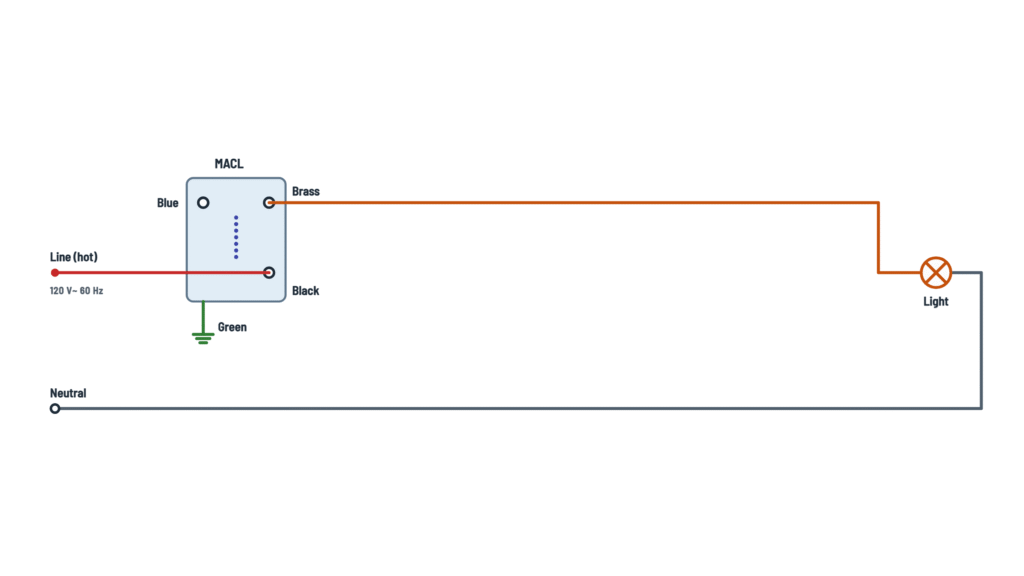
Only the black and brass screws are used.
Where it goes
To a traveler screw on the existing switch.
Which wire to use
One of the two wires running between the boxes (the unmarked ones).
Where it goes
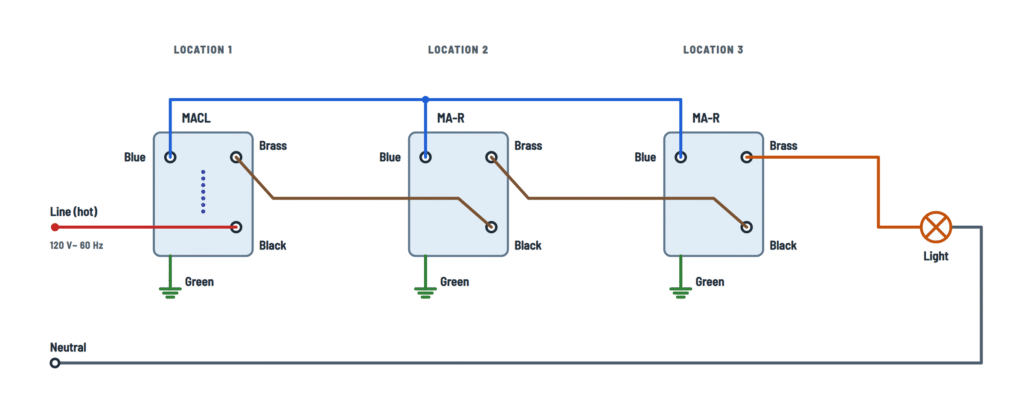
To the blue screws of all the companions.
Which wire to use
One of the two wires running between the boxes (the unmarked ones).
Where it goes
From the MACL brass screw to the other box, where it is spliced with the marked wire and with the jumper to the switch COM.
Where it goes
Links the MACL brass screw to the companion brass screw.
Where it goes
Each brass screw goes to the black screw of the next device.
Where it comes from
From the MACL brass screw.
Lamps
Permanently installed fixtures: Lutron-compatible dimmable CFL or LED, halogen or incandescent. If they flicker, buzz or drop out, they may not be compatible.
Caution
Do not use it with receptacles, motor-driven appliances or low-voltage transformers.
Where it comes from
From the splice in the other box: marked wire + remaining wire + jumper.
Lamps
Permanently installed fixtures: Lutron-compatible dimmable CFL or LED, halogen or incandescent. If they flicker, buzz or drop out, they may not be compatible.
Caution
Do not use it with receptacles, motor-driven appliances or low-voltage transformers.
Where it comes from
From the companion black screw.
Lamps
Permanently installed fixtures: Lutron-compatible dimmable CFL or LED, halogen or incandescent. If they flicker, buzz or drop out, they may not be compatible.
Caution
Do not use it with receptacles, motor-driven appliances or low-voltage transformers.
Where it comes from
From the last companion's brass screw.
Lamps
Permanently installed fixtures: Lutron-compatible dimmable CFL or LED, halogen or incandescent. If they flicker, buzz or drop out, they may not be compatible.
Caution
Do not use it with receptacles, motor-driven appliances or low-voltage transformers.
Splice
Marked wire + remaining wire + jumper, under one wire connector.
If the box has no ground
It may be installed with a nonmetallic faceplate and screws, or with the circuit protected by a GFCI. In that case, cap or remove the green wire before screwing it into the box.
About This Diagram
This diagram is redrawn from pages 1–2 of the Lutron MACL-153M Dimmer manual, and we offer it completely free and in English. We have also categorized it in the Light Switches & Dimmers (Home Electrical) section on Diagramverse, and it has been rated by 1 user with an average rating of 5.0. If you have any specific questions about the Lutron MACL-153M Dimmer Wiring Diagram, we suggest checking the Frequently Asked Questions (FAQs) section.
Printable Lutron MACL-153M Wiring Diagrams




Wiring Instructions
Before you start
The Lutron MACL-153M is a 120 V~ 60 Hz dimmer rated 150 W for dimmable CFL/LED and 600 W for incandescent or halogen. Before you buy bulbs or start wiring, check three things:
- Load. Add up the wattage of every bulb the dimmer will control. Use the dimmer only with permanently installed fixtures that take dimmable lamps. Never use it on receptacles, motor-driven appliances (fans, for example) or loads fed by low-voltage transformers. If you use CFL or LED bulbs, they must be on Lutron's compatible bulb list.
- Ganging. If the dimmer shares a wallbox with other devices side by side, you have to break off its side sections. That lowers the incandescent/halogen limit to 500 W with one side removed and 400 W with both sides removed. Loads made up only of CFLs or LEDs need no derating.
- Which variant you have. If one switch controls the light, use One location. If two switches control it, use 3-way · existing switch to keep the other switch, or 3-way · companion dimmer to replace it with a Maestro MA-R, MA-RR or MSC-AD. If three or more locations control it, use 4-way. That layout takes one MACL plus up to 9 companion dimmers. The wire run from the master dimmer to the last companion can be up to 150 ft (46 m).
Tools and materials: an insulated screwdriver, a wire stripper, a non-contact voltage tester or multimeter, electrical tape for marking wires, and the wire nuts and jumper wire that come with the dimmer. The screw terminals take 12 or 14 AWG wire. The push-in terminals take 14 AWG only.
Install the dimmer to all national and local electrical codes. If you aren't sure which wire is which, if the box is crowded or damaged, or if local rules require a permit for switch work, hire a licensed electrician.
Step-by-step wiring
- Turn the power off at the circuit breaker or fuse. Use your tester to confirm that every wire in the box is dead. Boxes sometimes carry more than one circuit.
- Two or more locations: pull each existing switch out of its box but leave its wires connected. On both switches, find the screw that is a different color from the others (usually black, sometimes labeled COMMON or COM). Do not count the ground screw. Mark the wire on that screw with tape. If you skip this step, the rest of the job turns into guesswork.
- Disconnect the wires from the old switch where the MACL will go. If you are ganging devices, break off the side sections now by bending them back and forth.
- Connect the Green wire to ground to the bare or green ground wire in the box.
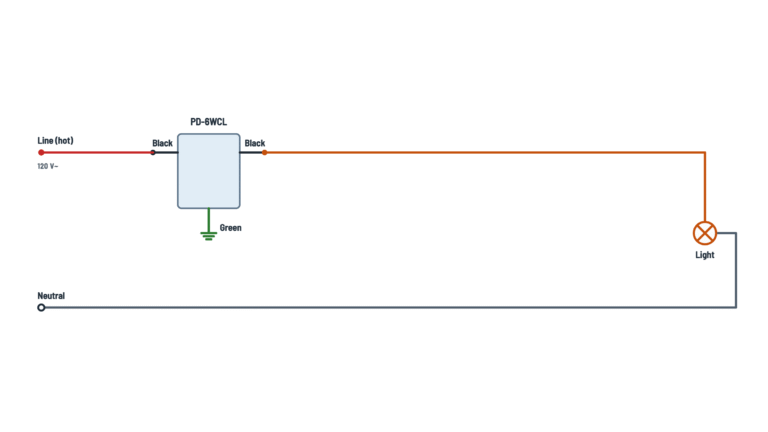
- One location: connect the 120 V line (hot) to the Black screw and the wire to the light to the Brass screw. The Blue screw stays unconnected. The Neutral stays spliced in the back of the box and never goes to the dimmer.
- 3-way · existing switch: at the MACL, connect the marked wire to the Black screw. Connect the two other wires that run between the boxes to the Brass screw and the Blue screw, as the drawing shows. At the other box, splice that box's marked wire, the remaining wire and the included Jumper. Run the jumper to the switch's COM screw. Connect the wire that leads to the MACL's Blue screw to one traveler screw, and leave the other traveler screw empty.
- 3-way · companion dimmer and 4-way: wire the MACL the same way. Then wire each Maestro companion dimmer so the wire from the Blue screw reaches every location. Follow the companion's own instructions for its terminals.
- For each wire, either wrap it fully clockwise around its screw and tighten, or strip it to 1/2 in (13 mm) and push it fully into a push-in terminal. Don't use both methods on the same wire.
- Fold the wires neatly into the box, mount every device with the screws provided, and fit the wallplates.
Testing and start-up
- Turn the breaker back on. Tap the large button (T): the light should come on. Use the raise (R) and lower (L) buttons to change the level, which the indicator lights display.
- 3-way · existing switch only: you must program the dimmer for it to work correctly. Hold T and R until an indicator light blinks. Press L until IL1, the bottom light, is selected, then tap T to save. Skip this if you used a companion dimmer: its setting, IL4, is the default.
- Adjust the dimming range for LEDs and CFLs. Hold T and L until an indicator light blinks. Hold L until the bottom indicator is lit, then tap R until every bulb is on and steady with no flicker. Tap T to save. Tap T to turn the light off, then tap T again: every bulb should come back on and stay steady. If any bulb doesn't, repeat the adjustment with a slightly higher setting. This step is optional for incandescent and halogen bulbs.
- Operate the light from every location: tap to toggle on and off, double-tap for full brightness, and press and hold for a delayed fade to off.
Safety notes
- A dimmer that is switched off does not disconnect the circuit. The line wire stays at 120 V, so turn the breaker off before you change a bulb or remove a wallplate.
- If the box has no ground, the code allows a replacement dimmer only with a nonmetallic, noncombustible faceplate and screws, or on a GFCI-protected circuit. In that case, cap the green wire before mounting.
- Stay within the wattage and derating limits. An overloaded dimmer overheats.
- Install the dimmer indoors only, where the temperature stays between 32 °F and 104 °F (0 °C and 40 °C). It is normal for the dimmer to feel warm during operation.
- Cover the dimmer when you paint or spackle, and clean it only with a soft, damp cloth.
Troubleshooting
| Symptom | Probable Cause | What to Check |
|---|---|---|
| With an existing 3-way switch, the light acts randomly or the other switch does nothing | The MACL wasn't programmed for an existing switch, so it is still on the companion setting (IL4) | Hold T and R until an indicator blinks, press L until IL1 is selected, then tap T to save. Test from both locations. |
| The light never comes on, but the breaker is on | The common (marked) wires were mixed up, so the line hot isn't on the Black screw | With the power off, check that the marked wire from each box went where the drawing shows. With the power on, use a tester to confirm 120 V between the wire on the Black screw and ground. Turn the power off before making any change. |
| The breaker trips as soon as you turn the power back on | The neutral or ground is connected to a dimmer screw, or a bare conductor is touching the metal box | Confirm that the Neutral stays spliced only to the light and isn't on any dimmer terminal. Check that the green wire goes only to ground. Look for nicked insulation or loose strands. |
| The MACL works, but the remote switch or companion dimmer does nothing | The wire on the Blue screw is loose, landed on the wrong screw at the remote location, or broken | With the power off, check the continuity of the wire from the MACL Blue screw to the remote device. At an existing switch, it must be on a traveler screw, not the COM screw. |
| The existing 3-way switch only works in one position | The Jumper isn't on the COM screw, or the splice of the marked and remaining wires is loose | Check that the splice holds the marked wire, the remaining wire and the jumper tightly, and that the jumper goes to the different-colored COM screw. |
| A companion dimmer far down the line works only some of the time or not at all | The run is longer than 150 ft (46 m), more than 9 companions are installed, or a non-Maestro companion is used | Measure the total wire length from the master to the last companion. Use only MA-R, MA-RR or MSC-AD companions, no more than 9. |
| LED or CFL bulbs flicker, buzz or drop out at low levels | The low-end setting is too low, or the bulbs aren't compatible | Rerun the dimming-range adjustment and raise the low end with R until every bulb stays steady. Check the bulbs against Lutron's compatible bulb list. |
| The dimmer gets very hot or the light shuts off after a while | Too much load, especially with side sections removed or mixed bulb types | Add up the bulb wattage. The limits are 150 W for CFL/LED and 600 W for incandescent, lowered to 500 W or 400 W when side sections are removed. Mixed loads have lower combined limits. |
| Wires slip out of the back of the dimmer, or the light cuts in and out | 12 AWG wire in a push-in terminal, the wrong strip length, or a loosely wrapped screw | Use push-in terminals only with 14 AWG wire stripped to 1/2 in (13 mm). Connect 12 AWG wire under the screws, fully wrapped and tight. |
| You feel a tingle from the wallplate screws in an old box without a ground | A metal plate on an ungrounded box, with the green wire left loose | Turn the power off. Cap the green wire, use a nonmetallic plate with nonmetallic screws, or add GFCI protection to the circuit. |