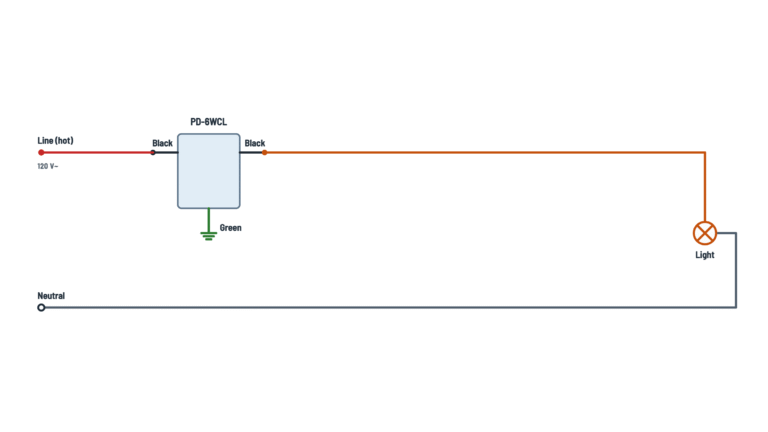
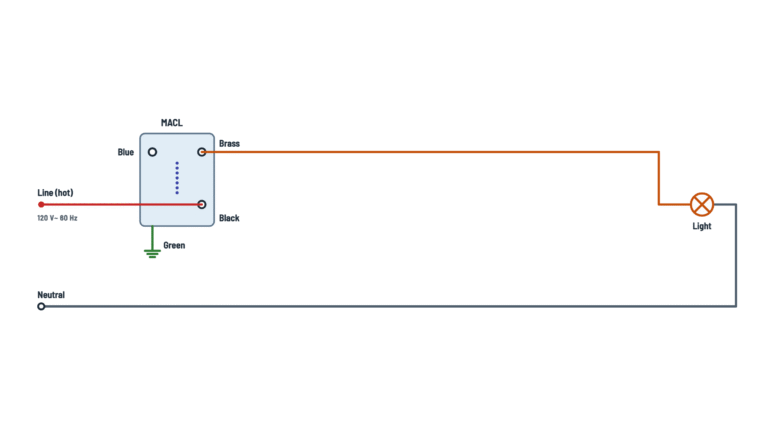
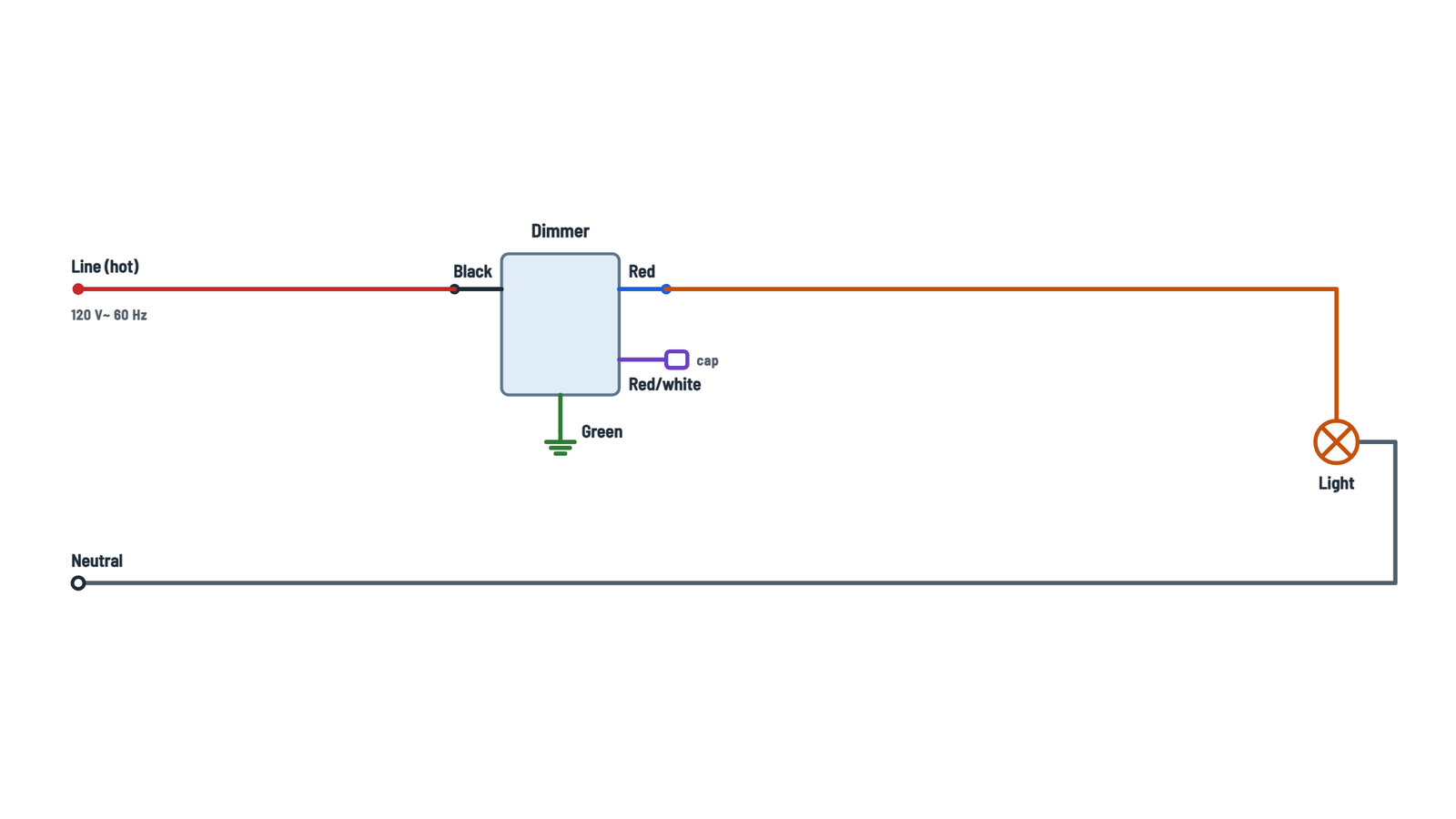
Lutron Diva DVCL-153P Dimmer Wiring Diagram
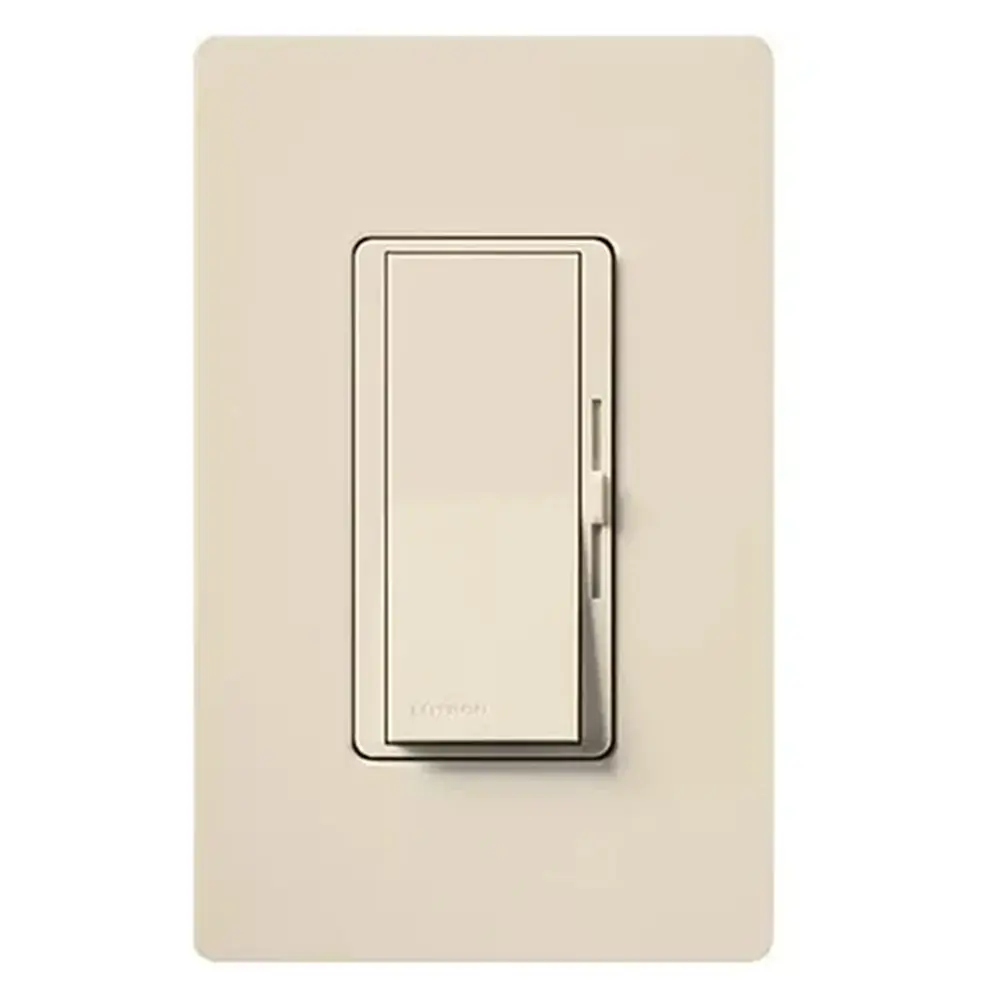
Complete diagram
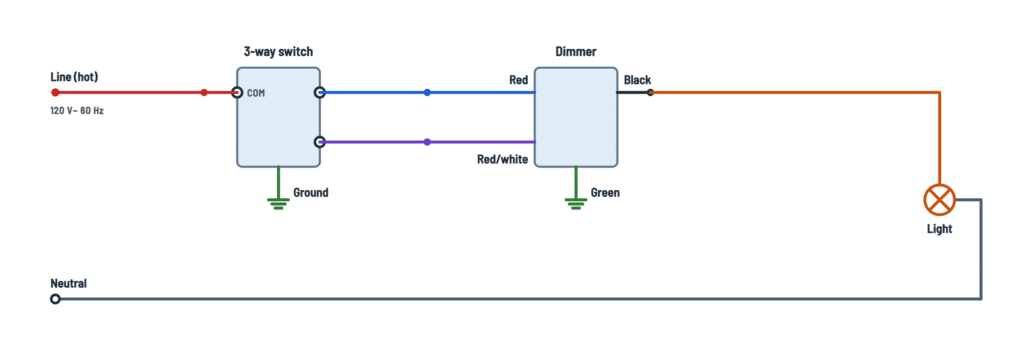
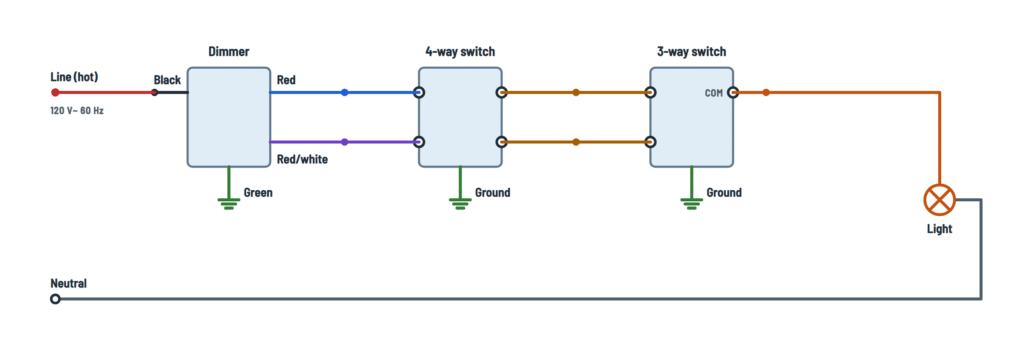
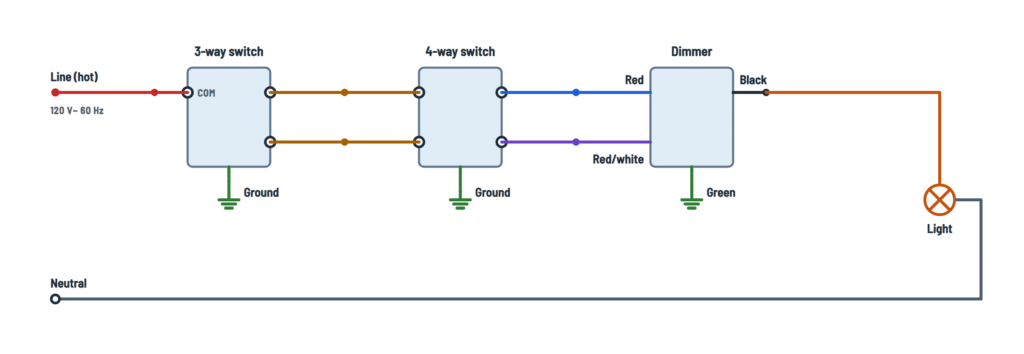
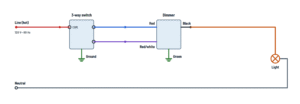
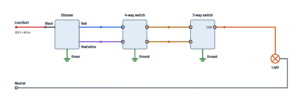
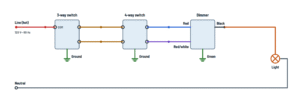
Diva DVCL-153P wiring for one, two or three locations.
Terminals and components · 8
- Line
- To the light
- Red
- Red/white
- Travelers
- Neutral
- Ground
Where it goes
To the dimmer black wire, with a wire connector.
Where it goes
To the dimmer black wire.
Where it goes
To the 3-way switch common screw.
Check the common
Identify the common screw from the switch's instruction sheet (it is usually the different-colored one, black or copper). Do not infer it from its position in the drawing.
In the box
If there are spliced neutrals in the box, leave them as they are.
Ratings
- 120 V~ 60 Hz
- Dimmable LED or CFL: up to 150 W
- Incandescent or halogen: up to 600 W
- Lutron LTEA Hi-lume drivers: up to 250 W (6 drivers)
- Wallbox at least 2½ in (64 mm) deep
Ganged or mixed bulbs
Removing side sections or mixing LED/CFL with incandescent bulbs lowers the maximum incandescent wattage:
LED/CFL None removed One side Both sides 0 W 600 W 500 W 400 W 1–25 W 500 W 400 W 300 W 26–50 W 400 W 300 W 200 W 51–75 W 300 W 200 W 100 W 76–100 W 200 W 100 W 50 W 101–125 W 100 W 50 W 0 W 126–150 W 0 W 0 W 0 W Low-end adjustment
With the wallplate removed: set the slider to the bottom and turn the adjustment dial or lever until the bulbs are stable.
4-way
The dimmer goes on the line side or the load side; never in the 4-way switch location.
Ratings
- 120 V~ 60 Hz
- Dimmable LED or CFL: up to 150 W
- Incandescent or halogen: up to 600 W
- Lutron LTEA Hi-lume drivers: up to 250 W (6 drivers)
- Wallbox at least 2½ in (64 mm) deep
Ganged or mixed bulbs
Removing side sections or mixing LED/CFL with incandescent bulbs lowers the maximum incandescent wattage:
LED/CFL None removed One side Both sides 0 W 600 W 500 W 400 W 1–25 W 500 W 400 W 300 W 26–50 W 400 W 300 W 200 W 51–75 W 300 W 200 W 100 W 76–100 W 200 W 100 W 50 W 101–125 W 100 W 50 W 0 W 126–150 W 0 W 0 W 0 W Low-end adjustment
With the wallplate removed: set the slider to the bottom and turn the adjustment dial or lever until the bulbs are stable.
Line side
Spliced to the hot coming from the breaker.
Load side
Spliced to the wire going to the light.
Where it goes
To the wire going to the light.
Where it goes
To a traveler screw on the 3-way switch.
Check the common
Identify the common screw from the switch's instruction sheet (it is usually the different-colored one, black or copper). Do not infer it from its position in the drawing.
Where it goes
To a screw on the 4-way switch.
Single pole
Not used: cap it with a wire connector.
Where it goes
To the other traveler screw on the 3-way switch.
Where it goes
To the other screw of the same pair on the 4-way switch.
Connections
- Travelers: dimmer red and red/white wires.
- Common: to the light.
Check the common
Identify the common screw from the switch's instruction sheet (it is usually the different-colored one, black or copper). Do not infer it from its position in the drawing.
Connections
- Common: line (hot).
- Travelers: dimmer red and red/white wires.
Check the common
Identify the common screw from the switch's instruction sheet (it is usually the different-colored one, black or copper). Do not infer it from its position in the drawing.
Connections
- Travelers: free pair of the 4-way switch.
- Common: to the light.
Check the common
Identify the common screw from the switch's instruction sheet (it is usually the different-colored one, black or copper). Do not infer it from its position in the drawing.
Connections
- Common: line (hot).
- Travelers: one pair of the 4-way switch.
Check the common
Identify the common screw from the switch's instruction sheet (it is usually the different-colored one, black or copper). Do not infer it from its position in the drawing.
Pairs
Each pair is usually one color (black or copper, and brass). Follow the switch's instruction sheet.
Caution
The dimmer cannot go in this location.
Which wires
The two wires running between the 4-way switch box and the 3-way switch box.
Where it comes from
From the dimmer red wire.
Lamps
With LEDs or CFLs use only bulbs marked dimmable; some need a minimum number of bulbs to work properly.
Where it comes from
From the 3-way switch common.
Lamps
With LEDs or CFLs use only bulbs marked dimmable; some need a minimum number of bulbs to work properly.
Where it comes from
From the dimmer black wire.
Lamps
With LEDs or CFLs use only bulbs marked dimmable; some need a minimum number of bulbs to work properly.
Switches
On the switches, ground is usually a green screw.
About This Diagram
This diagram is redrawn from page 7 of the Lutron Diva DVCL-153P Dimmer manual, and we offer it completely free and in English. We have also categorized it in the Light Switches & Dimmers (Home Electrical) section on Diagramverse, and it has been rated by 1 user with an average rating of 5.0. If you have any specific questions about the Lutron Diva DVCL-153P Dimmer Wiring Diagram, we suggest checking the Frequently Asked Questions (FAQs) section.
Printable Lutron Diva DVCL-153P Wiring Diagrams



Wiring Instructions
Before you start
The Lutron Diva DVCL-153P is a 120 V~ 60 Hz dimmer with no neutral connection. It handles up to 150 W of dimmable LED/CFL bulbs or 600 W of incandescent/halogen bulbs. If you mix bulb types, the allowed wattage depends on the mixed-bulb ratings. Use it only on permanently installed light fixtures with bulbs marked dimmable. Do not use it to control receptacles, motor-driven appliances or transformer-supplied appliances. It is for indoor use only, at 32 °F to 104 °F (0 °C to 40 °C).
- Tools: insulated screwdrivers, a wire stripper, a non-contact voltage tester or multimeter, masking tape or a marker for tagging wires, and twist-on wire connectors sized for the number and gauge of wires you are joining.
- Wire gauge: the dimmer's documentation does not give a gauge. As general good practice, the new wiring should match the existing branch circuit, usually 14 AWG on a 15 A breaker and 12 AWG on a 20 A breaker. Check your breaker and the existing cable.
- Wallbox: you need a U.S. wallbox at least 2.5 in (64 mm) deep. If several devices share one box, plan which side sections to break off. Removing sections lowers the incandescent rating to 500 W (one side removed) or 400 W (two sides removed). Never remove the outside sections of the end devices.
- Choose your variant: use Single pole if the light is switched from one place. Use a 3-way variant for two places and a 4-way variant for three or more. Then find which box the hot from the breaker enters. If it enters the box where the dimmer will go, pick line side. If the dimmer's box holds the cable that runs to the light, pick load side. The dimmer never goes in the 4-way (middle) location.
- Professional help: local codes apply. Many areas require a permit or a licensed electrician for new circuits or for adding switch locations. If the box has no ground and you are unsure about the grounding rules, or if the existing wiring does not match any variant, call a professional.
Step-by-step wiring
- Turn off the breaker or remove the fuse for the circuit. Use your tester to confirm that every wire in the box is dead, including other cables in a shared box.
- Remove the old switch's faceplate and mounting screws and pull the switch out. On a 3-way switch, tag the wire on the common terminal before you disconnect anything. It is usually the darker or odd-colored screw. That tag tells you which wire is the hot or the light feed, and which two are travelers.
- Check that the wires are in good condition, then strip them to the length shown on the dimmer's strip gauge. Straighten them before you join them.
- Connect the Green dimmer wire to the bare or green ground wire in the box. Ground every mechanical switch's green screw the same way.
- Single pole: connect Black to the line (hot) and Red to the wire going to the light. Cap Red/white by itself with the blue connector included. On this dimmer, Black and Red are interchangeable.
- 3-way: connect Red and Red/white to the two travelers. On the line side, connect Black to the line (hot), and the common of the 3-way switch goes to the light. On the load side, Black goes to the light, and the common of the 3-way switch receives the hot.
- 4-way: wire the dimmer and the 3-way switch as in the line side or load side 3-way setup. Connect Red and Red/white to one screw pair of the 4-way switch. Run the Travelers from the other pair to the travelers of the 3-way switch. Follow the 4-way switch's own instructions for which screws form a pair.
- Leave the Neutral wires joined together as they are. They run straight to the light and never connect to the dimmer.
- Twist each connector until it is tight. Tug each wire to confirm it holds, and make sure no bare copper shows below the connector, except on ground.
- Fold the wires carefully into the box, mount the dimmer level, and attach the faceplate.
Testing and start-up
Before restoring power, check that the air-gap switch is closed (pushed in). Then turn the breaker back on.
- Press the paddle. The light should turn on at the level set by the slider and turn off on the next press. Move the slider through its full range.
- In 3-way and 4-way circuits, operate every switch from both of its positions. Each one must turn the light on and off from any combination.
- For LEDs and CFLs, set the low end: turn the lights on, move the slider all the way down, then adjust the lever or dial until the light is stable and does not flicker or drop out. Turn the lights off and on again to confirm.
- If you want to measure, use a non-contact tester or meter to confirm about 120 V on the line (hot) wire to ground. With the air gap pulled out, the light output should read 0 V.
Safety notes
- This is 120 V AC, which is a shock hazard that can cause serious injury or death. Always work with the breaker off. Do not rely on the paddle or the air-gap switch to make the wires safe.
- Do not exceed the wattage rating, and apply the reduced ratings when you remove side sections or mix bulb types. Overloading causes overheating.
- It is normal for the dimmer to feel warm. If it is too hot to touch, the load is too high or the wiring is faulty.
- If the box has no grounding means, cap or remove the green wire. Then use a plastic faceplate with plastic fasteners, or make sure the circuit is protected by a GFCI.
- Protect the dimmer from dust when painting or spackling, and clean it only with a soft damp cloth.
Troubleshooting
| Symptom | Probable Cause | What to Check |
|---|---|---|
| Light does not turn on at all and the dimmer seems dead | Air-gap switch pulled out, tripped breaker, or the Black wire is not on the line (hot) | Push the air gap fully in and reset the breaker. With power on, test for about 120 V between the hot and ground at the dimmer box, then confirm the connector on the hot is tight. |
| Breaker trips as soon as I turn it back on | Hot touching ground or neutral, or a dimmer lead joined to the neutral bundle | Turn the power off and check that no dimmer wire is joined to the Neutral. Look for bare copper touching the box, and inspect the connectors for nicked insulation. |
| In a 3-way setup the light only works when the other switch is in one position | Hot or light wire placed on a traveler, and a traveler placed on the 3-way switch common | Find the wire you tagged as common. It must go to Black on the dimmer side, or to the COM screw of the 3-way switch. Only the travelers go to Red and Red/white. |
| Light stays on permanently and will not turn off | Line and load wires spliced together, bypassing the dimmer | With the power off, separate the line and light wires and connect them to Black and Red respectively, or to the switch common for the variant you used. |
| 4-way circuit works from some switches but not others | Travelers crossed on the 4-way switch, or a pair split across both sides | Check the 4-way switch instructions for its screw pairs. One pair must take both dimmer travelers and the other pair both travelers from the 3-way switch. |
| I put the dimmer in the middle box and nothing works properly | Dimmer installed in the 4-way location | Move the dimmer to the line side or load side end and put a 4-way mechanical switch in the middle. |
| Two dimmers in a 3-way circuit, erratic or not working | Only one dimmer is allowed per 3-way or 4-way circuit | Replace the second dimmer with a mechanical 3-way switch, wired with its common and both travelers. |
| LED bulbs flicker or turn off at the bottom of the slider | Low-end trim too low, non-dimmable bulbs, or too few bulbs | Confirm the bulbs are marked dimmable. Turn the lights on, move the slider to the bottom, and raise the adjustment lever until the light is steady. |
| Dimmer gets very hot or shuts off with lights connected | Load above the rating, especially after removing side sections or mixing bulb types | Add up the bulb wattage. Stay within 150 W LED/CFL or 600 W incandescent, reduced to 500 W or 400 W with side sections removed, or apply the mixed-bulb limits. |
| Mild tingle or shock from the faceplate screws | Green wire not connected, or a loose ground | Turn the power off and confirm that the Green dimmer wire is joined tightly to the bare or green ground. If there is no ground in the box, use a plastic faceplate with plastic screws or GFCI protection. |
| Single pole install works but a loose wire is left in the box | Red/white left uncapped | In single pole, Red/white is not used. Cap it on its own with a connector so it cannot touch anything. |