Redarc BCDC1225D Battery Charger Wiring Diagram

Typical setup
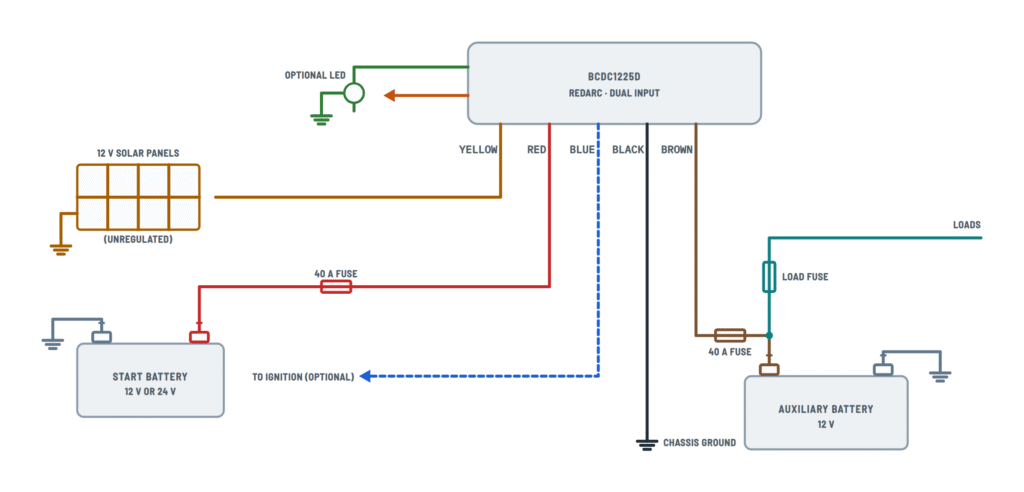
Solar and vehicle inputs, output to the auxiliary battery and setting wires.
Terminals and components · 8
- Solar
- Vehicle
- Output
- Ground
- Trigger (optional)
- LED
- Profile
- Loads
- Disconnect
Priority
The unit uses all available solar power first and tops up from the vehicle.
Wire size
Length Cross section 1-5 m 7,71 mm² (8 B&S) 5-9 m 13,56 mm² (6 B&S) Fuse
40 A near the battery; bolt-down MIDI fuses are recommended (Redarc FK40). Do not use blade fuses or self-resetting breakers.
Wire size
Length Cross section 1-5 m 7,71 mm² (8 B&S) 5-9 m 13,56 mm² (6 B&S) Splices
Join the heavy wires with crimped and soldered butt splices covered with heatshrink; do not use blade connectors.
Wire size
Length Cross section 1-5 m 7,71 mm² (8 B&S) 5-9 m 13,56 mm² (6 B&S) Fuse
40 A near the battery; bolt-down MIDI fuses are recommended (Redarc FK40). Do not use blade fuses or self-resetting breakers.
Wire size
Length Cross section 1-5 m 7,71 mm² (8 B&S) 5-9 m 13,56 mm² (6 B&S) Splices
Join the heavy wires with crimped and soldered butt splices covered with heatshrink; do not use blade connectors.
Caution
A «12 V» LED (3 V with a built-in resistor) will not work properly.
Lithium
Only LiFePO4 batteries with their own BMS, voltage protection and cell balancing. Do not install them in the engine bay.
Charge profile selection
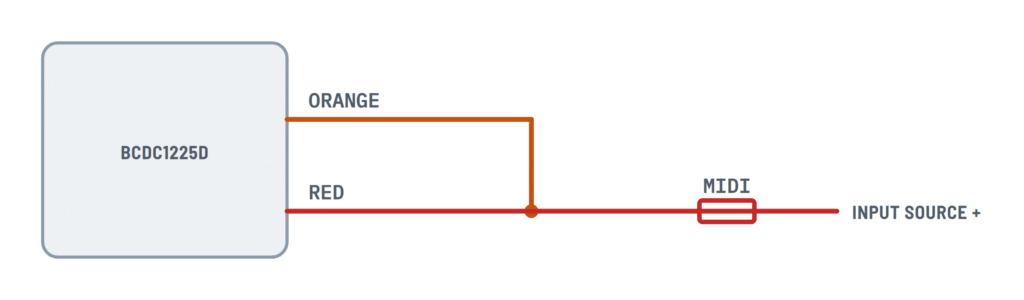
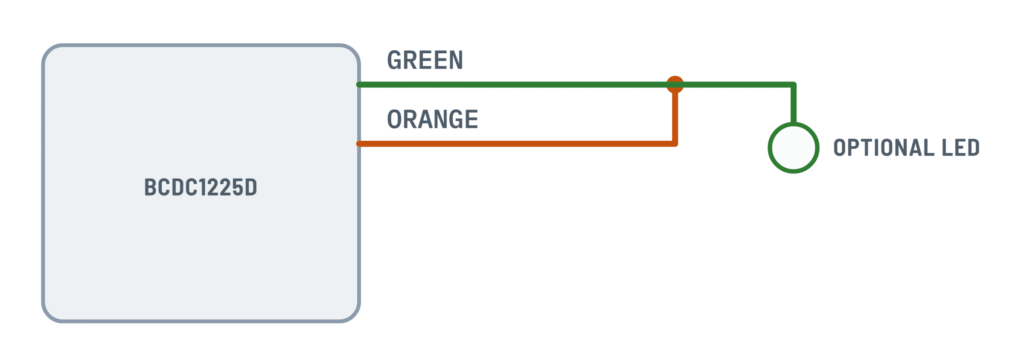
How to connect the orange wire for each charge profile.
Terminals and components · 1
- Orange
- Red
- Green
Profiles
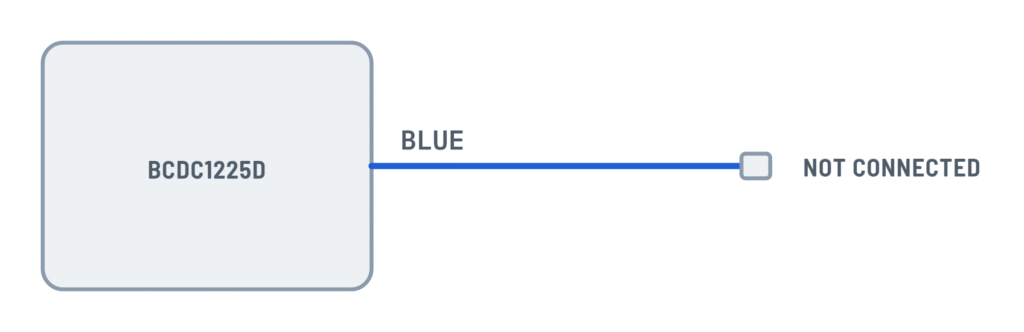
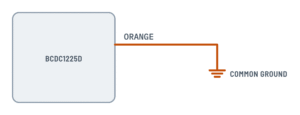
Profile Orange Max. Float A Not connected 14.6 V 13.3 V B To ground 15.0 V 13.3 V C To red 15.3 V 13.3 V Li To green 14.5 V 13.6 V Choosing
The profile's maximum voltage must not exceed the battery maker's maximum charging voltage. For an engine bay install, use a lower profile than in the cabin.
Vehicle input trigger
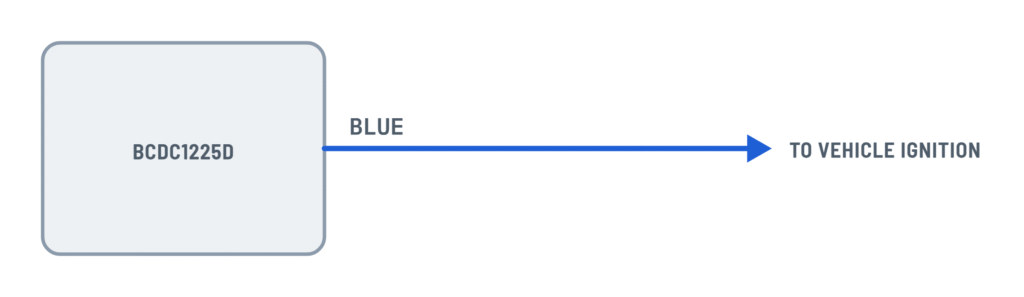
The blue wire selects when charging from the vehicle starts.
Terminals and components · 1
- Blue
Turn on / off
Mode 12 V: on / off 24 V: on / off Standard 13.2 V / 12.7 V 26.4 V / 25.4 V Low voltage 12.0 V / 11.9 V 24.0 V / 23.8 V With ignition
In low voltage mode, the ignition must also be on.
About This Diagram
These diagrams are redrawn from pages 8–9 and 11 of the Redarc BCDC1225D Battery Charger manual, and we offer them completely free and in English. We have also categorized it in the Batteries, BMS & Dual Battery (Solar & Batteries) section on Diagramverse, and it has been rated by 1 user with an average rating of 5.0. If you have any specific questions about the Redarc BCDC1225D Battery Charger Wiring Diagram, we suggest checking the Frequently Asked Questions (FAQs) section.
Printable Redarc BCDC1225D Wiring Diagrams






Wiring Instructions
Before you start
First, pick the variant that matches your installation for your Redarc BCDC1225D. Use Lead acid for standard, calcium, gel or AGM auxiliary batteries. Use LiFePO4 for a lithium battery with a built-in battery management system. The Profile tab shows where the orange wire goes for each battery. The Trigger tab shows the blue wire for your alternator: Standard for a fixed voltage or temperature compensating alternator, Low voltage for a variable voltage (smart) alternator.
You will need single-indent crimpers, butt splices, solder, heatshrink, ring lugs, a multimeter and MIDI bolt-down fuse kits (Redarc FK40, 40 A). Don't use blade fuses, self-resetting circuit breakers or standard red/blue/yellow crimp connectors, because they are not rated for this current. Size the red, yellow, black and brown cables by run length: 8 AWG for 3 to 16 ft, 6 AWG for 16 to 30 ft. Your vehicle's codes may require heavier cable, and going larger is always acceptable.
Check your battery's data. The maximum voltage of the profile you choose must not exceed the battery maker's maximum charging voltage, and 25 A must not exceed its maximum charging current. Before you work, disconnect the start battery negative and cover the solar panels. Redarc recommends a qualified installer. If you are not confident making heavy-current connections in a vehicle, hire an auto electrician.
Step-by-step wiring
- Mount the unit as close as possible to the auxiliary battery, with good airflow and away from engine heat and mud buildup. LiFePO4 batteries must not be installed in the engine bay. Fix the unit with screws through the four heatsink tabs, with the front label visible.
- Run the black ground wire to a clean, bare-metal chassis point using a crimped and soldered ring lug. Make sure the auxiliary battery negative and the solar panel negative also go to chassis ground.
- Fit a 40 A MIDI fuse close to the auxiliary battery positive, then connect the brown output wire to it.
- Fit a 40 A MIDI fuse close to the start battery positive and run the red vehicle input wire directly to it. Leave the fuse element out until you test.
- Connect the yellow solar input to the positive of an unregulated 12 V panel array. The panel must not have its own regulator, because the charger's MPPT does that job.
- Set the charge profile with the orange wire: leave it unconnected for A, join it to ground for B, to the red wire for C, or to the green wire for Li. If you leave the orange wire unconnected, insulate its end.
- Set the trigger with the blue wire: leave it insulated and unconnected for Standard, or connect it to an ignition-switched source for Low voltage.
- For remote status, wire a basic 3 V LED from the green wire to ground. A "12 V" LED with a built-in resistor will not work properly. On the Li profile, the green wire also stays joined to the orange.
- Run the auxiliary loads from the auxiliary battery through their own load fuse. With LiFePO4, put a low voltage disconnect between the battery and the loads.
- Make every heavy-wire joint with a crimped and soldered butt splice. Slide the heatshrink over only after the solder has cooled. Secure the cables away from sharp edges and hot parts.
Testing and start-up
Reconnect the start battery negative, then fit the fuses. Before you start the engine, measure the auxiliary battery at the brown wire. It must be above 4.2 V for the charger to recognize it. Now start the engine and allow up to 20 seconds for output whenever a source appears. The Vehicle LED lights when the red input is in use, and the Solar LED lights when the panels are supplying power. The selected profile LED stays solid while charging. A flashing profile LED means standby.
With the engine running, measure the red wire at the charger. In Standard mode it must be above 13.2 V on a 12 V system or 26.4 V on a 24 V system. In Low voltage mode, with the ignition on, it must be above 12.0 V or 24.0 V. The auxiliary battery voltage should rise over time and finally hold near float: 13.3 V, or 13.6 V on the Li profile. Every 100 seconds the unit pauses briefly to test the input and the battery, which is normal. After a long run, feel each joint. Any warm splice or lug needs to be remade.
Safety notes
- Lead-acid batteries release explosive gases. No smoking, sparks or flames near them, and wear eye and clothing protection.
- Fit fuses last and remove them first. A positive cable shorted to the chassis can carry enough current to burn insulation and start a fire.
- The heavy wires carry peaks of up to 35 A. Poor connections heat up, so never undersize the cable or use blade connectors.
- Charge only 12 V batteries. Use only LiFePO4 batteries with internal under and over voltage protection and cell balancing.
- The unit reduces its output above 130°F and shuts off at 175°F, so keep it ventilated.
- Never open the unit. A faulty charger must go back to Redarc.
Troubleshooting
| Symptom | Probable Cause | What to Check |
|---|---|---|
| No LEDs light at all on the charger | Auxiliary battery is below 4.2 V or not connected, there is no input, the ground is broken, or a fuse has blown | Measure the auxiliary battery at the brown wire (it must be above 4.2 V). Check the black ground at the chassis and both 40 A MIDI fuses, and make sure they are intact and tight. |
| The profile LED keeps flashing and nothing charges | No valid charging source, or the auxiliary battery is not connected or not at a chargeable voltage | Confirm the red wire goes directly to the start battery positive through its fuse and the yellow wire goes to the panel positive. Check that the black wire reaches the chassis, the auxiliary battery negative and the panel negative. |
| Engine is running but the Vehicle LED stays off | Smart alternator with the blue wire left unconnected (Standard trigger), so the voltage never reaches 13.2 V | Measure the red wire at the charger with the engine running. If it is below 13.2 V (12 V system) or 26.4 V (24 V system), connect the blue wire to ignition for the Low voltage trigger. Note that the Vehicle LED also stays off while solar covers the whole demand. |
| Blue wire is on ignition but the charger still won't start from the vehicle | Blue wire is on a feed that isn't ignition-switched or isn't live, or the input voltage is too low | With the ignition on, measure 12 V at the blue wire. The red wire must be above 12.0 V (12 V system) or 24.0 V (24 V system). |
| Sun is shining but the Solar LED is off | Regulated panel, open-circuit voltage below 9 V, panel negative not grounded, or the panel is shaded | Measure the yellow wire as close to the charger as possible: it must be above 9 V. Remove any panel regulator, check the panel negative goes to ground, and wait up to 2 minutes after any change. |
| All LEDs flash 5 times, then pause | Input under voltage, often from an undersized or long red cable, a loose lug or a poor fuse holder | Measure the voltage at the start battery and at the red wire under load. A large difference means you need heavier cable (8 AWG up to 16 ft, 6 AWG up to 30 ft) or better joints. |
| All LEDs flash 6 times, then pause | Input over voltage from the vehicle or the solar panel | Measure the red and yellow wires. A 12 V vehicle input shuts off above 16.0 V. The solar input shuts off above 33.0 V, so check that the panel array is a 12 V nominal unregulated array. |
| All LEDs flash 4 times, then pause | Output battery voltage too high | Measure the auxiliary battery. Check whether another charger or source is connected to it, and confirm that the brown wire goes to a 12 V battery. |
| All LEDs flash 3 times, or charging slows on hot days | Unit over temperature because it is mounted near engine heat, buried in mud or without airflow | Move the unit to a cooler spot with airflow, ideally on a metal surface. Output drops above 130°F and stops at 175°F. |
| Auxiliary battery is gassing, hot or overcharged | Wrong charge profile, for example the orange wire joined to the red (C, 15.3 V) or left loose (A, 14.6 V) on a lithium battery | Check where the orange wire goes. Compare the profile's maximum voltage with your battery maker's maximum charging voltage, and change to a lower profile or the Li profile as needed. |
| Charger on a 12 V vehicle won't turn on even though the wiring checks out | Unit stuck in 24 V input mode | Disconnect the red vehicle input (pull its fuse), reconnect it and retest. If the problem persists, contact Redarc. |
| Charge current is low and the cables, fuse holder or connectors get warm | Undersized cable, blade fuses, crimp-only or red/blue/yellow connectors, or a corroded ground | Feel the joints after a run and measure the voltage drop across each one. Replace blade fuses with MIDI bolt-down fuses, and remake joints as crimped, soldered butt splices with heatshrink. |