
Victron Smart Shunt 500a Battery Monitor Wiring Diagram
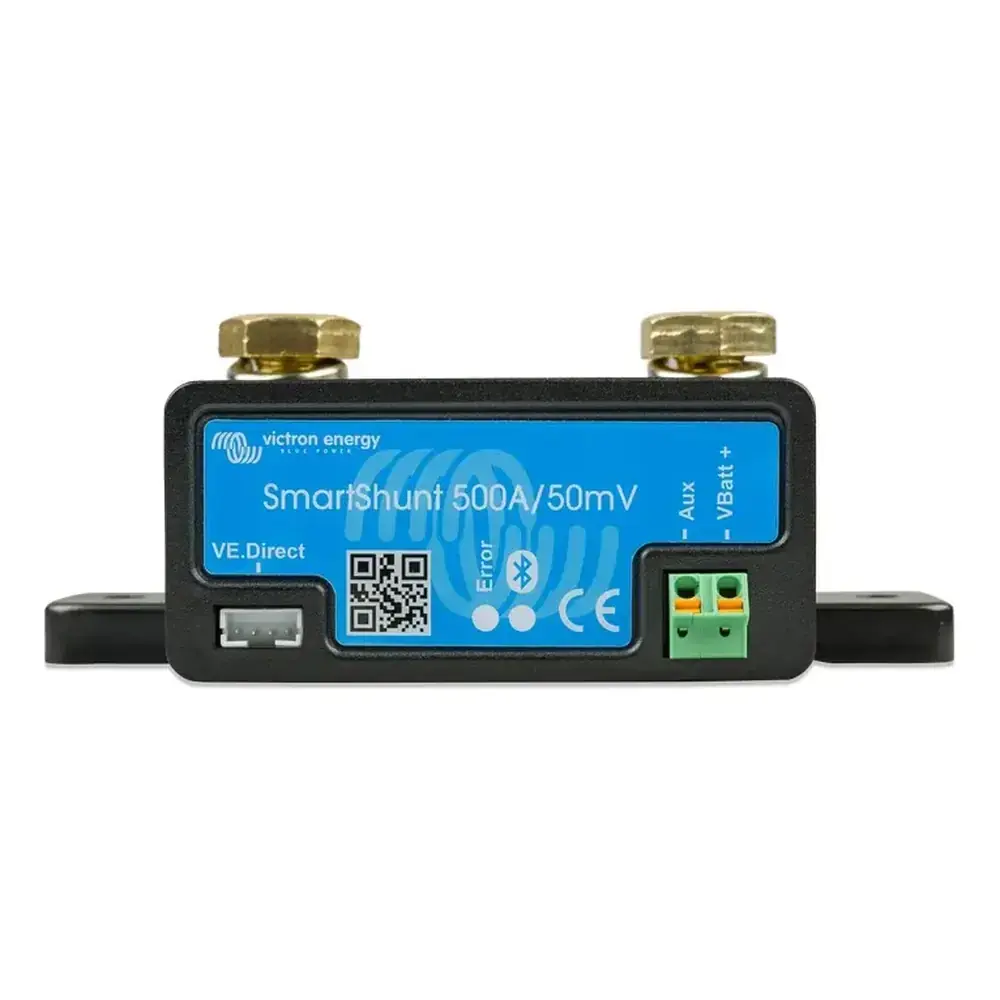
Victron Smart Shunt 500a Battery Monitor Wiring Diagram
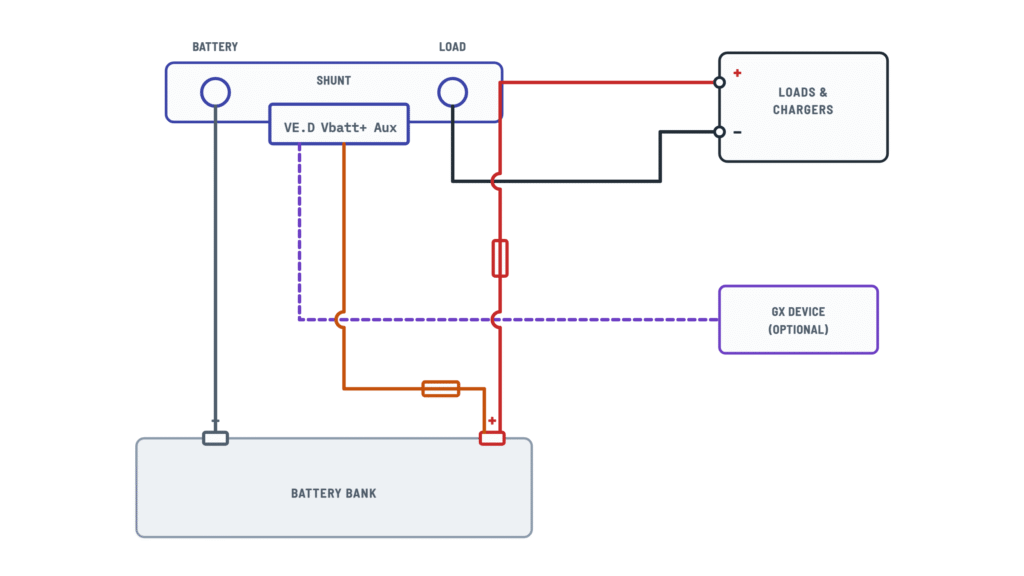
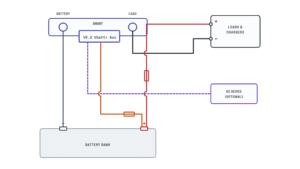
SmartShunt connections
Basic installation and auxiliary input options; tap any wire to see how it connects.
Terminals and components · 6
- Battery negative
- System negative
- Positive
- Vbatt+
- VE.Direct
- Aux
Terminals
Terminal Goes to BATTERY MINUS bolt Battery negative (M10) SYSTEM MINUS bolt Loads and chargers negative (M10) Vbatt+ Battery positive, fused Aux Auxiliary input (optional) VE.Direct GX device (optional) Torque
Tighten the M10 bolts to a maximum of 21 Nm (300 A model: 10 Nm).
Caution
Do not connect any load or charger to the battery negative or the BATTERY MINUS side: they would be left out of the state-of-charge calculation.
How to connect it
Connect the negative of all DC loads, inverters, battery chargers, solar chargers and other charge sources to the SYSTEM MINUS bolt.
Former name
Until 2020, SYSTEM MINUS was labeled LOAD MINUS.
Shutdown
To leave the system with no draw, open the battery switch, pull its fuses or disconnect the positive.
How to connect it
Push the red fused cable pin into Vbatt+ and bolt the M10 lug to the battery positive.
If it won't power up
Check the fuse in the Vbatt+ cable, the cable and its terminals.
With temperature sensor
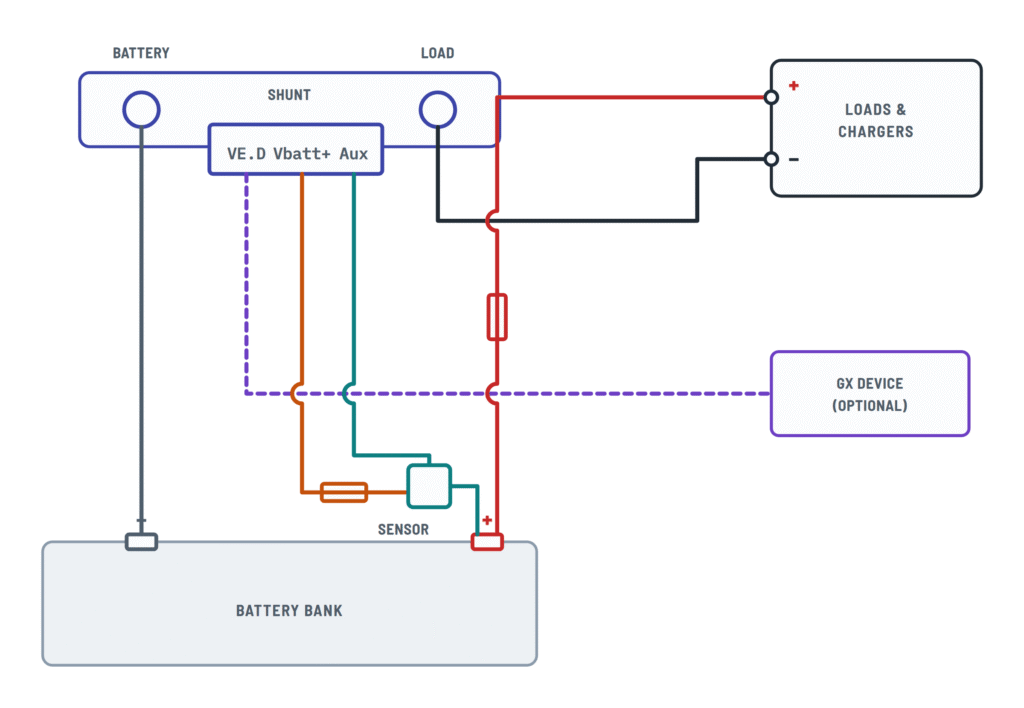
The sensor red wire goes to Vbatt+ and its lug to the battery positive; the supplied red fused cables are not used.
Bluetooth
Without a GX, the monitor is set up and read over Bluetooth with VictronConnect: once powered, the Bluetooth LED blinks.
Second battery
- The second battery negative must go to the shunt LOAD side.
- Push the second red fused cable pin into Aux and the M10 lug onto the second battery positive.
Midpoint
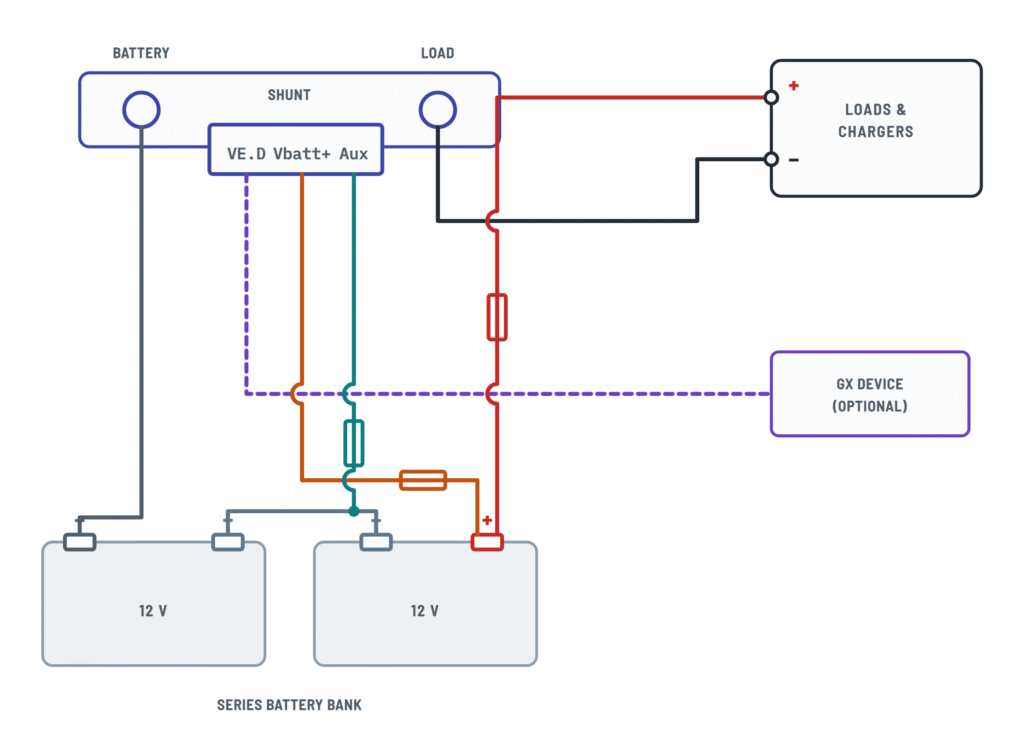
For 24 or 48 V banks with batteries in series: the second red fused cable runs from Aux to the bank midpoint positive.
What it's for
Gives early warning if one battery in the bank goes out of balance.
Temperature sensor
Sold separately (the sensor supplied with Victron inverter/chargers won't work). Black wire to Aux, red to Vbatt+, M10 lug to the battery positive.
About This Diagram
This diagram is redrawn from pages 4–7 of the Victron Smart Shunt 500a Battery Monitor manual, and we offer it completely free and in English. We have also categorized it in the Batteries, BMS & Dual Battery (Solar & Batteries) section on Diagramverse, and it has been rated by 1 user with an average rating of 5.0. If you have any specific questions about the Victron Smart Shunt 500a Battery Monitor Wiring Diagram, we suggest checking the Frequently Asked Questions (FAQs) section.
Printable Victron Smart Shunt 500a Wiring Diagrams



Wiring Instructions
Before you start
Pick the Victron Smart Shunt 500a variant that matches your installation. Basic monitors one battery bank. Second battery also reads the voltage of a starter or auxiliary battery. Midpoint is for 24V or 48V banks built from batteries in series or series/parallel. Temperature uses the optional Temperature sensor for BMV. The Aux input does only one of these jobs at a time.
- Tools: insulated wrenches or sockets for the M10 bolts, a torque wrench, a digital multimeter, eye protection and a phone or tablet with the VictronConnect app.
- Materials: the two red fused cables that come with the shunt (1.5 m, with a 1 A slow-blow fuse), M10 cable lugs for your main negative cables, and two screws or bolts to mount the shunt. Mounting screws are not included.
- Wire gauge: the battery negative and system negative cables carry the full battery current. Size them for your highest load or charge current and for your main battery fuse, the same as your positive cable. Follow the battery or inverter maker's cable charts and local electrical codes.
- Mounting location: the SmartShunt is IP21, so mount it in a dry place, close to the battery negative, using the two mounting holes in its base.
- When to call a professional: boats, RVs with shore power and large 48V banks often fall under marine or electrical codes. If you aren't confident working on high-current DC systems, or your installation needs an inspection, hire a qualified installer.
Before you touch any cable, switch off every load and charger, including solar chargers and inverter/chargers. Pull the main battery fuse or open the battery switch, then disconnect the negative battery terminal.
Step-by-step wiring
- Mount the shunt on a hard, dry surface. Put the BATTERY MINUS side toward the battery and the SYSTEM MINUS side toward your negative busbar or loads.
- Run a cable from the battery negative terminal to the BATTERY MINUS M10 bolt. Tighten it to a maximum of 21 Nm. Nothing else may connect to this bolt or to the battery negative terminal.
- Move every system negative to the SYSTEM MINUS M10 bolt, directly or through a negative busbar. That includes DC loads, inverters, battery chargers, solar chargers, alternator returns and DC-DC chargers. Tighten it to a maximum of 21 Nm. On older units this bolt is labeled LOAD MINUS.
- Make sure the System positive still runs from the battery positive through its main fuse to your loads and chargers. The shunt does not change the positive side.
- Push the ferrule pin of one red fused cable into the Vbatt+ terminal. Don't connect its M10 lug to the battery yet. If you are using the Temperature variant, skip this step and see step 6.
- Wire the Aux input for your variant:
- Second battery: first check that the second battery's negative connects to the SYSTEM MINUS side. Then push the second red fused cable's pin into Aux and route its lug to the second battery's positive.
- Midpoint: push the second red fused cable's pin into Aux and route its lug to the bank midpoint. Use busbars, and keep all cables to the busbars the same length.
- Temperature: push the sensor's black wire into Aux and its red wire into Vbatt+. Route the sensor lug to the main bank positive. The sensor replaces both red fused cables.
- If you have a GX device, plug a VE.Direct cable or a VE.Direct to USB interface into the VE.Direct port. The cable is sold separately.
- Reconnect the battery negative terminal. Bolt the Vbatt+ lug (or the temperature sensor lug) to the main battery positive, and the Aux lug to its target, if you have one. Fit the main battery fuse last.
Testing and start-up
- When it powers up, the blue LED blinks and the red LED gives a short flash. A slowly blinking blue LED means the shunt is ready for a Bluetooth connection.
- Measure the battery voltage with your multimeter, directly across the battery posts. It should closely match the voltage shown in VictronConnect.
- Connect with VictronConnect. Use the PIN printed on the serial number sticker, or 000000 if there is none, then change it to your own PIN. Install any firmware update the app offers: you can't change settings on older firmware.
- Make the essential settings:
- Battery capacity: the default is 200Ah. For lead-acid batteries, enter the C20 rating.
- Charged voltage: set it 0.2V to 0.3V below your charger's float voltage.
- Aux input: Starter battery, Midpoint, Temperature or None.
- Lithium batteries also need their own tail current, Peukert, charge efficiency and discharge floor values.
- Switch on one load. The current should read negative. Then switch on a charger: the current should read positive. Check that the Aux value looks right for your variant.
- State of charge shows "---" until the shunt synchronizes. Fully charge the battery, or press Synchronise in the app if you know the battery is full.
Safety notes
- A battery can deliver enough short-circuit current to melt a ring or a wrench. Take off rings, watches and other metal jewelry, and never lay tools on top of the battery.
- Lead-acid batteries can give off explosive gas. Keep sparks and flames away and make sure the area is ventilated. Making the final positive connection can spark, which is why the main fuse goes in last.
- Never remove the fuse from the Vbatt+ or Aux cable, and never bypass it. These small wires connect straight to battery positive.
- Don't over-torque the M10 bolts, and recheck that the lugs are tight after the first few charge cycles. A loose lug under high current heats up.
- The shunt draws a small current all the time. If you leave a lithium system unattended for a long period, interrupt the positive supply.
Troubleshooting
| Symptom | Probable Cause | What to Check |
|---|---|---|
| The blue LED doesn't light up and the app can't find the shunt | Blown fuse, loose ferrule or loose lug on the Vbatt+ cable, or Bluetooth was disabled | With a multimeter, measure between the Vbatt+ cable lug and the battery negative. You should see the full battery voltage, and it must be at least 6.5 VDC. Check the 1 A fuse and reseat the ferrule pin. If Bluetooth was turned off, connect over the VE.Direct port with a VE.Direct to USB interface and turn it back on. |
| Charging shows as a negative current and loads show as positive, or the state of charge always shows 100% | The battery and system cables are swapped on the shunt | Make sure the battery negative is on BATTERY MINUS and all system negatives are on SYSTEM MINUS. Swap the cables if needed. On firmware v4.19 or later you can instead set Current measurement direction to Reversed. |
| The state of charge stays high while the battery is clearly running down | A load or charger negative is connected to the battery negative post or to the BATTERY MINUS bolt, so its current bypasses the shunt | Follow every negative wire. Only the shunt cable may be on the battery negative post. Move any other negatives to the SYSTEM MINUS side, then check that switching that device on changes the current reading. |
| The starter battery voltage reading is missing | The second battery's negative isn't shared with the main bank, or it isn't on the SYSTEM MINUS side. Or Aux input isn't set to Starter battery. | Confirm that the starter battery negative connects to the SYSTEM MINUS side. Set Settings, then Misc, then Aux input to Starter battery. |
| The second battery reads lower than my multimeter shows | A bad fuse, a damaged Aux cable or a loose terminal | Measure at the second battery's posts, then at the Aux cable lug. Check the 1 A fuse, reseat the ferrule pin in Aux and tighten the lug. |
| The battery voltage reads about half the bank voltage | The Vbatt+ cable or the temperature sensor lug is connected to the midpoint instead of the bank positive | Move the lug to the positive terminal of the whole bank. The reading should then match a multimeter measured across the full bank. |
| No temperature reading, or the shunt seems dead with the sensor fitted | Wrong sensor (for example a MultiPlus sensor), red and black wires swapped, sensor lug not on the bank positive, or Aux not set to Temperature | Use the Temperature sensor for BMV. The red wire goes into Vbatt+ and the black wire into Aux. The lug goes on the main bank positive. Check the fuse in the sensor's red cable and set Aux input to Temperature. |
| A small current shows even with everything switched off | Standby currents, or a small zero offset | Unbolt every cable from the SYSTEM MINUS side, then run Zero current calibration in the app. Or raise the Current threshold, which defaults to 0.10A. |
| State of charge shows three dashes | The shunt is unsynchronized after installation or after losing power | Fully charge the battery so it synchronizes automatically, or press Synchronise if you know the battery is full. Also check the charged voltage and tail current settings. |
| The app shows readings but won't let me change settings | Outdated firmware | Update VictronConnect, connect to the shunt and press UPDATE in the Product info screen. |
| Readings jump around and a shunt bolt feels warm | A loose or poorly crimped cable lug on BATTERY MINUS or SYSTEM MINUS | Turn everything off and pull the battery fuse. Inspect the crimps and clean the contact faces, then retighten to no more than 21 Nm. |
| The midpoint alarm trips often, even on a new bank | Batteries started at different states of charge, or the cables to the midpoint busbars are uneven | Use busbars with cables of equal length. If the deviation goes above 3% while charging, stop and charge each battery on its own. |


