Victron BMV-712 Battery Monitor Wiring Diagram
BMV-712 connections
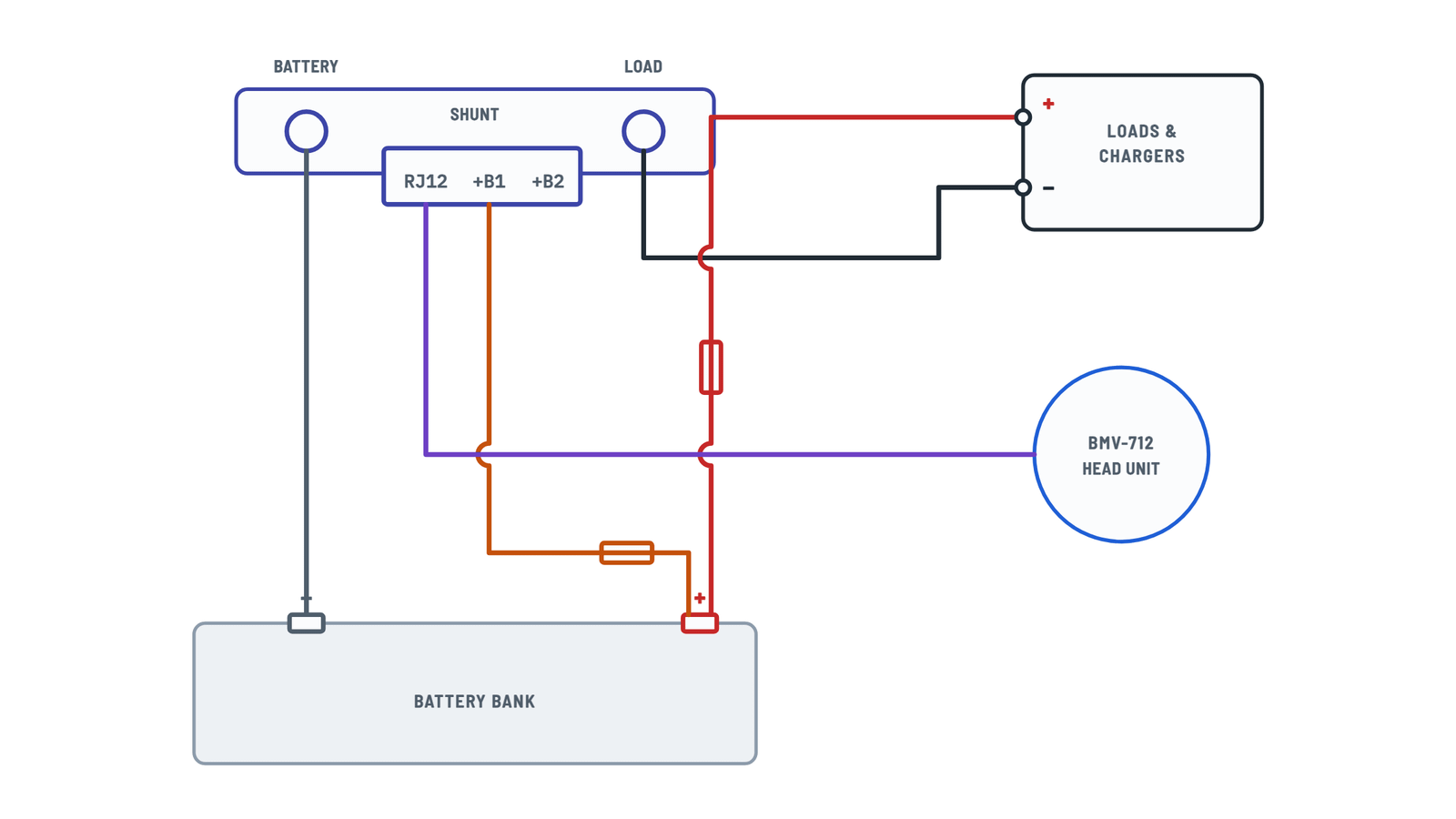
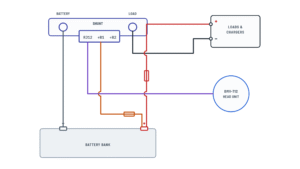
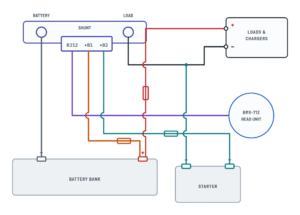
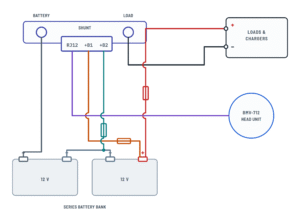
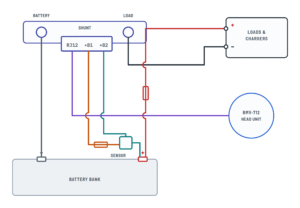
Basic installation and auxiliary input options; tap any wire to see how it connects.
Terminals and components · 7
- Battery negative
- System negative
- Positive
- +B1
- RJ12
- +B2
Terminals
Terminal Goes to BATTERY bolt Battery negative (M10) LOAD bolt Loads and chargers negative (M10) +B1 Battery positive, fused +B2 Auxiliary input (optional) RJ12 Head unit Torque
Tighten the M10 bolts to a maximum of 21 Nm (300 A model: 10 Nm).
Caution
Do not connect any load or charger to the battery negative or the BATTERY side: they would be left out of the state-of-charge calculation.
How to connect it
Connect the negative of all DC loads, inverters, battery chargers, solar chargers and other charge sources to the LOAD bolt.
Shutdown
To leave the system with no draw, open the battery switch, pull its fuses or disconnect the positive.
How to connect it
Push the red fused cable pin into +B1 and bolt the M10 lug to the battery positive.
If it won't power up
Check the fuse in the +B1 cable, the cable and its terminals.
With temperature sensor
The sensor red wire goes to +B1 and its lug to the battery positive; the supplied red fused cables are not used.
How to connect it
Plug one end into the shunt RJ12 and the other into the RJ12 on the back of the head unit.
After connecting
The display and Bluetooth turn on. Configure the monitor (wizard or app) for full operation.
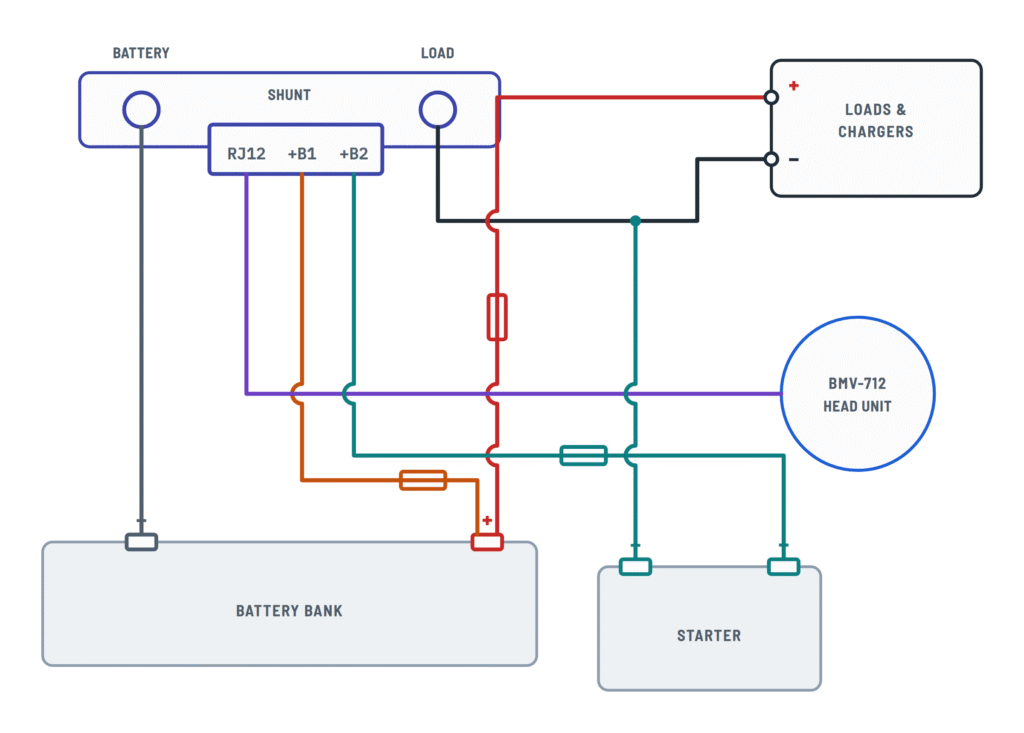
Second battery
- The second battery negative must go to the shunt LOAD side.
- Push the second red fused cable pin into +B2 and the M10 lug onto the second battery positive.
Midpoint
For 24 or 48 V banks with batteries in series: the second red fused cable runs from +B2 to the bank midpoint positive.
What it's for
Gives early warning if one battery in the bank goes out of balance.
Temperature sensor
Sold separately (the sensor supplied with Victron inverter/chargers won't work). Black wire to +B2, red to +B1, M10 lug to the battery positive.
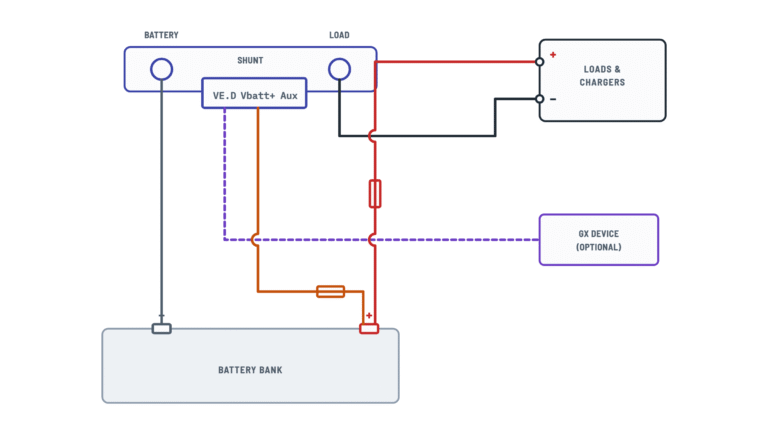
Relay and GX connection
Relay connector and VE.Direct port on the back of the head unit.
Terminals and components · 4
- Relay
- VE.Direct
Default operation
It energizes when the state of charge falls below 50% and de-energizes at 90%. It can be set for other conditions (e.g., voltage) or inverted.
Caution
Do not exceed 60 V or 1 A on the contact: use an external relay for larger loads.
What it's for
The GX (e.g., Cerbo GX with GX Touch) shows the data and sends it to the VRM portal.
About This Diagram
These diagrams are redrawn from pages 7–10 of the Victron BMV-712 Battery Monitor manual, and we offer them completely free and in English. We have also categorized it in the Batteries, BMS & Dual Battery (Solar & Batteries) section on Diagramverse, and it has been rated by 1 user with an average rating of 5.0. If you have any specific questions about the Victron BMV-712 Battery Monitor Wiring Diagram, we suggest checking the Frequently Asked Questions (FAQs) section.
Printable Victron BMV-712 Wiring Diagrams




Wiring Instructions
Before you start
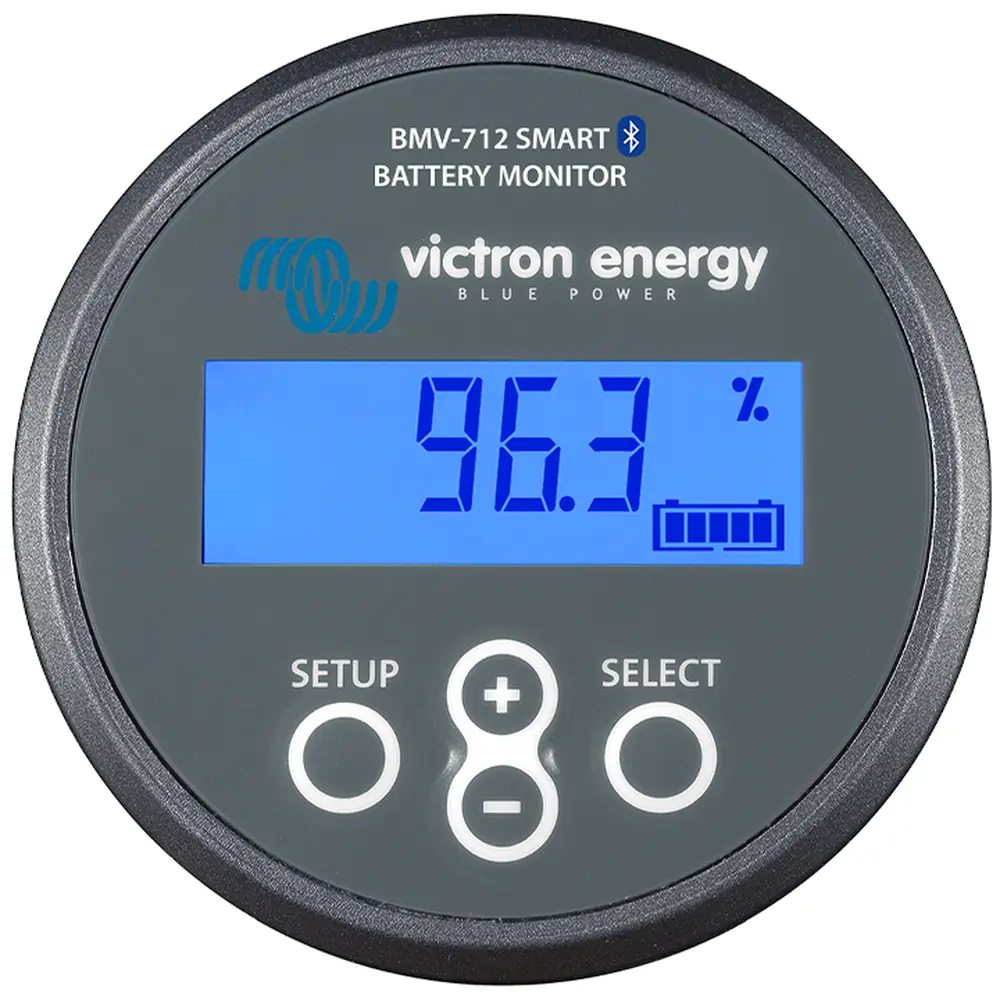
The Victron BMV-712 has three main parts: the 500 A / 50 mV shunt, which goes in the battery negative, the Head unit with the display, and the RJ12 cable to head unit that links the two. Before you open any connection, pick the variant that matches your system:
- Basic: one battery or bank, only +B1 connected.
- Second battery: +B2 also reads a second battery's voltage, usually a starter battery.
- Midpoint: +B2 connects to the midpoint of a series-connected bank so the monitor can spot imbalance between its halves.
- Temperature: a temperature sensor uses +B1 and +B2, and its lug goes on the battery positive.
Only one function can use +B2, so you have to choose one of the last three. If you plan to use the relay or connect a GX device, look at the Relay & GX tab as well.
Tools and materials: insulated wrenches sized for the battery and shunt bolts, a crimper and lugs that match your cable, a digital multimeter, cable ties, and enough clearance to mount the shunt securely. The red fused wire, its 1 A fuse and the 10 m RJ12 cable come in the box. The VE.Direct cable is sold separately. Size the main negative cable between the battery and the shunt, and from the shunt to the system, for your system's maximum current and protective fuse. Use at least the gauge of your existing main battery cables, and follow your local electrical code or the marine/RV standards that apply.
Isolate everything first. Switch off all chargers, inverters, solar chargers and loads, then pull the main battery fuse or open the battery switch. On large banks, on house systems tied to shore or grid power, or wherever an inspection is required, have a qualified electrician do or check the work.
Step-by-step wiring
- With everything isolated, remove the cable from the battery negative terminal, then remove every other negative cable connected there or to the negative busbar.
- Mount the shunt close to the battery on a solid, dry surface where nothing can short across its bolts.
- Connect the Battery negative to the shunt's BATTERY bolt. Nothing else may go on this side.
- Move every system negative to the shunt's LOAD bolt: loads, inverters, chargers, solar chargers, alternator returns and chassis or hull connections. Any negative path that skips the shunt makes the readings wrong.
- Tighten both bolts firmly and check that the lugs sit flat. Don't put washers between a lug and the shunt bolt.
- Plug the pin of the Red fused wire (+B1) into the +B1 socket on the shunt. Leave the M10 lug free for now. In the Temperature variant, the sensor's red wire goes to +B1 instead.
- For the second battery or midpoint variant, plug the second fused wire into +B2. Its lug goes to the starter battery positive or to the bank midpoint, as the selected variant shows. For the temperature variant, plug the sensor's black wire into +B2.
- Run the RJ12 cable from the shunt to the head unit's position. Keep it away from heavy DC cables and sharp edges, but don't plug it in yet.
- If you use them, connect the relay wires to COM and NO (or NC for inverse logic), and the VE.Direct cable to your GX device.
- Connect the positive lugs last: the +B1 lug (or the temperature sensor lug) goes to the battery positive +, and the +B2 lug to its point. Leave the inline fuses in place.
- Plug the RJ12 cable into the shunt and the head unit, mount the head unit, and refit the main battery fuse.
Testing and start-up
The head unit should power up as soon as the RJ12 cable is connected and the +B1 wire is live. If it stays dark, stop and check the +B1 fuse and the connections before you go on.
- Measure the battery voltage at the battery posts with your multimeter and compare it with the monitor's reading. They should agree closely.
- With all loads and chargers off, the current should read near zero.
- Switch on a known load. The monitor should show a discharge current about the size of that load. Then start a charger and check that the reading changes to charging.
- If you use +B2, check that the second reading matches your meter at the starter battery or midpoint.
- Configure the monitor on the head unit or over Bluetooth with VictronConnect: enter your battery bank's details, the +B2 function you wired, and the relay settings. Let the batteries reach a full charge so the state of charge starts from a correct reference.
Safety notes
- Even a low-voltage battery can deliver enough current to weld a wrench, burn you or start a fire. Remove rings and watches, and use insulated tools.
- Always keep the fuses on the +B1 and +B2 wires. These thin wires connect directly to the battery positive, and without a fuse a chafed wire can start a fire.
- The shunt is rated 500 A. Don't use it in a system where the continuous current can exceed that.
- The relay contact is rated 60 V / 1 A. To switch a generator starter, a contactor or a larger load, drive an external relay instead.
- Lead-acid batteries can release hydrogen during charging, so make connections only after the battery has rested, and keep sparks away from vents.
Troubleshooting
| Symptom | Probable Cause | What to Check |
|---|---|---|
| The display stays blank after installation | The +B1 wire isn't live, its fuse is blown, or the RJ12 cable isn't seated | Measure the voltage between the +B1 lug and the shunt's BATTERY bolt. It should match the battery voltage. Check the 1 A fuse for continuity and push both RJ12 plugs fully home. |
| Current shows charging when I switch on a load, and discharging when I charge | The shunt is installed backwards, with the battery on the LOAD bolt and the system on the BATTERY bolt | Check that only the battery negative cable is on the BATTERY bolt and that all system negatives are on the LOAD bolt. Swap them if needed. |
| Voltage is right, but current stays near zero even with big loads running | Loads or chargers still return through the battery negative post or the chassis, bypassing the shunt | Make sure the battery negative post has only one cable, the one to the shunt. Move every other negative, including chassis or hull bonds, to the LOAD bolt. |
| State of charge drifts and never matches reality | A charger or load still bypasses the shunt, or the battery settings are wrong | Trace every negative cable to the LOAD bolt. Check the battery bank details in VictronConnect, and let the battery reach a full charge so the monitor can synchronize. |
| Starter battery or midpoint reading shows 0 V | The +B2 fuse is blown, the +B2 lug isn't connected, or the +B2 function isn't set up | Measure from the +B2 lug to the shunt's BATTERY bolt. Check the fuse in the +B2 wire, and set the auxiliary input function to match the variant you wired. |
| Midpoint alarm is always on, even though the batteries look fine | The +B2 lug is on the wrong point, or one battery in the series bank really is out of balance | Check that the lug is on the link between the two halves of the bank. Measure each half separately. They should be close to equal at rest. |
| Temperature reads nonsense or is missing | The sensor's red and black wires are swapped, the sensor lug isn't on the battery positive, or +B2 is set to another function | Check that the red wire goes to +B1 and the black wire to +B2, and that the lug is tight on the battery positive. Then set the auxiliary input to temperature. |
| Readings jump or the display resets when the engine cranks or a heavy load starts | A loose shunt bolt, a corroded lug or a poorly seated RJ12 plug | With the system isolated, retighten the BATTERY and LOAD bolts and inspect the lugs. Reseat the RJ12 plugs and move the cable away from heavy DC cables. |
| The alarm or generator doesn't respond when the relay should switch | Wired to NC instead of NO, the relay isn't configured, or the load is too big for the contact | Check continuity between COM and NO when the relay is active. Check the relay conditions in the settings, and use an interposing relay for anything above 60 V / 1 A. |
| The GX device doesn't show the battery monitor | No VE.Direct cable, or the wrong cable or port | Use a VE.Direct cable or a VE.Direct-USB interface between the VE.Direct port on the back of the head unit and the GX device. A regular network or RJ12 cable won't work. |