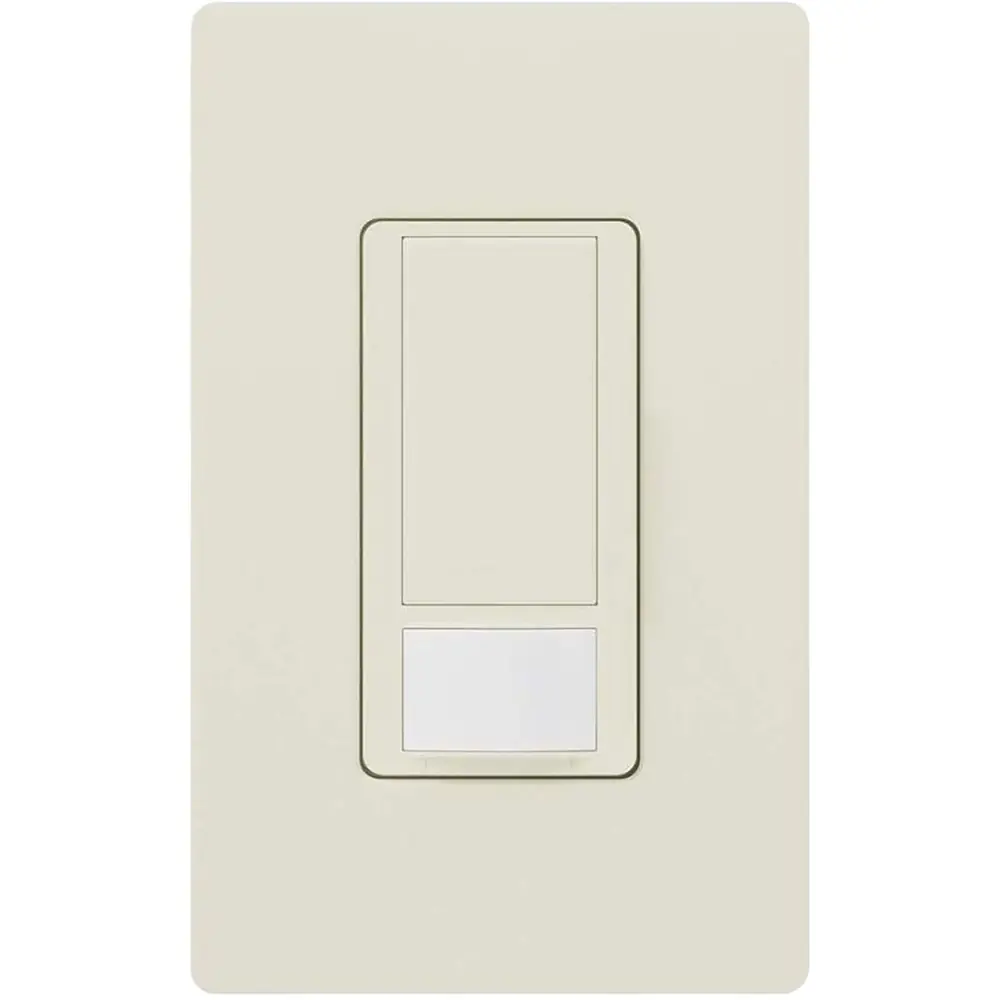
Lutron MS-OPS5M Motion Sensor Switch Wiring Diagram
Complete diagram
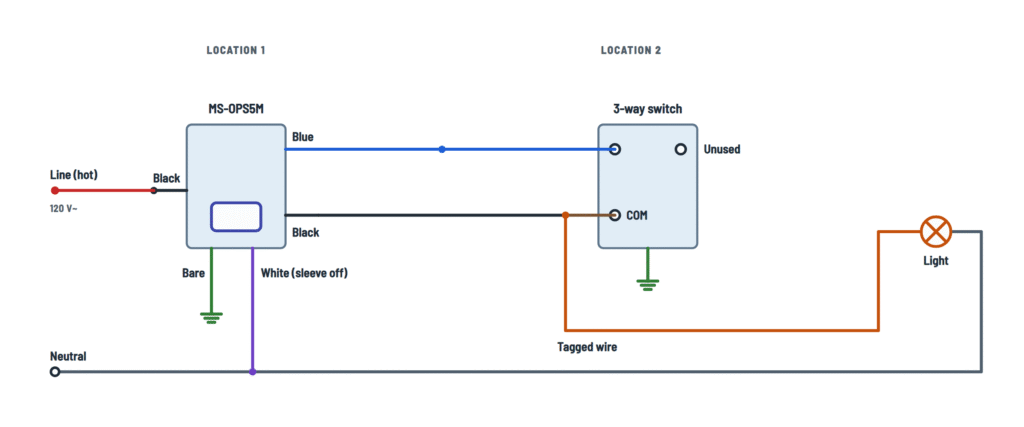
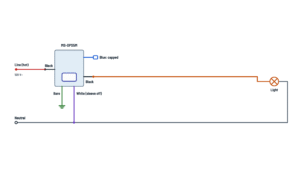
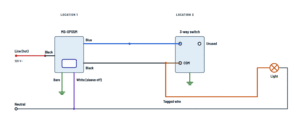
MS-OPS5M wiring for single pole or 3-way, with or without neutral.
Terminals and components · 8
- Line
- To the light
- Black wires
- Blue
- White
- Neutral
- Ground
Single pole
The two wires from the old switch (same-color screws) go to the two black wires; either way.
Tagged wire
In each box, tag the wire on the different-colored screw. In the sensor box it goes to a black wire; it may be the hot or the one going to the light.
In the box
If there are spliced neutrals (white) in the box, add the sensor white wire to that splice.
Maximum loads
Load Maximum Incandescent, halogen, ELV 600 W MLV 450 W LED or CFL 360 W Ballast 5 A Fan 3 A · 1/10 HP Fan + light 3 A Settings (wallplate off)
Hold the indicated button until the lens flashes (about 5 s); it flashes once per option and saves on release.
Flashes Timeout Mode (small button) 1 Test (< 15 s) Auto-on, auto-off 2 1 min Manual-on, auto-off 3 5 min (default) Auto-on with low daylight 4 15 min — 5 30 min — When power is restored
For the first 2 minutes it does not control the light automatically; the button works.
3-way
Only one sensing switch per circuit; it can go in either box.
Single pole
Interchangeable: one to each wire from the old switch.
3-way
- One black → tagged wire.
- The other black → a traveler; in the other box it is spliced to the tagged wire and the jumper.
Test the wiring (3-way)
- Wait 2 minutes after restoring power.
- If the sensing switch does not turn the light on and off, swap its two travelers (blue and black).
- If the 3-way switch does not turn the light on after the sensor turned it off, move the traveler to the other screw.
Single pole
Not used: cap it.
Where it goes
Through a traveler, to a traveler screw on the 3-way switch.
Test the wiring (3-way)
- Wait 2 minutes after restoring power.
- If the sensing switch does not turn the light on and off, swap its two travelers (blue and black).
- If the 3-way switch does not turn the light on after the sensor turned it off, move the traveler to the other screw.
With neutral
Remove the green sleeve and splice it to the box neutrals (white).
Without neutral
Leave the green sleeve on and connect it to ground (retrofit only).
Caution
If there is neither neutral nor ground, consult a licensed electrician.
Where it comes from
From the second black wire.
Where it comes from
From the tagged wire in the other box, spliced with the black traveler and the jumper.
Before rewiring
Tag the wire on the different-colored (common) screw and remove it; the yellow jumper goes there instead.
Caution
The light may not respond if the switch is flipped rapidly.
Splice
Tagged wire + black traveler + jumper, under one wire connector.
Ground
Splice it to the box ground wire (bare or green).
About This Diagram
This diagram is redrawn from page 2 of the Lutron MS-OPS5M Motion Sensor Switch manual, and we offer it completely free and in English. We have also categorized it in the Light Switches & Dimmers (Home Electrical) section on Diagramverse, and it has been rated by 1 user with an average rating of 5.0. If you have any specific questions about the Lutron MS-OPS5M Motion Sensor Switch Wiring Diagram, we suggest checking the Frequently Asked Questions (FAQs) section.
Printable Lutron MS-OPS5M Wiring Diagrams





Wiring Instructions
Before you start
The Lutron MS-OPS5M is a 120 V~ 50/60 Hz occupancy sensing switch that replaces a standard wall switch. Use the selector above the diagram to choose your installation:
- Single pole · neutral: one switch controls the light, and the box has a bundle of white neutral wires.
- Single pole · no neutral: one switch, and the box has only the hot, the switched wire to the light and ground.
- 3-way · neutral or 3-way · no neutral: two switches control the same light. The sensor replaces one of them, and the Existing 3-way switch stays in the other box.
Check your load against the ratings before you buy or install. The limits are 600 W incandescent, halogen or ELV; 450 W MLV; 360 W LED or CFL; 5 A ballast; 3 A (1/10 HP) fan; and 3 A for a combined fan and light. Never use the sensor to control receptacles.
You need a non-contact voltage tester, a multimeter, a screwdriver, wire strippers, approved wire connectors sized for the wires in your box, and tape or labels for tagging wires. The sources don't specify a wire gauge. Keep the existing branch-circuit wiring, and make sure your connectors are rated for its gauge and for the number of wires in each splice. The Yellow jumper and its connector come with the sensor.
A ground connection is required for the sensor to work. If your box has neither a neutral nor a ground, stop and call a licensed electrician. Install everything to national and local electrical codes. Some jurisdictions require a permit or a licensed electrician even for switch replacement, so check with your local authority.
Step-by-step wiring
- Turn off the breaker for the circuit. Remove the wallplate and the existing switch, then use the tester to confirm every wire in the box is dead. Check the other 3-way box too.
- 3-way only: before you disconnect the old switch, tag the wire attached to the different-color screw (the common). That wire becomes the tagged wire. The other two wires on the same-color screws are the travelers. In the other box, tag that switch's common wire the same way.
- Find the neutral. A neutral is a bundle of white wires spliced together in the back of the box that doesn't connect to the old switch. A white wire attached to the old switch is not a neutral. In a switch loop, that white wire is often used as a hot.
- Connect the Bare wire to ground to the box ground.
- With neutral: remove the green sleeve and connect the White wire with green sleeve to the neutral bundle. Without neutral: leave the sleeve on and connect the wire to ground. Only use the ground connection in retrofit and replacement work.
- Single pole: connect one Black wire to the incoming 120 V hot and the other to the wire going to the light. Either black wire can go to either. Cap the Blue wire on its own.
- 3-way, sensor box: connect one Black wire to the tagged wire, the other Black to one traveler, and the Blue wire to the other traveler.
- 3-way, other box: rewire the Existing 3-way switch. Splice its tagged wire, the traveler that runs to the sensor's black wire, and the Yellow jumper together, then land the jumper on the common screw. Put the remaining traveler on one traveler screw and leave the other traveler screw unused. Ground the switch's green screw.
- Tug each wire to check the splices. Fold the wires neatly into the box and mount the sensor. Leave the wallplate off if you plan to change any settings.
Testing and start-up
Turn the breaker back on. For the first 30 seconds you can switch the light on and off with the button, but the sensor won't control the light automatically for 2 minutes. Wait the full 2 minutes before you judge whether it works. A click when the sensor switches is normal.
3-way: after the 2 minutes, check that the sensor turns the light on and off, and that the other switch turns the light on after the sensor has turned it off. If either check fails, turn the power off and swap the travelers on the device that failed. Don't flip the 3-way switch back and forth quickly, because the light might not respond.
To change a setting, press and hold the indicated button until the lens starts flashing, which takes about 5 seconds. The lens flashes once for each setting, about 3 seconds apart and always starting at setting 1. Release the button on the setting you want. For example, to set the timeout, hold the large button. The settings are:
- Timeout: Test Mode, 1, 5 (default), 15 or 30 minutes.
- Sensor mode: occupancy (Auto-On and Auto-Off), vacancy (Manual-On and Auto-Off), or Auto-On daylight sensing and Auto-Off.
- Advanced: motion sensitivity low or high, or return all settings to default.
Use Test Mode to walk the room and check the coverage. In Test Mode the timeout is less than 15 seconds. The sensor leaves Test Mode after 5 minutes or when you press any button. When you're done, put the faceplate and wallplate back on.
Safety notes
- This is a 120 V circuit, which can cause serious injury or death. Turn off the breaker, and verify the power is off before you touch any wire, including in the second 3-way box.
- Controlling receptacles can cause overheating and damage other equipment.
- Don't put more than 20 of these devices on one 120 V branch circuit.
- Install the sensor indoors only, where the temperature stays between 32 °F and 104 °F. It needs a clear line of sight into the room. Avoid heat sources and drafts.
- Clean it only with a soft damp cloth, never with chemical cleaners.
Troubleshooting
| Symptom | Probable Cause | What to Check |
|---|---|---|
| Nothing happens at all: no response to motion or the button | There's no ground or neutral connection on the white wire with green sleeve, the breaker is off, or the hot isn't connected to a black wire. | With power off, check that the white wire goes to the neutral bundle (sleeve off) or to ground (sleeve on), and that the bare wire is grounded. With power on, measure about 120 V between the black wire connected to the hot and neutral or ground. |
| The button works right after power-up, but the light doesn't come on when I walk in | The sensor is still in its 2-minute start-up period. | Wait the full 2 minutes after restoring power, then test again by walking into the room. |
| Breaker trips as soon as power is restored | The white wire is connected to a hot instead of a neutral, or a bare or black conductor is touching ground. | With power off, confirm the white wire you used is a true neutral bundle and not the white wire of a switch loop. Check every splice for exposed copper. |
| In 3-way, the sensor won't turn the light on and off | The travelers at the sensor are reversed. | Turn the power off and swap the black traveler and the blue wire at the sensor. Wait 2 minutes after restoring power before you test again. |
| The other switch won't turn the light back on after the sensor turns it off | The travelers at the existing 3-way switch are reversed. | Turn the power off and swap the traveler connections at the existing 3-way switch, keeping the splice on the yellow jumper to the common screw. |
| In 3-way, the light only works from one location or never comes on | The tagged wire wasn't identified correctly, or the yellow jumper isn't on the common screw. | With power off, confirm that the tagged wire was the one on the different-color screw. In the other box, the tagged wire, the traveler and the yellow jumper must be spliced together, with the jumper on the common screw. |
| In single pole, the light behaves oddly or the sensor misbehaves | The blue wire is uncapped or tied into a splice. | With power off, make sure the blue wire is capped by itself and isn't touching anything. |
| The sensor runs hot or the lights fail early | The load is over the rating or of the wrong type, or the sensor controls a receptacle. | Add up the lamp wattage: maximum 600 W incandescent, 450 W MLV, or 360 W LED or CFL. Remove any receptacles from the switched leg. |
| The light turns off while people are still in the room | The sensor has no clear view, the timeout is too short, or the sensitivity is low. | Run Test Mode to check the coverage, remove obstructions, set the timeout to 15 or 30 minutes, or set the motion sensitivity to high. |
| The light comes on by itself with nobody in the room | Hot objects or moving air are near the sensor's field of view, or the sensitivity is high. | Move heat sources away and block drafts, or set the motion sensitivity to low. |
| The light doesn't respond when I flip the 3-way switch quickly | This is normal behavior when the switch is toggled rapidly. | Operate the 3-way switch at a normal pace and give the light a moment to respond. |