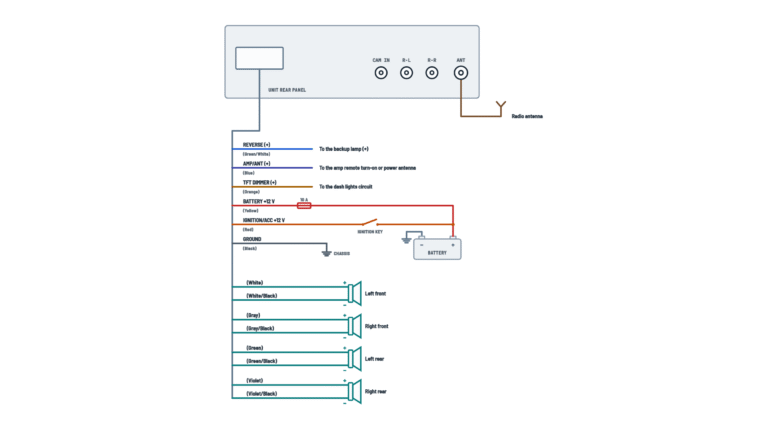
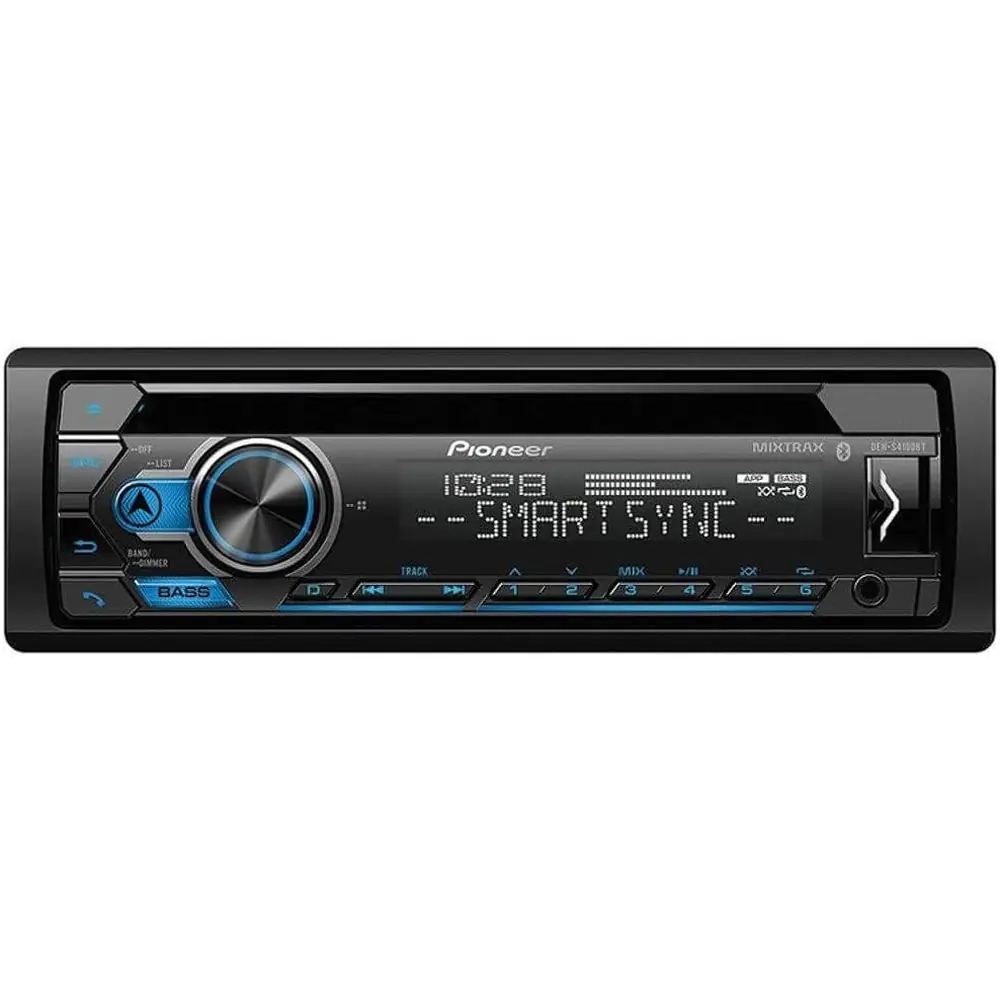
Pioneer DEH-S4100BT Audio Receiver Wiring Diagram
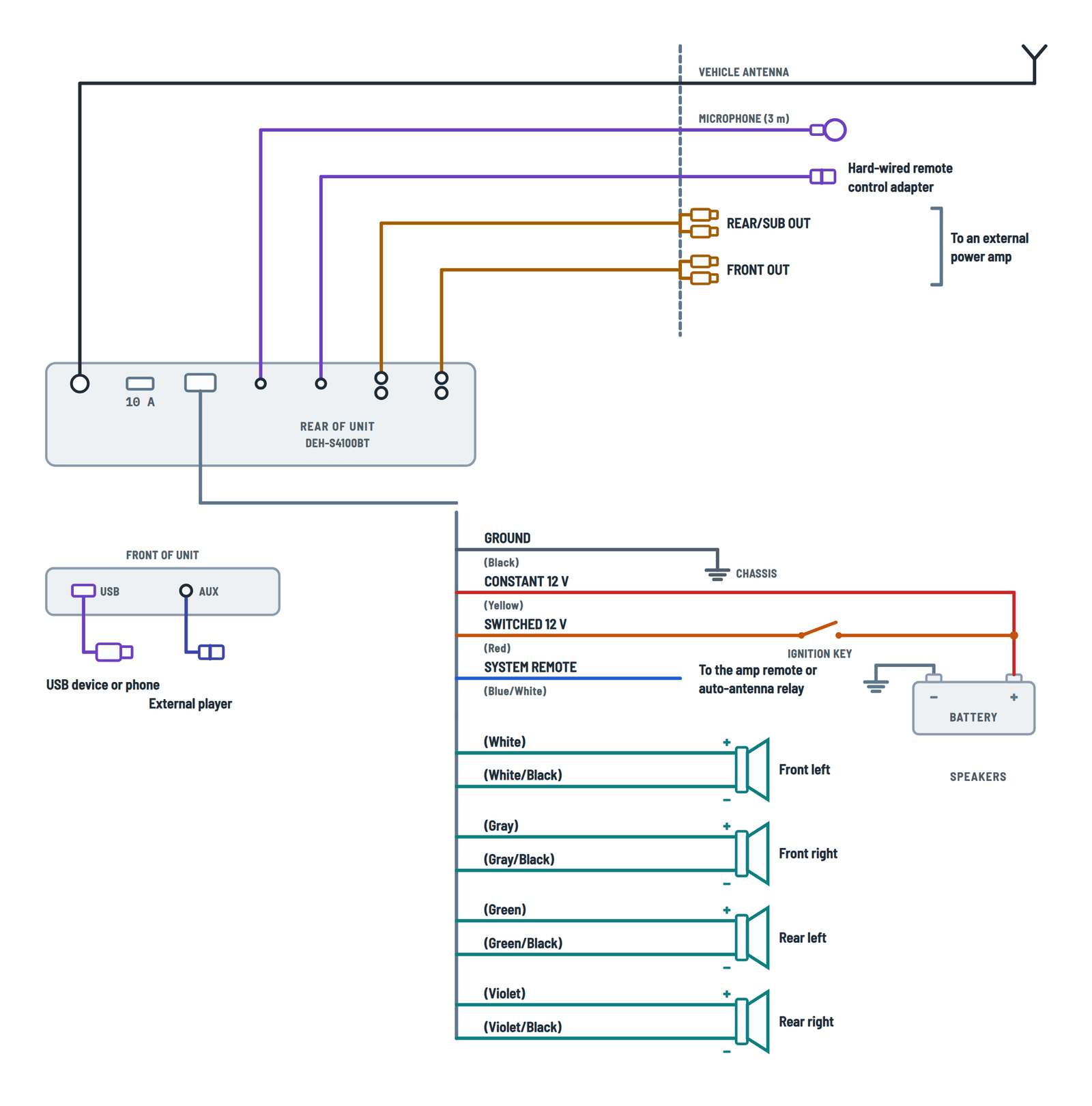
Complete diagram
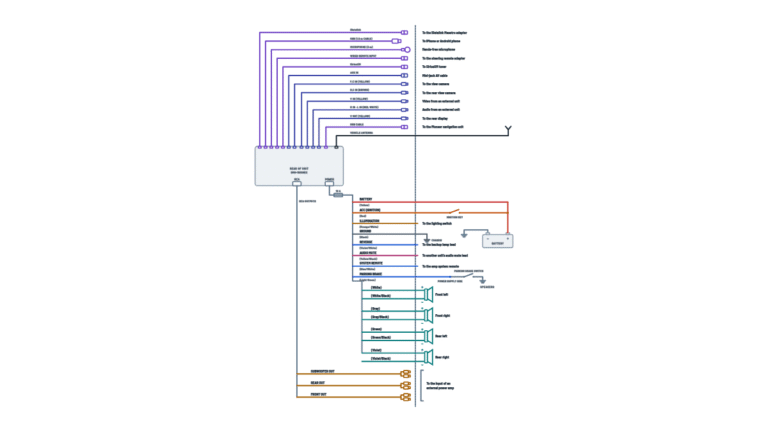
Every cable and connector on the unit and where each one goes.
Terminals and components · 15
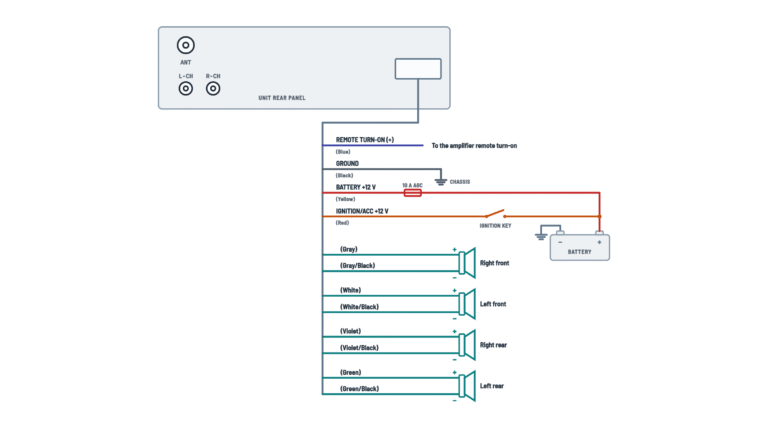
- Constant 12 V
- Switched 12 V
- Ground
- System remote
- Illumination and preamp
- Speakers
- AUX input
- Connectors
- Antenna and devices
Caution
Do not let the lead wind around the steering column or shift lever; secure it with clamps.
Hubs
Connection through a USB hub is not supported.
Settings
Turn the AUX setting on in the menu to use it.
Separate screws
The power amp ground and this unit's ground go to the body with different screws. A loose screw can cause smoke, fire or malfunction.
Caution
Do not run it to the battery through the hole into the engine compartment.
Fuse
The rear of the unit has a 10 A fuse: replace it only with one of the same rating.
No ACC position
If the ignition switch has no ACC position, connect it to a terminal that detects the key; otherwise the battery will drain.
Never to a power terminal
Never connect it to the power terminal of an amp or auto antenna: it may drain the battery or cause a malfunction.
Glass antenna
If the vehicle has a glass antenna, connect it to the antenna booster power supply terminal.
Caution
Tape any unused speaker leads. With a two-speaker system, do not connect anything to the spare leads.
Negative leads
Do not ground the speaker negative lead or band it together with other speakers' negatives.
Caution
Tape any unused speaker leads. With a two-speaker system, do not connect anything to the spare leads.
Negative leads
Do not ground the speaker negative lead or band it together with other speakers' negatives.
Caution
Tape any unused speaker leads. With a two-speaker system, do not connect anything to the spare leads.
Negative leads
Do not ground the speaker negative lead or band it together with other speakers' negatives.
Caution
Tape any unused speaker leads. With a two-speaker system, do not connect anything to the spare leads.
Negative leads
Do not ground the speaker negative lead or band it together with other speakers' negatives.
Plugs
L = left, R = right; connect with RCA cables (sold separately).
Plugs
L = left, R = right; connect with RCA cables (sold separately).
Subwoofer
The subwoofer output is monaural.
Speaker leads
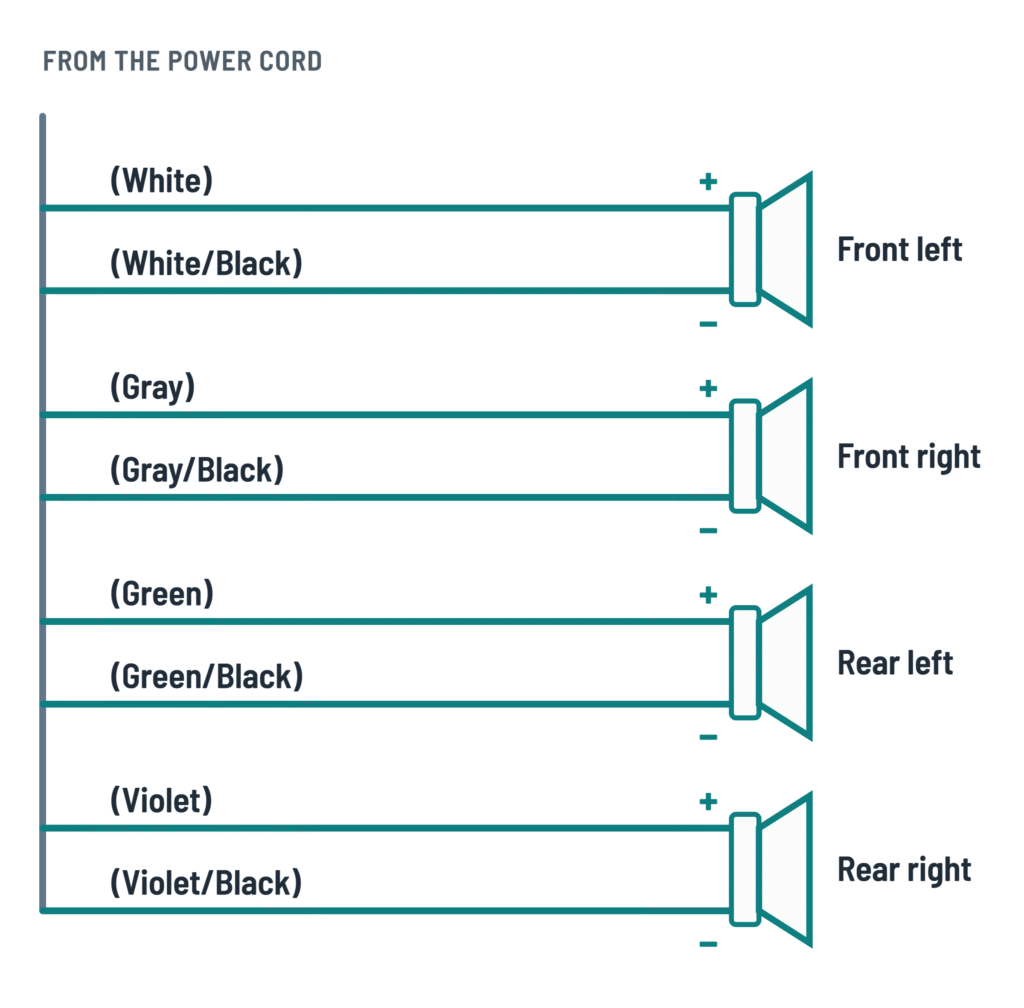
The eight speaker leads with their polarity, with four speakers or with a subwoofer on the rear leads.
Terminals and components · 4
- Speakers
- Unused
Caution
Tape any unused speaker leads. With a two-speaker system, do not connect anything to the spare leads.
Negative leads
Do not ground the speaker negative lead or band it together with other speakers' negatives.
Caution
Tape any unused speaker leads. With a two-speaker system, do not connect anything to the spare leads.
Negative leads
Do not ground the speaker negative lead or band it together with other speakers' negatives.
Caution
Tape any unused speaker leads. With a two-speaker system, do not connect anything to the spare leads.
Negative leads
Do not ground the speaker negative lead or band it together with other speakers' negatives.
Caution
Tape any unused speaker leads. With a two-speaker system, do not connect anything to the spare leads.
Negative leads
Do not ground the speaker negative lead or band it together with other speakers' negatives.
Setting
With a subwoofer on the rear leads, set the rear output to subwoofer (SW) in the menu.
Negative leads
Do not ground the speaker negative lead or band it together with other speakers' negatives.
Setting
With a subwoofer on the rear leads, set the rear output to subwoofer (SW) in the menu.
Negative leads
Do not ground the speaker negative lead or band it together with other speakers' negatives.
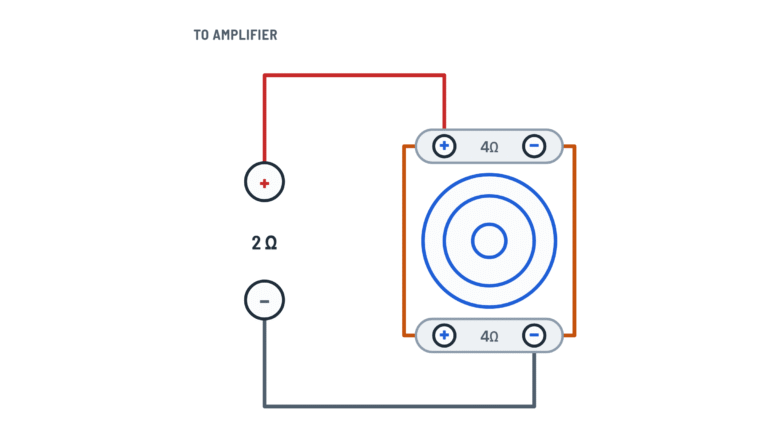
2 Ω subwoofer
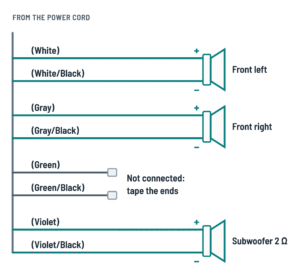
A 2 Ω subwoofer (or two 4 Ω subwoofers in parallel) goes only to the violet and violet/black leads and must be rated over 70 W. Connect nothing to the green and green/black leads.
Setting
With a subwoofer on the rear leads, set the rear output to subwoofer (SW) in the menu.
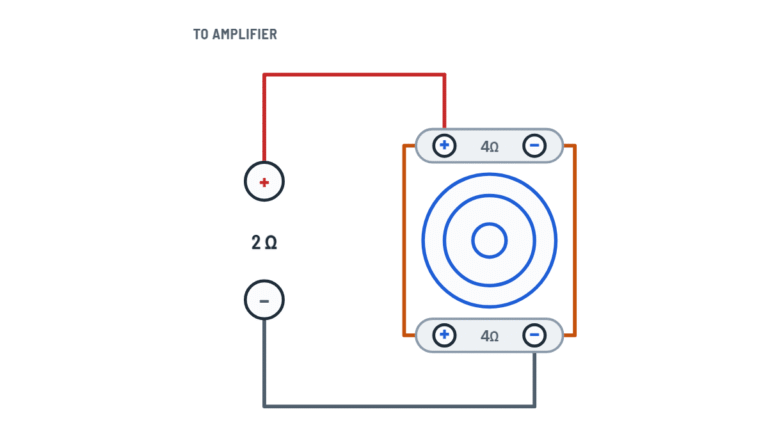
2 Ω subwoofer
A 2 Ω subwoofer (or two 4 Ω subwoofers in parallel) goes only to the violet and violet/black leads and must be rated over 70 W. Connect nothing to the green and green/black leads.
Setting
With a subwoofer on the rear leads, set the rear output to subwoofer (SW) in the menu.
External power amp
RCA outputs to the amplifiers and the lead that turns them on.
Terminals and components · 4
- Preamp
- System remote
- Amplifier
Amp turn-on
Connect it to the system remote terminal of each amplifier.
Plugs
L = left, R = right; connect with RCA cables (sold separately).
Plugs
L = left, R = right; connect with RCA cables (sold separately).
Subwoofer
The subwoofer output is monaural.
About This Diagram
These diagrams are redrawn from page 3 of the Pioneer DEH-S4100BT Audio Receiver manual, and we offer them completely free and in English. We have also categorized it in the Car Audio & Stereo (Automotive) section on Diagramverse, and it has been rated by 1 user with an average rating of 5.0. If you have any specific questions about the Pioneer DEH-S4100BT Audio Receiver Wiring Diagram, we suggest checking the Frequently Asked Questions (FAQs) section.
Printable Pioneer DEH-S4100BT Wiring Diagrams





Wiring Instructions
Before you start
The Pioneer DEH-S4100BT is built only for vehicles with a 12 V battery and negative ground. It runs from 14.4 V DC (10.8 V to 15.1 V allowable), draws up to 10.0 A, and has a 10 A fuse on the power cord. Pioneer warns that people without training in automotive electronics should not install it themselves. If you are not comfortable working on your vehicle's wiring, have a professional installer do the job. Car stereo work usually does not need a permit. If you have to drill holes or modify the vehicle, check with your dealer first.
- Tools: a digital multimeter, wire strippers, a crimp tool with insulated butt connectors (or a vehicle-specific harness adapter), insulating tape, cable clamps, and panel removal tools.
- Wire gauge: the sources do not give a gauge. Do not shorten the unit's harness leads. If you need extensions, use wire at least as heavy as the lead you are extending. If an extension carries power, it must also be fused.
- Isolation: disconnect the negative terminal of the battery before you touch any wiring. Leave it off until every connection is finished and insulated.
- Choose your variant: use the Speakers tab. Pick Four speakers for a normal full-range setup. Pick 4 Ω subwoofers, 2 Ω subwoofer or Two 4 Ω in parallel if you are driving a passive subwoofer straight from the rear speaker leads. Use the Power amp tab if external amplifiers will take the RCA outputs.
Step-by-step wiring
- Find the vehicle's constant 12 V, switched 12 V and ground circuits with your meter. The battery stays disconnected, so this step needs special care: a constant circuit reads about 12 V with the key off, and a switched circuit reads 12 V only with the key in ACC or ON. Make these two readings with the battery briefly reconnected, then disconnect it again before you join any wires.
- Connect the Black chassis ground first. Run it to clean, paint-free metal on the body and fasten it firmly. If you are also installing a power amp, give the amp's ground its own screw. Never share one screw between the two grounds.
- Connect Yellow to the constant 12 V supply terminal. Do not run the yellow lead through the firewall straight to the battery.
- Connect Red to the terminal controlled by the ignition switch. If your ignition has no ACC position, use a circuit that switches with the ignition key. Otherwise the unit can drain the battery.
- If you have an amplifier or a power antenna, connect Blue/white to the amp's system remote terminal or to the auto-antenna relay control terminal. If the vehicle has a glass antenna, connect it to the antenna booster power supply terminal instead. It is a signal output rated 300 mA max, 12 V DC. It must never feed a power terminal.
- Wire the speakers in pairs, keeping polarity right: white and white/black for FL, gray and gray/black for FR, green and green/black for RL, violet and violet/black for RR. Each speaker gets its own pair of leads.
- For a 2 Ω subwoofer, or two 4 Ω subwoofers in parallel, use only violet and violet/black. Tape the unused green and green/black leads separately.
- If you use amplifiers, run RCA cables from FRONT OUT and REAR/SUB OUT to the amp inputs. Keep the RCA cables away from the power wiring.
- Plug in the antenna at ANT. Plug the microphone into MIC and the steering-wheel adapter, if you have one, into REMOTE. Mount the microphone in front of the driver, on the sun visor or the steering column. Route its lead with clamps so it cannot wrap around the steering column or shift lever.
- Cover every unused connector with insulating tape. Wrap tape wherever wiring touches metal, and keep cables away from seat rails, the shift lever and heater outlets.
Testing and start-up
- Before you mount the unit, reconnect the battery negative. Check for about 12 V on yellow at all times and on red with the key in ACC or ON, both measured to the black ground. With the key off, red should read 0 V.
- Remove the front panel and press the RESET button with a pointed tool longer than 8 mm. Turn the key to ON. The setup menu should appear.
- Go to INITIAL settings and set REAR-SP. Choose FUL for full-range rear speakers, or SW for a subwoofer wired directly to the rear leads. Then set SP-P/O MODE to match what is on the RCA outputs.
- Play music at low volume. Use FADER and BALANCE to check that each speaker plays from its correct position. If you have a subwoofer, set SUBWOOFER to ON, then adjust the phase and CROSSOVER.
- Confirm that the amplifier or power antenna turns on with the source and turns off with it.
- When everything works, secure the unit in its mounting sleeve. Leave space behind it for airflow and keep it at an angle of less than 60°.
Safety notes
- A 12 V system can deliver very high short-circuit current. A bare yellow lead touching the chassis can melt insulation or start a fire, so keep the battery disconnected while you work.
- Never cut into the unit's power cable to supply other devices; it has limited current capacity. Replace a blown fuse only with one of the same rating, 10 A.
- Never ground a speaker negative lead, and never join the negatives of several speakers. The amplifier outputs are not referenced to ground.
- Use speakers rated over 50 W at 4 Ω to 8 Ω. Never use speakers of 1 Ω to 3 Ω. A 2 Ω subwoofer on the rear leads must be rated over 70 W.
- A loose ground screw can cause smoke, fire or malfunction, so check that it is tight before you close the dash.
Troubleshooting
| Symptom | Probable Cause | What to Check |
|---|---|---|
| The unit won't turn on at all | Blown 10 A fuse, missing yellow or red supply, or a poor ground | Check the fuse on the power cord. With the key in ACC, measure about 12 V from yellow to black and from red to black. Retighten the ground on bare metal. |
| The clock and presets are lost every time I turn the car off | Yellow and red are swapped, or both are on a switched circuit | With the key off, yellow must still read about 12 V. If it reads 0 V, move it to a constant 12 V circuit. |
| The battery goes flat overnight | Red is on a constant circuit, often in vehicles with no ACC position, or Bluetooth is left on standby with the engine off | With the key off, red should read 0 V. Move it to a circuit switched by the ignition key. |
| The display shows AMP ERROR | A speaker lead is shorted or grounded, speaker negatives are joined together, or the load impedance is too low | Check each speaker pair for stray strands and chassis contact. Measure the impedance: at least 4 Ω per speaker, or 2 Ω on the violet leads only. Then cycle the ignition off and on. |
| The amplifier or power antenna never turns on | Blue/white is not connected, or it is connected to the wrong terminal | With the unit on, measure about 12 V on blue/white. It must go to the amp's remote terminal or the antenna relay control terminal, not to a power terminal. |
| The amp turns on but there is no sound from it | The RCA cable is on the wrong output, or SP-P/O MODE does not match the system | Check which RCA cable goes to FRONT OUT and which to REAR/SUB OUT. Then set SP-P/O MODE to REAR/SUB.W, SUB.W/SUB.W or REAR/REAR to match the connected equipment. |
| The bass is weak and the sound seems hollow | One speaker is wired with reversed polarity, or the subwoofer phase is wrong | Check that every colored lead goes to + and every striped black lead goes to −. Try switching the SUBWOOFER phase between NOR and REV. |
| The subwoofer on the rear leads only plays full-range music | REAR-SP is still set to FUL | In INITIAL settings, set REAR-SP to SW. Set SUBWOOFER to ON and adjust the LPF in CROSSOVER. |
| There is whining or buzzing noise that follows engine speed | Poor ground, the amp and head unit sharing one ground screw, or RCA cables routed next to power wiring | Clean the paint off the ground point and give each device its own screw. Reroute the RCA cables away from the power leads. |
| The display shows CHECK USB | The USB cable is shorted or pinched, or the device draws more than 1.5 A | Inspect the cable and replace it if it is damaged. Disconnect the device and cycle the ignition. Do not connect through a USB hub. |