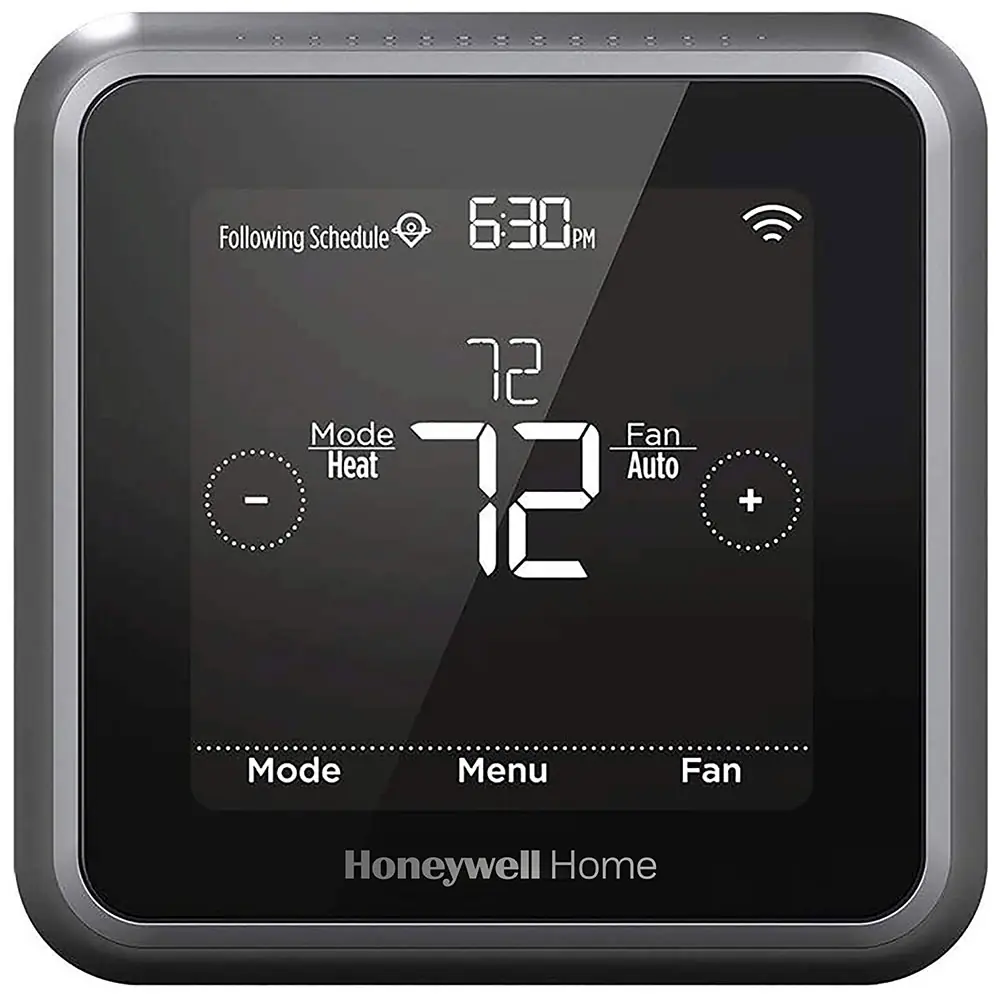
Honeywell Lyric T5 Wifi Thermostat Wiring Diagram
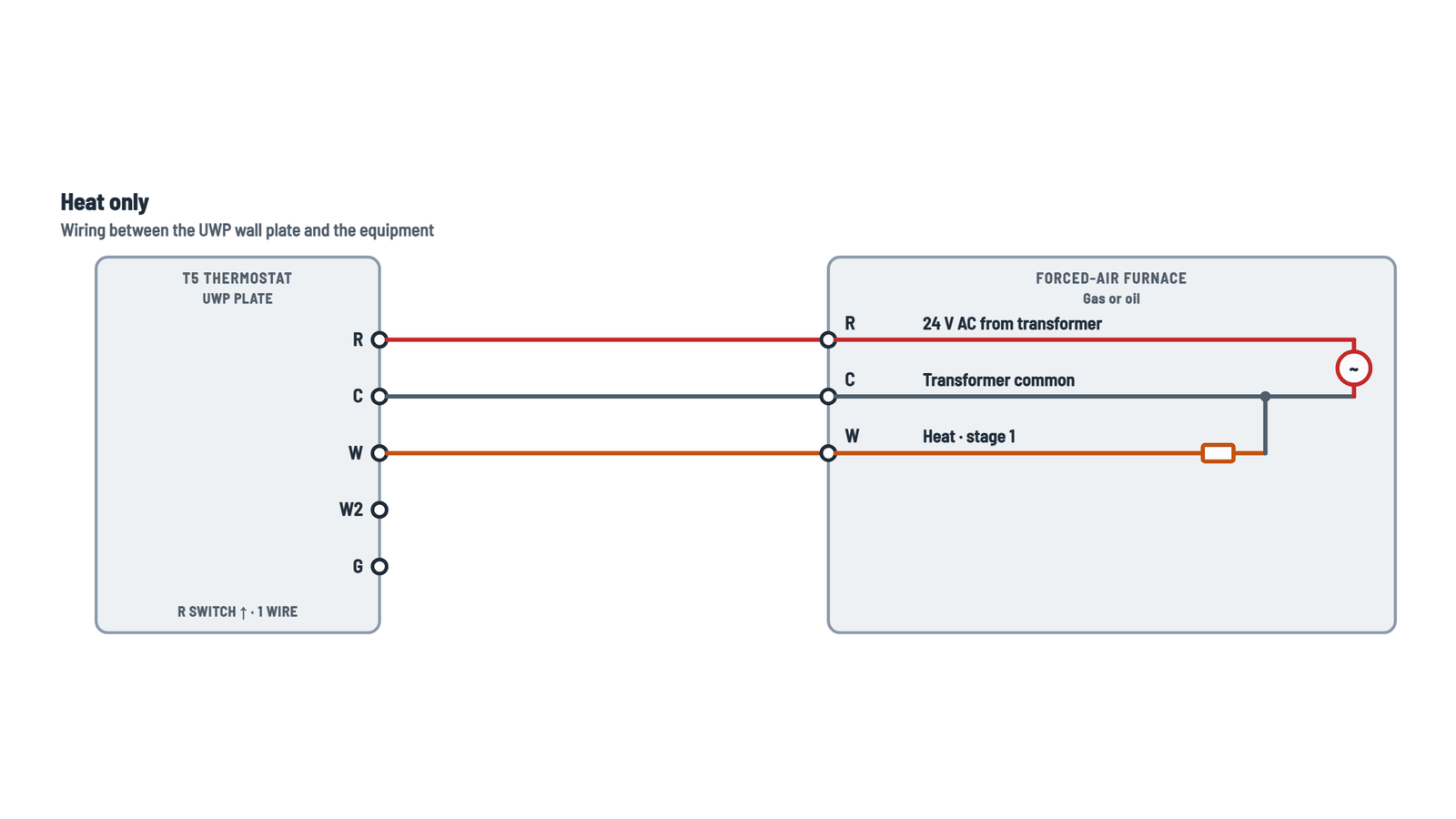
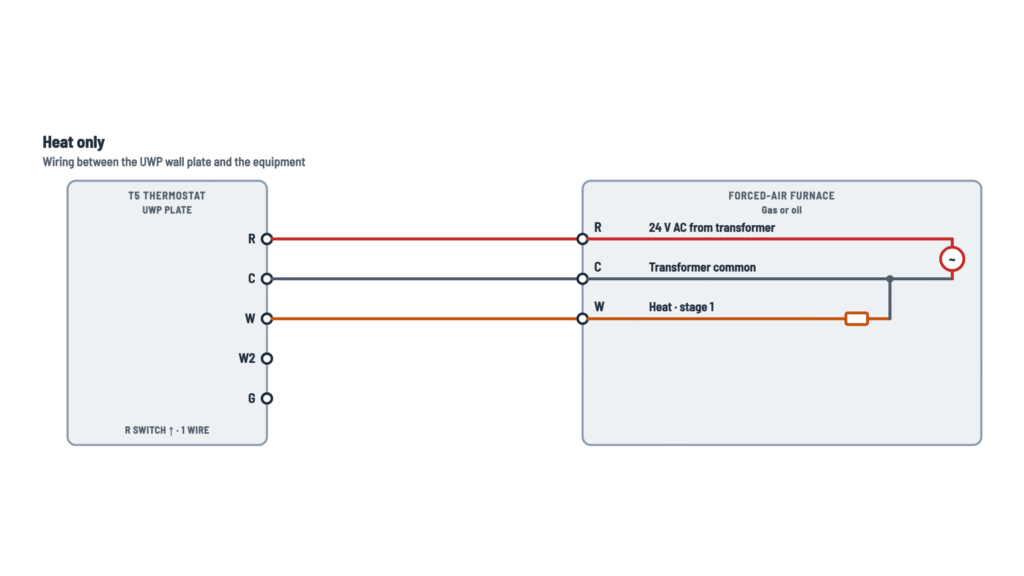
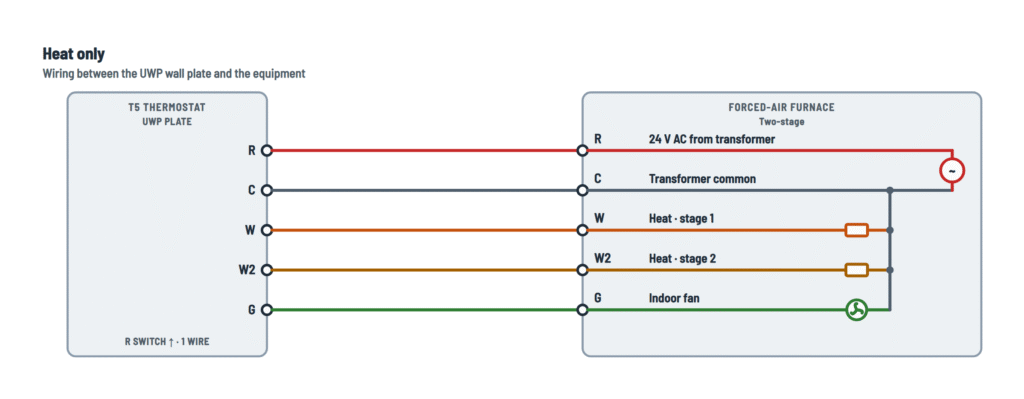
Heat only
Forced-air furnace: gas, oil, electric or fan coil.
Terminals and components · 4
- R · 24 V
- Common
- Heat
- Heat 2
- Fan
How to set it
With a single R wire (it may have been on R, Rh or Rc on the old thermostat), set the switch up and insert that wire into R. With two wires, set it down: the Rc wire goes into Rc and the R or Rh wire into R.
Jumpers
The T5 needs no jumpers: remove any from the old thermostat.
What it does
Brings 24 V AC to the thermostat, which sends it back through W, Y, G… to call for heat, cooling or fan.
How to connect it
A single R wire goes into R with the switch up, even if it was on Rh or Rc on the old thermostat.
What it does
Completes the 24 V circuit and powers the thermostat continuously.
Required
The T5 does not work without a C wire. If the old thermostat had none, run a spare conductor from the equipment's C (common) terminal.
What it does
On a call for heat the thermostat connects R to W and the equipment starts heating.
What it does
Energized in addition to W when more capacity is needed.
Setup
Set 2 heat stages in the thermostat setup.
What it does
With electric or fan coil equipment, the thermostat also runs the fan when calling for heat.
What it does
On gas or oil furnaces, the furnace runs its own fan while heating; G is for fan-only operation.
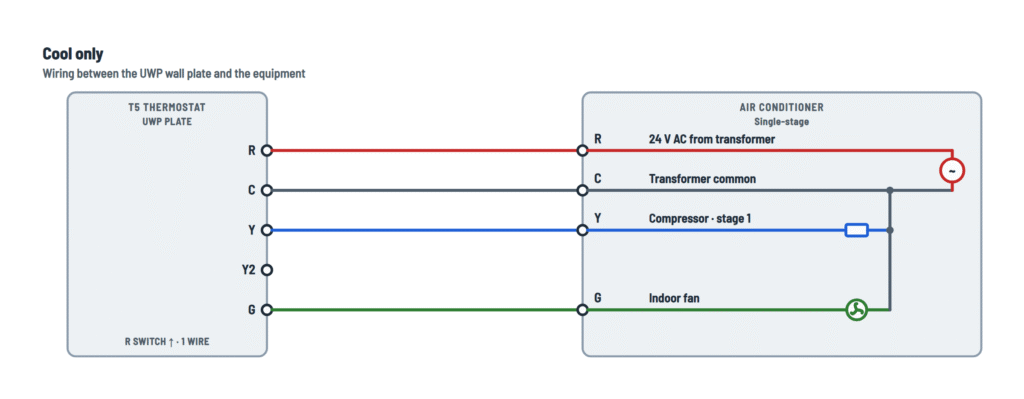
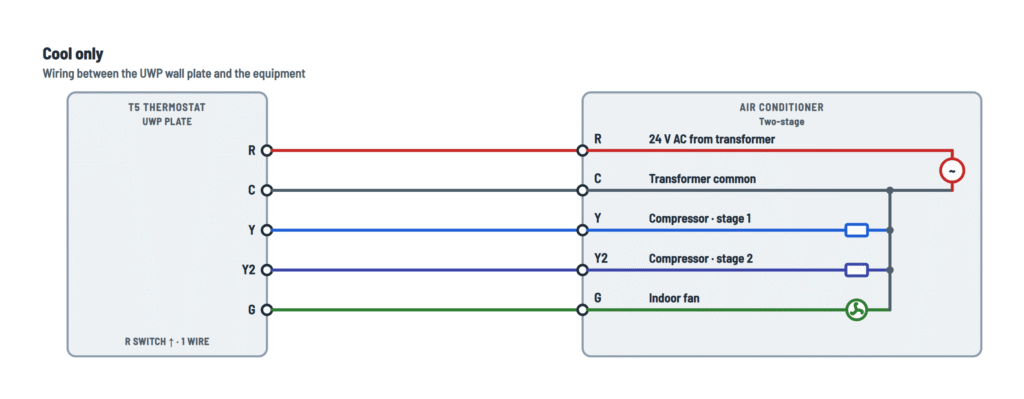
Cool only
Air conditioning without heating.
Terminals and components · 5
- R · 24 V
- Common
- Compressor
- Compressor 2
- Fan
How to set it
With a single R wire (it may have been on R, Rh or Rc on the old thermostat), set the switch up and insert that wire into R. With two wires, set it down: the Rc wire goes into Rc and the R or Rh wire into R.
Jumpers
The T5 needs no jumpers: remove any from the old thermostat.
What it does
Brings 24 V AC to the thermostat, which sends it back through W, Y, G… to call for heat, cooling or fan.
How to connect it
A single R wire goes into R with the switch up, even if it was on Rh or Rc on the old thermostat.
What it does
Completes the 24 V circuit and powers the thermostat continuously.
Required
The T5 does not work without a C wire. If the old thermostat had none, run a spare conductor from the equipment's C (common) terminal.
What it does
Energizes the outdoor unit's compressor contactor.
What it does
Energized in addition to Y when more capacity is needed.
Setup
Set 2 cool or compressor stages in the setup (maximum 2).
What it does
On a call for cooling, the thermostat runs the fan with the compressor. It also allows fan-only operation.
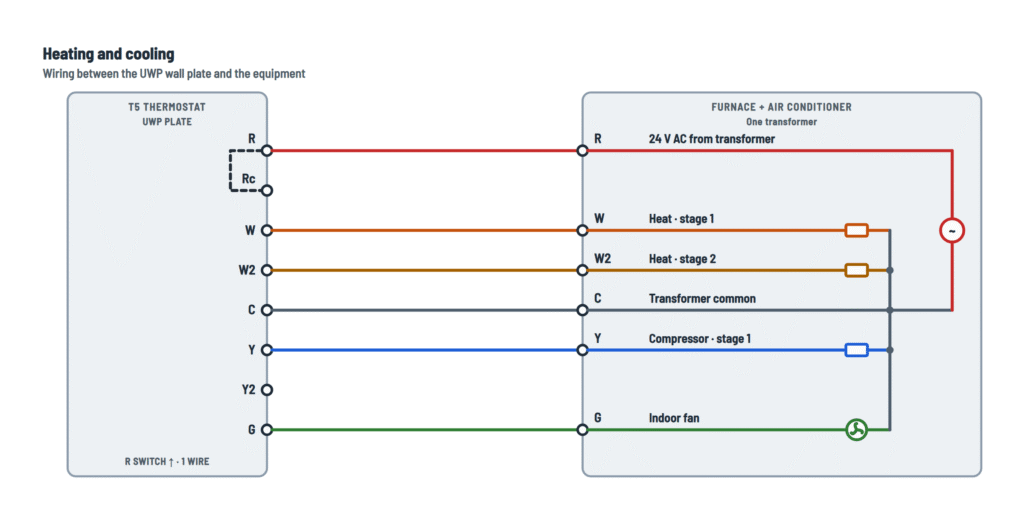
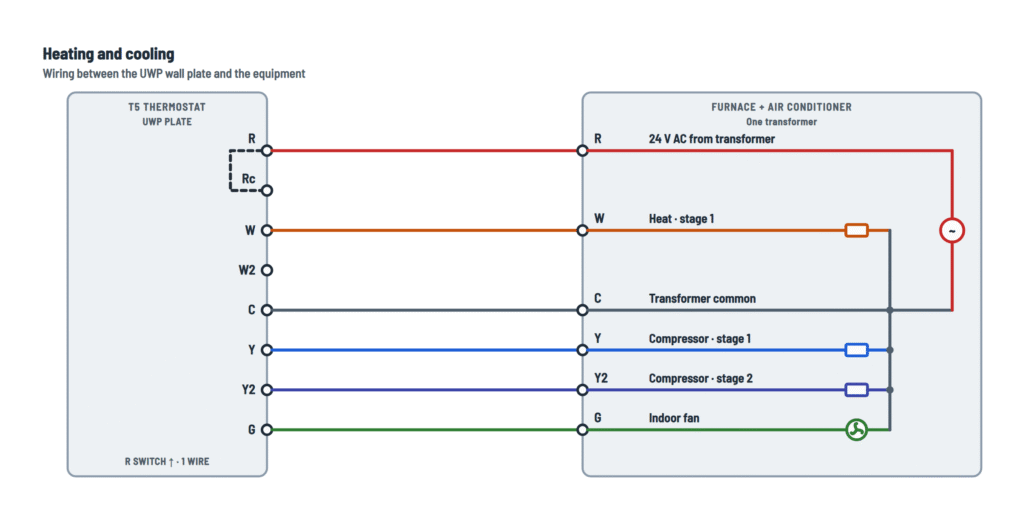
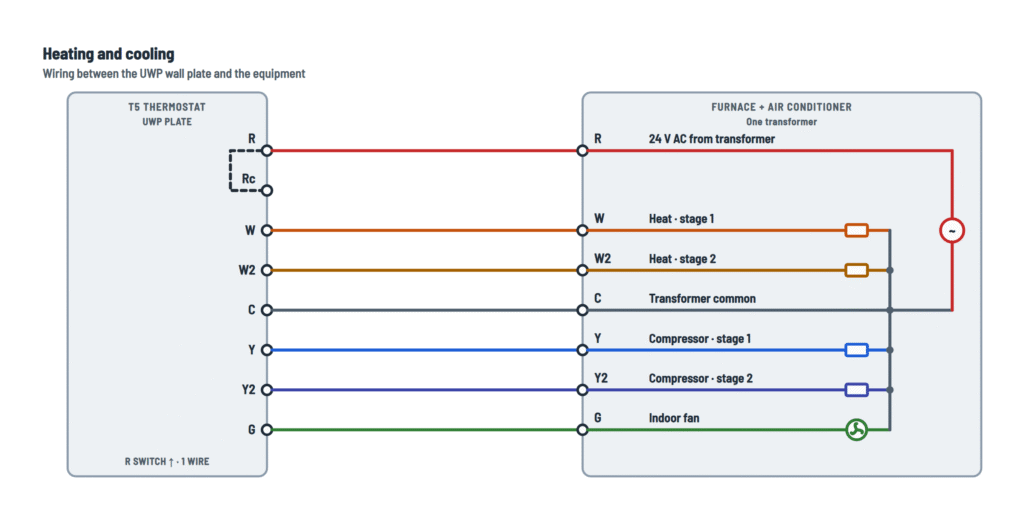
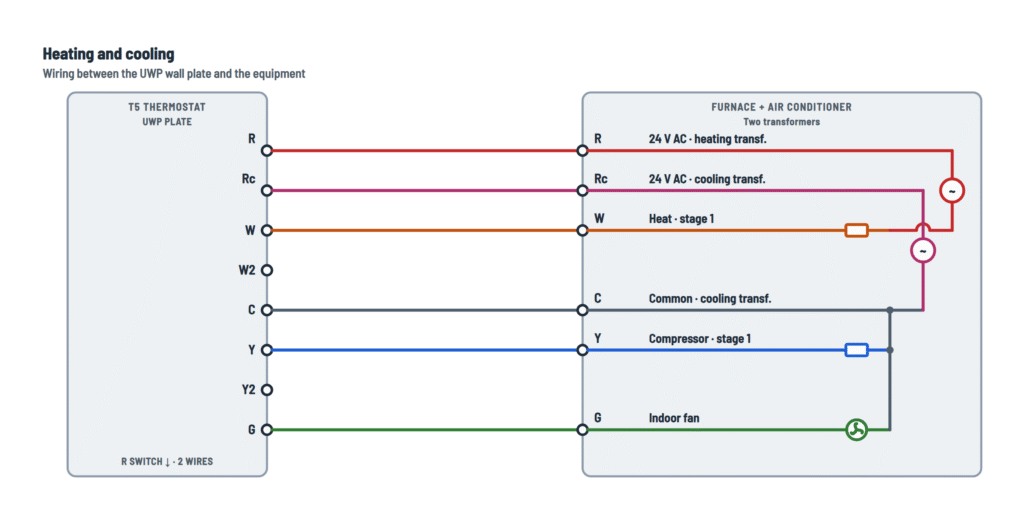
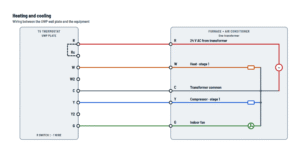
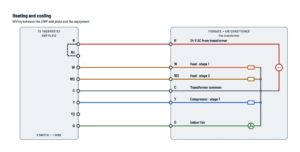
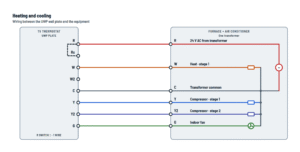
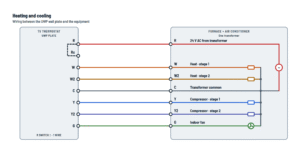
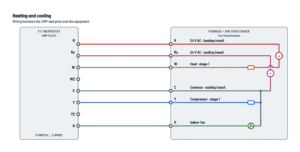
Heating and cooling
Conventional system (H = heat stages, C = cool stages), with one or two transformers.
Terminals and components · 6
- R · 24 V
- Rc · cooling 24 V
- Heat
- Heat 2
- Common
- Compressor
- Compressor 2
- Fan
How to set it
With a single R wire (it may have been on R, Rh or Rc on the old thermostat), set the switch up and insert that wire into R. With two wires, set it down: the Rc wire goes into Rc and the R or Rh wire into R.
Jumpers
The T5 needs no jumpers: remove any from the old thermostat.
Two transformers
Typical of a boiler or furnace with a separate air conditioner: each unit has its own transformer.
What it does
Brings 24 V AC to the thermostat, which sends it back through W, Y, G… to call for heat, cooling or fan.
How to connect it
A single R wire goes into R with the switch up, even if it was on Rh or Rc on the old thermostat.
What it does
Brings 24 V AC to the thermostat, which sends it back through W, Y, G… to call for heat, cooling or fan.
How to connect it
With two transformers, R takes the heating unit's one (R or Rh wire on the old thermostat).
How to connect it
Only with two transformers: the old thermostat's Rc wire goes into Rc and the R switch is set down.
What it does
On a call for heat the thermostat connects R to W and the equipment starts heating.
What it does
Energized in addition to W when more capacity is needed.
Setup
Set 2 heat stages in the thermostat setup.
What it does
Completes the 24 V circuit and powers the thermostat continuously.
Required
The T5 does not work without a C wire. If the old thermostat had none, run a spare conductor from the equipment's C (common) terminal.
What it does
Completes the 24 V circuit and powers the thermostat continuously.
Required
The T5 does not work without a C wire. If the old thermostat had none, run a spare conductor from the equipment's C (common) terminal.
Two transformers
The common must come from the cooling transformer.
What it does
Energizes the outdoor unit's compressor contactor.
What it does
Energized in addition to Y when more capacity is needed.
Setup
Set 2 cool or compressor stages in the setup (maximum 2).
What it does
On a call for cooling, the thermostat runs the fan with the compressor. It also allows fan-only operation.
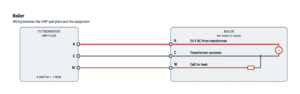
Boiler
Hot water or steam heat, straight to the boiler or through a zone valve.
Terminals and components · 4
- R · 24 V
- Common
- Heat
How to set it
With a single R wire (it may have been on R, Rh or Rc on the old thermostat), set the switch up and insert that wire into R. With two wires, set it down: the Rc wire goes into Rc and the R or Rh wire into R.
Jumpers
The T5 needs no jumpers: remove any from the old thermostat.
What it does
Brings 24 V AC to the thermostat, which sends it back through W, Y, G… to call for heat, cooling or fan.
How to connect it
A single R wire goes into R with the switch up, even if it was on Rh or Rc on the old thermostat.
What it does
Completes the 24 V circuit and powers the thermostat continuously.
Required
The T5 does not work without a C wire. If the old thermostat had none, run a spare conductor from the equipment's C (common) terminal.
What it does
When heat is called, W sends 24 V to the boiler's thermostat input.
Check
Some boilers have thermostat terminals without 24 V AC: then there is no R and C to use and a separate transformer or zone control is needed. Check the boiler manual.
How to connect it
W goes to the valve motor; the other motor lead returns to the transformer common (C). Once open, the valve usually starts the boiler through its own end switch.
Setup
System type: boiler (hot water or steam).
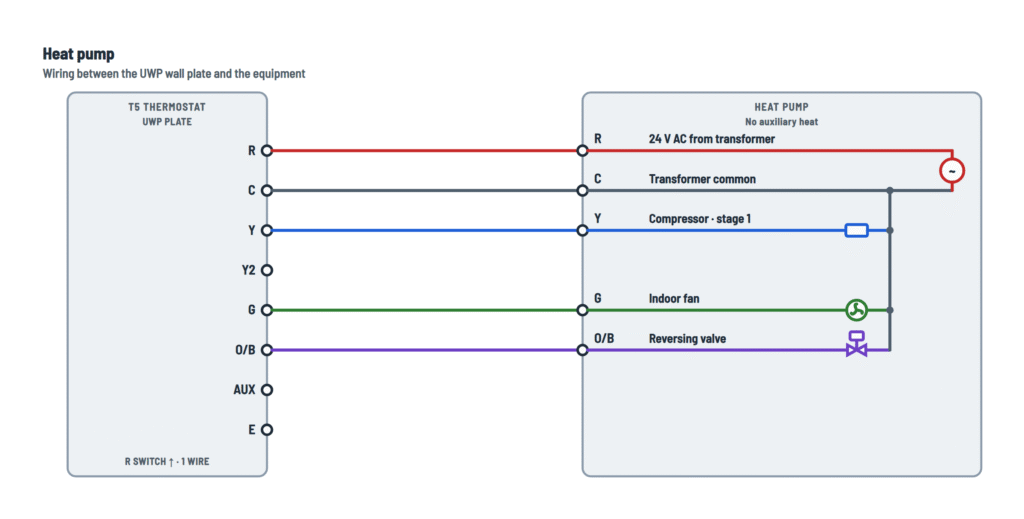
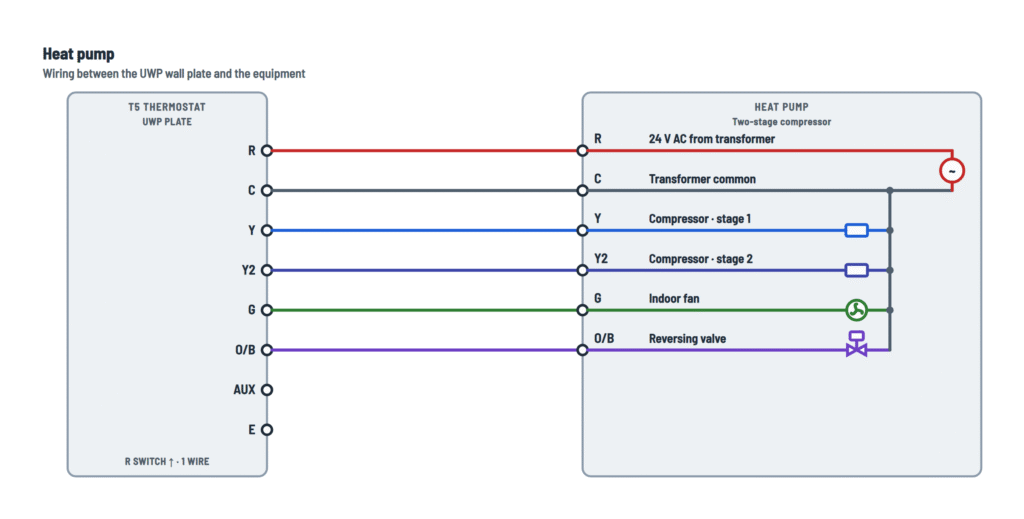
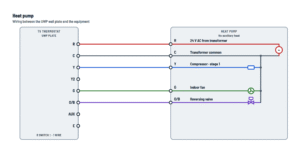
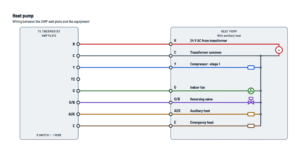
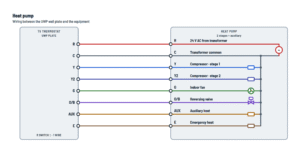
Heat pump
Air-to-air or geothermal, with or without auxiliary heat. W is not used on heat pumps.
Terminals and components · 6
- R · 24 V
- Common
- Compressor
- Compressor 2
- Fan
- Reversing
- Auxiliary
- Emergency
How to set it
With a single R wire (it may have been on R, Rh or Rc on the old thermostat), set the switch up and insert that wire into R. With two wires, set it down: the Rc wire goes into Rc and the R or Rh wire into R.
Jumpers
The T5 needs no jumpers: remove any from the old thermostat.
What it does
Brings 24 V AC to the thermostat, which sends it back through W, Y, G… to call for heat, cooling or fan.
How to connect it
A single R wire goes into R with the switch up, even if it was on Rh or Rc on the old thermostat.
What it does
Completes the 24 V circuit and powers the thermostat continuously.
Required
The T5 does not work without a C wire. If the old thermostat had none, run a spare conductor from the equipment's C (common) terminal.
What it does
Energizes the compressor contactor. On a heat pump, Y runs in both cooling and heating; the O/B valve sets the mode.
What it does
Energized in addition to Y when more capacity is needed.
Setup
Set 2 cool or compressor stages in the setup (maximum 2).
What it does
On a call for cooling, the thermostat runs the fan with the compressor. It also allows fan-only operation.
Setup
In the setup choose O (valve energized in cooling) or B (energized in heating), as the heat pump maker specifies.
Check
If the unit heats on a call for cooling, the O/B setting is reversed.
What it does
Adds backup heat (for example, electric heat strips) when the heat pump cannot reach the setpoint.
Caution
On a heat pump, nothing connects to W: it can keep the heat running continuously.
What it does
Used in EM Heat mode: heats with the backup source only, for example when the heat pump has failed.
About This Diagram
These diagrams are redrawn from the Honeywell Lyric T5 Wifi Thermostat manual, and we offer them completely free and in English. We have also categorized it in the Thermostats (HVAC & Water Heating) section on Diagramverse, and it has been rated by 1 user with an average rating of 5.0. If you have any specific questions about the Honeywell Lyric T5 Wifi Thermostat Wiring Diagram, we suggest checking the Frequently Asked Questions (FAQs) section.
Printable Honeywell Lyric T5 Wifi Thermostat Wiring Diagrams










Wiring Instructions
Before you start
First, make sure your system is compatible. The Honeywell Lyric T5 Wifi is a 24 V AC thermostat. It works with most single-stage and multi-stage conventional and heat pump systems, and it needs a C wire to run. It does not work with electric baseboard heat (120–240 V) or with millivolt systems. Look at the old thermostat: if it has thick black wires joined with wire nuts, or it is marked 120 V or higher, you have a line voltage system and the T5 cannot be used.
Tools: small flat-head and Phillips screwdrivers, wire stripper, needle-nose pliers, pencil, level, a drill with a 7/32 in bit, and a smartphone with the Honeywell Lyric app. You also need your home Wi-Fi password. The thermostat connects only to a 2.4 GHz network.
Wire: you can reuse the existing thermostat cable. Honeywell does not give a wire gauge. As general practice, use solid copper thermostat cable, commonly 18 AWG. If you have to run a new cable to add a C wire, choose one with a conductor for every terminal you need plus a spare.
Choose the right tab:
- Heat only: a furnace with no air conditioning.
- Cool only: air conditioning with no heat on the thermostat.
- Heating and cooling: a furnace plus an air conditioner. Use 1H/1C · 2 transf. if your old thermostat had separate R (or Rh) and Rc wires.
- Boiler: a hot water or steam boiler, or a zone valve.
- Heat pump: your old thermostat had an O/B wire.
To pick the variant, count your W and Y wires; that count is your number of stages. Replacing a low-voltage thermostat is usually a homeowner job. Call an HVAC professional if you need a new C wire landed at the equipment control board, or if the wiring at the equipment doesn't match what you find at the wall. Permit rules vary, so check locally.
Step-by-step wiring
- Turn off power at the breaker or switch that controls your heating and cooling. To confirm it is off, change the setpoint on the old thermostat: if nothing starts within 5 minutes, the power is off.
- Take the old thermostat off its wall plate. Photograph the wiring so the terminal letters are readable. If wire colors are faded or two wires are the same color, label each one.
- Write down which terminals have wires: first R, Rh and Rc, then Y, Y2, G, C, O/B, W, W2 or AUX, and E. Remove any jumpers and leave them out of your count, because the T5 does not need them. S and U terminals are not supported. If you find wires on other terminals, get further support before you continue.
- Disconnect the wires and remove the old wall plate. Wrap the wires around a pencil so they can't fall back into the wall.
- Feed the bundle through the back of the UWP. Strip or trim each wire so about 1/4 in of straight, clean copper is exposed.
- Set the R switch. With one R wire (R, Rh or Rc), set the switch up and insert the wire into R. With two wires, set the switch down, put the Rc wire in Rc, and put the R or Rh wire in R.
- Connect the remaining wires one per terminal. Press each tab and push the wire into the inner hole until it seats. On a heat pump, the old W2 or AUX wire goes to AUX and the old E wire goes to E. On a zone valve, the valve motor connects between W and C. Tug each wire gently to check that it holds.
- Only after the wiring is done, level the UWP and fix it to the wall. Use the supplied anchors and all three #8 1-1/2 in screws, then close the door.
- Line the thermostat up with the UWP and snap it firmly into place.
- Turn the power back on at the breaker or switch.
Testing and start-up
Within moments, the screen should show START SETUP. If it stays blank, turn the power off again and check your C and R connections. You can also measure R to C with a meter set to AC volts: expect roughly 24 V AC, and the T5 is rated for 20–30 V AC.
Configure the thermostat with the Lyric app or with manual setup. The settings must match your wiring:
- System Type: Conventional Forced Air, Heat Pump, Boiler or Cool Only.
- Equipment Type for your system.
- Reversing Valve (heat pumps only): O/B on Cool or O/B on Heat.
- Cool/Compressor Stages: 0, 1 or 2.
- Heat Stages: 0, 1 or 2. On heat pumps, Aux/E stages: 0 or 1.
Then test each function. In Heat, set the setpoint above room temperature. In Cool, set it below. Set the fan to On and check that the blower runs. Allow up to 5 minutes for the equipment to respond. On a heat pump, also confirm that Em Heat appears in the mode list.
Safety notes
- Always disconnect power before wiring. Live work can cause electric shock or damage the equipment.
- Compressor protection is bypassed during testing. Don't switch cooling or heat pump modes on and off rapidly, or you can damage the compressor.
- Keep bare ends short so neighboring wires never touch. As general practice, a short between R and C can blow the low-voltage fuse on the control board or damage the transformer.
- The thermostat outputs have current limits. W, W2, Y and Y2 handle 0.02–1.0 A. G, O/B and E handle 0.02–0.5 A. A load above these limits needs a relay.
- In a two-transformer system, never jumper R to Rc. The R switch in the down position keeps the transformers apart.
- If your old thermostat contains mercury, don't throw it in the trash. Ask your local waste authority how to recycle it.
Troubleshooting
| Symptom | Probable Cause | What to Check |
|---|---|---|
| Screen stays blank after I turn the power back on | No 24 V between R and C: breaker or equipment switch off, furnace door not closed, C wire loose or not connected at the equipment, or a blown low-voltage fuse | Check the breaker, the equipment switch and the furnace door. Measure R to C at the UWP; you should read 20–30 V AC. If you read nothing, confirm C is landed at the equipment and check the control board fuse. |
| Thermostat restarts or the screen goes dark when the heat or AC kicks on | Loose or poorly seated C or R wire, so voltage drops under load | Re-strip to 1/4 in of clean copper, reseat the wires in the inner holes and tug-test them. Measure R to C during a call; it should stay within 20–30 V AC. |
| Heat works but the AC won't come on, or the AC works but the heat won't | R switch in the wrong position for the number of R wires | With one R wire, set the switch up and put the wire in R. With R or Rh plus Rc, set it down, with Rc in Rc and R or Rh in R. |
| Heat pump blows warm air in Cool mode and cold air in Heat mode | Reversing valve setting doesn't match the equipment | In the Reversing Valve setting, change O/B on Cool to O/B on Heat, or the reverse, then test both modes again. |
| Nothing happens when I call for heat, but the screen works | W wire not seated, wrong System Type selected (for example Cool Only), or Heat Stages set to 0 | Check System Type and Heat Stages. Tug-test the W wire. During a heat call, measure W to C; you should read about 24 V AC. |
| Second stage or auxiliary heat never comes on | Stage count set too low, or the W2/AUX or Y2 wire is on the wrong terminal | Set Cool/Compressor Stages and Heat Stages or Aux/E stages to match your wires. Make sure the old W2 or AUX wire is on AUX (heat pump) or W2 (conventional). |
| Em Heat doesn't appear in the mode list | Not configured as a heat pump with an auxiliary or emergency stage, or the E wire is missing | Set System Type to Heat Pump and Aux/E stages to 1. Check that the old E wire is on E. |
| Blower runs nonstop, or never runs in heating or cooling | Fan mode set to On, or the G wire swapped with another wire or left out | Set Fan to Auto. Compare your wiring with your photo and confirm the blower wire is on G. |
| Zone valve doesn't open on a boiler system | Valve motor not connected between W and C, valve isn't a 24 V model, or the valve draws too much current | During a call, measure W to C for about 24 V AC. Check that the valve's rating label shows 24 V and a current within the 1.0 A limit of W. |
| Low-voltage fuse blows as soon as power comes back | Bare wire ends or stray strands touching, nicked insulation in the wall, or an output overloaded | Turn the power off. Trim the ends so only 1/4 in is bare, inspect the cable for damage, and replace the fuse with one of the rating printed on the control board. |
| Cool On or Heat On flashes and the compressor doesn't start | Normal compressor protection delay, also used after a power loss | Wait a few minutes; the compressor starts by itself. If it never starts, check the Y wire and measure Y to C during a call. |