Honeywell T3 Thermostat Wiring Diagram
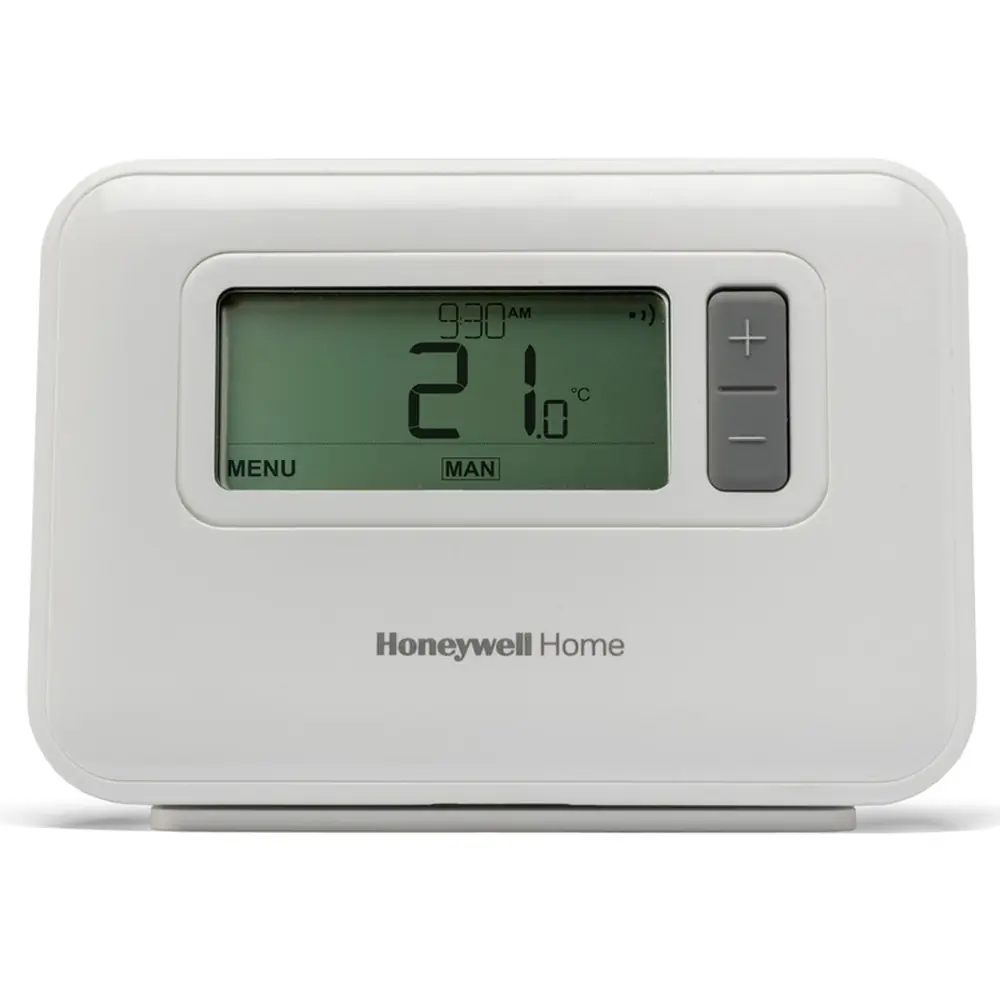
Wired T3 and T3M
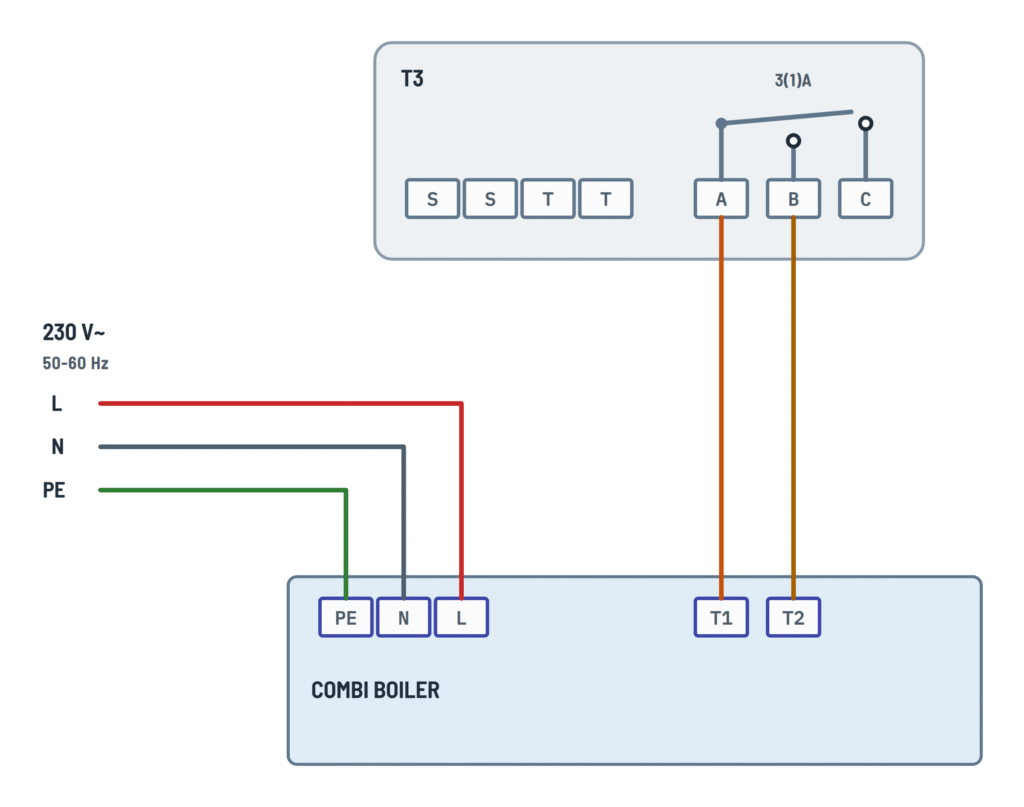
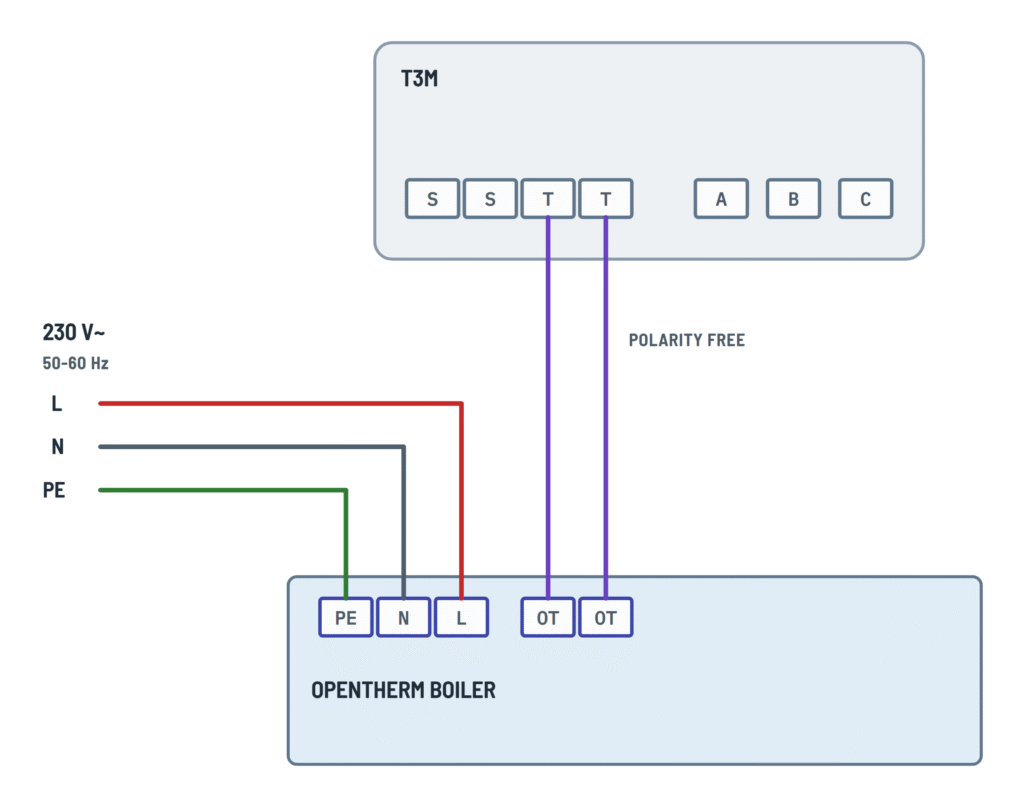
The T3 relay (A B C) with a basic boiler, combi or zone valve, and the T3M with an OpenTherm boiler.
Terminals and components · 5
- L
- N
- PE
- A
- B
- OpenTherm
- Valve
- Equipment
Terminal C
C is the normally closed contact: it is not used in these diagrams.
No batteries
The T3M is powered by the boiler: if the screen is blank, check that the boiler has power.
Basic boiler
The command is the switched live reaching L; it does not need a separate permanent live.
Combi boiler
The relay closes T1-T2 as a volt-free contact; the boiler is powered separately through L and N.
V4043 wires
- BR (brown): motor, switched live
- BL (blue): neutral
- G/Y: earth
- GR and O: auxiliary switch to the boiler
OpenTherm boiler
The T3M asks the boiler for just the right output instead of only switching it on and off.
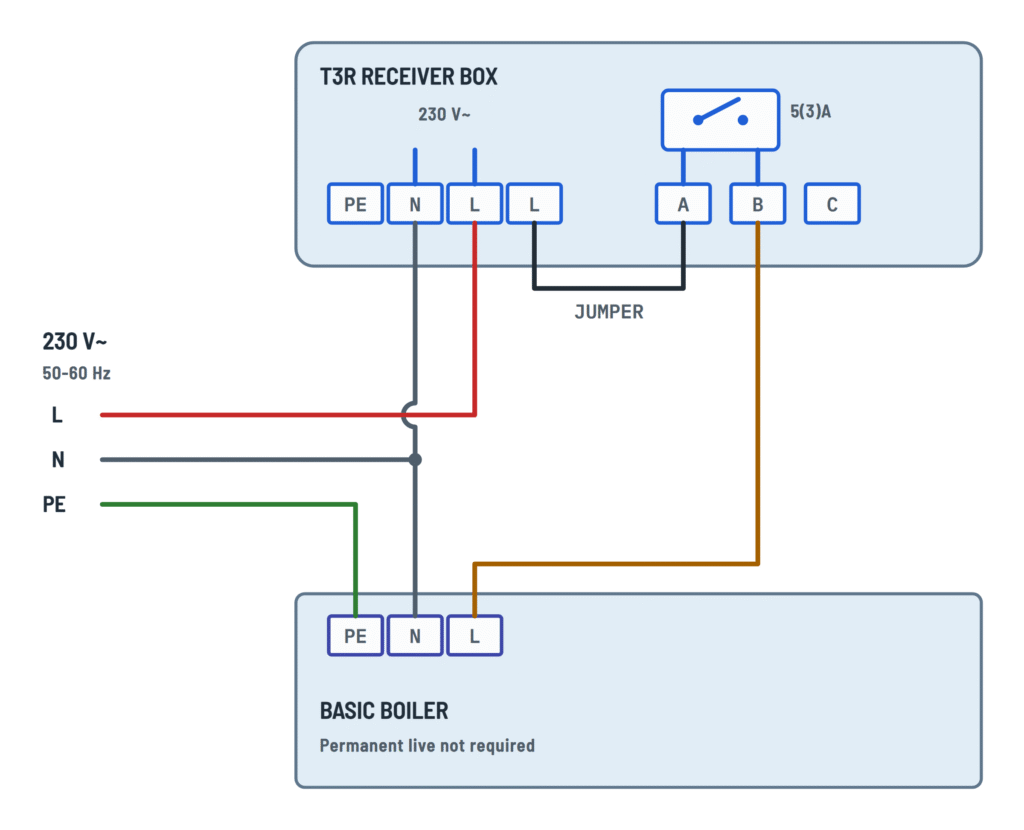
Wireless T3R: receiver box
The T3R receiver box is wired to the mains and to the boiler or valve; the thermostat talks to it wirelessly.
Terminals and components · 7
- L
- N
- PE
- A
- B
- Jumper
- Receiver box
- Equipment
Reset button
Do not press the small reset button: it clears the binding with the thermostat.
Terminal C
C is the normally closed contact: it is not used in these diagrams.
Basic boiler
The command is the switched live reaching L; it does not need a separate permanent live.
Combi boiler
The relay closes T1-T2 as a volt-free contact; the boiler is powered separately through L and N.
V4043 wires
- BR (brown): motor, switched live
- BL (blue): neutral
- G/Y: earth
- GR and O: auxiliary switch to the boiler
Check the auxiliary switch
The T3R diagram does not show gray (GR) or orange (O): connect them according to the boiler installation.
About This Diagram
This diagram is redrawn from the Honeywell T3 Thermostat manual, and we offer it completely free and in English. We have also categorized it in the Thermostats (HVAC & Water Heating) section on Diagramverse, and it has been rated by 1 user with an average rating of 5.0. If you have any specific questions about the Honeywell T3 Thermostat Wiring Diagram, we suggest checking the Frequently Asked Questions (FAQs) section.
Printable Honeywell T3 Wiring Diagrams






Wiring Instructions
Before you start
Start by working out which drawing matches your equipment. The Honeywell T3 and T3M tab covers the wired thermostats. Choose Basic boiler if the boiler is switched by a live feed, Combi boiler if it has volt-free thermostat terminals (T1-T2), Zone valve for a 2-port V4043 valve, and OpenTherm (T3M) only if you have the T3M and an OpenTherm boiler. The T3R tab covers the wireless kit. There the thermostat runs on batteries and all of the wiring is done at the receiver box next to the boiler.
- Tools: insulated screwdrivers, wire strippers, a voltage tester and a multimeter with continuity or resistance ranges, a drill and wall plugs.
- Materials: the terminal blocks accept wires up to 1.5 mm². For the T3R you need a 2-wire cable from the boiler to the receiver box, and a 230V supply for the box. Use cable that meets your local wiring rules for 230V circuits.
- Batteries: the T3 and T3R use 2 x 1.5V LR6 AA alkaline batteries. The T3M has no batteries because it is powered by the boiler through the T T wires.
- Isolation: switch off and lock out the mains supply to the boiler, the valve and the receiver box. Then prove the terminals are dead with your tester before you touch anything.
- Professional help: the boiler, valve and receiver box terminals carry 230V. If you aren't qualified to work on mains wiring or inside a gas or oil boiler, hire a licensed electrician or heating engineer. Your local rules may also require one, or a notification or permit.
Before you disconnect an old thermostat, take a photo of its wiring for reference.
Choosing locations
Mount the thermostat 1.2 to 1.5 m above the floor. Keep it away from drafts, direct sunlight and heat sources. Put the T3R receiver box near the boiler, at least 30 cm from any metal object, including metal wall boxes and the boiler casing. Cables can enter the receiver box from the back through the wall box opening or from the bottom using the cable clamps. Mains wiring goes on the left and low-voltage wiring on the right.
Step-by-step wiring
- Confirm that the power is off and dead at every piece of equipment you will open.
- Run Earth to the earth terminal of the boiler or valve. The thermostat and its terminals have no earth connection.
- Connect Neutral (N) to the boiler N, or to the valve blue (BL) in the zone valve variant. For the T3R, also bring neutral to the receiver box N.
- T3R only: connect the 230V Live (L) to the receiver box L so the box is powered.
- Wire the switching contact for your variant:
- Basic boiler, wired T3: bring the live to B, and run A to the boiler as the switched live.
- Basic boiler, T3R: fit the L-A jumper so that B outputs a switched live. Run B to the boiler L.
- Combi boiler: connect A to boiler T1 and B to boiler T2. The live goes only to the boiler (and to the T3R box). Don't fit the L-A jumper.
- Zone valve: feed the live to A (on the T3R through the L-A jumper) and to the gray (GR) wire. Connect B to the motor brown (BR), and connect orange (O) to the boiler so the boiler fires when the valve is open.
- OpenTherm (T3M): run two wires from T T to the boiler OT terminals. Polarity doesn't matter. The live goes only to the boiler.
- Tighten every terminal, give each wire a pull to check it is held, and make sure no bare copper shows outside the terminals.
- Wired T3/T3M: fix the back plate to the wall, make the connections, and fit the front cover and the thermostat. T3R: replace the receiver box cover and tighten the front screw.
- Fit the batteries in the T3 or T3R and remove any battery tab.
Testing and start-up
- Before you restore power, use your meter on the resistance range across A and B. They should be open when there is no call for heat. In the combi variant, check that no mains voltage can reach T1-T2.
- Restore power. On the T3R, the receiver box status LED should go steady green. Press the manual override button: the boiler should start and the button LED should light green. Press it again to stop the boiler, waiting at least 3 seconds between presses.
- Set the year, date and time when the thermostat asks for them. The T3R kit comes already bound, so you only need to bind it again if you replace a part.
- Raise the setpoint above room temperature. The heat-demand icon should appear and the boiler or valve should respond. In the live-switched variants, you should measure about 230V between the switched output and N during a call. With a zone valve, you should measure 230V on orange (O) once the valve is fully open.
- In the installer menu, set the cycle rate to suit your heating equipment. Gas boilers and zone valves: 6 cycles per hour and 1 minute minimum on-time. Oil boilers: 3 cycles per hour and 4 minutes. Thermal actuators: 12 cycles per hour.
Safety notes
- Even when the thermostat is satisfied, the live, the gray valve wire and the receiver box terminals stay at 230V. Isolate the supply before you open any equipment.
- The T3 contact is rated 3(1) A and the receiver box contact 5(3) A. Never switch direct 230/240V electric heating with them.
- The combi T1-T2 terminals are often low-voltage. Putting mains on them can damage the boiler's control board.
- The rating label on your boiler and its installation manual set the fuse size and supply arrangement. Follow them and your local wiring rules.
Troubleshooting
| Symptom | Probable Cause | What to Check |
|---|---|---|
| The wired T3 display stays blank after installation | Battery tab not removed, batteries fitted the wrong way round, or batteries exhausted | Unclip the thermostat, remove the tab, check battery orientation and fit 2 new 1.5V LR6 AA alkaline batteries |
| The T3M display is blank | No power on the OpenTherm bus: a loose T T wire, wires on the wrong boiler terminals, or the boiler is off | Check the boiler is powered and that both wires go from T T to the boiler OT terminals. Tighten the terminals and check each wire for continuity |
| The heat icon shows but the boiler never starts | Faulty wiring connection, or A and B on the wrong wires | With power off, check that A and B close (near 0 ohms) during a call for heat. Compare the wiring at the thermostat and boiler with your variant. If the wiring is right, the boiler water may already be up to temperature |
| The combi boiler shows a fault or its fuse blows when the thermostat calls | Mains reaching T1-T2, for example because the L-A jumper was left in on a T3R | Remove the L-A jumper. A and B must only connect T1 and T2 with no voltage applied. Get the boiler checked before you run it again |
| Basic boiler on a T3R: the receiver box clicks but the boiler stays off | L-A jumper missing, so B has no live to switch | During a call for heat, measure between B and N. You should read about 230V. If you read 0V, fit the jumper from the second L terminal to A |
| The zone valve opens but the boiler doesn't fire | Gray (GR) not fed with live, or orange (O) not connected to the boiler | With the valve fully open, measure orange to N. You should read about 230V. Check that gray is on the live and orange reaches the boiler's switched-live input |
| The zone valve doesn't move when heat is called | Brown (BR) not on B, blue (BL) not on neutral, or no live on A | Measure between B and N during a call for heat. You should read about 230V. Then check the brown and blue connections |
| The receiver box LED is off and the button does nothing | No 230V supply to the receiver box | Measure between the box L and N. You should read about 230V. Check the supply fuse or isolator and that the terminals are tight |
| The receiver box LED flashes red and the thermostat shows no signal | Radio link lost: too far away, or metal near the receiver box | Keep the box at least 30 cm from metal, including the boiler casing and metal wall boxes. Move the thermostat closer (up to about 30 m in a home) |
| After replacing the thermostat or the box, the receiver LED stays off and the thermostat shows no signal | The units are not bound | Reset the box binding with the pinhole (3 seconds). Hold the box button for 3 seconds until the LED flashes amber, then set 14A to 1 in the thermostat's binding menu |
| The oil boiler starts and stops too often | Cycle rate left at the gas boiler default | In the installer menu, set 2CR to 3 and the minimum on-time (3OT) to 4 minutes |
| The heating runs in short regular bursts and ignores the setpoint | Failsafe mode (20% on / 80% off) because of a sensor fault or lost radio link | Check the wiring to the remote sensor if one is fitted, or restore the T3R radio link. If the sensor alert remains, replace the thermostat |