Hunter 44157 Thermostat Wiring Diagram
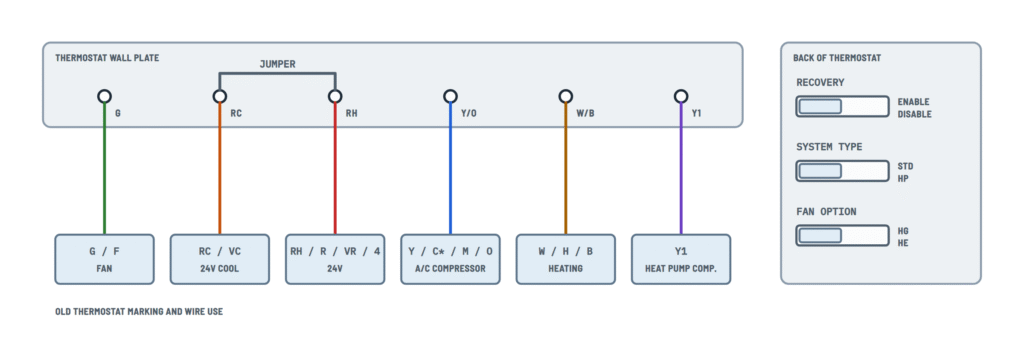
Wall plate and switches
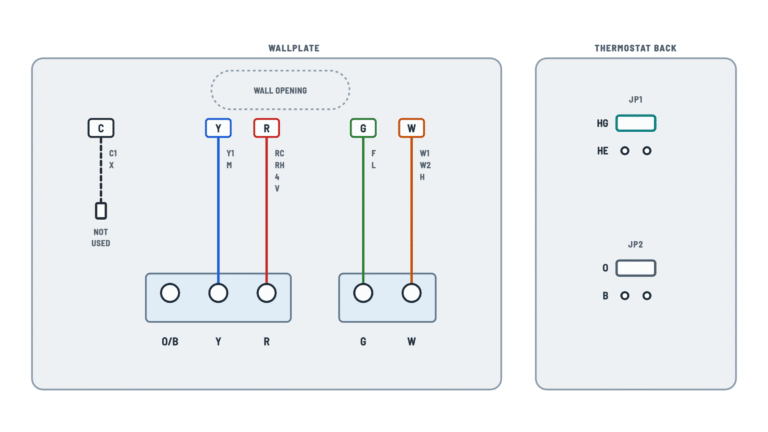
Which terminal each wire goes to by the old thermostat's letter, the RC-RH jumper and the switches on the back.
Terminals and components · 10
- RH
- RC
- Y/O
- W/B
- G
- Y1
- Jumper and switches
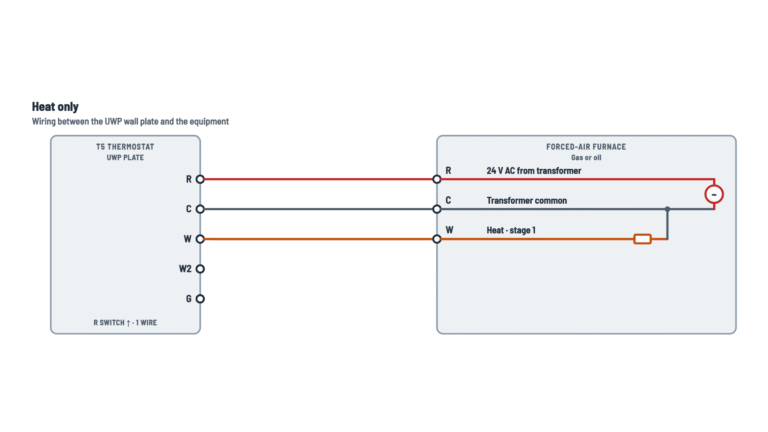
2-wire heat only
If the wires are unmarked, one goes to RH and the other to W.
With two transformers
If you leave the jumper with both RH and RC connected, you tie the two transformers together and can damage the equipment.
C wire
If there are both Y and C wires, C may be the common: do not connect it to any terminal (this thermostat runs on batteries).
Single stage only
Not for multi-stage heat pumps or heat pumps with auxiliary heat.
With an electric furnace
Leave it on HG and test: if the fan does not come on within a minute of a call for heat, move the switch to HE.
Conventional systems
Furnace or boiler with air conditioning, cool only or heat only: which wires there are and where each one goes.
Terminals and components · 5
- RH
- RC
- Y/O
- W/B
- G
- Jumper
2-wire heat only
If the wires are unmarked, one goes to RH and the other to W.
With two transformers
If you leave the jumper with both RH and RC connected, you tie the two transformers together and can damage the equipment.
C wire
If there are both Y and C wires, C may be the common: do not connect it to any terminal (this thermostat runs on batteries).
Single-stage heat pump
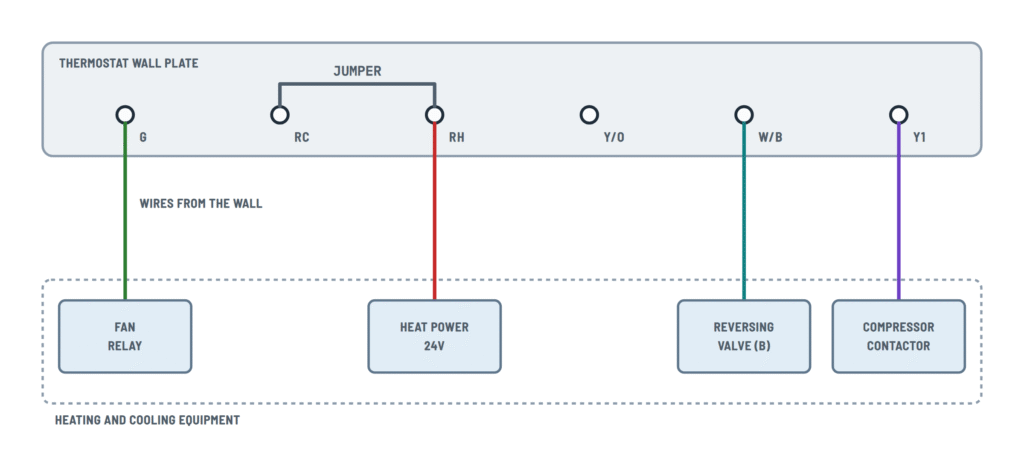
Heat pump without auxiliary heat: the compressor goes to Y1 and the reversing valve to Y/O (O) or W/B (B).
Terminals and components · 5
- RH
- Y1
- G
- Valve
- Jumper
2-wire heat only
If the wires are unmarked, one goes to RH and the other to W.
With two transformers
If you leave the jumper with both RH and RC connected, you tie the two transformers together and can damage the equipment.
O or B
Only one reversing valve wire is used: O or B, depending on the heat pump brand.
If both O and B
Only one valve wire is used; if both O and B are present, B may be a common.
About This Diagram
These diagrams are redrawn from pages 10 and 16–19 of the Hunter 44157 Thermostat manual, and we offer them completely free and in English. We have also categorized it in the Thermostats (HVAC & Water Heating) section on Diagramverse, and it has been rated by 1 user with an average rating of 5.0. If you have any specific questions about the Hunter 44157 Thermostat Wiring Diagram, we suggest checking the Frequently Asked Questions (FAQs) section.
Printable Hunter 44157 Wiring Diagrams



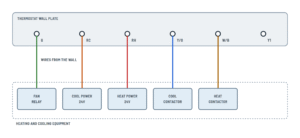

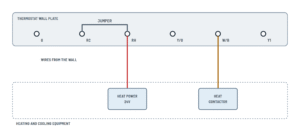


Wiring Instructions
Before you start
The Hunter 44157 is a battery-powered thermostat for 24V AC control circuits and millivolt systems such as standing-pilot gas heaters. It works with gas, oil and electric furnaces, boilers, central air conditioning and single-stage heat pumps without auxiliary heat. It is not designed for multi-stage heat pumps or for 120/240V electric baseboard heat. If your old thermostat has heavy wires joined with wire nuts or is marked with a line-voltage rating, stop: this thermostat is the wrong one for that system.
You need a flat-head screwdriver, a small Phillips screwdriver, a hammer, a drill with a 3/16" bit, two AA alkaline batteries, the supplied labels, screws and anchors, and electrical tape. You can normally reuse the existing thermostat cable. No wire gauge is specified for this thermostat. If you run new cable, use standard low-voltage thermostat cable as your equipment manufacturer recommends. Follow local code, and call an HVAC technician if the old terminals are unlabeled or you are unsure of your system type.
Choosing the right diagram
- 4-wire: one R wire plus Y, G and W. Keep the jumper.
- 5-wire: separate RH and RC wires from two transformers. Remove the jumper.
- Cool only: R, Y and G with no heating wire.
- Heat, 2-wire: two wires only, typical of boilers and millivolt gas valves.
- Heat, 3-wire: R, W and G, for a furnace without air conditioning.
- Heat pump, O valve or B valve: a Y1 compressor wire plus a reversing valve wire marked O (energized in cooling) or B (energized in heating).
Step-by-step wiring
- Set the old thermostat to OFF, then switch off the HVAC equipment at the breaker panel or the furnace switch.
- Remove the old cover and find the terminals without disconnecting anything. Some wall plates hide the terminals behind a door or on the back.
- Label each wire by the letter on its old terminal, not by its color. R, RH, VR or 4 become RH. RC or VC become RC. Y, M or O become Y/O. W, H or B become W/B. G or F become G. Y1 stays Y1.
- Look for a C wire. The 44157 runs on batteries and has no C terminal, so never connect a C wire. If both Y and C are present, C is a common wire. On a heat pump with both O and B, B may be a common. You only need one reversing valve wire.
- Secure the wires so they cannot slip into the wall, disconnect them and remove the old wall plate.
- Release the new wall plate with the tab on the bottom of the thermostat. Pull the wires through the opening and level the plate. Mark two holes, drill 3/16" holes, tap the anchors in flush and fix the plate with both screws.
- Keep the RC – RH jumper if you have a single R wire. Remove it only if you have both RH and RC wires.
- Loosen the terminal screws without removing them. Insert each wire behind the black terminal shield of its matching terminal and tighten the screw. Tug each wire gently to confirm it is held.
- Wrap the bare end of every unused wire, including any C wire, in electrical tape. Push it back into the wall with the excess cable.
- On the back of the thermostat, set SYSTEM TYPE to STD or HP. Set the fan option to HG for gas or oil, or to HE for an electric furnace. Set RECOVERY to ENABLE or DISABLE.
- Set the front SYSTEM switch to OFF and FAN to AUTO. Hook the top of the thermostat over the two tabs on the wall plate and press until the bottom tab snaps in. Never force it, because the terminal pins can bend.
- Install two fresh AA alkaline batteries and restore power at the panel or furnace.
Testing and start-up
Set the day and time first so the programs run at the right hours. Then test each function:
- Fan: switch FAN to ON and the blower should start. Return it to AUTO.
- Heat: select HEAT and raise the setpoint a few degrees above room temperature. The furnace, boiler or heat pump should start. On a heat pump, warm air confirms the reversing valve wire is on the right terminal.
- Cool: select COOL and lower the setpoint below room temperature. Compressor protection can delay start-up by up to about 4 minutes, so wait before deciding something is wrong.
- Off: select OFF and confirm everything stops.
Safety notes
- Never connect the 44157 to 120V or 240V circuits, including electric baseboard heaters. Line voltage destroys the thermostat and creates a fire risk.
- Always cut power before you touch the wires. A bare R wire touching another conductor can short the transformer. If your control board has a low-voltage fuse, that short can blow it.
- Never connect a C wire to any terminal. Joining a common to RH, RC, W/B or Y/O shorts the transformer.
- Replace the batteries as soon as the low-battery icon flashes. When the batteries run too low, the thermostat shuts the system off, which matters in freezing weather.
Troubleshooting
| Symptom | Probable Cause | What to Check |
|---|---|---|
| The display stays blank after installation | Batteries are dead, not alkaline or inserted backwards | Install two new AA alkaline batteries and check their polarity. If the display is still blank, press Reset with a paperclip. |
| The display works but the heating or cooling never starts on my 4-wire system | The RC – RH jumper was removed although there is only one R wire | Reinstall the jumper between RC and RH. Removing it is only correct when separate RH and RC wires are present. |
| Heating works but the air conditioning does not, or the reverse, on a 5-wire system | The RH or RC wire is on the wrong terminal or is not clamped | With the power off, confirm the heating transformer wire is on RH and the cooling one is on RC. Each wire should be behind its terminal shield with the screw tight, and the jumper should be removed. |
| A breaker trips, the furnace fuse blows or the system goes dead when I restore power | A C wire is connected to a terminal, or bare wire ends are touching | Remove any C wire from the terminals and tape it off. Check that no stray strands bridge terminals and that the unused wires are taped. Replace the control board fuse if it blew. |
| My heat pump blows cold air in HEAT and warm air in COOL | The reversing valve wire is on the wrong terminal, or the wrong heat pump variant was used | An O wire goes to Y/O and a B wire goes to W/B. Check the letter on the old thermostat's terminal, not the wire color. |
| My heat pump does not heat properly or behaves like a furnace | The SYSTEM TYPE switch is set to STD | Remove the thermostat from the wall plate and set SYSTEM TYPE to HP. Also check that the compressor wire is on Y1. |
| The blower does not come on with the heat, or runs at the wrong time, on my electric furnace | The fan option switch is on HG | Set the switch on the back of the thermostat to HE for an electric furnace. Use HG for gas or oil. |
| The equipment keeps running even with the thermostat set to OFF | Wires are shorted together in the cable or at the wall plate, or the thermostat is faulty | Turn off the power and separate the wires. If the equipment still runs with the thermostat removed, look for damaged cable insulation or a fault in the equipment. If it only runs with the thermostat installed, replace the unit. |
| Nothing happens when I call for heat or cooling | The compressor delay is active, power to the equipment is off or the blower door is open | Wait up to 4 minutes. Check the breakers and the furnace service switch, and make sure the furnace blower door is fully closed. |
| The thermostat works only intermittently after I snap it onto the wall plate | The thermostat is not fully seated, or terminal pins are bent | Remove the thermostat and inspect the pins. Hook it over the top tabs and press gently until the bottom tab clicks, without forcing it. |