MSD 6014 Ignition Control Wiring Diagram
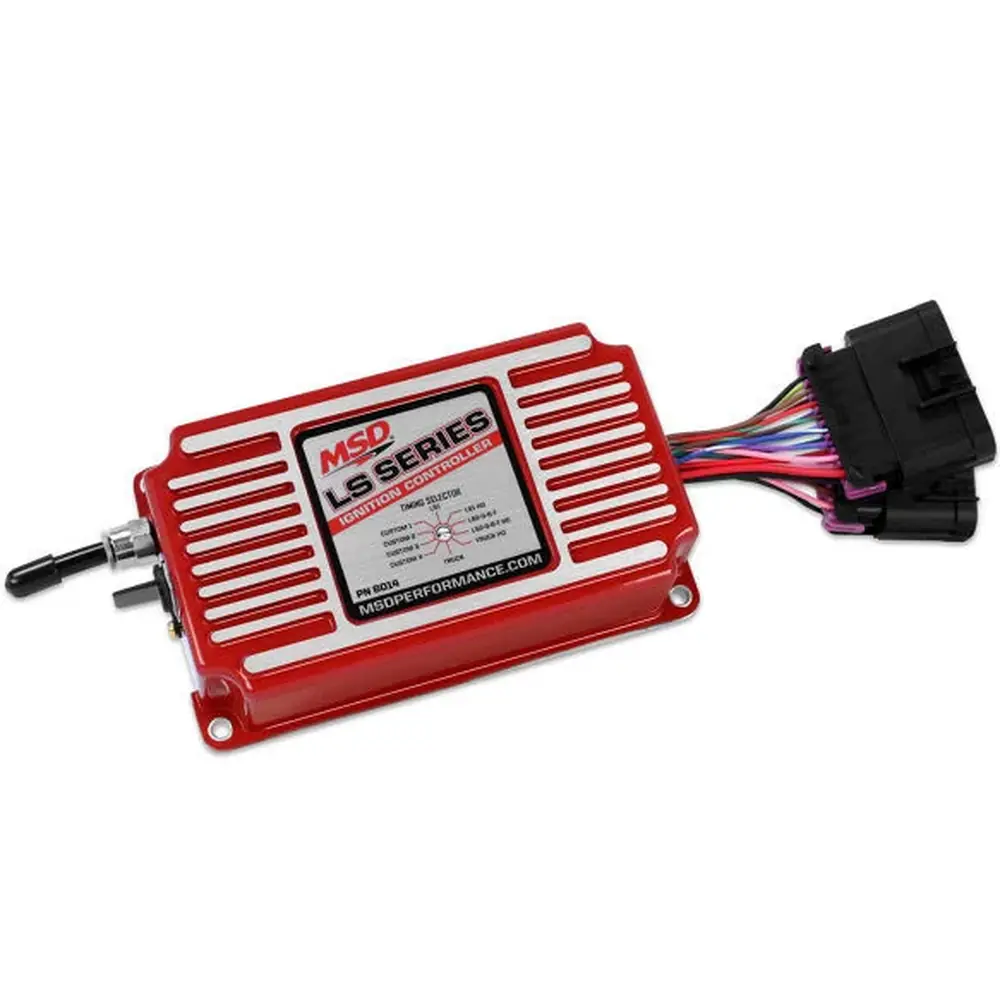
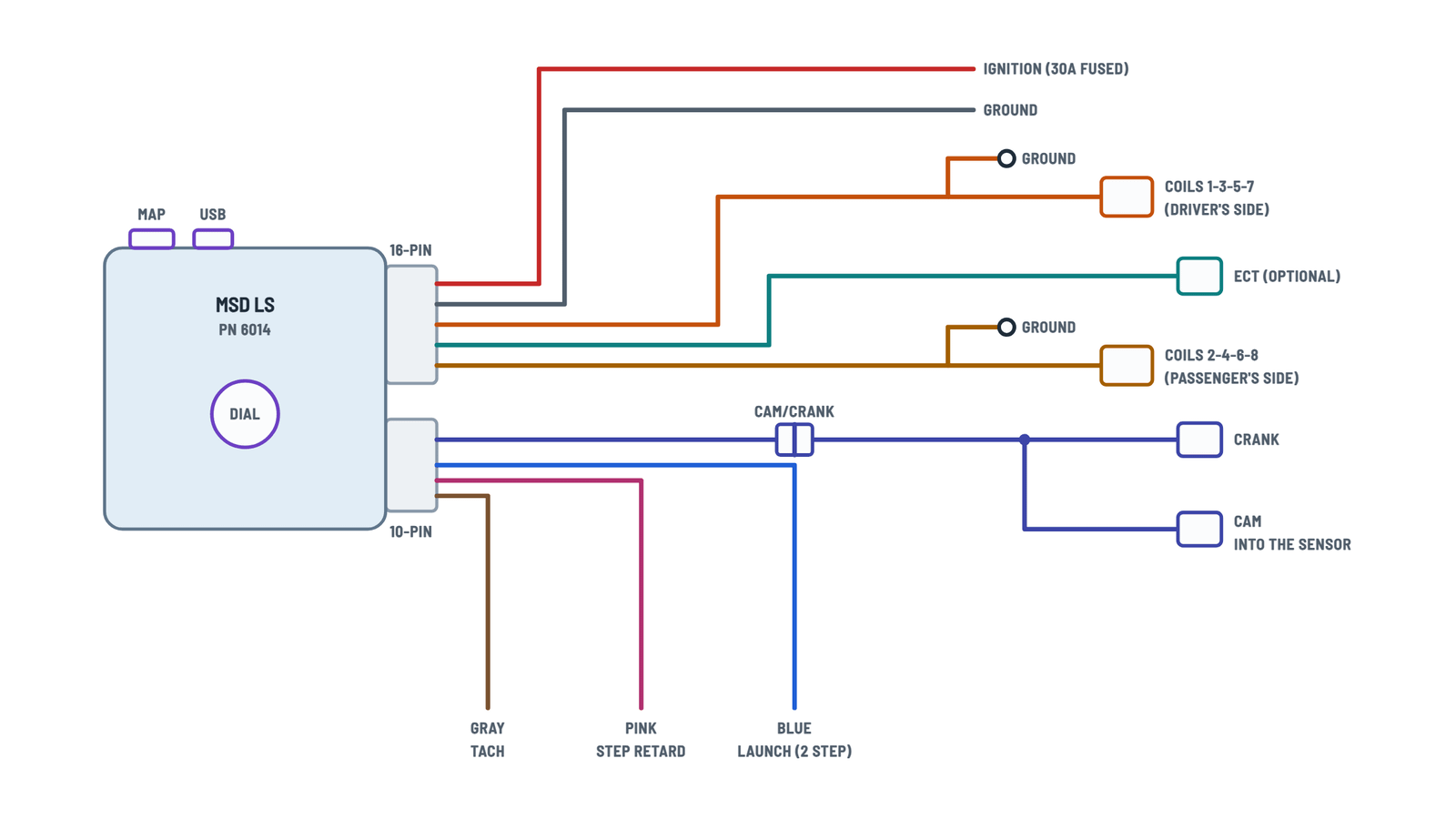
LS ignition harness
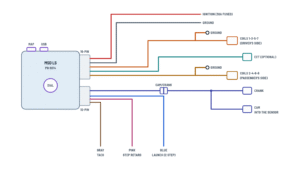
The controller and its harness: power, coils, sensors and feature wires.
Terminals and components · 10
- Power
- Ground
- Odd coils
- Even coils
- ECT
- CAM/CRANK
- Launch
- Step retard
- Tach
Caution
Do not power it directly through the ignition key: use the relay in the «Power» tab.
Connector pins
Pin Color Function A Black Chassis ground B Red Coil 7 C Green Coil 5 D — Not used E Brown Sensor ground F Lt. blue Coil 3 G Violet Coil 1 H Pink 12-volt supply Connector pins
Pin Color Function A Black Chassis ground B Red/green Coil 2 C Brown/green Coil 4 D — Not used E Brown Sensor ground F Blue/white Coil 6 G Violet/blue Coil 8 H Pink 12-volt supply Pins
- Pin 1, black: sensor ground.
- Pin 2, yellow: coolant signal.
Without the sensor
If it is not connected, the timing is not changed; only the ECT diagnostic shows up.
Extension harnesses
PN Wheel and cam sensor 22791 24x crank / 1x cam (rear) 2278 58x crank / 4x cam (front) 2279 24x crank / 1x cam (front) Cam connector
The cam connector plugs directly into the sensor, not the OEM pigtail.
Connector pins
Pin Color Function D Orange/yellow Crank C Brown/white Cam E Orange 5 V A Pink 12 V B Brown Sensor ground Latched
With «Latched» enabled, the launch limit can only come on if the rpm falls below 7/8 of the setting (for example, 3,500 with 4,000): it prevents accidental activation at high rpm.
Dial
Six fixed curves for stock engines (LS1, LS1 HO, LS2-3-6-7, LS2-3-6-7 HO, Truck, Truck HO) and four customizable ones (Custom 1–4). Use the arrow on the switch to select.
MAP
1/4" port for the built-in MAP sensor: advances under vacuum and retards under boost.
Mounting
In a sturdy, dry place away from heat, with the supplied rubber isolators; do not power wash it.
Relay power set-up
Recommended relay to feed the controller with 30 A and a fuse.
Terminals and components · 5
- Battery and output
- Keyed 12 V
- Ground
Why
The controller requires a 30 A fused power source; it must not be powered directly through the key switch.
About This Diagram
These diagrams are redrawn from page 4 of the MSD 6014 Ignition Control manual, and we offer them completely free and in English. We have also categorized it in the Ignition (Automotive) section on Diagramverse, and it has been rated by 1 user with an average rating of 5.0. If you have any specific questions about the MSD 6014 Ignition Control Wiring Diagram, we suggest checking the Frequently Asked Questions (FAQs) section.
Printable MSD 6014 Ignition Control Wiring Diagrams



Wiring Instructions
Before you start
Use both tabs of the MSD 6014 diagram. Complete shows how the main harness connects to the coils, the sensors and the switched inputs. Power shows how to feed the controller's Red wire through a relay. Every installation of needs both.
- Tools: a digital multimeter, crimpers and quality terminals, heat-shrink tubing, a drill and fasteners for the mounting kit, and a laptop with the MSDView software.
- Materials: a relay rated 30 A minimum, an inline 30 A fuse holder, the correct crank/cam extension harness for your engine, and the optional GM coolant sensor (PN 12608814) if you plan to use temperature correction.
- Wire gauge: the instructions don't give a gauge for the power feed. Size the battery-to-relay and relay-to-Red wires for a 30 A circuit at the length you need, and never use wire lighter than the fuse protects. If you're unsure, ask your parts supplier or check an automotive wire ampacity chart.
- Spark plug wires: confirm you are running suppression-type (spiral core) plug wires. Solid core wires cannot be used with this controller.
- Isolation: disconnect the battery before any wiring. Remove the negative cable first and reconnect it last.
You can do the base programming on the bench before installation. Install MSDView on your PC before you connect the controller. The unit runs on USB power alone, so no 12 V supply is needed for setup. The first time you connect, the software may prompt you to install updates.
Step-by-step wiring
- Mount the controller. Choose a sturdy, dry spot away from exhaust heat and use the supplied rubber isolators to limit vibration. The unit is potted, but don't put it where it can be submerged or hit by a pressure washer. Make sure the rotary dial and USB port remain easy to reach.
- Route the MAP line (if used). Run a vacuum line from the intake manifold to the 1/4 in fitting on the controller. You need it for boosted engines. It's recommended for naturally aspirated engines too, so the timing can advance under vacuum.
- Connect the coil harnesses. Plug Odd coils (driver's side) into the driver's side coil connector for cylinders 1-3-5-7. Plug Even coils (passenger's side) into the passenger's side connector for 2-4-6-8. Bolt each ring terminal to clean, bare chassis or engine metal. Don't swap the sides: that puts the firing order on the wrong bank.
- Install the crank/cam extension harness. Choose the harness by crank count and cam sensor location. 22791 is for 24x crank with a rear 1x cam sensor. 2279 is for 24x crank with a front 1x cam sensor. 2278 is for 58x crank with a front 4x cam sensor. The 24x setups use a black crank connector and the 58x setup uses a grey one. Connect the harness to the CAM/CRANK plug. You don't select a pattern because the controller detects it automatically.
- Connect the ECT sensor (optional). Plug the 2-pin ECT connector into a stock GM LS coolant sensor. The temperature correction is calibrated for that sensor, so don't substitute a different sensor unless it has the same calibration.
- Ground the controller. Run the Black wire straight to a solid ground, ideally the engine block or battery negative. Use a clean, paint-free contact.
- Build the relay circuit (Power tab). Run battery positive through a 30 A fuse to relay terminal 30, with the fuse close to the battery. Connect a keyed 12 V source to terminal 86, ground terminal 85, and run terminal 87 to the controller's Red wire. Leave 87a unused. The key switch should only energize the relay coil. Never power the Red wire directly from the key switch.
- Wire the switched inputs (optional). Blue activates the launch rev limiter (two-step) and Pink activates step retard. Each one turns on when it receives 12 V, so feed it from a switched 12 V source such as a clutch or transbrake switch for Blue, or a nitrous arming circuit for Pink. Insulate and tie back any input you don't use.
- Connect the tachometer. Run the Gray wire to your tach's signal input. It outputs a 12 V square wave.
- Finish the harness. Keep the crank/cam and tach wiring away from plug wires and coil packs. Secure it with ties away from moving parts and the exhaust, then reconnect the battery (negative last).
Testing and start-up
- With the key off, measure across the relay's 87 output and ground. You should read 0 V. With the key on, the relay should click and the Red wire should read battery voltage, about 12 V or more.
- Connect MSDView and open the monitors. Ignition Voltage should stay above 12 V. Rotary Dial Position should match the table you selected with the arrow on the dial. Engine Coolant Temperature should show a realistic value if the sensor is installed, or -40°C if it isn't.
- For a first start, pick a conservative table that matches your engine. Use the low-octane tables unless you are running 91-93 octane fuel. Leave Coil Type on Auto if you're unsure.
- Crank the engine and confirm the tach shows RPM. Once it's running, check base timing with a timing light. If you enabled Idle Timing Control, the idle timing will move around on purpose.
- Test each switched input: apply 12 V to Blue and Pink and check that Launch Input and Step Retard Input show as active.
Safety notes
- The coils produce very high secondary voltage. Don't touch the coils, plug wires or boots while the engine is cranking or running.
- The power circuit carries enough current to melt wiring if it shorts. Always install the 30 A fuse at the battery end and protect the wires wherever they pass through metal.
- Keep fuel and nitrous lines away from the controller and wiring. Disconnect the battery again before changing any connection.
Troubleshooting
| Symptom | Probable Cause | What to Check |
|---|---|---|
| Engine cranks but there is no spark at all | No power on the Red wire, a blown 30 A fuse, or a poor Black ground | With the key on, measure from the Red wire to ground: you should read battery voltage. Check the fuse, check that the relay clicks, and confirm 87 is wired to Red (not 87a). Measure resistance from the Black wire to battery negative: it should be near 0 ohms. |
| Spark only on one bank, or the engine runs very rough | A coil harness is unplugged or on the wrong side, or its ring terminal is not grounded | Confirm the 1-3-5-7 connector is on the driver's side and 2-4-6-8 is on the passenger's side. Clean the ring terminal contact and bolt it to bare metal. |
| Controller works on the bench but cuts out or misfires under load | The controller is powered straight from the key switch, or the power wire is too thin and the voltage sags | Rewire through a 30 A relay as shown in the Power tab. Log Ignition Voltage: it should stay above 12 V. A Battery fault means the supply dropped below 9 V or rose above 18 V. |
| No start, and MSDView shows a Crank Fault | The crank signal is missing because of the wrong extension harness, a loose connector or a bad crank sensor | Check that you used 22791, 2279 or 2278 to match your crank count and cam sensor location. Reseat the crank connector and inspect the pins. |
| MSDView shows a Cam Fault while cranking | RPM is being detected but there is no cam signal, usually from a cam connector that is unplugged, wrong or damaged | Make sure the extension harness's cam connector is plugged into the cam sensor at the correct location, front or rear. Check for broken wires in that branch. |
| Tachometer reads zero or jumps around | The Gray wire is not connected, is connected to the wrong tach input, or is picking up noise from the plug wires | Connect Gray to the tach's signal input and confirm the tach accepts a 12 V square wave. Reroute the wire away from the coils and plug wires. |
| Coolant temperature shows -40°C or 130°C | -40°C means the ECT sensor is open or not connected. 130°C means the ECT circuit is shorted | Inspect the 2-pin ECT connector and its wiring. Confirm it is the GM sensor (PN 12608814). With no sensor, the controller uses 50°C, so this reading alone won't change the timing. |
| Two-step never engages, or engages at the wrong time | No 12 V reaching the Blue wire, Latched mode is enabled, or the switch is miswired | Watch the Launch Input monitor while you work the switch. With Latched enabled, the limiter only engages once RPM falls below 7/8 of the set launch RPM. |
| Step retard doesn't pull any timing | No 12 V on the Pink wire, or RPM is below the Minimum Engine Speed setting | Check that Step Retard Input shows active when the circuit is armed. Lower Minimum Engine Speed, or set it to 0 so step retard works at any RPM. |
| Engine misfires and you hear radio or tach interference | Solid core spark plug wires | Replace them with suppression-type (spiral core) plug wires. Solid core wires cannot be used with this controller. |