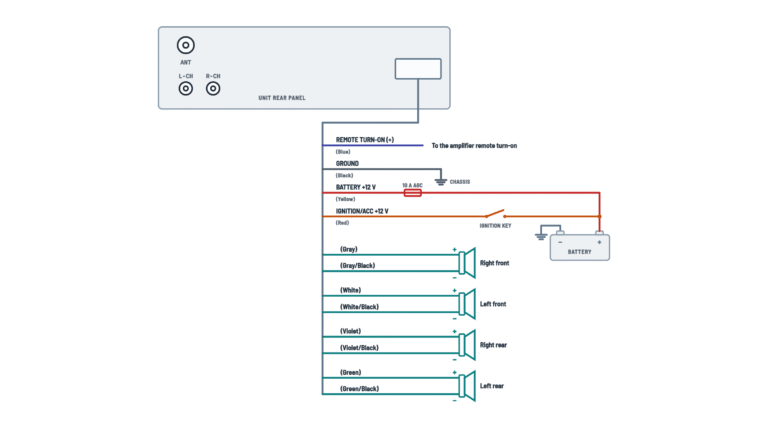
Pioneer DMH-160BT Multimedia Receiver Wiring Diagram

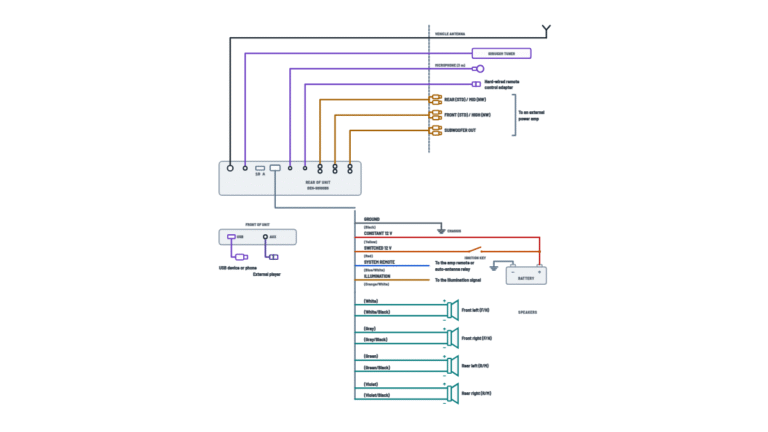
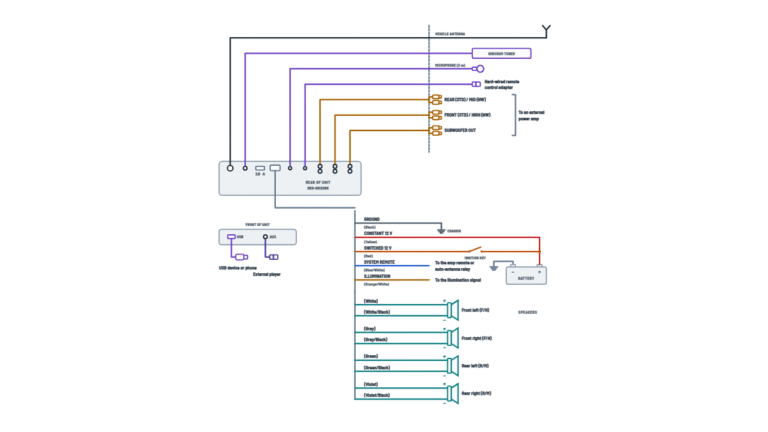
Complete diagram
Every cable and connector on the rear of the unit and where each one goes.
Terminals and components · 23
- Battery +
- Switched 12 V
- Ground
- Signals
- Illumination and preamp
- Speakers
- Video and camera
- Connectors
- Mute
- Antenna and devices
Connection
Plug the vehicle antenna cable in here.
Where to mount it
Where it best picks up the driver's voice; if the cable does not reach the sun visor, mount it on the steering column. Connect it with the unit off (ACC OFF).
Maximum length
Micro USB: up to 2 m; USB-C: up to 4 m. Longer cables may not work properly.
Installation
Follow the tuner's instruction manual.
Cable
Use a mini-jack AV cable: with other cables the contact order may differ and disturb picture and sound.
Colors
White: left audio; red: right audio; yellow: video.
Fuse
The power cord has a 10 A fuse: replace it only with one of the same rating.
No ACC
It cannot be installed in a vehicle without an ACC position on the ignition switch.
Why
The unit knows when the lights are on to dim the display.
Separate screws
The power amp ground and this unit's ground (or other devices) go to the body with different screws. A loose screw can cause smoke, fire or malfunction.
Why
The unit senses whether the car moves forward or backward and shows the rear camera.
Always active
It outputs the signal even if the audio source is off.
Required
This lead must go to the power supply side of the switch, not the ground side.
Caution
Tape any unused speaker leads. With a two-speaker system, do not connect anything to the spare leads.
Impedance
4 to 8 Ω speakers; with an external amp these leads are not used.
Caution
Tape any unused speaker leads. With a two-speaker system, do not connect anything to the spare leads.
Impedance
4 to 8 Ω speakers; with an external amp these leads are not used.
Caution
Tape any unused speaker leads. With a two-speaker system, do not connect anything to the spare leads.
Impedance
4 to 8 Ω speakers; with an external amp these leads are not used.
Caution
Tape any unused speaker leads. With a two-speaker system, do not connect anything to the spare leads.
Impedance
4 to 8 Ω speakers; with an external amp these leads are not used.
Plugs
L = left, R = right. With this connection the speaker leads are not used.
Plugs
L = left, R = right. With this connection the speaker leads are not used.
Plugs
L = left, R = right. With this connection the speaker leads are not used.
Warning
Never install the rear display where the driver can watch video while driving.
Connection
It comes from the connector 1 cable.
Warning
Use it only for a reverse or mirror-image rear view camera; do not connect other equipment.
Automatic view
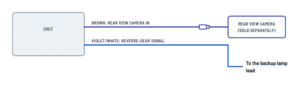
Shifting into REVERSE switches the screen to the camera automatically (needs the violet/white connected).
Power cord
Battery, ignition, ground, illumination and vehicle signals.
Terminals and components · 7
- Battery +
- Switched 12 V
- Ground
- Signals
- Illumination and preamp
Fuse
The power cord has a 10 A fuse: replace it only with one of the same rating.
No ACC
It cannot be installed in a vehicle without an ACC position on the ignition switch.
Why
The unit knows when the lights are on to dim the display.
Separate screws
The power amp ground and this unit's ground (or other devices) go to the body with different screws. A loose screw can cause smoke, fire or malfunction.
Why
The unit senses whether the car moves forward or backward and shows the rear camera.
Always active
It outputs the signal even if the audio source is off.
Required
This lead must go to the power supply side of the switch, not the ground side.
Speaker leads
The eight leads for the four speakers, with their polarity.
Terminals and components · 4
- Speakers
Caution
Tape any unused speaker leads. With a two-speaker system, do not connect anything to the spare leads.
Impedance
4 to 8 Ω speakers; with an external amp these leads are not used.
Caution
Tape any unused speaker leads. With a two-speaker system, do not connect anything to the spare leads.
Impedance
4 to 8 Ω speakers; with an external amp these leads are not used.
Caution
Tape any unused speaker leads. With a two-speaker system, do not connect anything to the spare leads.
Impedance
4 to 8 Ω speakers; with an external amp these leads are not used.
Caution
Tape any unused speaker leads. With a two-speaker system, do not connect anything to the spare leads.
Impedance
4 to 8 Ω speakers; with an external amp these leads are not used.
External power amp
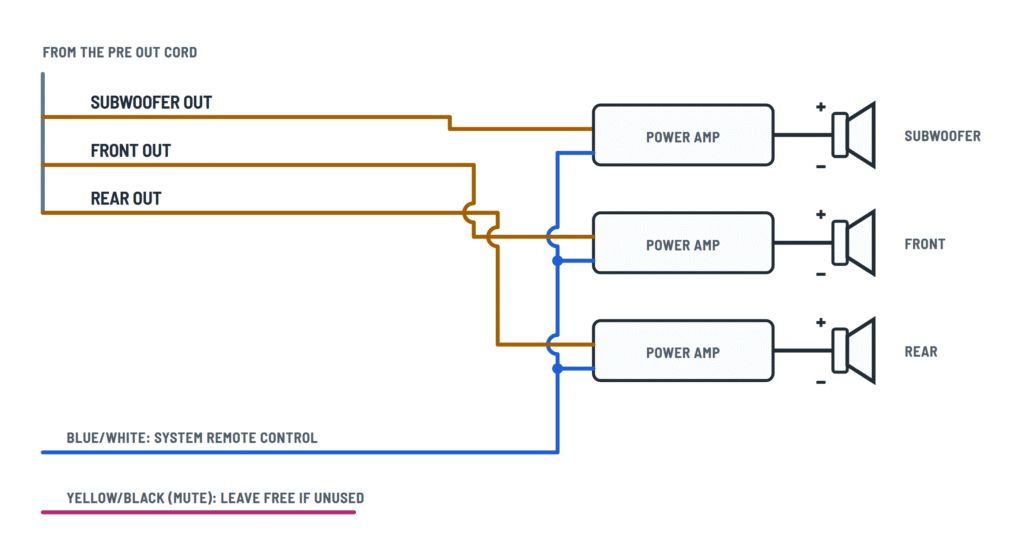
RCA outputs to the amplifiers and the lead that turns them on. With this connection the speaker leads are not used.
Terminals and components · 6
- Signals
- Illumination and preamp
- Mute
- Antenna and devices
Plugs
L = left, R = right. With this connection the speaker leads are not used.
Plugs
L = left, R = right. With this connection the speaker leads are not used.
Plugs
L = left, R = right. With this connection the speaker leads are not used.
Amp turn-on
Connect it to the system remote (REM) terminal of each amplifier.
Connection
Follow each amplifier's manual.
Camera and video
Rear view camera, external video input and output for a rear display.
Terminals and components · 2
- Video
- Reverse
- External device
Warning
Use it only for a reverse or mirror-image rear view camera; do not connect other equipment.
Automatic view
Shifting into REVERSE switches the screen to the camera automatically (needs the violet/white connected).
Why
The unit senses whether the car moves forward or backward and shows the rear camera.
Cable
Use a mini-jack AV cable: with other cables the contact order may differ and disturb picture and sound.
Colors
White: left audio; red: right audio; yellow: video.
Settings
The unit must be set up to use it.
Warning
Never install the rear display where the driver can watch video while driving.
About This Diagram
These diagrams are redrawn from pages 3–6 of the Pioneer DMH-160BT Multimedia Receiver manual, and we offer them completely free and in English. We have also categorized it in the Car Audio & Stereo (Automotive) section on Diagramverse, and it has been rated by 1 user with an average rating of 5.0. If you have any specific questions about the Pioneer DMH-160BT Multimedia Receiver Wiring Diagram, we suggest checking the Frequently Asked Questions (FAQs) section.
Printable Pioneer DMH-160BT Wiring Diagrams







Wiring Instructions
Before you start
Choose the tab that matches your job. Complete shows the whole system. Power covers the main power cord. Speakers shows the four speaker pairs. Power amp applies if external amplifiers take the RCA preouts. In Camera and video, the selector switches between Rear camera (the Brown input and the Violet/white reverse lead) and AV video and rear display (AUX IN and REAR MON).
The Pioneer DMH-160BT receiver is only for 12 V negative-ground vehicles that have an ACC position on the ignition switch. If your vehicle has no ACC wire or circuit, do not install it. The unit is designed for professional installation. Use a qualified mobile-electronics installer in two cases: if you can't identify circuits with a meter, or if your vehicle has a factory backup camera that U.S. or Canadian rear-visibility rules require. That camera must keep working through a separately sold adapter.
- Tools: digital multimeter, wire stripper, crimp tool, insulated butt connectors (or solder and heat-shrink), electrical tape and cable clamps.
- Materials: a vehicle-specific harness adapter and dash kit are good general practice, so you don't have to cut factory wiring. RCA cables, the mini-jack AV cable, the camera, the steering wheel adapter and the SiriusXM tuner are sold separately.
- Wire gauge: the gauge isn't specified, so use any extension or adapter wire at least as heavy as the lead it joins. Never shorten the receiver's leads, because the fuse holder and protection parts are built into them.
- Speakers: 4 to 8 Ω, rated over 50 W maximum input when all four channels are used.
Disconnect the negative (−) battery cable before you start. Plan a mounting spot that is horizontal within 0 to 60 degrees and away from airbag deployment zones, heater vents and direct sun. Leave about 5 cm of clearance behind the chassis for cooling.
Step-by-step wiring
- Connect Black first, to clean bare metal on the vehicle body with its own screw. Any power amp needs its own ground on a separate screw.
- Connect Yellow to a terminal with constant 12 V at the fuse box or harness, not directly to the battery. Engine vibration can wear through the insulation where the wire passes the firewall and cause a dangerous short.
- Connect Red to the switched ACC terminal. Check with the meter first: 0 V with the key off, about 12 V at ACC.
- Connect Orange/white to the lighting switch terminal so the display can dim when the headlamps are on.
- Connect Light green to the power supply side of the parking brake switch, never the ground side. Do not bypass it.
- Connect Violet/white to whichever of the two backup lamp wires changes voltage when the shifter is in REVERSE (R). With the parking brake set and your foot on the brake, measure both wires to find it.
- Connect Blue/white to the remote terminal of the amplifier, auto-antenna relay or antenna booster. Keep the total load within 300 mA. This lead has 12 V whenever ACC is on, even if the audio source is off.
- Wire the speakers: White/White/black to FL, Gray/Gray/black to FR, Green/Green/black to RL and Violet/Violet/black to RR. The striped wire is always −. With only two speakers, connect nothing to the unused pair and tape each lead on its own. If external amps drive every speaker, tape all eight leads.
- On the pre out cord, run RCA cables from SUB OUT, FRONT OUT and REAR OUT to the amplifier inputs. Connect Yellow/black only to the audio mute lead of equipment that has one. Otherwise, tape it.
- On connector 1, plug the rear view camera's video output into Brown (camera only) and the hard-wired steering wheel adapter into the Steering wired remote input.
- On connector 2, use only a mini-jack AV cable for AUX IN. Run REAR MON to a rear display mounted where the driver can't see it.
- Plug in the antenna, the SiriusXM tuner (with the supplied cable), the USB cable and the microphone. Turn ACC off before connecting the microphone. Clamp every cable away from the steering column, shift lever, pedals, seat tracks, doors and hot surfaces, and leave no bare wire exposed.
Testing and start-up
Leave the unit loose and reconnect the battery negative cable. With the ignition off, press RESET with a pen tip. This reset is required before first use after installation.
- Measure Yellow to ground: about 12 V at all times. Red: 12 V only at ACC. The unit accepts 10.8 V to 15.1 V.
- Turn ACC on. The receiver should power up, and Blue/white should read about 12 V.
- Use Fader/Balance to check that each speaker plays from the correct position. With a two-speaker system, set Front and Rear to 0.
- Switch on the headlamps with Lighting Detect active. The display should dim.
- Apply the parking brake. Video sources should then play only while the vehicle is parked.
- With a camera, turn on Back-up Camera Input, hold the brake pedal and shift into R. The camera image must appear right away.
- With a subwoofer amp, enable Subwoofer in the Cutoff settings.
Once everything works, mount the unit with the supplied screws.
Safety notes
- The power cord has a 10 A fuse. Replace it only with a fuse of the same rating. The unit draws up to 10.0 A.
- Never cut into the receiver's power lead to feed other products. You would exceed its current capacity and overheat it.
- Never tamper with or disable the parking brake interlock. Doing so can be unlawful and dangerous.
- Use the Brown input only for a reverse or mirror-image rear view camera.
- Run the engine when you use the unit for a long time, or you can drain the battery.
- Do not open the chassis. There are high-voltage parts inside.
Troubleshooting
| Symptom | Probable Cause | What to Check |
|---|---|---|
| The receiver won't turn on at all | Blown 10 A fuse, no 12 V on Yellow or Red, or a poor Black ground | Measure Yellow to body ground (about 12 V at all times) and Red (about 12 V at ACC). Check that the ground screw is tight on bare metal. Replace the fuse only with a 10 A fuse. |
| The clock, presets and settings reset every time I turn the car off | Yellow is on a switched circuit, or Yellow and Red are swapped | With the key off, Yellow must still read about 12 V. If it reads 0 V, move it to a constant 12 V terminal. |
| The battery goes flat overnight, or the unit stays on with the key out | Red is connected to a constant 12 V circuit | With the key off, Red must read 0 V. Move it to a terminal that is live only at ACC. |
| A caution message covers the screen and video won't play even when parked | Light green is not connected, is on the ground side of the switch, or the interlock was triggered | Connect Light green to the power supply side of the parking brake switch. Stop, hold the brake pedal, then apply, release and re-apply the parking brake. |
| No camera picture when I shift into reverse | Back-up Camera Input is off, the Brown RCA is loose, or Violet/white is on the wrong backup lamp wire | Turn on Back-up Camera Input in Camera settings and reseat the camera RCA in Brown. Measure Violet/white: its voltage must change when the shifter enters R. |
| The screen goes black in reverse, and I have no camera | Back-up Camera Input is on with nothing connected to Brown | Turn off Back-up Camera Input in Camera settings. |
| The sound is thin, with weak bass from one side | One speaker is wired with reversed polarity | At every speaker, check that the plain wire goes to + and the striped wire (for example Gray/black) to −. |
| "Caution! AMP Overload" appears, or one channel is silent | A speaker lead is shorted to metal, an unused lead is untaped, or a speaker is below 4 Ω | Inspect and tape every unused lead. Confirm the speakers are rated 4 to 8 Ω. Turn ACC off for at least 9 seconds, then on again. |
| The external amplifier or power antenna doesn't switch on | Blue/white is not connected, or the remote load exceeds 300 mA | With ACC on, measure about 12 V on Blue/white at the amp remote terminal. Connect fewer devices or use a relay if the load is too high. |
| The display doesn't dim when the headlights are on | Orange/white is not on the lighting switch circuit, or Lighting Detect is off | With the headlamps on, measure 12 V on Orange/white, and turn on Lighting Detect in Display Settings. |
| "Check Antenna" or "Check Tuner" shows on screen | The antenna plug or the SiriusXM tuner cable is loose or wrong | Reseat the antenna plug in ANT and the tuner on the supplied SiriusXM cable. Check battery voltage, then switch the engine off and on. |
| The AUX picture or sound is distorted or missing | The wrong type of cable is plugged into AUX IN | Use a mini-jack AV cable made for this input, and confirm the external component is actually sending a signal. |