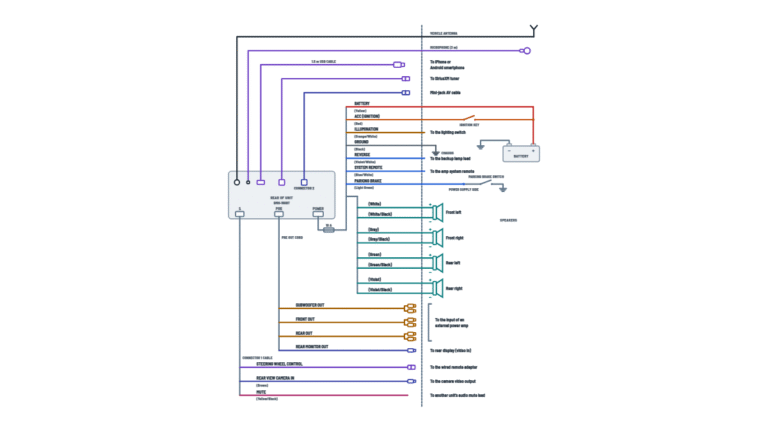
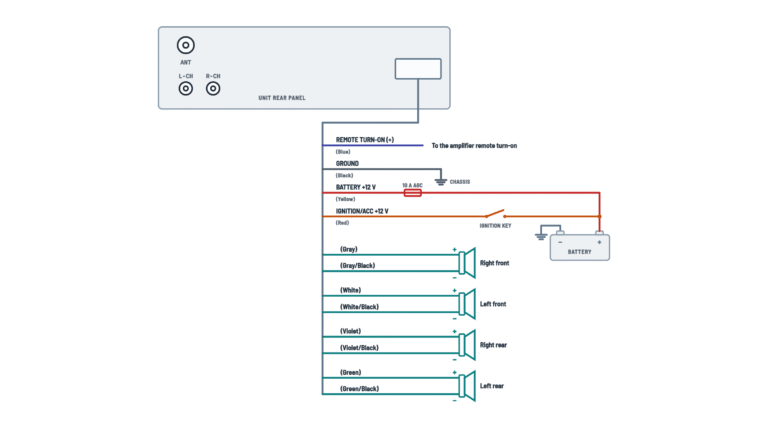
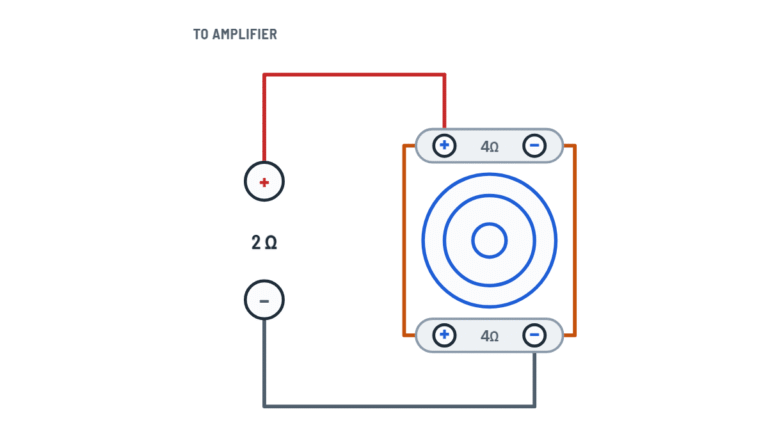
Alpine ILX-W650 Multimedia Receiver Wiring Diagram
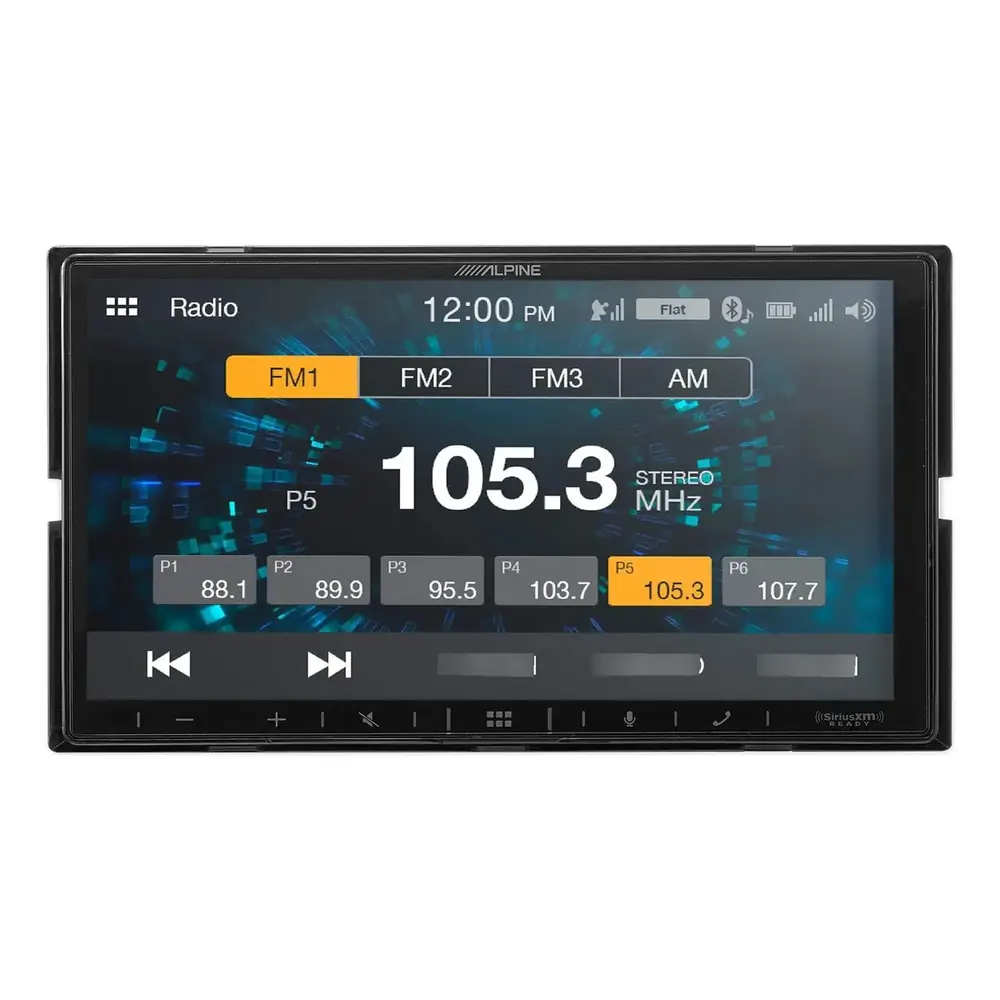
Complete diagram
Every cable and connector on the rear of the unit and where each one goes.
Terminals and components · 21
- Battery +
- Switched 12 V
- Ground
- Control and signals
- Speakers
- Preamp (RCA)
- Cameras
- Connectors
- Antenna
Connection
Plug the vehicle antenna cable in here.
Where to mount it
Where it picks up the driver's voice easily without changing driving posture, for example on the sun visor.
Use
Plug the phone or flash drive into the end of the extension cable.
Connection
For connection details, consult an Alpine dealer.
Installation
Follow the installation guide included with the tuner.
What it does
It supplies 12 V while the unit is on, so the amplifier turns on with it.
What it does
It tells the unit that the vehicle is in reverse.
Caution
Use it only for the power antenna: do not use it to turn on an amplifier or signal processor.
What it does
The unit knows whether the parking brake is on.
Caution
If you connect it straight to the battery +, the unit draws current (several hundred mA) even when off and may drain the battery.
Vehicle without ACC
You can add an SPST switch with its fuse, both sold separately.
Fuse
If you replace the fuse, use one with the same rating.
Noise
Keep the battery power leads as far away from other leads as possible.
Caution
Never use bolts or nuts of the brake or steering systems, or of tanks, for the ground.
Good ground
Remove any paint, dirt or grease from the ground point.
Caution
Connect each − lead to its speaker's − terminal. Never connect left and right channel speaker leads to each other or to the vehicle body.
Caution
Connect each − lead to its speaker's − terminal. Never connect left and right channel speaker leads to each other or to the vehicle body.
Caution
Connect each − lead to its speaker's − terminal. Never connect left and right channel speaker leads to each other or to the vehicle body.
Caution
Connect each − lead to its speaker's − terminal. Never connect left and right channel speaker leads to each other or to the vehicle body.
Use
Connect the rear camera's video output here.
Use
Connect the front camera's video output here.
Plug colors
Red plug = right channel; white plug = left channel.
Plug colors
Red plug = right channel; white plug = left channel.
Plug colors
Red plug = right channel; white plug = left channel.
Power and signals
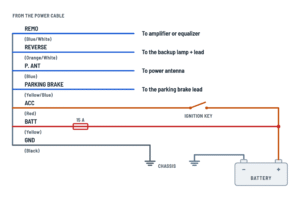
Power, ground, remote turn-on and vehicle signal leads.
Terminals and components · 7
- Battery +
- Switched 12 V
- Ground
- Control and signals
What it does
It supplies 12 V while the unit is on, so the amplifier turns on with it.
What it does
It tells the unit that the vehicle is in reverse.
Caution
Use it only for the power antenna: do not use it to turn on an amplifier or signal processor.
What it does
The unit knows whether the parking brake is on.
Caution
If you connect it straight to the battery +, the unit draws current (several hundred mA) even when off and may drain the battery.
Vehicle without ACC
You can add an SPST switch with its fuse, both sold separately.
Fuse
If you replace the fuse, use one with the same rating.
Noise
Keep the battery power leads as far away from other leads as possible.
Caution
Never use bolts or nuts of the brake or steering systems, or of tanks, for the ground.
Good ground
Remove any paint, dirt or grease from the ground point.
Speakers
The eight leads for the four speakers, with their polarity.
Terminals and components · 4
- Speakers
Caution
Connect each − lead to its speaker's − terminal. Never connect left and right channel speaker leads to each other or to the vehicle body.
Caution
Connect each − lead to its speaker's − terminal. Never connect left and right channel speaker leads to each other or to the vehicle body.
Caution
Connect each − lead to its speaker's − terminal. Never connect left and right channel speaker leads to each other or to the vehicle body.
Caution
Connect each − lead to its speaker's − terminal. Never connect left and right channel speaker leads to each other or to the vehicle body.
Cameras and preamp outputs
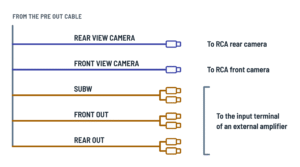
Camera inputs and RCA outputs for an external amplifier.
Terminals and components · 5
- Preamp (RCA)
- Cameras
Use
Connect the rear camera's video output here.
Use
Connect the front camera's video output here.
Plug colors
Red plug = right channel; white plug = left channel.
Plug colors
Red plug = right channel; white plug = left channel.
Plug colors
Red plug = right channel; white plug = left channel.
About This Diagram
These diagrams are redrawn from pages 48–49 of the Alpine ILX-W650 Multimedia Receiver manual, and we offer them completely free and in English. We have also categorized it in the Car Audio & Stereo (Automotive) section on Diagramverse, and it has been rated by 1 user with an average rating of 5.0. If you have any specific questions about the Alpine ILX-W650 Multimedia Receiver Wiring Diagram, we suggest checking the Frequently Asked Questions (FAQs) section.
Printable Alpine ILX-W650 Wiring Diagrams



Wiring Instructions
Before you start
Confirm the vehicle has a 12 V negative ground system; the Alpine ILX-W650 is designed only for that. Gather wire strippers, a crimp tool with insulated butt connectors (or solder and heat shrink), a digital multimeter, electrical tape, cable ties, and the harness adapter and dash kit for your car if it needs them. When you extend a lead, use wire at least as heavy as the lead itself; no gauge is specified, so treat that as general good practice.
Disconnect the cable from the battery − terminal before any wiring. Car audio work does not normally need a permit, but it does need skill: if your dash has airbags, a factory amplifier or a data-bus harness, have a professional installer do it.
Pick the right tab. Complete shows everything. Power covers the seven leads that run the unit, Speakers covers the four speaker pairs driven by the built-in amplifier, and Cameras and preamp covers the camera inputs and the outputs for an external amplifier.
Step-by-step wiring
- Plan the routing. Keep the unit and its leads at least 10 cm away from the car harness, keep the battery leads away from other wiring, and use rubber grommets wherever a wire passes through metal.
- Connect GND (Black) first, to an existing screw on a metal part of the body or a clean, bare metal spot with paint, dirt and grease removed. Tighten it securely. Never use bolts from the brake, steering or other safety systems, or from a fuel tank.
- Connect BATT (Yellow) to battery +, keeping its 15 A fuse holder in the circuit and reachable.
- Connect ACC (Red) to a source that has 12 V only with the key in ACC or ON; check it with the meter in both key positions first. Do not tap leads feeding the on-board computer or other factory modules, and if you use a fuse box terminal, make sure its fuse rating suits the unit. With no ACC supply available, add an SPST switch with a 5 A fuse on the ACC side and a 20 A fuse on the battery side; never tie ACC straight to the battery.
- Connect FL, FR, RL and RR. The solid color goes to + and the color with the black stripe to −. Never join − leads together or to the body, and insulate unused leads individually.
- Connect PARKING BRAKE (Yellow/Blue) to the power supply side of the parking brake switch.
- Connect REVERSE (Orange/White) to the + side of the backup lamp lead. Probe it first: it should read about 12 V only in reverse.
- If the car has a power antenna, connect P. ANT (Blue) to its +B terminal. Use it for the antenna only, never to turn on an amplifier.
- For an external amplifier, run RCA cables from FRONT OUT, REAR OUT and SUBW (red is right, white is left) and connect REMO (Blue/White) to its remote turn-on lead. Insulate REMO if unused.
- Plug cameras with RCA video outputs into REAR CAM and FRONT CAM.
- Plug the vehicle antenna into ANT, the included microphone into MIC and the included extension cable into USB. Add the optional SiriusXM tuner at SXM and a steering remote interface at Steering following their own instructions. Mount the microphone where it picks up the driver's voice, such as the sun visor.
- Tie all cables away from pedals, the steering column, gear lever and seat rails.
Testing and start-up
Reconnect the battery − terminal and test before mounting the unit in the dash.
- With the key off the unit stays off. At ACC or ON it should start, showing the language menu the first time.
- Measure between BATT and GND at the harness: expect battery voltage. The unit is rated 14.4 V DC, 11 to 16 V allowable, and may malfunction below 11 V under load.
- Use Fader and Balance to confirm each speaker plays from the right position, and that both speakers of each pair sound equally full in the bass.
- Stop, apply the parking brake and open Setup. Under Camera, set Primary or Secondary to Rear and choose NTSC or PAL to match the camera. Shift into reverse with your foot on the brake and confirm the rear view appears.
- With a subwoofer amplifier, set Sub.W to On (it is Off by default) and set the crossover to suit your speakers before raising the volume.
- Check that any amplifier and power antenna switch on and off with the unit.
Safety notes
- BATT is live at all times. A short to the body can melt wiring and start a fire, so keep the battery disconnected until every connection is insulated.
- Replace the BATT fuse only with the same 15 A rating.
- Never cut insulation off existing wires to power other equipment; it can overload the wire and cause a fire.
- Do not bypass the PARKING BRAKE lead: it keeps video off the screen while the car moves.
- Mount the unit between horizontal and 30°, keep the rear heat sink and fan clear, and avoid moisture and dust.
- Never rely on the camera alone when backing up.
Troubleshooting
| Symptom | Probable Cause | What to Check |
|---|---|---|
| The unit is completely dead: no screen, no sound. | Blown 15 A fuse on BATT, loose GND, or ACC not connected to a switched source. | Check the 15 A fuse in the BATT fuse holder and replace it with the same rating. With the key at ACC, measure from BATT to chassis and from ACC to chassis: both should read battery voltage. Check that GND is tight on bare metal. |
| The radio forgets settings and presets every time I turn off the car. | BATT and ACC are swapped or joined, so the unit loses constant power with the key off. | With the key off, BATT (Yellow) should still read battery voltage and ACC (Red) should read 0 V. Rewire them to the correct sources. |
| My battery goes flat after the car sits for a day or two. | ACC is connected directly to battery +, so the unit keeps drawing several hundred milliamperes. | Measure ACC with the key off: it must read 0 V. Move it to a switched source, or add an SPST switch with a 5 A fuse. |
| The screen shuts off or restarts when I crank the engine or turn the volume up. | Voltage dropping below 11 V because of a weak battery, poor ground or undersized extension wire. | Measure BATT to GND while playing loud: it should stay above 11 V. Clean and tighten the ground, and replace thin extension wire with heavier wire. |
| Video won't play and I can't get into the Setup menus. | PARKING BRAKE lead not connected, connected to the wrong side of the switch, or brake not applied. | Confirm Yellow/Blue goes to the power supply side of the parking brake switch. Apply the brake, release it with your foot on the brake pedal, and apply it again. |
| The rear camera doesn't come on when I shift into reverse. | REVERSE lead on the wrong wire, or camera not assigned in Setup. | Measure the lead Orange/White is joined to: it should read about 12 V only in reverse. Set Camera Primary or Secondary to Rear. |
| The camera picture is black and white, rolling or garbled. | Camera signal setting doesn't match the camera, or loose RCA plug at REAR CAM or FRONT CAM. | Switch Camera Signal between NTSC and PAL, and reseat the RCA plug. |
| Thin sound with almost no bass from the door speakers. | One speaker of a pair wired with reversed polarity. | Check that each solid-color lead goes to speaker + and the black-striped lead to −. Swap the leads on the speaker that is wrong. |
| My external amplifier never turns on. | Amplifier remote wired to P. ANT instead of REMO, or REMO not connected. | Move the amplifier's remote turn-on lead to REMO (Blue/White) and confirm about 12 V on it with the unit on. |
| The subwoofer amplifier gets no signal. | Sub.W is still Off, or the RCA cable is plugged into the wrong output. | Set Sub.W to On in Sound Setup and confirm the cable comes from SUBW, not FRONT OUT or REAR OUT. |
| The radio picks up few stations and the ones it does are noisy. | Antenna plug not fully seated at ANT, poor antenna ground, or power antenna not raising. | Reseat the antenna plug, check the antenna ground at its mount, and confirm P. ANT reads about 12 V when the radio is on. |
| A whine that follows engine speed comes through the speakers. | Poor ground, or power leads routed alongside the car harness. | Move GND to clean bare metal with paint removed, and reroute leads at least 10 cm from the vehicle harness. |