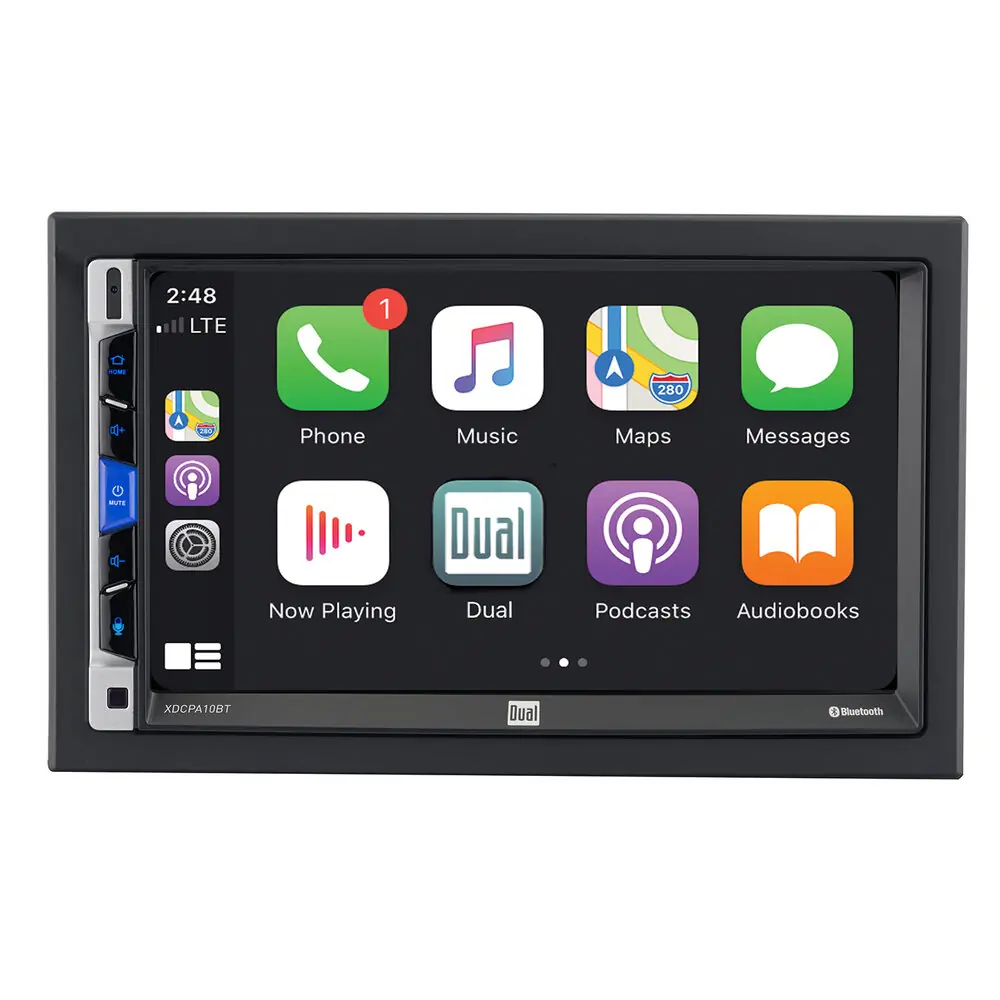
Dual XDCPA10BT Multimedia Receiver Wiring Diagram
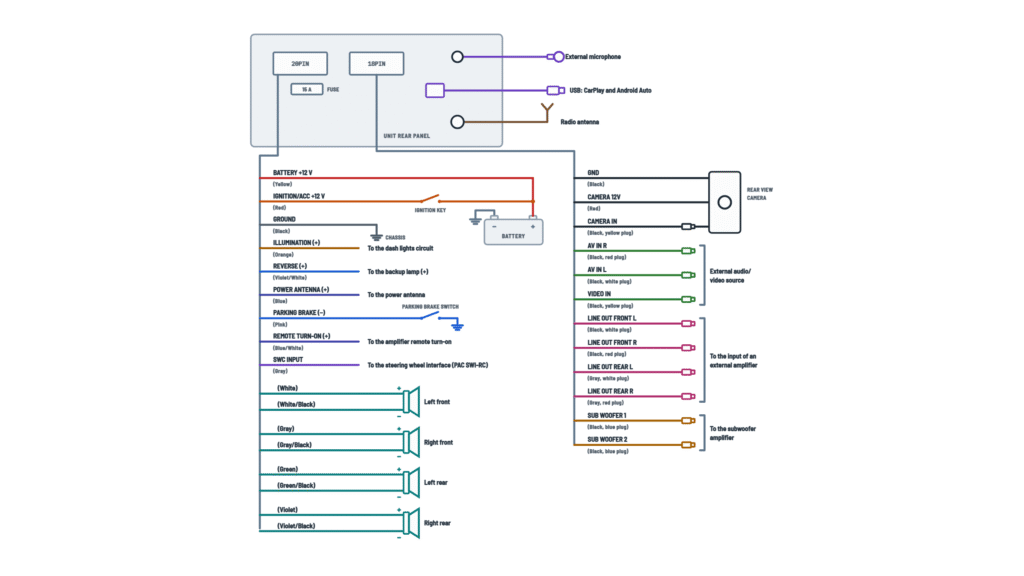
Unit connections
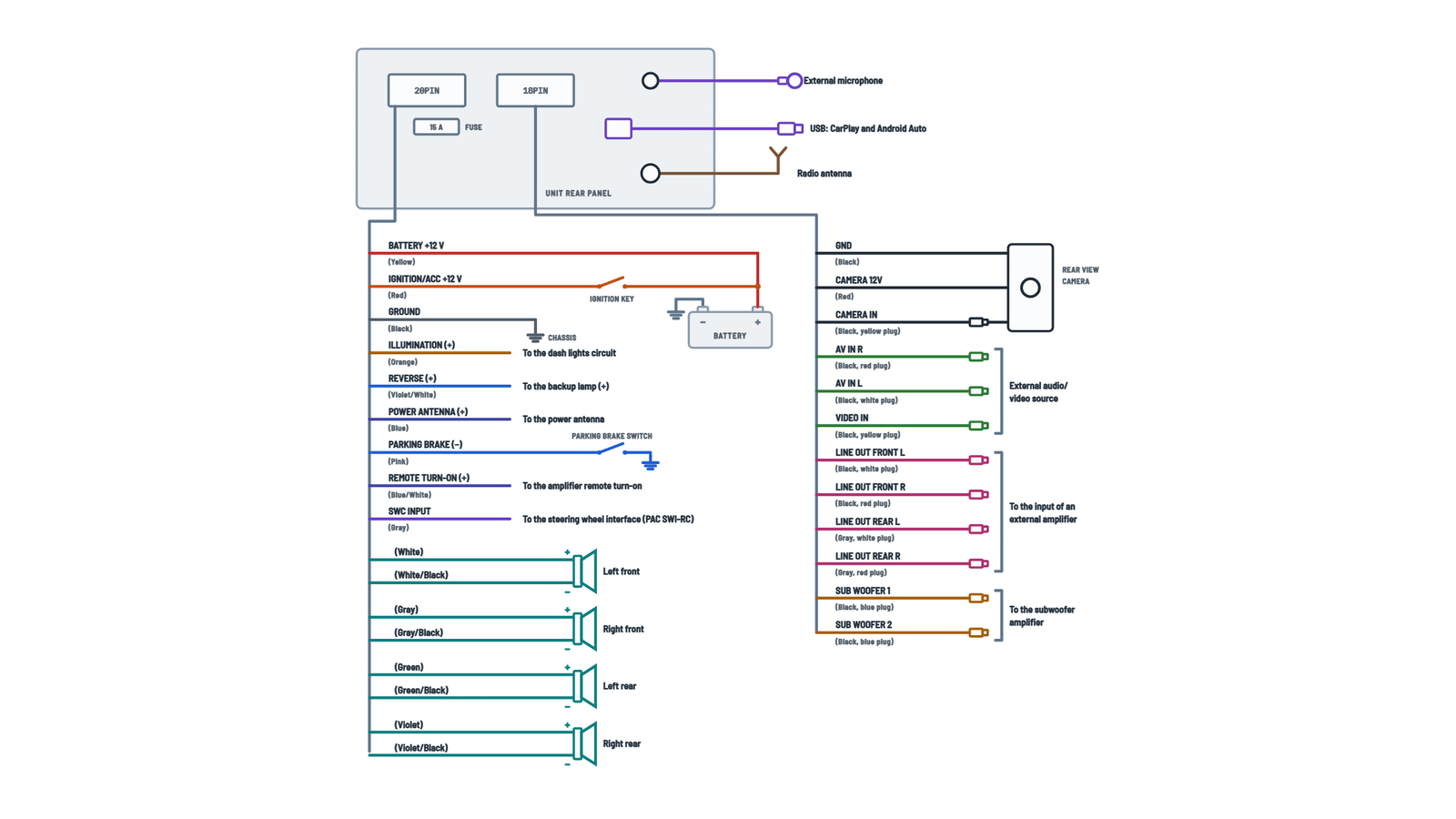
20-pin harness (power, speakers, SWC), 18-pin harness (camera, A/V, outputs) and rear panel connectors.
Terminals and components · 20
- Battery
- ACC
- Ground
- Speakers
- Camera
- Line outputs
- Subwoofer
Fuse
The unit uses one 15 A ATC mini fuse on the power connector. Replace it only with the same type and rating.
If the unit won't turn on
Check that the yellow and red wires have 11 to 16 V, the ground and the fuse.
Warning
Connect it to the parking brake switch. Do not simply ground it to the chassis.
Programming
On the SWI-RC choose position 7 (“Pioneer/Other/Sony”) and program the functions in that order; skip any you don't use.
Caution
Tape any unused wires and keep the speaker wires away from the chassis.
Impedance
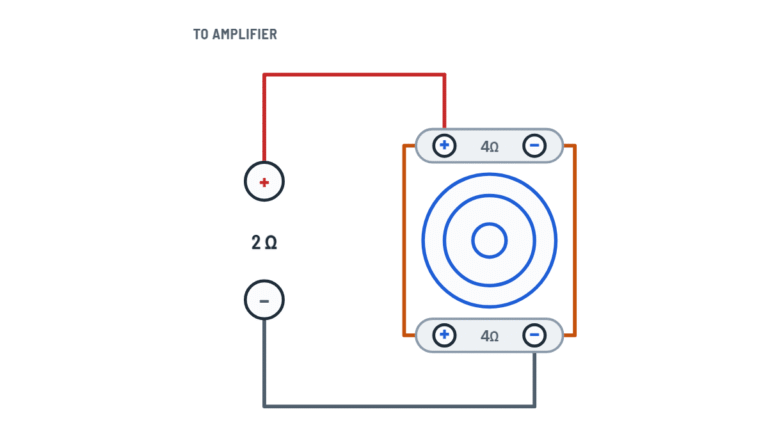
4 Ω speakers.
Caution
Tape any unused wires and keep the speaker wires away from the chassis.
Impedance
4 Ω speakers.
Caution
Tape any unused wires and keep the speaker wires away from the chassis.
Impedance
4 Ω speakers.
Caution
Tape any unused wires and keep the speaker wires away from the chassis.
Impedance
4 Ω speakers.
Automatic selection
With the reverse wire connected to the backup lamp, the unit switches to the camera automatically. The external video output is not active while the camera is in use.
Plugs
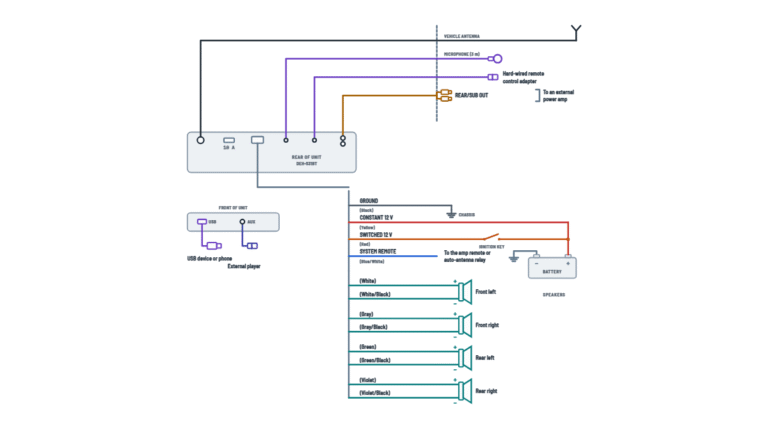
L = left (white plug), R = right (red plug).
Volume
If you use the external device's headphone output, adjust its volume.
Plugs
L = left (white plug), R = right (red plug).
Check
The drawing shows a black cable with blue plugs, but the manual's note says a blue jacket with a black plug: go by the SUB WOOFER label.
About This Diagram
This diagram is redrawn from page 6 of the Dual XDCPA10BT Multimedia Receiver manual, and we offer it completely free and in English. We have also categorized it in the Car Audio & Stereo (Automotive) section on Diagramverse, and it has been rated by 1 user with an average rating of 5.0. If you have any specific questions about the Dual XDCPA10BT Multimedia Receiver Wiring Diagram, we suggest checking the Frequently Asked Questions (FAQs) section.
Printable Dual XDCPA10BT Wiring Diagrams
Wiring Instructions
Before you start
The Dual XDCPA10BT is built only for vehicles with a 12VDC negative ground electrical system. Don't install it in a 24 V truck or a positive-ground vehicle. Dual strongly recommends a professional installer or authorized dealer. You can do it yourself if you're comfortable with automotive wiring and with removing dash trim. No permit is needed for a car radio. However, some states prohibit a video screen that the driver can see while driving. Check your local law before you choose the mounting position.
Gather these tools and materials:
- A vehicle-specific wiring harness adapter and dash kit (general good practice; they save you from cutting the factory wiring)
- Wire strippers, crimp connectors or solder and heat-shrink, and electrical tape
- A digital multimeter and a test light
- The supplied M5 mounting screws, trim ring and wire harness (use only the provided hardware and harness)
- Automotive-grade wire of AWG 18 or heavier if you need to extend the Ignition, Memory or Ground wires
- An Apple-certified Lightning cable or a good-quality USB cable for your phone, plus an optional rear camera and PAC SWI-RC interface
Pick a mounting spot away from direct sunlight, heat, dust, water splash and excessive vibration. Then disconnect the negative battery terminal and keep it disconnected until all the wiring is finished.
Step-by-step wiring
- Remove the factory radio and identify the vehicle wires. With the battery reconnected only for this test, use a multimeter to find the constant +12 V wire, the switched +12 V wire (it reads +12 V only with the key in ACC or ON) and the speaker pairs. Disconnect the battery again before you connect anything.
- Connect Ground (black) first, to a clean bare-metal point on the chassis. Scrape away any paint, and use a ring terminal and screw rather than a painted bracket.
- Connect Memory (constant +12 V) (yellow) to the constant battery feed. This wire carries the 15 A fuse on the power connector.
- Connect Ignition (switched +12 V) (red) to the switched ACC/ignition feed. If you swap the yellow and red wires, the unit can drain the battery or lose its settings.
- Connect the four speaker pairs and keep the polarity consistent: FL white (+) and white/black (−), FR gray (+) and gray/black (−), RL green (+) and green/black (−), RR violet (+) and violet/black (−). The speakers should be rated 4 ohms. Never connect a speaker negative to chassis ground.
- Run the Parking brake (pink) wire to the parking brake switch. Do not just ground it to metal: the video lock-out depends on this connection.
- Connect Illumination (orange) to the dash lights circuit if you want the display to dim automatically with the headlights.
- If you're installing a camera, connect Reverse (violet/white) to the backup lamp positive wire. Plug the camera video into CAMERA IN. Connect the camera's power to the red camera 12 V lead and its ground to the black lead.
- If you have an external amplifier, connect Remote turn-on (blue/white) to the amplifier's REM terminal. Connect the LINE OUT front (black cable) and rear (gray cable) RCAs and the SUB WOOFER outputs to the amplifier inputs. Route the RCA cables away from power wires.
- Connect Power antenna (blue) only if the vehicle has a motorized antenna. Insulate the end of the blue and blue/white wires if you don't use them.
- Connect the Steering wheel control input (gray) to a PAC SWI-RC interface if you want steering wheel controls. Set the SWI-RC selector to position 7, "Pioneer/Other/Sony", and program the functions in the PAC mapping order. Skip any function you don't use.
- Plug in the vehicle antenna, the MIC and the rear USB cable. Mount the microphone near the driver, such as on the headliner or the steering column, and run the USB cable to a convenient spot for the phone. Connect any external source to AV IN.
- Insulate every splice, secure the wiring away from sharp edges and moving parts, and fix the unit to its bracket with 2 or 3 of the supplied screws.
Testing and start-up
Before you close up the dash, reconnect the negative battery terminal and run these checks:
- Power: with the key in ACC, the unit should turn on with the Power/Mute button. The supply at the harness should be between 11 and 16 VDC on both yellow and red. With the key off, red should read 0 V and yellow should still read battery voltage.
- Speakers: play the radio and use balance and fader to confirm that each speaker plays on the correct side and position. Thin bass usually means a speaker is wired with reversed polarity.
- Display dimming: turn the headlights on. The display should dim when Dimmer Mode is set to Auto.
- Camera: with the parking brake set, shift into reverse. The camera image should appear automatically.
- Video lock-out: release the parking brake and confirm that video is blocked.
- Phone and steering controls: connect your phone by USB and confirm that CarPlay or Android Auto launches. Pair Bluetooth, make a test call and try each steering wheel button.
If the unit behaves erratically, press the RESET button behind the front panel, under the USB port, with a pen tip.
Safety notes
- A 12 V battery can deliver hundreds of amps into a short circuit. Keep the negative terminal disconnected while you work, and never let the yellow or red wire touch the chassis.
- Replace the fuse only with a 15 A ATC mini fuse. A higher rating removes the protection and can start a fire. Disconnect the harness before you change the fuse.
- Don't defeat the parking brake lock-out, and don't watch video while driving. Keep the volume low enough to hear emergency vehicles.
- Don't remove the unit's covers. If the LCD breaks, avoid skin contact with the liquid crystal fluid, and wash with soap right away if it touches you.
Troubleshooting
| Symptom | Probable Cause | What to Check |
|---|---|---|
| The radio won't turn on at all | Yellow or red wire not connected or at the wrong voltage, black ground loose, or blown fuse | Measure yellow and red to ground with the key in ACC: both should read 11 to 16 VDC. Check that the black wire is on bare metal, and inspect the 15 A ATC mini fuse on the power connector. |
| The radio loses the clock and presets every time I turn off the car | Yellow and red wires swapped, or Memory (constant +12 V) connected to a switched circuit | With the key off, yellow must still read battery voltage and red must read 0 V. Swap the connections if they're reversed. |
| The fuse blows as soon as I turn the key | Yellow or red wire touching the chassis, a speaker wire grounded, or the wrong fuse rating | Look for pinched or bare wires behind the dash. Check each speaker lead for continuity to chassis: there should be none. Fit only a 15 A fuse. |
| The screen works but there's no sound | Speaker wires not connected, touching each other, or touching ground | Check every speaker connection at the harness and at the speaker. Insulate all bare speaker wire from each other and from the chassis. |
| Sound is thin with weak bass from the front or rear | One speaker of a pair wired with reversed polarity | Confirm that the solid color goes to + and the color with the black stripe goes to − for FL, FR, RL and RR. |
| I have audio but the video stays blocked | Parking brake wire not connected to the brake switch, or the brake isn't applied | With the brake fully set, check that the pink wire reaches the brake switch circuit and that its connection is solid. |
| The backup camera doesn't come up in reverse | Reverse wire not on the backup lamp positive, camera not powered, or video not in CAMERA IN | In reverse, violet/white should read about +12 V. Check that the camera has 12 V and ground on its red and black leads, and that the video plug is in CAMERA IN rather than VIDEO IN. |
| My external amplifier won't turn on | Amplifier REM connected to the blue Power antenna wire instead of blue/white, or not connected at all | With the unit on, the blue/white wire should read +12 V at the amplifier's REM terminal. |
| No sound from the amplified speakers or the subwoofer | RCA cables in the wrong outputs, or Subwoofer Control turned off | Check that front goes to the black LINE OUT cable, rear to the gray one, and sub to SUB WOOFER. In Audio settings, set Subwoofer Control to On and check the Subwoofer Gain. |
| Steering wheel buttons do nothing or do the wrong thing | PAC SWI-RC set to the wrong radio type or programmed out of order, or gray wire not connected | Set the SWI-RC to position 7 "Pioneer/Other/Sony", reprogram in the mapping order and skip unused functions. Then confirm the gray SWC lead is connected. |
| The display won't dim at night, or stays dark in the daytime | Illumination wire not connected or on the wrong circuit, or Dimmer Mode set manually | The orange wire should read +12 V only with the headlights on. Set Dimmer Mode to Auto in the Display settings. |
| Radio reception is weak or full of static | Antenna plug not fully seated, or power antenna not raising | Push the antenna plug firmly into the antenna jack. On motorized antennas, confirm that the blue wire gives +12 V with the radio on. |