Honeywell T10 Thermostat Wiring Diagram
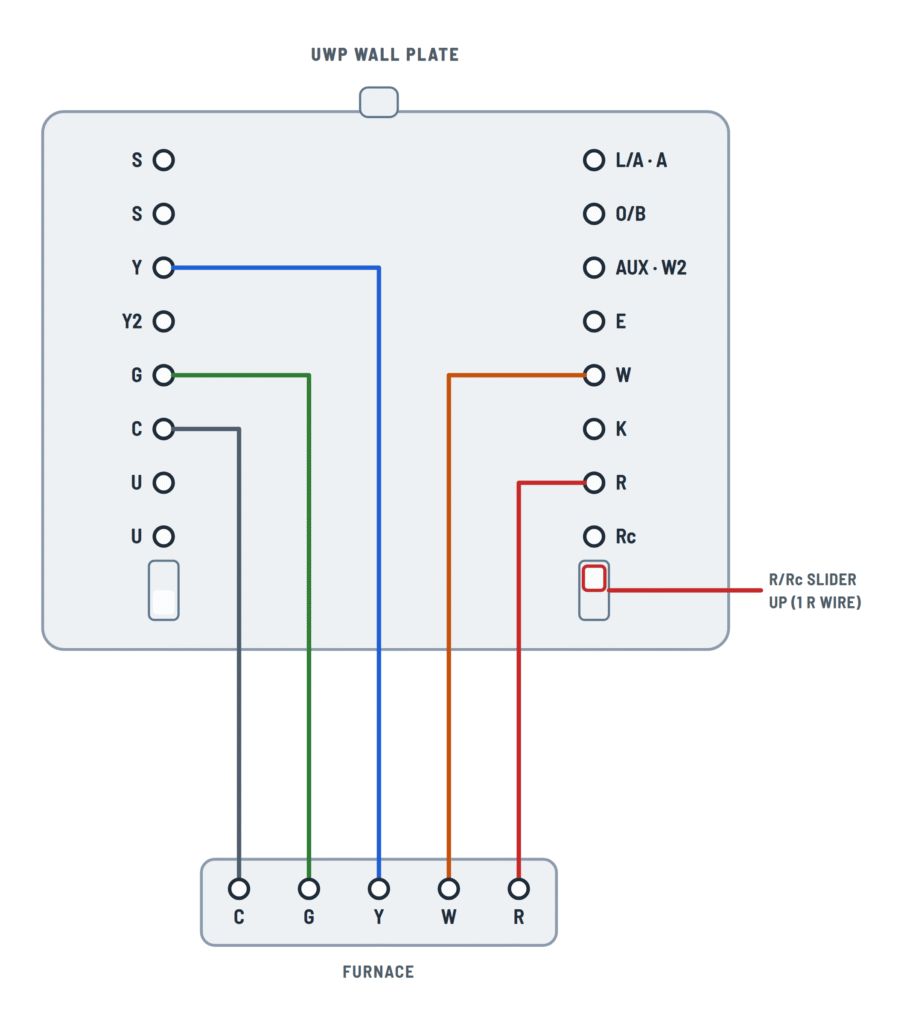
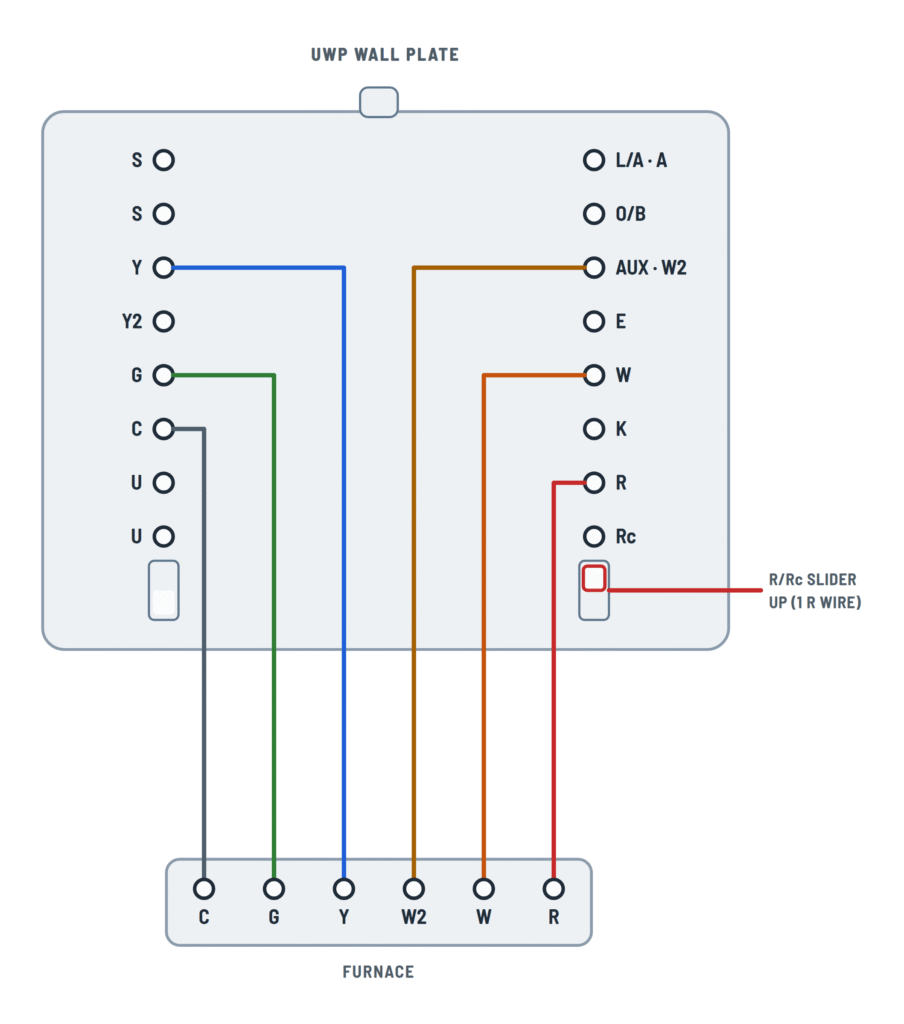
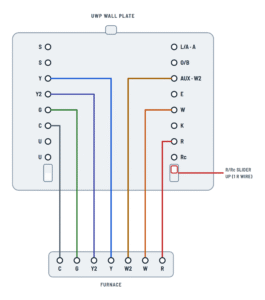
Furnace and air conditioning
One transformer: heating, cooling or both, in one or two stages.
Terminals and components · 5
- R (24 V)
- Common
- Fan
- Cooling
- Cooling stage 2
- Heating
- Heating stage 2
- Optional
What it does
Brings the equipment transformer's 24 V AC to the thermostat.
R/Rc slider
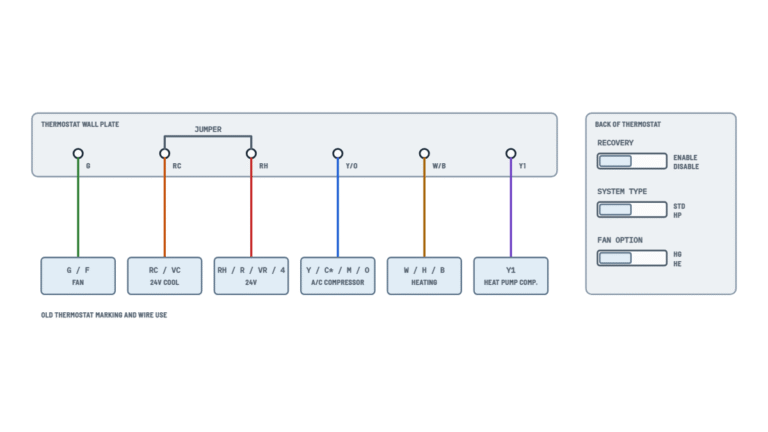
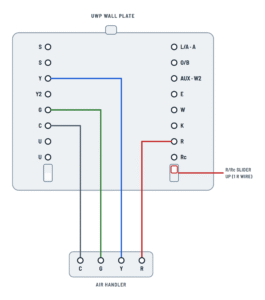
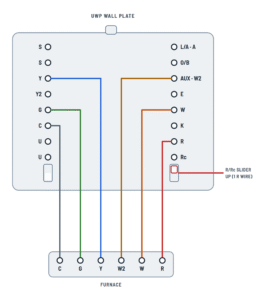
With a single R wire (marked R, Rc or RH on the old thermostat), the slider goes up: R and Rc are joined inside the plate.
How to choose
- One R wire (on R, Rc or RH of the old thermostat): up.
- One wire on R and one on Rc: down.
What it does
It is the transformer's common (0 V). The T10 needs it to operate: without C it won't power up.
If you only have 4 wires
The THP9045A C-wire adapter uses the K terminal instead of Y and G, freeing one wire for C.
Optional
Only used for independent fan control. Most heat-only gas or oil forced-air systems have no G wire.
What it does
Energizes the fan relay: in Auto with heating or cooling, in On all the time.
Ratings
20–30 V AC, 0.02–0.5 A.
What it does
Energizes the compressor contactor at the air handler or furnace.
Ratings
20–30 V AC, 0.02–1.0 A.
What it does
Adds the second compressor stage (or fan stage 2) when more cooling is needed.
What it does
Calls the furnace or boiler's first heat stage.
Ratings
20–30 V AC, 0.02–1.0 A.
What it does
Turns on the furnace's high stage when the first stage can't keep up.
Shared terminal
AUX and W2 are the same terminal: on conventional systems it is used as W2.
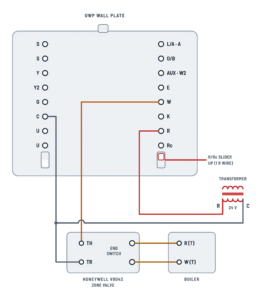
Boiler and two-transformer systems
Hot water or oil heat, with or without air conditioning.
Terminals and components · 7
- R (24 V)
- Rc (24 V)
- Common
- Fan
- Cooling
- Heating
- End switch
What it does
Brings 24 V AC from the heating transformer (the furnace's or boiler's).
R/Rc slider
With two transformers, the slider goes down so R and Rc stay separate.
What it does
Brings the equipment transformer's 24 V AC to the thermostat.
R/Rc slider
With a single R wire (marked R, Rc or RH on the old thermostat), the slider goes up: R and Rc are joined inside the plate.
What it does
Brings the zone valve transformer's 24 V AC to the thermostat.
R/Rc slider
One transformer: the slider goes up.
What it does
Feeds the cooling and fan outputs (Y, G).
Crossing
The wire crosses over W and R without touching them: there is no splice.
How to choose
- One R wire (on R, Rc or RH of the old thermostat): up.
- One wire on R and one on Rc: down.
What it does
With two transformers, the common must come from the cooling transformer (the air handler).
If you only have 4 wires
The THP9045A C-wire adapter uses the K terminal instead of Y and G, freeing one wire for C.
What it does
It is the transformer's common (0 V). The T10 needs it to operate: without C it won't power up.
If you only have 4 wires
The THP9045A C-wire adapter uses the K terminal instead of Y and G, freeing one wire for C.
What it does
The transformer common goes to the C terminal and also to the valve's TR terminal: the two wires are spliced.
What it does
Energizes the fan relay: in Auto with heating or cooling, in On all the time.
Ratings
20–30 V AC, 0.02–0.5 A.
What it does
Energizes the compressor contactor at the air handler or furnace.
Ratings
20–30 V AC, 0.02–1.0 A.
What it does
Calls the furnace or boiler's first heat stage.
Ratings
20–30 V AC, 0.02–1.0 A.
What it does
Calls the boiler for heat through its W (T) thermostat terminal.
What it does
Powers the valve motor (TH terminal). Once open, its end switch fires the boiler.
How it works
When W supplies 24 V, the motor opens the valve; at the end of travel it closes its end switch.
What it does
The boiler starts only once the valve is open.
What it does
It is the circuit's only transformer: the R/Rc slider goes up.
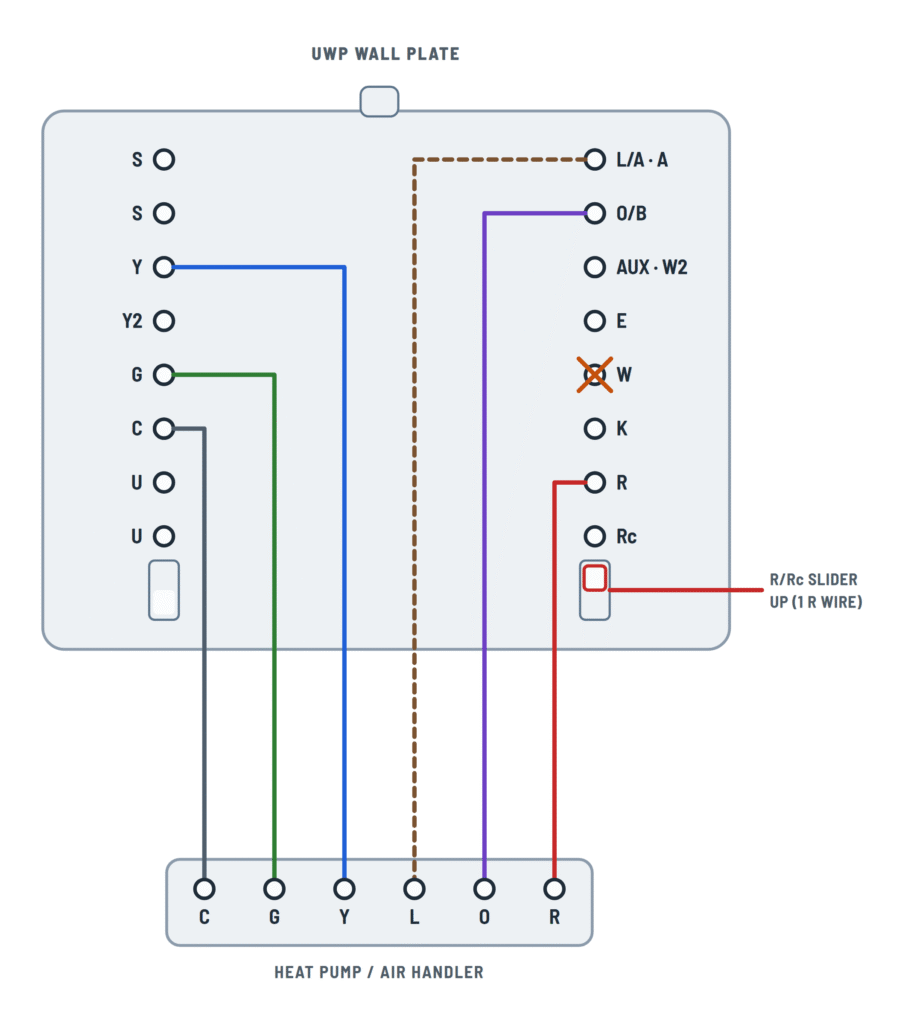
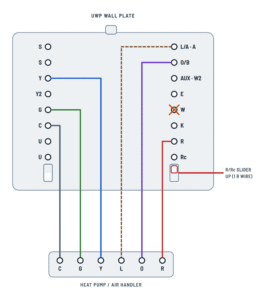
Heat pump
Heat pump with or without auxiliary heat (aux), and dual fuel.
Terminals and components · 8
- R (24 V)
- Common
- Fan
- Compressor
- Compressor stage 2
- Reversing valve
- Fault (optional)
- Aux heat
- Furnace (backup)
What it does
Powers the thermostat and all its outputs.
R/Rc slider
One transformer: the slider goes up and R is joined to Rc inside the plate.
How to choose
Up with a single R wire; down only if there are wires on both R and Rc.
What it does
Completes the 24 V circuit and powers the thermostat display.
If you only have 4 wires
The THP9045A adapter uses the K terminal instead of Y and G, freeing one wire for C.
Ratings
20–30 V AC, 0.02–0.5 A.
What it does
On a heat pump the compressor provides cooling or heating; the O/B valve decides which.
What it does
Adds the compressor's high stage when the first stage can't keep up.
Optional
Connect it only if the heat pump has a fault terminal (L). That's why it is dashed.
Typical use
Compressor monitor.
O or B
Some heat pumps use B instead of O for the reversing valve. It is selected in the thermostat setup.
Ratings
20–30 V AC, 0.02–0.5 A.
What it does
Turns on the heat strips when the heat pump alone can't keep up.
Terminal name
Each brand labels the equipment's aux heat terminal differently: check its wiring guide.
Outdoor temperature lockout
Aux heat can be locked out at high outdoor temperatures from the app or with an outdoor sensor.
What it does
The furnace W wire goes to the AUX terminal: the furnace is the heat pump's backup heat.
Two boards
The heat pump and furnace have separate boards; the drawing shows them together. W comes from the furnace board.
Outdoor temperature lockout
The balance point lockout is set from the app or with an outdoor sensor.
Caution
A wire on W can make the heat run continuously. Backup heat goes to AUX.
What it's for
With the outdoor sensor on the two S terminals, the thermostat can lock out backup heat based on outdoor temperature. It can also be done over the internet with the app.
When it's used
Most heat pumps use the same heat strips for AUX and emergency heat, so E stays empty. With separate sets, one goes to E (emergency mode) and the other to AUX.
U terminals: air quality
Air quality equipment on the U terminals, set by the U slider.
Terminals and components · 3
- U contact
- Common
- U slider
What it does
Closes when the thermostat calls for humidification, dehumidification or ventilation.
Ratings
20–30 V AC, 0.02–0.5 A.
What it does
With the U slider up, this terminal supplies Rc's 24 V to open the damper.
Ratings
20–30 V AC, 0.02–0.5 A.
What it does
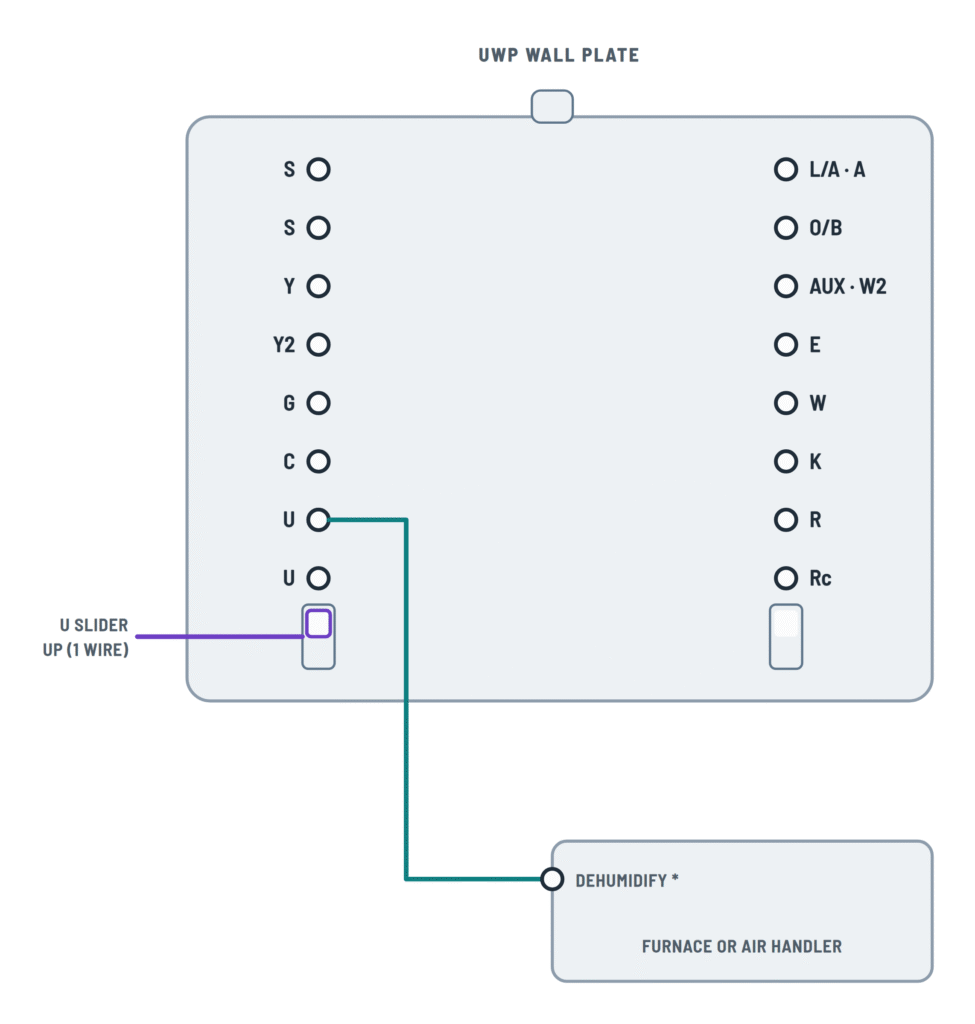
With the U slider up, it sends 24 V to the low fan speed terminal for dehumidification.
Terminal name
* This terminal's label varies by equipment: check its wiring guide.
What it does
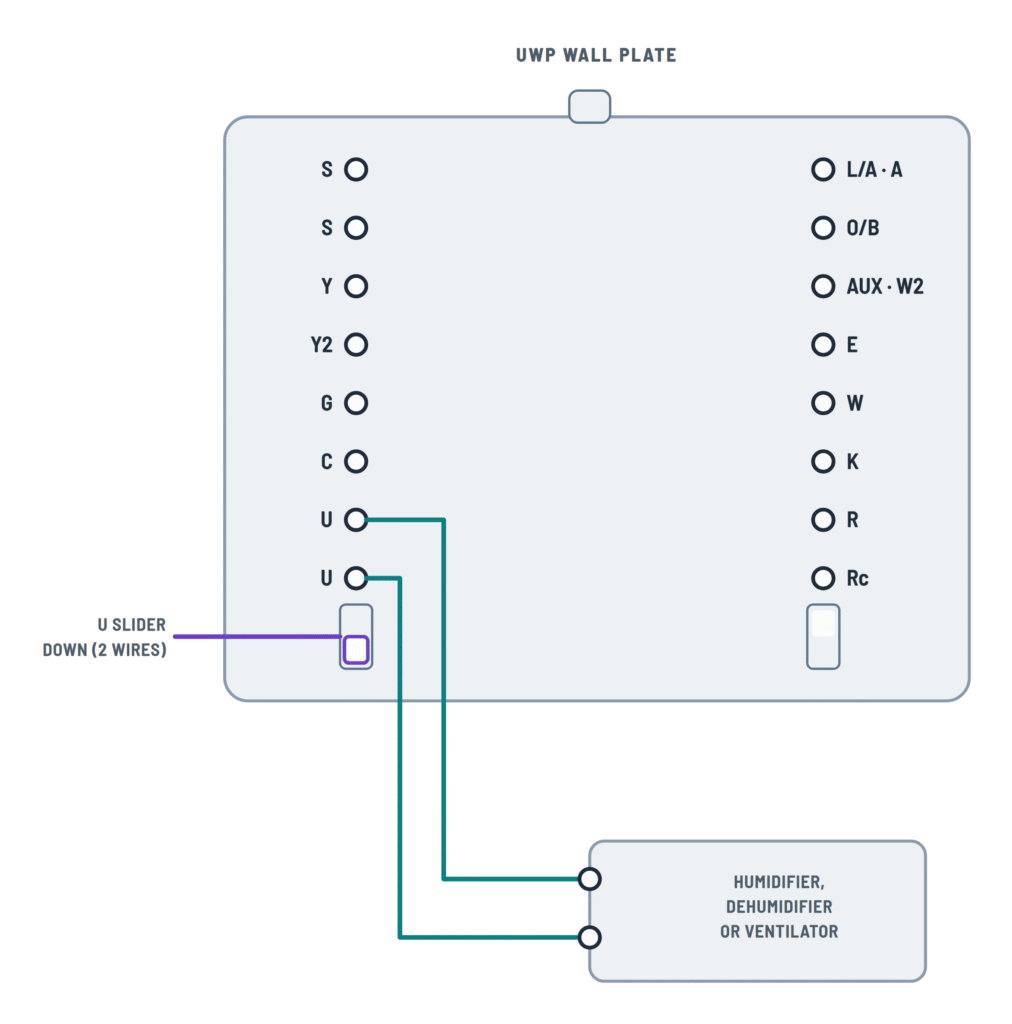
With the U slider down, the two U terminals are a dry contact: the equipment supplies its own voltage.
What it does
Receives R from the external transformer; the U contact passes it to the equipment.
How to connect it
The external transformer powers the equipment: R goes through the U contact and C goes straight to the equipment.
How to connect it
Use the cooling transformer's common (the same one that feeds Rc).
Positions
- Down (2 wires): the U terminals are a dry contact.
- Up (1 wire): the lower U is tied to Rc internally; one wire goes from the upper U to the equipment and the other to the cooling transformer's common.
Typical use
Up, mostly with fresh air dampers or low fan speed for dehumidification.
About This Diagram
These diagrams are redrawn from pages 20–29 of the Honeywell T10 Thermostat manual, and we offer them completely free and in English. We have also categorized it in the Thermostats (HVAC & Water Heating) section on Diagramverse, and it has been rated by 1 user with an average rating of 5.0. If you have any specific questions about the Honeywell T10 Thermostat Wiring Diagram, we suggest checking the Frequently Asked Questions (FAQs) section.
Printable Honeywell T10 Wiring Diagrams














Wiring Instructions
Before you start
The Honeywell T10 is a low-voltage control. It works with most 24 V AC furnaces, air conditioners, boilers and heat pumps. It does not work with 120/240 V electric baseboard heat. If your old thermostat is connected to thick line-voltage wires or is marked 120 V or 240 V, stop: this thermostat is not the right product for that system.
First pick the tab that matches your equipment:
- Furnace: gas or electric forced-air furnaces, with or without central air, with one or two stages.
- Boiler and 2 transformers: oil furnaces or hot-water boilers with a separate air handler for cooling, boiler-only systems, and V8043 power-open zone valves.
- Heat pump: systems with a reversing valve wire (O or B). This includes dual fuel systems, where a furnace provides the backup heat.
- U terminals: use this tab as well if you are adding a humidifier, dehumidifier, ventilator or fresh air damper.
Tools and materials: a screwdriver, a level, a drill with a 7/32 in bit (red anchors) or a 3/16 in bit (yellow anchors), masking tape and a pen for labeling wires, and a multimeter that reads AC volts. Use 18 to 22 AWG thermostat wire. Shielded cable is not required.
The C wire is mandatory. The T10 needs a constant 24 V AC common to run. If your cable has no spare conductor and your system uses Y and G, plan to install a THP9045A1098 or THP9045A1023 C-wire adapter. Otherwise, pull a new cable with more conductors.
Thermostat wiring is usually homeowner work. Call a licensed HVAC technician if you need to open the equipment's control board, add a transformer, or work on boiler and zone-valve controls, or if you are not sure what type of system you have. Local rules on permits vary.
Step-by-step wiring
- Turn off power to the heating and cooling equipment at the breaker or at the service switch. Wait until the old thermostat's display goes blank.
- Remove the old thermostat from its base. Take a photo of the existing connections. Label every wire with the letter of the terminal it was on, not with its color: wire colors are not reliable.
- Check whether the old thermostat used separate R and Rc wires. One R wire (on R, Rc or RH) means a single transformer. Separate wires on R and Rc mean two transformers.
- Disconnect the wires and remove the old base. If the old control has a sealed mercury tube, take it to a recycling or hazardous waste collection point. Do not put it in the trash.
- Feed the wires through the wiring hole of the UWP. Level it, mark the holes, drill, and tap in the anchors. Fasten it with the supplied screws until it no longer moves, without overtightening. If the wall has paint gaps, or you are mounting on an electrical box, install the junction box adapter and cover plate first.
- Set the R/Rc slider. Put it up for one transformer, which includes every heat pump. Put it down for two transformers.
- Connect R and C first. On a two-transformer system, the cooling transformer's R goes to Rc and C comes from the cooling (air handler) transformer.
- Connect the control wires for your variant:
- Furnace systems: W, G and Y, then W2 and Y2 on two-stage equipment.
- Heat pumps: Y, O/B, G, then Y2, AUX, E and L/A where present. Never use W on a heat pump.
- Insert each wire by pushing down the terminal tab and seating the wire in the inner hole. Use only one wire per terminal. Tug each wire gently to confirm it is held.
- If you are adding indoor air quality equipment, set the U slider. Put it down for a dry contact. Put it up to tie the lower U to Rc, which is the usual choice for a fresh air damper or a low-speed fan for dehumidification. Then wire the U terminals as shown on the U terminals tab.
- Push extra wire back into the wall. Close the UWP door, which should shut without bulging. Snap the thermostat onto the plate. If you used the cover plate, remove the gray trim ring first.
Testing and start-up
Restore power and make sure the furnace door is fully closed, because many units have a door safety switch. The display should come on and start the installer setup.
If the screen stays blank, turn the power off again and recheck R and C. Then, with power on, measure between R and C at the thermostat plate. You should read about 24 V AC. The control outputs are rated for 20 to 30 V AC.
In installer setup, choose the system type that matches the wires you connected: conventional or heat pump, number of stages, O or B changeover, and IAQ equipment. Then use Installer Test to run heat, cool, fan and IAQ one at a time, and confirm each piece of equipment responds.
Compressor protection is bypassed during testing, so do not cycle the compressor on and off quickly. In normal operation, a flashing "Cool On" or "Heat On" means the thermostat is holding off the compressor for about 5 minutes. That is expected.
Safety notes
- Always disconnect power before wiring. A short between R and C, or between R and any output, can blow the equipment's low-voltage fuse or damage the transformer.
- Never connect any T10 terminal to 120/240 V.
- Most outputs are rated up to 1.0 A. G, O/B, E, L/A and U are rated up to 0.5 A. Do not use them to drive loads beyond these ratings.
- W also accepts a 750 mV DC powerpile (millivolt) circuit. Confirm the system type before you assume a 24 V circuit.
- On boilers and zone valves, the valve's end switch fires the boiler. Leave the boiler's own controls and limits in place.
Troubleshooting
| Symptom | Probable Cause | What to Check |
|---|---|---|
| Screen stays blank after installation | Missing or broken C wire, power off at the equipment, or furnace door switch open | Check the breaker and service switch and make sure the furnace door is closed. Then measure between R and C at the plate: you should read about 24 V AC. If you get 0 V, trace the C wire back to the transformer common. |
| Thermostat turns on but nothing happens when cooling is called, on a system with two transformers | R/Rc slider left up, or C taken from the heating transformer | Set the slider down so R and Rc are kept separate. Confirm that Rc and C both come from the air handler (cooling) transformer. |
| Heat pump blows cold air in heat mode and warm air in cool mode | Reversing valve setting is wrong (O instead of B, or the reverse) | Confirm the wire is on O/B. In installer setup, change the changeover setting to match your heat pump (O or B), then test both modes. |
| Auxiliary heat runs while cooling, or cooling runs on a call for heat | A wire is connected to W on a heat pump system | Remove the wire from W. Backup heat goes on AUX, or on AUX and E if there are separate wires. |
| Heat pump never brings on the backup heat strips | Aux wire landed on W or E only, or the system type is set without aux heat | Move the aux wire to AUX and set the heat pump system type with auxiliary heat in installer setup. |
| Equipment fuse blows or the transformer hums when power is restored | Bare wire ends touching, or R landed on C or on an output terminal | Power off. Check that every conductor is in its own terminal with no stray strands. Replace the fuse with one of the same rating marked on the control board. |
| Second stage of heat or cooling never comes on | Y2 or W2 not wired, or the system is set up as single stage | Confirm the equipment has a second-stage terminal wired to Y2 or W2, and set the matching number of stages in installer setup. |
| Humidifier or damper does not operate | U slider in the wrong position for the way the device is powered | Built-in or external transformer: set the slider down (dry contact). Device powered by the furnace or air handler transformer: set the slider up, wire the upper U to the device, and wire the device's other lead to C. |
| Thermostat restarts or loses power at random | Loose wire in the UWP terminal or a weak C connection at the equipment | Tug each wire at the plate and re-seat any that move. Check the C splice at the equipment board for tightness. |
| Boiler with zone valve never fires | Valve end switch not wired to the boiler, or TR not on transformer common | Check that W goes to the valve's TH and that TR is spliced to transformer C. Confirm the end switch leads go to the boiler's R (T) and W (T). |